Jamf MDM har længe været go-to-løsningen for organisationer, der søger problemfri kontrol og sikkerhed over enhedsflåder. Der kan dog komme et tidspunkt, hvor du har brug for det fjerne Jamf MDM-profiler, om du vil genvinde personlig frihed over din enhed eller for at ændre din organisations politikker. I denne omfattende guide vil vi tage dig gennem fjernelse af en Jamf MDM-profil trin for trin, og sikre, at du elegant kan overføre din enhed fra administreret til uafhængig, mens du bevarer dine data og indstillinger.
- Del 1. Sådan fjerner du Jamf MDM-profiler
- Del 2. Sådan fjerner du alle MDM-profiler fra iOS
- Del 3. Ofte stillede spørgsmål om Jamf MDM
Del 1. Sådan fjerner du Jamf MDM-profiler
Da der også er en Android-version af Jamf, kan du lære følgende trin for at fjerne Jamf MDM-profilen på Jamf Pro. Uanset hvilke enheder du bruger, kan denne måde hjælpe dig, når du får tilladelse til at fjerne Jamf MDM-profiler.
Trin 1 Log ind på Jamf Pro og få adgang til Jamf Pro-webgrænsefladen ved hjælp af dine administratoroplysninger.
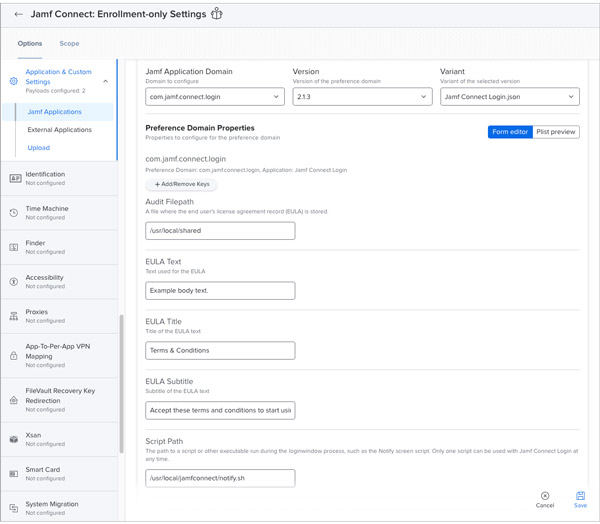
Trin 2 Vælg enheden for at fjerne profilen. Du kan finde enheden i afsnittet "Enheder" eller "Mobile enheder" på Jamf Pro-dashboardet.
Trin 3 Klik på knappen "Administration" på enhedens detaljeside. Se efter den MDM-profil, du vil fjerne fra listen over profiler.
Trin 4 For at fjerne MDM-profilen skal du klikke på knappen "Fjern" og bekræfte, når prompten vises.
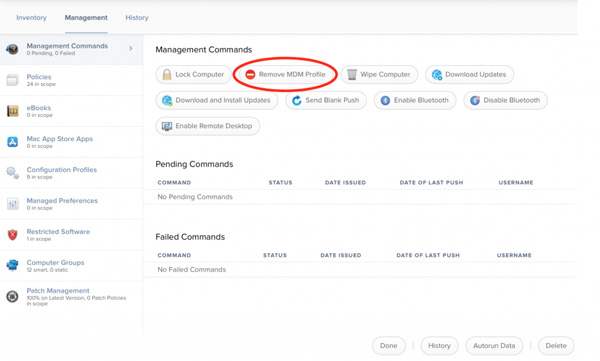
Trin 5 For at sikre, at MDM-profilen er blevet fjernet, kan du tjekke enhedens indstillinger for at se, om der er Jamf længere.
Bemærk venligst, at de specifikke trin kan variere afhængigt af din version af Jamf Pro og konfigurationen af din MDM-profil. Vær altid forsigtig, når du fjerner MDM-profiler, da denne handling kan påvirke enhedens administration og funktionalitet. Du kan have problemet, når iPhone siger, at den ikke kan aktiveres på grund af forkerte operationer. Hvis du støder på problemer eller er usikker på processen, anbefales det at bruge løsningen nedenfor, Apeaksoft iOS Unlocker, til at fjerne Jamf MDM-profilen.
Del 2. Sådan fjerner du alle MDM-profiler fra iOS
Som vi alle ved, bruges Jamf normalt på iOS-enheder, og der er en løsning til iOS-enheder. Du kan bruge Apeaksoft iOS Unlocker at fjerne Jamf MDM-profiler uden anstrengelse. Denne software sikrer datasikkerheden på dine enheder. Det er der ingen grund til sikkerhedskopiere data når ingen data går tabt under fjernelse. Med dens nemme betjening vil et par klik fjerne Jamf MDM-profilerne på dine iOS-enheder. Den nyeste iPhone 17 og iOS 26 kunne fungere godt med Apeaksoft iOS Unlocker.
4,000,000 + Downloads
Arbejd med alle iOS-enheder og systemversioner.
Fjern nemt Jamf MDM-profiler med et par klik.
Sørg for, at der ikke tabes data under profilfjernelsen.
Omgå Jamf MDM-kontrol for at bruge din iOS normalt.
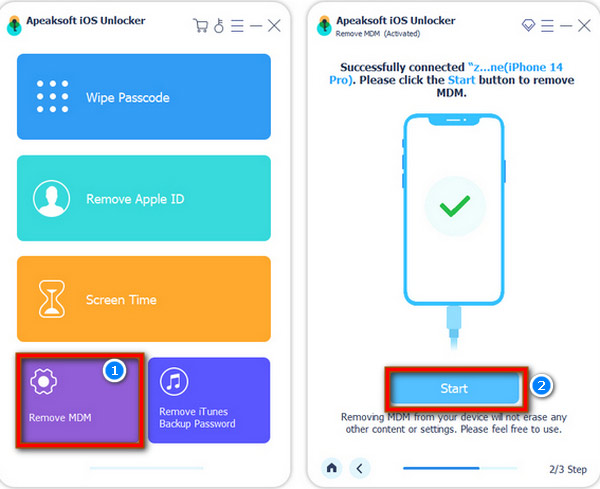
Trin 1 Når du har tilsluttet din iOS og computer, kan du åbne Apeaksoft iOS Unlocker. Og klik derefter på knappen "Fjern MDM".
Trin 2 Det næste trin er at klikke på knappen "Start", og processen for profilfjernelse starter. Klik på knappen "OK" for at afslutte processen.
Del 3. Ofte stillede spørgsmål om Jamf MDM
Hvad laver Jamf MDM?
Jamf MDM er en softwareløsning designet til at administrere og sikre Apple-enheder i en organisation. Det giver administratorer værktøjer til at fjernkonfigurere, overvåge og vedligeholde Apple-enheder såsom iPhones, iPads, Macs og Apple TV'er. Kritiske funktioner i Jamf MDM omfatter implementering af apps, håndhævelse af sikkerhedspolitikker, konfiguration af indstillinger, sporing af enhedsbeholdning og yde fjernhjælp.
Er Jamf kun til Apple-enheder?
Nej. Historisk set har Jamf primært været fokuseret på at administrere Apple-enheder og er kendt for sin ekspertise på dette område. I de senere år har Jamf dog udvidet sine tilbud til at omfatte understøttelse af andre platforme, herunder Windows- og Android-enheder.
Kan Jamf fjernes?
Ja, Jamf-administrationsprofiler og -agenter kan fjernes fra enheder. Administratorer kan starte fjernelsesprocessen fra Jamf Pro-konsollen, og fjernelsen sendes til målenheden. Hvis brugere ønsker at fjerne Jamf fra deres enheder, kan de bruge Apeaksoft iOS Unlocker.
Konklusion
At tage kontrol over din enheds administration kan være en befriende oplevelse. Uanset om du skal returnere din enhed til personlig brug, skifte til en anden MDM-løsning, eller af en hvilken som helst anden grund, fjernelse af en Jamf MDM-profil er ligetil, når du kender trinene. Husk at sikkerhedskopiere vigtige data og rådfør dig med din organisations it-afdeling, hvis du er usikker på nogle aspekter af proceduren. Med oplysningerne i denne vejledning, især hjælpen fra Apeaksoft iOS Unlocker, kan du trygt navigere i afmeldingsprocessen for at fjerne Jamf MDM-profilen.