8 Καλύτερες Δωρεάν και Freemium Δημιουργοί Slideshow Online και Offline

Μια παρουσίαση διαφανειών είναι μια παρουσίαση μιας σειράς στατικών εικόνων σε μια οθόνη ή οθόνη, συνήθως σε μια προκαθορισμένη ακολουθία. Είναι ένας εξαιρετικός τρόπος για να συλλέξετε, να προβάλετε και να διαχειριστείτε τις βιβλιοθήκες φωτογραφιών σας με τα ίδια θέματα. Για να δημιουργήσετε μια παρουσίαση διαφανειών, χρειάζεστε ένα δωρεάν slideshow makerΣας επιτρέπει να τοποθετήσετε τις φωτογραφίες σας στο storyboard, να τις τακτοποιήσετε και να εφαρμόσετε ένα θέμα και μουσική υπόκρουση. Αυτό το άρθρο προσδιορίζει μια λίστα με τα κορυφαία.
ΠΕΡΙΕΧΟΜΕΝΟ ΣΕΛΙΔΑΣ:
Μέρος 1: Σύγκριση δωρεάν προγραμμάτων δημιουργίας διαφανειών
Μεθοδολογία
Έχουμε δοκιμάσει τις δημοφιλείς εφαρμογές δημιουργίας διαφανειών στην αγορά για να εντοπίσουμε την κορυφαία δωρεάν λίστα. Επιπλέον, συλλέξαμε εκατοντάδες αναφορές χρηστών. Κατά την αξιολόγησή τους, εστιάζουμε σε ορισμένες πτυχές, όπως οι μορφές εξόδου, η ποιότητα διαφανειών, το πρόγραμμα επεξεργασίας φωτογραφιών bonus και πολλά άλλα.
| Μορφές εισόδου | Μορφές εξόδου | Υποστηριζόμενες συσκευές | |
| Apeaksoft Video Converter Ultimate | Όλες οι μορφές φωτογραφιών, βίντεο και ήχου | MP4, M4V, MOV, MKV, SWF, WMV, AVI, FLV, κ.λπ. | Windows 11/10/8/7/XP/Vista Mac OS X 10.12 ή παραπάνω |
| Δωρεάν εργαλείο δημιουργίας διαφανειών ThunderSoft | Δημοφιλείς μορφές φωτογραφιών | FLV, MP4, MPG, AVI, WMV, MKV, MOV | Windows 11/10/8/7/XP/Vista |
| iMovie | JPG, PNG, HEIC | MP4 και MOV | macOS |
| Flexclip | PNG, JPG, WebP, GIF, BMP, PSD, RAW, HEIC και άλλα | MP4 και GIF | Διαδικτυακό σεμινάριο |
| Παρουσιάσεις Google | Δημοφιλείς μορφές φωτογραφιών | PPTX | Διαδικτυακό σεμινάριο |
| adobe express | JPG, PNG, GIF, SVG | MP4 | Διαδικτυακό σεμινάριο |
| Το Βίντεο | JPG, PNG, HEIC και άλλα | MP4 | iOS και Android |
| Google Photos | JPG, PNG, HEIC και άλλα | MP4 | iOS και Android |
Μέρος 2: Top 3 Free Slideshow Makers στην επιφάνεια εργασίας
Κορυφαία 1: Apeaksoft Video Converter Ultimate
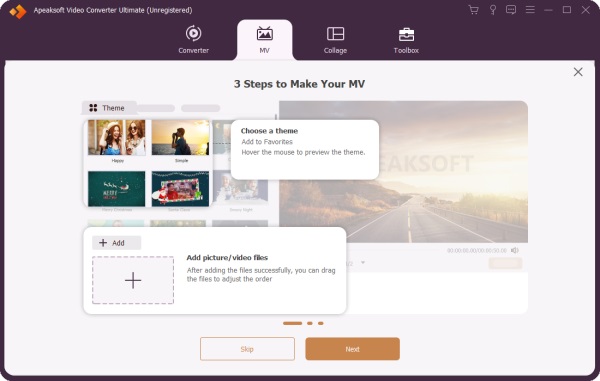
Apeaksoft Video Converter Ultimate είναι ένα δωρεάν πρόγραμμα δημιουργίας slideshows με τεχνητή νοημοσύνη για αρχάριους. Προσφέρει σχεδόν τα πάντα για τη δημιουργία slideshows με φωτογραφίες, βίντεο κλιπ και ηχητικά κομμάτια. Επιπλέον, τα ενσωματωμένα θέματα, η μουσική βιβλιοθήκη και άλλα στοιχεία σάς επιτρέπουν να δημιουργείτε slideshows σαν επαγγελματίας.
Ασφαλής λήψη
Ασφαλής λήψη
- Δημιουργήστε δωρεάν παρουσιάσεις με μουσική και εικόνες.
- Συμπεριλάβετε ένα πρόγραμμα επεξεργασίας βίντεο.
- Προσφέρετε θέματα και μουσική βιβλιοθήκη.
- Προεπισκόπηση παρουσιάσεων με ένα πρόγραμμα αναπαραγωγής πολυμέσων.
- Υποστηρίξτε ένα ευρύ φάσμα μορφών εξόδου.
- Χρειάζεται λίγος χρόνος για να αποδοθεί το αποτέλεσμα.
Ακολουθούν τα βήματα για να δημιουργήσετε μια παρουσίαση διαφανειών με εικόνες και μουσική:
Βήμα 1. Πρόσθεσε φωτογραφίες
Ανοίξτε το πρόγραμμα δημιουργίας διαφανειών αφού το εγκαταστήσετε στον υπολογιστή σας. Μεταβείτε στο MV Καρτέλα και κάντε κλικ στο Πρόσθεση μενού για να εισαγάγετε τις φωτογραφίες. Μετά τη φόρτωση, τακτοποιήστε αυτές τις φωτογραφίες στο storyboard.
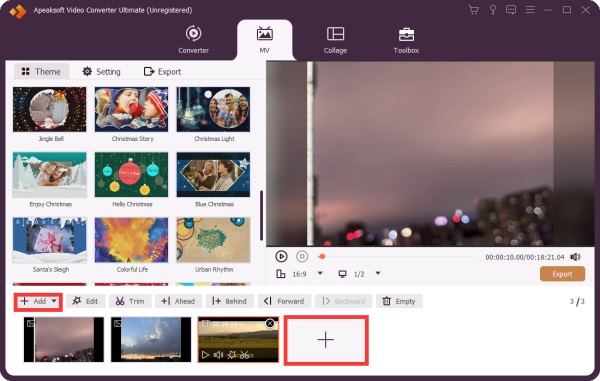
Βήμα 2. Δημιουργήστε μια παρουσίαση διαφανειών.
Επιλέξτε ένα κατάλληλο θέμα στο θέμα καρτέλα. Στη συνέχεια, κατευθυνθείτε στην Ρυθμίσεις καρτέλα και προαιρετικά πληκτρολογήστε έναν τίτλο. Επιλέξτε το πλαίσιο δίπλα στο Μουσική υπόκρουσηκαι επιλέξτε ένα κομμάτι από τη βιβλιοθήκη ή κάντε κλικ στο Πρόσθεση για να προσθέσετε ένα τραγούδι. Εφαρμόστε το κουμπί Ξεθωριάζω και Σβήνω εικόνα επιδράσεις.
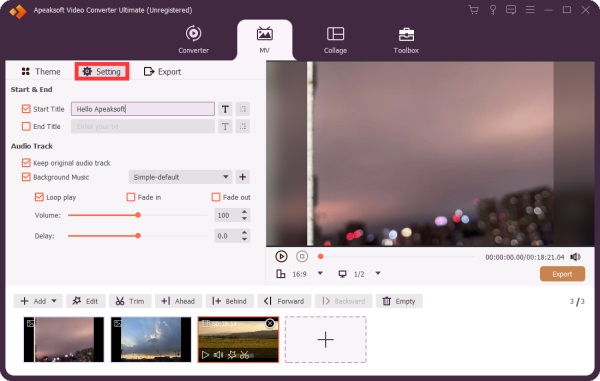
Βήμα 3. Εξαγωγή της παρουσίασης
Κάντε κλικ στο Δοκιμάστε να παίξετε κάτω από το πρόγραμμα αναπαραγωγής πολυμέσων για να δείτε την παρουσίαση. Εάν είστε ικανοποιημένοι, μεταβείτε στο εξαγωγή καρτέλα και ορίστε τη μορφή εξόδου και τον φάκελο εξόδου. Τέλος, κάντε κλικ στην Démarrer l'exportation,en κουμπί.
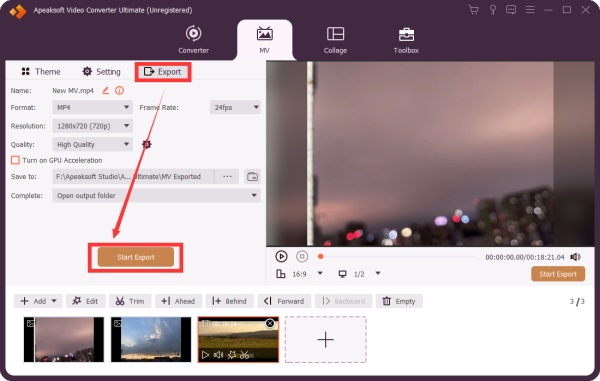
Περισσότερες Πληροφορίες
Κορυφαία 2: Δωρεάν Δημιουργός Παρουσίασης Διαφανειών ThunderSoft
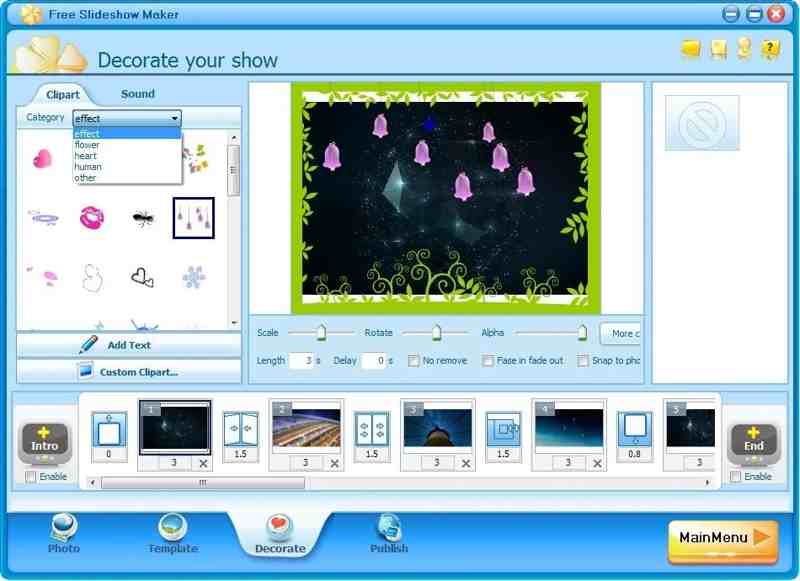
Το ThunderSoft Free Slideshow Maker είναι ένα δωρεάν πρόγραμμα δημιουργίας παρουσιάσεων εικόνων για Windows. Σας επιτρέπει να δημιουργείτε παρουσιάσεις για το YouTube και άλλα μέσα κοινωνικής δικτύωσης. Προσφέρει τόσο δωρεάν όσο και premium έκδοση.
- Δημιουργήστε μια παρουσίαση διαφανειών με έως και 500 εικόνες.
- Προσθέστε μεταβάσεις, υπότιτλους και μουσική.
- Συμπεριλάβετε 70 κινούμενα πρότυπα.
- Δημιουργήστε παρουσιάσεις διαφανειών για HTML5.
- Η διεπαφή είναι παλιά.
- Δεν έχει ενημερωθεί εδώ και καιρό.
Κορυφή 3: iMovie
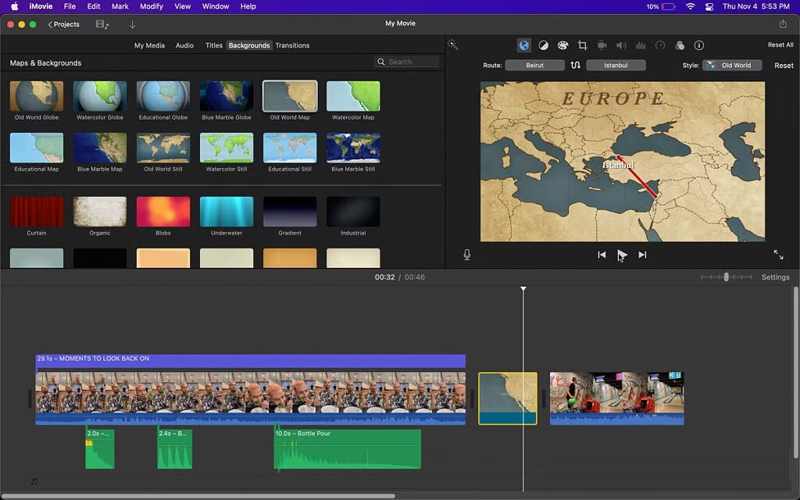
Το iMovie είναι το δωρεάν πρόγραμμα δημιουργίας διαφανειών εικόνων σε macOS. Μπορείτε να δημιουργήσετε ένα έργο, να προσθέσετε φωτογραφίες και βίντεο και να δημιουργήσετε μια παρουσίαση διαφανειών στο MacBook σας. Ενώ προσφέρει ένα πρόγραμμα επεξεργασίας βίντεο εισαγωγικού επιπέδου, είναι αρκετό για τη δημιουργία μιας παρουσίασης διαφανειών. Μπορείτε επίσης προσθήκη φωνητικών σημειώσεων στο iMovie για να δημιουργήσετε μια ζωντανή παρουσίαση διαφανειών.
- Ενσωματώστε ένα διαισθητικό γραφικό περιβάλλον χρήστη (GUI).
- Προσφέρετε εξαιρετικά πρότυπα.
- Εργαστείτε με άλλες εφαρμογές σε Mac.
- Παρέχετε ένα πρόγραμμα επεξεργασίας βίντεο.
- Χωρίς προηγμένα χαρακτηριστικά.
- Είναι διαθέσιμο μόνο σε Mac.
Μέρος 3: Κορυφαίοι 3 δωρεάν παραγωγοί διαφανειών σε απευθείας σύνδεση
Top 1: Flexclip
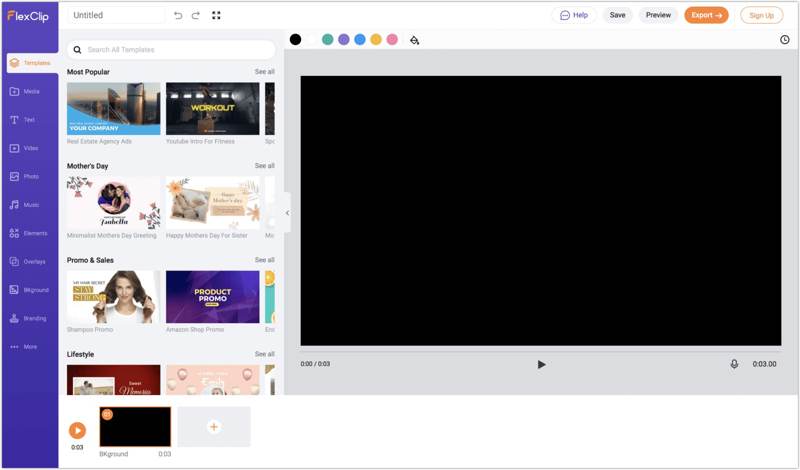
Το Flexclip είναι ένα δωρεάν πρόγραμμα δημιουργίας διαφανειών με δυνατότητα δημιουργίας μουσικής στο διαδίκτυο. Σας επιτρέπει να ανεβάσετε φωτογραφίες και να δημιουργήσετε μια παρουσίαση διαφανειών με μουσική υπόκρουση χωρίς να κατεβάσετε τίποτα στην επιφάνεια εργασίας σας. Το μόνο που χρειάζεστε είναι ένας λογαριασμός.
- Εύκολο στη χρήση
- Προσφέρετε εργαλεία Τεχνητής Νοημοσύνης.
- Συμπεριλάβετε εκτενή πρότυπα.
- Παροχή χώρου αποθήκευσης στο cloud.
- Προσθέτει υδατογραφήματα σε παρουσιάσεις διαφανειών.
- Τα προηγμένα χειριστήρια είναι περιορισμένα.
Κορυφή 2: Παρουσιάσεις Google
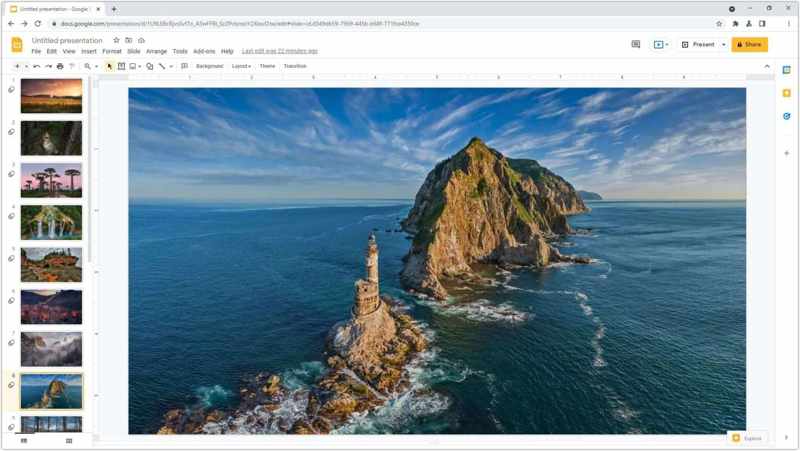
Το Google Slides είναι ένα ακόμη δωρεάν εργαλείο δημιουργίας διαδικτυακών παρουσιάσεων. Σας επιτρέπει να δημιουργείτε παρουσιάσεις online με έναν λογαριασμό Google. Η εύχρηστη διεπαφή και οι προηγμένες λειτουργίες το καθιστούν δημοφιλές για συνεργασία.
- Ελεύθερη πρόσβαση για οποιονδήποτε.
- Απρόσκοπτη και αποτελεσματική.
- Δημιουργήστε παρουσιάσεις διαφανειών στο διαδίκτυο.
- Αποθηκεύστε παρουσιάσεις στο cloud.
- Οι λειτουργίες premium παρουσιάσεων απαιτούν συνδρομή στο Google Workspace.
Top 3: Adobe Express
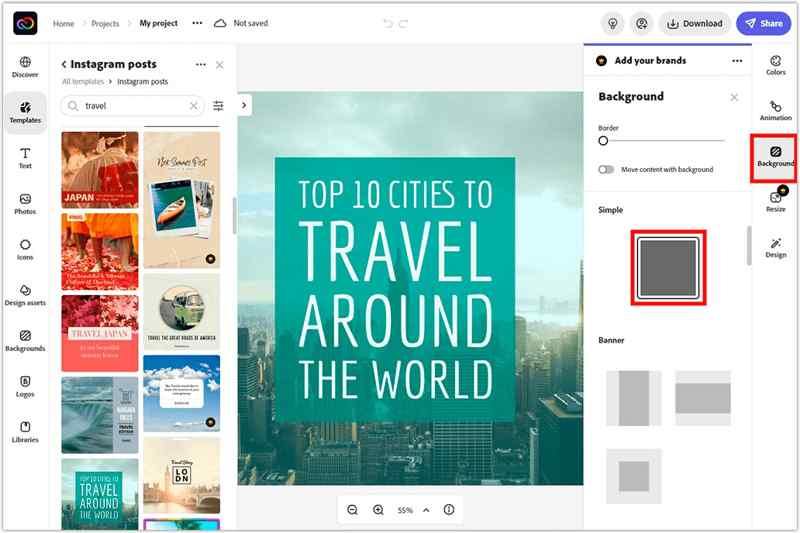
Το Adobe Express είναι ένας γρήγορος τρόπος για να δημιουργήσετε μια παρουσίαση διαφανειών online δωρεάν. Ενώ οι προηγμένες λειτουργίες και ο χώρος αποθήκευσης στο cloud απαιτούν συνδρομή επί πληρωμή, μπορείτε να δοκιμάσετε τη δωρεάν έκδοση με έναν λογαριασμό Adobe.
- Συμπεριλάβετε πρότυπα ρευστών.
- Προσφέρετε εργαλεία Τεχνητής Νοημοσύνης.
- Παρέχετε ένα πρόγραμμα επεξεργασίας βίντεο.
- Ενσωμάτωση ChatGPT.
- Ορισμένα εργαλεία τεχνητής νοημοσύνης είναι επιτυχημένα ή όχι.
- Είναι ακριβό.
Μέρος 4: Οι 2 κορυφαίες δωρεάν εφαρμογές δημιουργίας διαφανειών
Κορυφή 1: Βίντεο
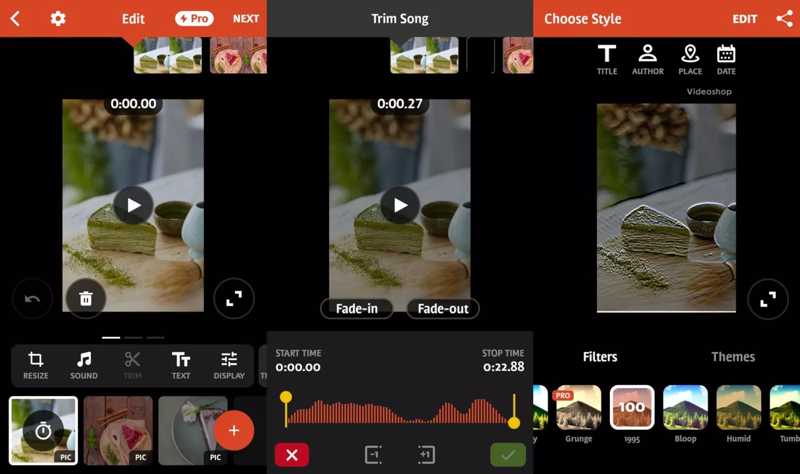
Το Videoshop είναι ένα από τα κορυφαία δωρεάν προγράμματα δημιουργίας slideshow για χρήστες iPhone και Android. Στην πραγματικότητα, είναι ένα πλήρες πρόγραμμα επεξεργασίας βίντεο με εργαλεία δημιουργίας slideshow και πολλές άλλες λειτουργίες, όπως φίλτρα και εφέ.
- Δημιουργήστε εύκολα παρουσιάσεις διαφανειών.
- Προσθήκη κειμένου και μεταβάσεων.
- Επεξεργαστείτε ομαλά τις παρουσιάσεις διαφανειών.
- Κοινοποιήστε παρουσιάσεις στα μέσα κοινωνικής δικτύωσης.
- Οι χρήστες ανέφεραν προβλήματα σταθερότητας.
- Υπάρχει ένα υδατογράφημα στην δωρεάν έκδοση.
Κορυφή 2: Φωτογραφίες Google
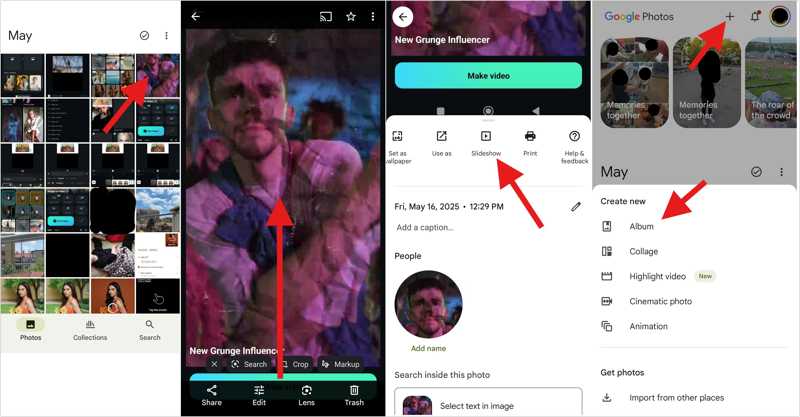
Το Google Photos είναι μια άλλη επιλογή για να δημιουργείτε δωρεάν παρουσιάσεις διαφανειών με μουσική. Ως αποθηκευτικός χώρος φωτογραφιών, διαθέτει ενσωματωμένο εργαλείο δημιουργίας παρουσιάσεων διαφανειών και βασικές λειτουργίες επεξεργασίας φωτογραφιών. Επιπλέον, προσφέρει 15 GB δωρεάν αποθηκευτικού χώρου.
- Οργανώστε φωτογραφίες με τεχνητή νοημοσύνη.
- Δημιουργήστε αντίγραφα ασφαλείας φωτογραφιών και βίντεο.
- Δημιουργήστε γρήγορα μια παρουσίαση διαφανειών.
- Μοιραστείτε απευθείας παρουσιάσεις διαφανειών.
- Ο δωρεάν αποθηκευτικός χώρος είναι περιορισμένος.
- Χωρίς προηγμένα χαρακτηριστικά.
Συμπέρασμα
Τώρα, θα πρέπει να μάθετε τα 8 κορυφαία δωρεάν παρουσίαση διαφανειών με δημιουργούς μουσικής στο διαδίκτυο με δωρεάν μουσικούς δημιουργούς στο διαδίκτυο., στον υπολογιστή και την κινητή συσκευή σας. Μερικά από αυτά είναι εντελώς δωρεάν στη χρήση. Άλλα προσφέρουν μια δωρεάν έκδοση ή μια δωρεάν επίδειξη. Μπορείτε να επιλέξετε μια κατάλληλη με βάση την αξιολόγησή μας και την περίπτωσή σας. Apeaksoft Video Converter Ultimate είναι μια καλή επιλογή για αρχάριους.
Σχετικά άρθρα