AI Face Enhancer: Improve Face Clarity in Photos for Free

A blurry face can make an otherwise good photo less useful. For example, you may have an old family picture, a low-resolution portrait, or a portrait photo downloaded from social media. When you zoom in, facial details may look unclear or pixelated. An Tekoälyinen kasvojenkorostaja can help improve these images and make faces easier to see.
This post will guide you through the magic of AI face enhancer and show you how easy it is to use an AI face enhancer.
SIVUN SISÄLTÖ:
Part 1: What Is an AI Face Enhancer?
An AI face enhancer is an image enhancement tool that uses artificial intelligence to improve the appearance and clarity of faces in photos. It analyzes image patterns and uses them to improve details, reduce the effects of low resolution, and make portraits look clearer.
Unlike basic sharpening tools, AI-based enhancement can use learned image patterns to improve the appearance of facial features. It may help with photos where eyes, hair, and other small details look soft or unclear.
A face enhancer AI tool can be useful for different types of images, including:
- Portrait photos: Make facial details easier to see in personal or professional portraits.
- Old family photos: Improve the clarity of scanned pictures with low resolution.
- Social media images: Make small profile pictures and downloaded portraits clearer.
- Ryhmäkuvat: Improve the overall clarity of a photo when faces look too small or soft.
- Low-resolution pictures: Increase image resolution so the photo looks better when viewed at a larger size.
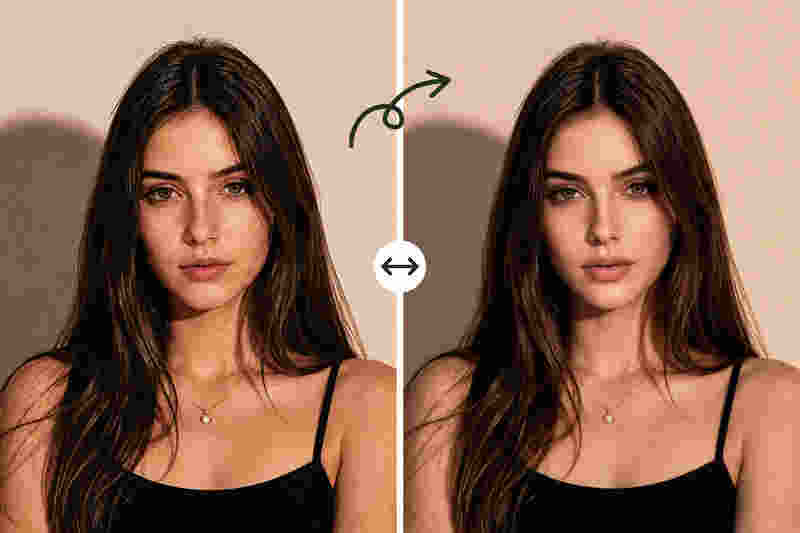
However, AI face enhancement has limits. It cannot always recover the exact details lost in a blurry photo. The result depends on the original image quality, and enhanced details may not perfectly match the person's real appearance.
Part 2: Why Use AI Face Enhancement?
AI face enhancer is actually very powerful and practical in our daily life. There are several reasons to use AI enhancement for face clarity instead of leaving a photo as it is.
1. Make Blurry Faces Clearer
When a face on a photo looks blurry, it can be difficult to recognize small features. An AI face enhancer can help improve visible details and make the image look sharper. This is useful for portraits that appear soft because of low resolution or limited image quality.
2. Improve Low-Resolution Portraits
Some photos look acceptable at their original size but become pixelated when enlarged. AI kuvan resoluution tehostin can increase resolution and help maintain a clearer appearance. It is useful when you want to use a portrait in a presentation, print a photo, or display it on a larger screen.
3. Give Old Photos a New Look
Old photos may have limited resolution because they were taken with older cameras or scanned from printed pictures. AI face enhancement may help improve their clarity and make them easier to view. It can also be a helpful first step before organizing or sharing a digital photo collection.
4. Save Time on Photo Editing
Manual photo editing often requires several adjustments to sharpness, contrast, and other settings. An AI-valokuvatehostin offers a simpler approach. You can upload an image and let the tool process it without learning complex editing techniques.
Part 3: How to Use an AI Face Enhancer Online Free
If you need an AI face enhancer free of charge, Apeaksoft Free Image Upscaler is worth trying. It is an online image enhancement tool designed to improve image quality and enlarge pictures with AI technology.
Instead of installing a desktop application, you can use this tool through a web browser. It is suitable for people who want a straightforward way to improve portraits, profile pictures, and other low-resolution images.
Here are some of its key benefits.
Enhance Face Clarity with AI: Apeaksoft Free Image Upscaler helps improve the clarity of low-resolution images. When you upload a portrait, its AI-powered enhancement process can make visible facial details look clearer and improve the overall appearance of the picture.
The result depends on the source image. Photos with some visible facial information usually offer a better starting point than images with severe blur or very little detail.
Upscale Images to a Higher Resolution: Image enlargement can make a small portrait more useful for different purposes. Apeaksoft Free Image Upscaler supports image upscaling, helping you increase the resolution of a picture while improving its overall clarity.
This can be useful for profile photos, personal albums, online posts, and other images that need to be displayed at a larger size.
Use an AI Image Face Enhancer for Free: You do not always need a paid photo editor to improve a portrait. Apeaksoft Free Image Upscaler provides an accessible way to enhance images online without requiring a complicated editing process.
If you are looking for a free AI face enhancer for occasional photo improvement, it offers a convenient place to start. Check the website for the current usage limits, supported image formats, and available enlargement options.
Steps to Use an AI Face Enhancer:
Using an AI face enhancer online does not have to be complicated. Follow these steps to improve a portrait with Apeaksoft Free Image Upscaler.
Vaihe 1. Open the online tool
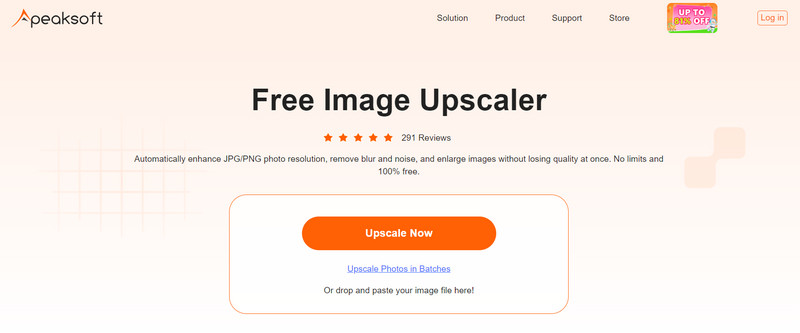
Käy Apeaksoft Free Image Upscaler website in your browser. Find the image upload area to begin.
Vaihe 2. Lataa valokuvasi
Valitse Laadukas nyt button to select the portrait, profile picture, or other image you want to enhance. For better results, choose the highest-quality original version available.
Vaihe 3. Let AI enhance the image
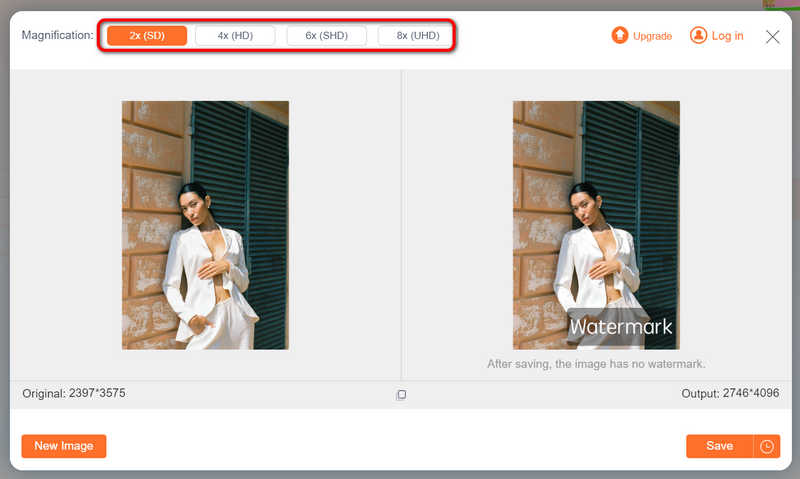
When your image is added, it is automatically upscaled and enhanced. You can also select 2×, 4×, 6×, and even 8× to improve clarity and increase resolution.
Vaihe 4. Esikatsele tulosta.
Check the enhanced image and compare it with the original. Pay attention to facial features and the overall image quality. If the face still looks unclear, try another source image with more visible details.
Vaihe 5. Download the enhanced photo.
Jos olet tyytyväinen tulokseen, napsauta Säästä button to download the processed image. You can then use it in a personal photo collection, online profile, or other suitable project.
Part 4: Tips for Getting Better AI Face Enhancement Results
Even a good AI face enhancer tool cannot produce perfect results from every image. A few simple tips can help you get more useful results.
- Start with the best original photo: A larger image with visible facial features usually provides more useful information for enhancement.
- Avoid extremely blurry images: If the original face contains almost no recognizable details, AI may generate an estimated appearance rather than recover the original features.
- Check the result at different sizes: A portrait may look clear as a thumbnail but show unwanted details when enlarged.
- Keep a copy of the original: Save the unedited image so you can compare results or try a different enhancement method.
- Use enhancement in moderation: Excessive sharpening or artificial-looking facial details may make a photo look less natural.
If you are enhancing an old family photo or an image of someone else, remember that AI-generated details may not be historically accurate. Avoid treating an enhanced image as reliable evidence of someone's exact appearance.
Part 5: FAQs of AI Face Enhancer
Is there a free AI face enhancer online?
Yes. Some online image enhancement tools offer free features for improving image clarity and increasing resolution. Apeaksoft Free Image Upscaler is one option for users who want to enhance photos in a browser without installing desktop software. Check its website for current free usage limits.
How does a face enhancer AI improve blurry photos?
AI-based enhancement analyzes image patterns and uses learned information to improve the appearance of details. It may make facial features look clearer and reduce the visual effects of low resolution. However, it cannot guarantee the recovery of details that were never captured in the original image.
Is AI face enhancement suitable for old photos?
Yes, it is. An AI face enhancer tool can help improve the clarity of old photos, especially scanned portraits with low resolution. However, severely damaged, faded, or heavily blurred images may need additional restoration work. Always compare the enhanced version with the original to make sure the result remains suitable for your purpose.
Is an AI face enhancer online free better than manual editing?
It depends on your needs. An online AI tool is often easier for quick enhancement because it requires less manual adjustment. Traditional photo editors provide more control over individual settings, which can be useful for detailed retouching.
Yhteenveto
You do not need advanced editing skills to make a low-resolution portrait look clearer. A free AI face enhancer can help improve image quality, enlarge small pictures, and make facial details easier to view. Apeaksoft Free Image Upscaler offers a simple online way to enhance photos without installing extra software. Whether you want to improve a profile picture, make an old portrait clearer, or upscale a small image, give it a try and see how much it can improve your photo.
Aiheeseen liittyvät artikkelit