How to Record on Prime Video (Without a Black Screen)

Amazon Prime Video offers thousands of popular and classic movies and TV shows. But what if you want to watch your favorite show offline, or save a clip? In that case, the key question is: can you record on Prime Video? In this simple guide, we will answer all your questions about how to record Amazon Prime Video and how to avoid the frustrating black screen issue.
SIVUN SISÄLTÖ:
Part 1: Can You Record on Prime Video?
Generally, you can't record on Prime Video. Prime Video does not have a built-in record feature like DirecTV. Moreover, Amazon blocks standard screen recorders. If you try to use a normal screen recorder, you will usually just end up with audio and a completely black screen.

However, there are still a few easy ways to record Amazon Prime Video and save your favorite shows. Let's look at how to do that the right way.
Part 2: How to Record on Prime Video Without Being Blocked
Method 1: Ultimate Screen Recorder for Recording on Prime
If you try to record on Prime Video, you'll need a reliable screen recorder to directly access the visual and audio content. Apeaksoft Screen Recorder is just what you need. You can also get the original quality of the video and even enhance it to 4K quality. No matter how long a Prime movie or episode is, it can work stably to record video in the best quality and high fluency.
Vaihe 1. Hanki Apeaksoft-näytön tallennin
Valitse Ilmainen lataus alla olevaa painiketta ladataksesi, asentaaksesi ja käynnistääksesi Apeaksoft Screen Recorder.
Suojattu lataus
Suojattu lataus
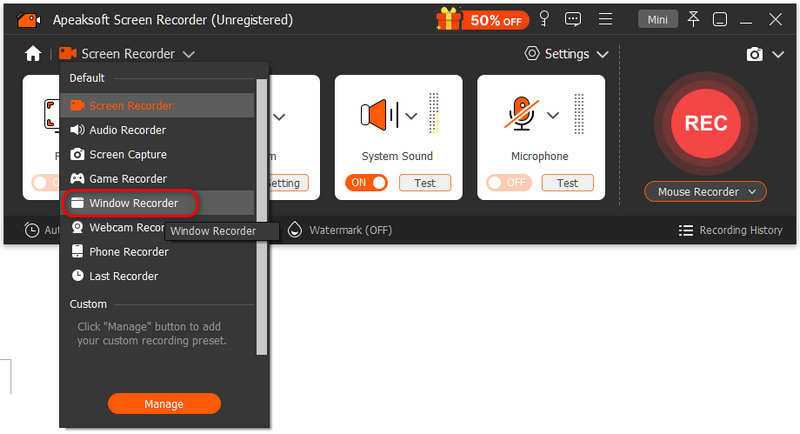
Vaihe 2. Valitse Window Recorder
On the main interface of Apeaksoft Screen Recorder, click the Screen Recorder pudotusvalikko valittavaksi Ikkunan tallennin.
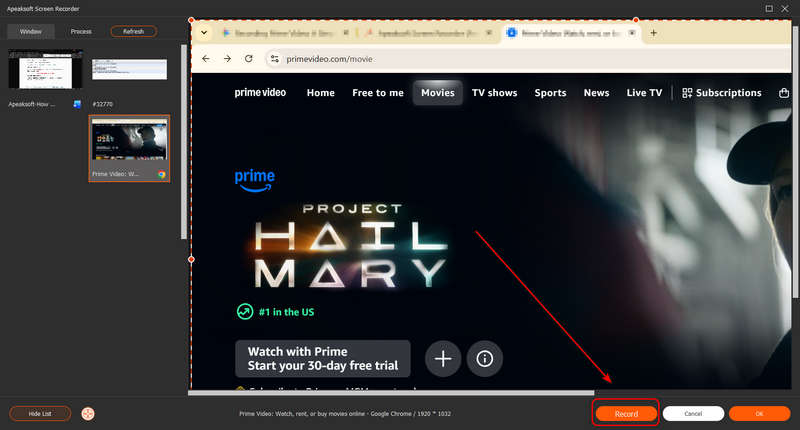
Vaihe 3. Start Recording Prime Video
You should select the browser window of Prime Video. Then click the Record button in the bottom-right corner to start recording.
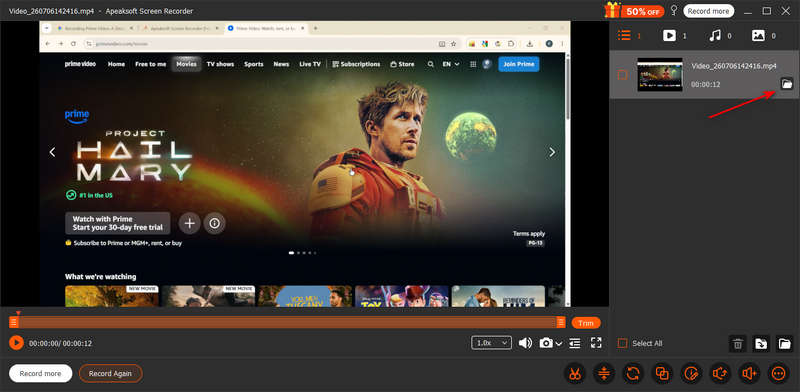
Vaihe 4. Save Your Recorded Prime Video
Valitse ennätys button again to stop recording. Then, you can see the recorded video in the list. Click the Avaa kansio button to check the Prime video recording.
Method 2: Turn off Hardware Acceleration
If you see that your Prime Video recordings have black or white blocking, you can turn off the hardware acceleration in your browser.
- Google Chrome: Valitse Muokkaa button (three dots at top right) > Asetukset > järjestelmä > Sammuta Käytä grafiikkakiihdytystä, jos mahdollista > Relaunch Chrome.
- Edgelle: Click the three dots > Asetukset > System and Performance>Turn off Käytä grafiikkakiihdytystä, jos mahdollista > Relaunch Edge.
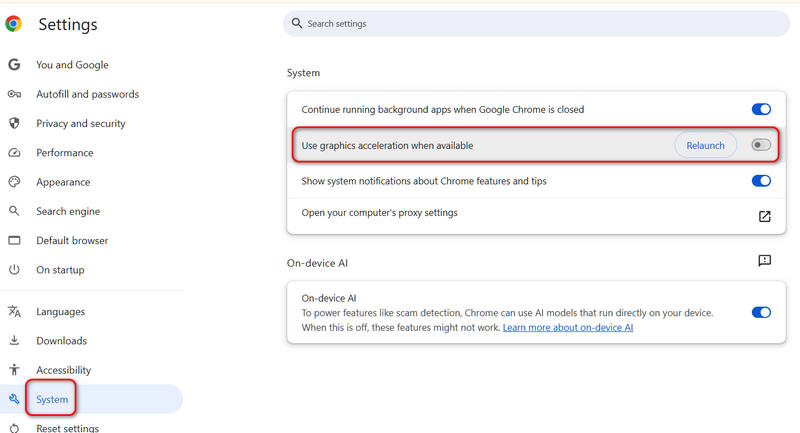
Then, you can retry screen recording on Prime Video; this time, you may succeed in recording without being blocked.
Part 3: How to Download Prime Video for Offline Viewing
If you have paid for Prime Video, you don't need to screen record Prime Video; the easiest method is to use Amazon’s official download feature. This allows you to watch videos offline without using internet data.
- 1.Avaa Prime Video -sovellus on your phone, tablet, or Windows 10/11 computer.
- 2.Find the movie or TV show you want to save.
- 3.Valitse Lataa button, choose your video quality, and wait for it to finish.
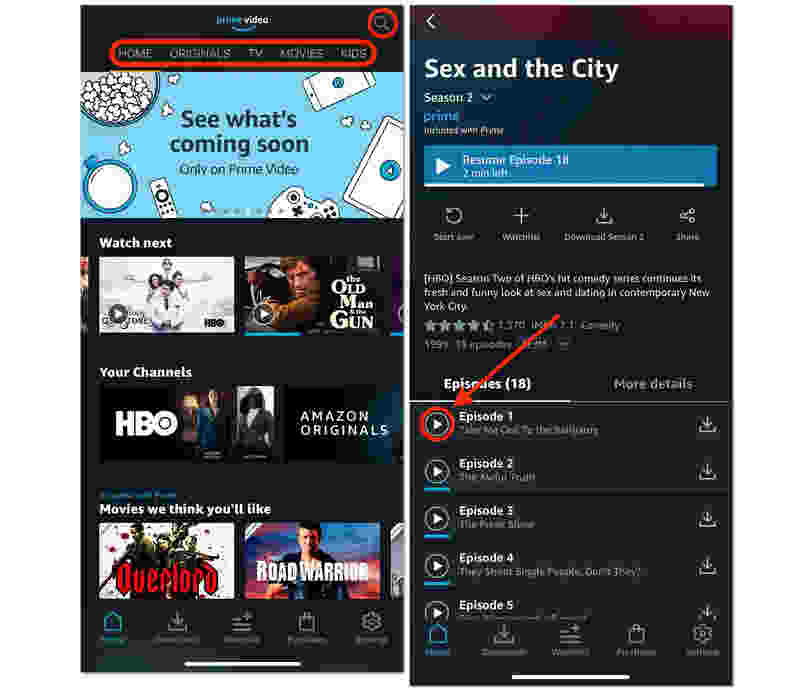
Huomautus: The downloaded videos from Prime Video are not saved forever on your computer or phone. If you haven’t watched a downloaded video for 30 days, it will disappear. It will also disappear after 40 hours since it was played. Moreover, if your Prime Video premium expires, the video is still unplayable.
Kirjallisuutta
Part 4: FAQs of How to Record on Prime Video
Can I record football on Amazon Prime?
Yes, you can record football games on Amazon Prime. You can use Apeaksoft Screen Recorder to directly record the games without being blocked and view them offline without an internet.
Does Amazon Prime have a DVR option?
No, Prime Video doesn't has a DVR option. You can either download video or use a third-party screen recorder to capture the movies or TV shows you like.
Can you rewatch live events on Amazon Prime?
Yes, you can. Usually, Prime Video will save full replays of those live events as long as they have the copyrights. You can directly view and screen record on the event replays.
Yhteenveto
Nyt tiedät how to record on Prime Video! For the best quality and zero hassle, always try downloading the video inside the official app first. If you must screen record movies and TV shows from Prime Video, you'd better turn off hardware acceleration on your web browser first, and then use Apeaksoft Screen Recorder to do the screen recording. You can get the best video and sound quality for offline viewing.
 Apeaksoft Screen Recorder
 Tallenna mitä tahansa videota ja ääntä puhelimen ja tietokoneen näytölle.
Suojattu lataus
Suojattu lataus
Aiheeseen liittyvät artikkelit