TinyTake Review 2026: Capture Performance & Real Testing

If you're a longtime TinyTake user, you may notice some major changes when you use it today. We also notice it. When we download it again from the official website, we find its name has changed to Mango Recorder, and some of its features and pricing options have also changed.
However, many TinyTake reviews available online don't fully cover these recent changes. That's why we revisit and update this latest TinyTake review to give you a clear look. Keep reading!
SIVUN SISÄLTÖ:
What Is TinyTake - Basic Introduction & Tested Review
TinyTake (now called Mango Recorder) is a screen capture and recorder tool published by MangoApps. It is a lightweight screen capture and recording program compatible with both Windows and Mac. This tool focuses on screenshot capture and screen recording, which is useful for daily communication, tutorial creation, bug reporting, and more.
It also supports convenient keyboard shortcuts, allowing you to quickly start a screenshot or recording without opening the main interface.
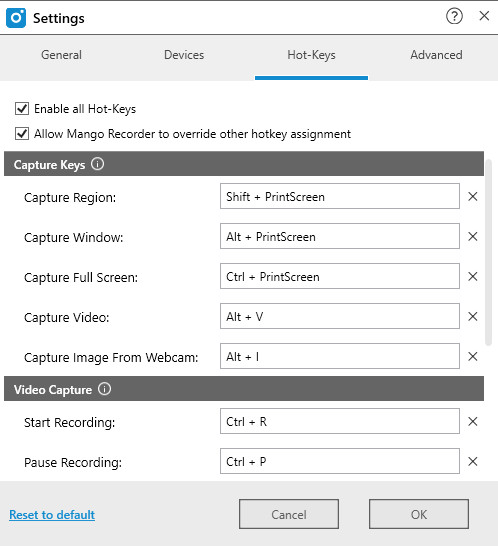
TinyTake's functions can be divided into two parts: image capture and video capture. We downloaded the Free Version from the official website and tested both features.
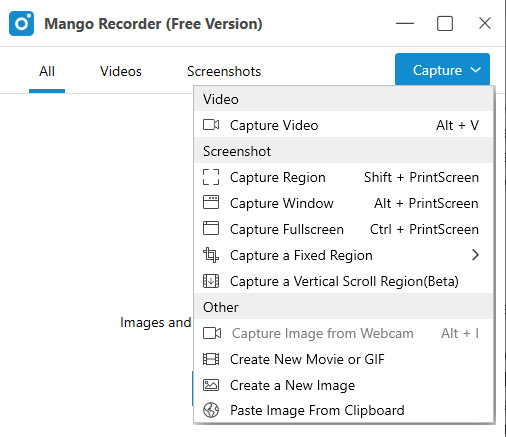
For image capture, TinyTake offers a quick and convenient way to take screenshots. You can choose different capture options based on your needs, including Kaappaa alue, Kaappaa ikkuna, Capture Fullscreen, Capture a Fixed Regionja Capture a Vertical Scroll Region (Beta).
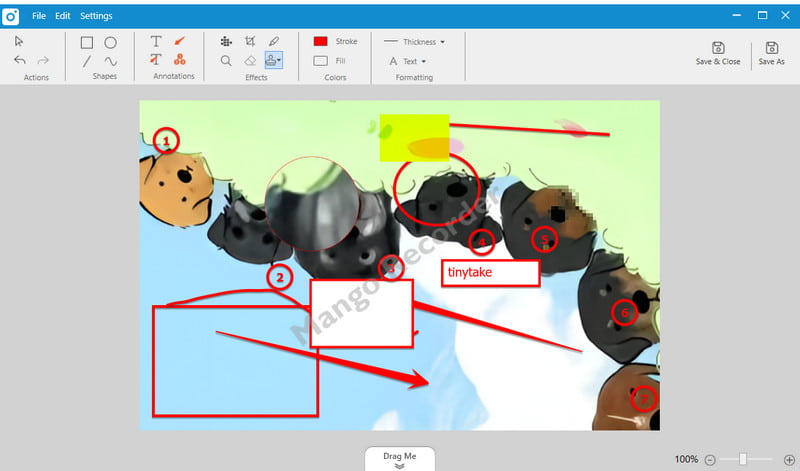
After you select the area, this tool enables you to caption, highlight, and edit your captured screenshots. As shown in the image below, you can circle, number, and highlight the keypoints or something you want others to notice. You can also add captions to explain the image. Moreover, you can add a watermark to the image using your own watermark file. Once you're done editing, you can either save the screenshot locally or copy it to the clipboard.
- You can use hotkeys to quickly capture screenshots without opening the main interface.
- You can choose whether to add a watermark (some free screenshot tools automatically add their own branding watermarks to the image).
- It offers multiple screenshot modes and built-in editing tools, which are very practical.
- You can save an unfinished screenshot to the main interface by clicking Tallenna ja sulje in the program's main interface and return to it anytime to continue editing.
- It saves screenshots as PNG files by default.
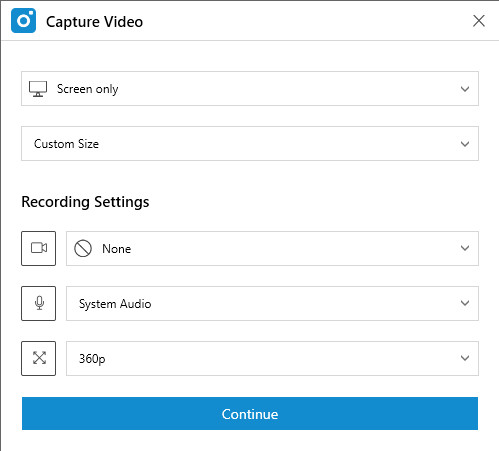
For video capture, TinyTake lets you customize the recording area or choose from several preset sizes, such as 1024 × 768 and 1280 × 1024. You can also choose whether to record your webcam and microphone. In addition, it offers multiple resolution options from 360p to 1440p. You can adjust the video quality based on your needs.
After recording, TinyTake also provides some basic editing tools. You can add text, draw circles, lines, and arrows to highlight important parts of the video.
- Free screen recorder with no watermarks.
- Se tukee pikanäppäimiä.
- It has no recording time limit, at least in our test. This differs from previous TinyTake reviews that claim that the free version was limited to 5 minutes of recording.
- It provides basic editing tools, such as trimming.
- It exports recordings in MP4 format by default.
- The recorded video opens in full-screen mode by default after finishing recording, and you cannot minimize it directly.
- You cannot add annotations while recording.
- The built-in editing tools are quite limited.
Detailed TinyTake Pricing & Plan Comparison
Mukaan TinyTake's official website, TinyTake (now Mango Recorder) provides both free and premium versions. The main difference is that the Free version stores screenshots and videos locally, while the Premium version enables you to store screenshots and videos in cloud storage and generate links for quick sharing. Users can view the content directly in a browser without downloading the app.
The pricing model and product structure of TinyTake have changed significantly. Historically, the Free version only enabled users to record per video for 5 minutes. However, in our test of the latest version, we were able to record for more than 5 minutes without any time-limit warning or interruption.
In the past, the Free version also enabled you to upload recorded videos to the Cloud and offered 2GB of cloud storage, while the free cloud storage feature is no longer available for the current free version.
For the Premium version, the pricing model is also different from the previous TinyTake plans. Rather than a standalone subscription, MangoApps now bundles the cloud-based Recorder features with its Workplace platform.
Existing MangoApps customers can access Recorder Premium through their accounts, while new users need to purchase the MangoApps Workplace Standard plan. You can check the table below for more details.
| Suunnitelma | Kuukausittain | Vuosittain | Mukana olevat käyttäjät | Video Recording & Sharing |
| Perus | $ 99 / kk | $ 990 / vuosi | 25 käyttäjät | Ei |
| Standard | $ 149 / kk | $ 1,490 / vuosi | 25 käyttäjät | Kyllä |
| kohti | $ 299 / kk | $ 2,990 / vuosi | 25 käyttäjät | Kyllä |
Huomautus: Prices may change. Please refer to the official pricing page for the latest pricing information. MangoApps also provides a 14-day free trial.
TinyTake (Mango Recorder) vs. Apeaksoft Screen Recorder
Although TinyTake provides a free and quick way to capture the screen, we found that it offers limited control over recording settings and video editing overall. If you want more recording and editing options, you can consider other screen recording tools, such as Apeaksoft Screen Recorder.
Suojattu lataus
Suojattu lataus
| Ominaisuus | TinyTake (Mango Recorder) | Apeaksoft Screen Recorder |
| Kuvakaappaus | Kyllä | Kyllä |
| Näytön tallennus | Kyllä | Kyllä |
| Tallennusalue | Custom area and preset sizes | Mukautettu tallennusalue |
| päätöslauselma | Jopa 1440p | Jopa 4 kt |
| Esitysmuoto | MP4 for video; PNG for screenshots | Useita lähtömuotoja |
| Video Codec | Rajoitetut vaihtoehdot | Lisää vaihtoehtoja |
| Frame Rate | Rajoitettu hallinta | Säädettävä |
| Verkkokameran tallennus | Kyllä | Kyllä |
| Microphone Recording | Kyllä | Kyllä |
| Reaaliaikainen huomautus | Ei | Kyllä |
| Videoeditointi | Vain perusleikkaus | Lisää muokkaustyökaluja |
| Recording Shortcuts | Kyllä | Kyllä |
Vinkki: Apeaksoft Screen Recorder also enables you to tallenna iPhone-näyttö työpöydällä.
FAQs About TinyTake by MangoApps
Onko TinyTake ilmainen?
Yes. TinyTake (now Mango Recorder) offers a Free version with basic screenshot and screen recording features.
Is TinyTake safe?
Yes. TinyTake is developed by MangoApps, and we did not encounter any security issues during our test.
Does TinyTake have a time limit?
No. The latest version we tested does not appear to have a recording time limit.
Yhteenveto
Overall, if you mainly want a quick and convenient tool for taking screenshots or recording your screen, the Free version of TinyTake should be enough. If you pursue cloud storage and shareable links, you can consider the TinyTake Premium version. However, if you want more features and customization options, Apeaksoft Screen Recorder on harkitsemisen arvoinen.
 Apeaksoft Screen Recorder
 Tallenna mitä tahansa videota ja ääntä puhelimen ja tietokoneen näytölle.
Suojattu lataus
Suojattu lataus
Aiheeseen liittyvät artikkelit