


Slik gjenoppretter du View Once-bilder fra WhatsApp-kontoen din

Personvernbekymringer er fortsatt et hett tema, spesielt for meldingstjenester. For eksempel har WhatsApp gradvis lagt til funksjoner for å forbedre personvernet. De introduserte engangsbilder og -videoer, også kjent som midlertidige eller flyktige filer. Disse mediefilene forsvinner når de er sett av mottakeren og kan ikke åpnes igjen. Denne veiledningen deler de velprøvde metodene for å se en gang bilder omgå for WhatsApp-nettstedet eller app.
SIDEINNHOLD:
- Del 1: Hva er View Once Photo på WhatsApp
- Del 2: Slik gjenoppretter du visning av bilder på WhatsApp etter avsender
- Del 3: Slik gjenoppretter du View Once-bilder på WhatsApp via skjermbilde
- Del 4: Slik gjenoppretter du View Once-bilder på WhatsApp fra sikkerhetskopi
- Del 5: Slik henter du bilder du har sett én gang på WhatsApp uten sikkerhetskopi
Del 1: Hva er View Once Photo på WhatsApp
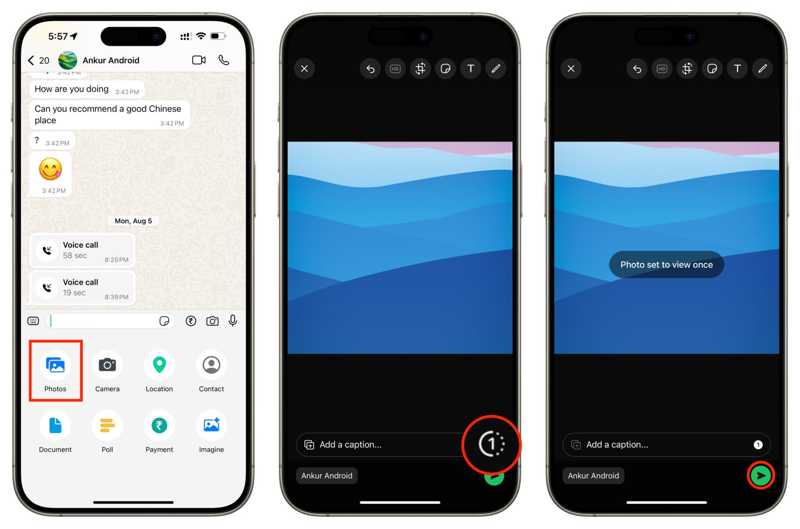
Vis én gang er en funksjon som er utviklet for å holde delte bilder og videoer private og midlertidige. Når du sender et bilde, en video eller en talemelding i WhatsApp, kan du velge Vis én gang. Etter at mottakeren har åpnet den, fjernes innholdet umiddelbart og kan ikke vises lenger.
Hvor lenge varer et bilde som er vist én gang på WhatsApp? Ifølge vår forskning vil innholdet utløpe automatisk 14 dager etter at det ble sendt, selv om det er uåpnet.
Del 2: Slik gjenoppretter du visning av bilder på WhatsApp etter avsender
Den raskeste måten å gjenopprette bilder som er vist én gang på WhatsApp, er å be avsenderen om hjelp. Faktisk kan verken du eller avsenderen få tilgang til å se bilder og videoer på WhatsApp etter at de er sett eller utløpt. Men hvis avsenderen fortsatt har innholdet på enheten sin, kan du be ham eller henne om å sende det på nytt.
Del 3: Slik gjenoppretter du View Once-bilder på WhatsApp via skjermbilde
Kan du ta skjermbilder av WhatsApp-bilder som kan vises én gang? Ja. Denne måten kan hjelpe deg med å lagre bilder som kan vises én gang lokalt. Siden WhatsApp automatisk sletter mediefilene, må du forberede deg på forhånd. Denne måten krever ikke ekstra programvare eller maskinvare.
Slik tar du skjermbilde av WhatsApp View Once Photo på Android
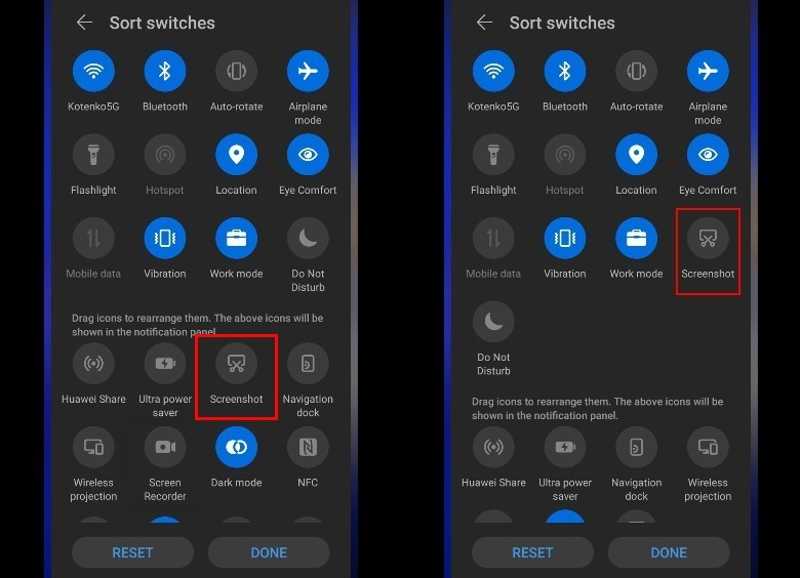
Trinn 1. Åpne WhatsApp app på telefonen din.
Trinn 2. Finn og trykk på visningsbildet.
Trinn 3. Sveip nedover fra toppen av skjermen for å åpne Raske innstillinger ruten.
Trinn 4. Pek Skjermbilde for å ta et skjermbilde av WhatsApp-bildet som kan sees én gang.
Slik tar du skjermbilde av WhatsApp View Once-bilde på iPhone
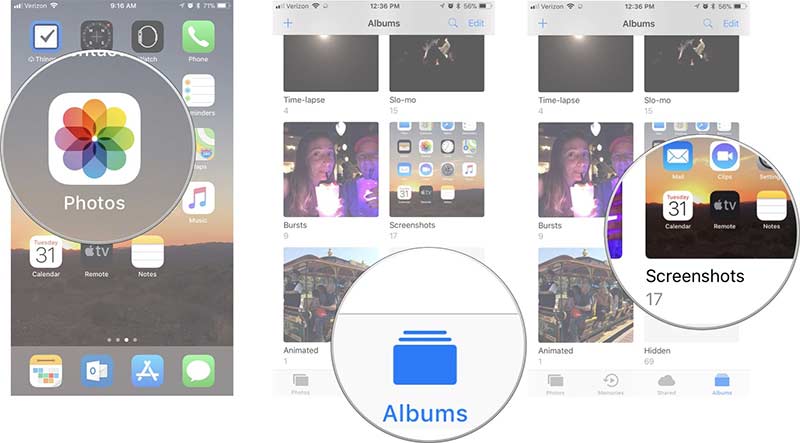
Trinn 1. Åpne bildet som kan vises én gang i WhatsApp.
Trinn 2. Trykk på Side + volum opp knappene sammen for å ta et skjermbilde på en iPhone med Face ID.
På eldre iPhone-modeller trykker du på Side + Home knappene samtidig for å ta et skjermbilde.
Trinn 3. Kjør deretter Bilder appen, og gå til Skjerm albumet for å se bildet.
Videre Reading
Del 4: Slik gjenoppretter du View Once-bilder på WhatsApp fra sikkerhetskopi
WhatsApp har en sikkerhetskopierings- og gjenopprettingsfunksjon. Hvis du trenger å hente et bilde du kan se én gang på WhatsApp på iPhone- eller Android-telefonen din, kan du avinstallere appen og gjenopprette mediefilene dine.
Trinn 1. Trykk lenge på WhatsApp-appen på skjermen og trykk på Slett- eller Avinstaller-knappen.
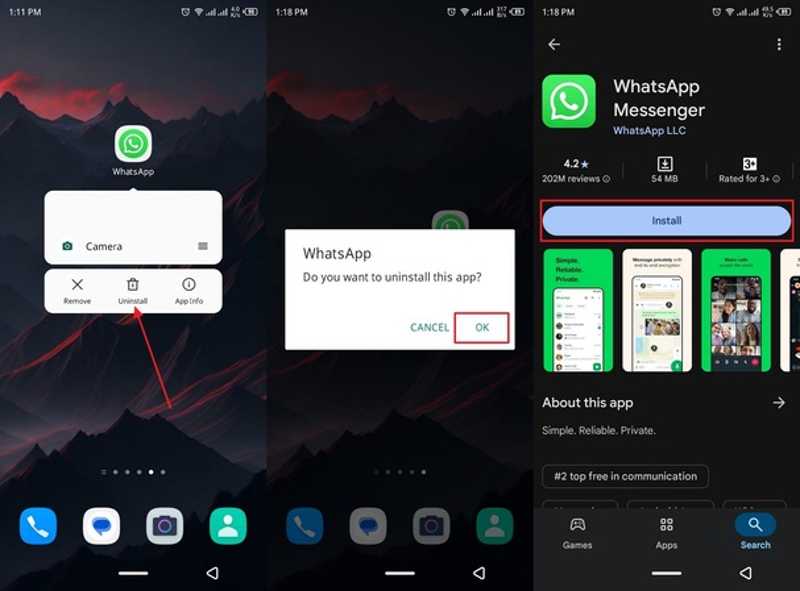
Trinn 2. Etter det, søk etter WhatsApp på Play-butikken or App Store.
Trinn 3. Installer appen på nytt og åpne den.
Trinn 4. Trykk på Enig og fortsett knapp.
Trinn 5. Logg inn med samme telefonnummer.
Trinn 6. Trykk på Gjenopprette knappen for å gjenopprette chattene dine.
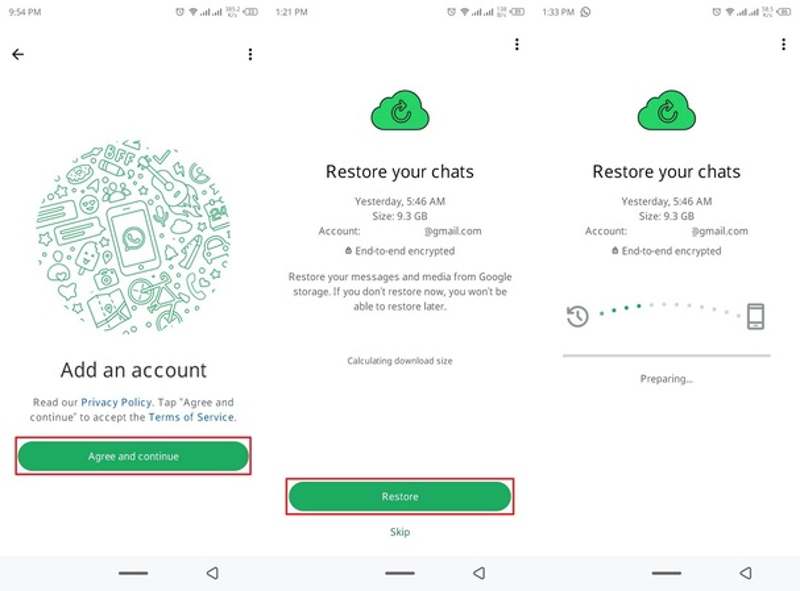
Trinn 7. Når prosessen er ferdig, sjekk om de viste bildene er tilbake.
Del 5: Slik henter du bilder du har sett én gang på WhatsApp uten sikkerhetskopi
Apeaksoft iPhone Data Recovery er en enkel måte å få et visningsbilde på WhatsApp på iPhonen din. Den lar deg gjenopprette appbilder selv om du ikke har sikkerhetskopier. Dessuten er programvaren enkel å bruke.

Lastet ned av over 1,000,000 Brukere
- Gjenopprett tapte bilder på iPhonen din i 3 trinn.
- Hent ut data fra iCloud/iTunes-sikkerhetskopi uten å tilbakestille iPhone.
- Forhåndsvis iPhone-bilder for selektiv gjenoppretting.
- Vil ikke forstyrre eksisterende bilder på iPhonen din.
- Støtt de nyeste utgavene av iOS og iPadOS.
Sikker nedlasting
Sikker nedlasting
Slik henter du View Once-bilder på WhatsApp på iPhone
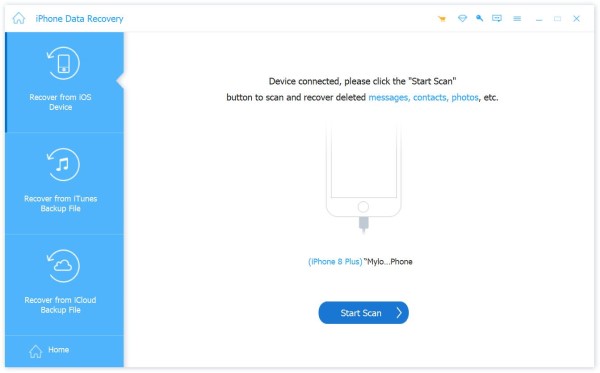
Trinn 1. Skann din iPhone
Start programvaren for bildegjenoppretting for iPhone etter at du har installert den på datamaskinen. Den er tilgjengelig på Windows 11 til XP, macOS 10.7 eller nyere. Koble iPhonen til datamaskinen med en Lightning-kabel. Klikk på start Scan -knappen for å begynne å skanne enheten din.
Trinn 2. Forhåndsvis bilder
Når dataskanningen er ferdig, velg Bilder-appen i sidefeltet. Du kan se alle WhatsApp-bilder med miniatyrbildene.
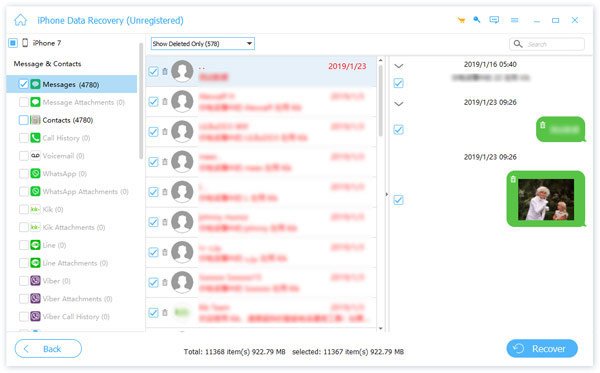
Trinn 3. Gjenopprett bildene som ble vist én gang
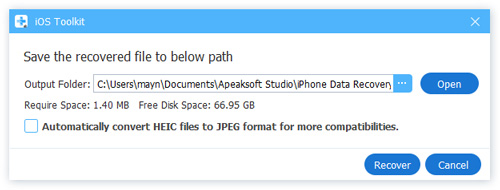
Velg de visningsbare bildene du vil gjenopprette, og klikk på Gjenopprette -knappen. Velg en utdatamappe og trykk på Gjenopprette en gang til.
Konklusjon
Denne veiledningen forklarte om du kan skjermbilde av et bilde som bare vises én gang på WhatsAppDu kan lagre bilder som kan vises én gang ved å ta skjermbilder på iPhone eller Android-telefonen din. Den innebygde sikkerhetskopierings- og gjenopprettingsfunksjonen lar deg raskt hente tapte bilder på WhatsApp. Hvis du ikke har konfigurert sikkerhetskopieringsfunksjonen, Apeaksoft iPhone Data Recovery er det ultimate alternativet for å gjenopprette bilder.
 Apeaksoft iPhone Data Recovery
 Gjenopprett slettede eller tapte data fra iOS-enheter, iTunes og iCloud-sikkerhetskopi.
Sikker nedlasting
Sikker nedlasting
Relaterte artikler




