8 beste SanDisk-gjenopprettingsprogramvare for nybegynnere: Gratis eller betalt

Som en leder innen flashminnebransjen har SanDisk en omfattende produktlinje, inkludert SD-kort, Memory Stick-kort og USB-stasjoner. I følge vår forskning lider noen SanDisk-brukere av datatap, som utilsiktet sletting, kortformatering, filsystemkrasj og mer. Derfor identifiserer artikkelen vår de 8 viktigste Gjenoppretting av SanDisk-kortfiler programvare.
SIDEINNHOLD:
- Topp 8 SanDisk-gjenopprettingsverktøy på et øyeblikk
- Topp 1. Apeaksoft Data Recovery
- Topp 2. Diskdrill
- Topp 3. R-Studio
- Topp 4. Stellar Data Recovery
- Topp 5. Recuva
- Topp 6. GratisGjenopprett sletting
- Topp 7. PhotoRec
- Topp 8. SanDisk RescuePRO Deluxe
- Profftips du trenger å vite om SD-kortgjenoppretting
- Test miljø: Windows 10 Pro (22H2), macOS Sequoia 15
- Filtype: Vi testet gjenoppretting av bilder (JPEG, PNG), videoer (MP4, MOV), lydfiler (MP3) og dokumenter (DOCX, PDF).
- Filstørrelse: Spenn fra 12 KB til 4.8 GB.
- Testmetode: Kopier forberedte filer til SD-kortet, sørg for at de åpnes normalt, og slett dem. Kjør deretter gjenopprettingsprogrammer for å se gjenopprettingsfrekvensen og gjennomsnittlig behandlingstid, og om prosessen er enkel å gjennomføre.
- påminnelse: Gjenopprettingsraten og hastigheten kan variere avhengig av enhetsmodell, operativsystemversjon og om de slettede filene har blitt overskrevet.
Topp 8 SanDisk-gjenopprettingsverktøy på et øyeblikk
👍 Beste totalt sett
 Apeaksoft Data Recovery
- Plattform
- Best for
Gjenopprett SD i alle tilfeller
- Pris $ 22.45 / måned
Beste gratis alternativ
 Recuva
- Plattform
- Best for
Gratis grunnleggende filgjenoppretting
- Pris Gratis / $24.95 Pro (årlig)
Best for partisjonsgjenoppretting
 Stellar Data Recovery
 - Plattform
- Best for
Enkel partisjons- og mediegenoppretting
- Pris $ 59.99/år
Beste enkle gjenoppretting
 Freeundelete
- Plattform
- Best for
Rask gjenoppretting av sletting på NTFS/FAT
- Pris Gratis
Best for minnekort
 SanDisk RescuePRO Deluxe
 - Plattform
- Best for
SD-kort og flash-medier
- Pris 39.95 USD/år (standard)
| verktøy | Hvor kraftig er den? | Hvor lett er det å bruke? |
| Apeaksoft Data Recovery | ⭐⭐⭐⭐⭐ 5/5 | ⭐⭐⭐⭐⭐ 5/5 |
| Disk Drill | ⭐⭐⭐⭐⭐ 5/5 | ⭐⭐⭐⭐⭐ 5/5 |
| Stellar DR | ⭐⭐⭐⭐ 4/5 | ⭐⭐⭐⭐ 4/5 |
| R-Studio | ⭐⭐⭐⭐⭐ 5/5 | ⭐⭐⭐ 3/5 |
| Recuva | ⭐⭐ 2/5 | ⭐⭐⭐⭐⭐ 5/5 |
| Freeundelete | ⭐⭐⭐ 3/5 | ⭐⭐⭐ 3/5 |
| PhotoRec | ⭐⭐⭐ 3/5 | ⭐⭐ 2/5 |
| SanDisk RescuePRO Deluxe | ⭐⭐⭐ 3/5 | ⭐⭐ 2/5 |
Topp 1. Apeaksoft Data Recovery

Plattform: Windows / Mac
Viktige funksjoner
- Gjenopprett alle populære filtyper uten overskriving.
- Skann SanDisk-en din lynraskt, uten å gå glipp av noe.
- Hent filer etter en tilbakestilling til fabrikkinnstillinger eller formatering.
- Lar deg gjenopprette data selektivt med enkle klikk.
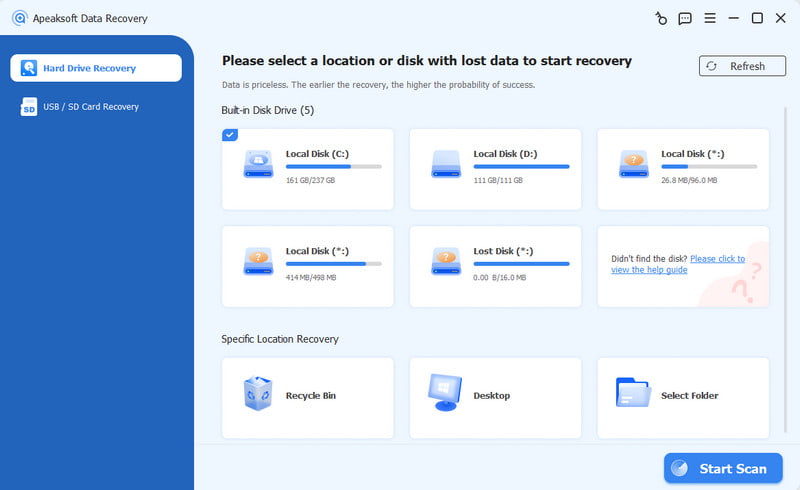
Apeaksoft Data Recovery er en av de beste SanDisk-datagjenopprettingsprogramvarene for Mac og Windows. Den kan dekke nesten alle dine SanDisk-gjenopprettingsbehov. Den støtter bilder, videoer, dokumenter og andre filtyper. Dessuten kan den gjenopprette utilsiktet slettede filer, formaterte kort og mer.
- Støtt et bredt spekter av filtyper.
- Tilgjengelig i nesten alle situasjoner.
- Forhåndsvis tapte filer før du gjenoppretter dem på SanDisk.
- Fungerer for alle SanDisk-produkter.
- Beskytt filkvaliteten.
- Kan ta litt tid med mange filer på kortet ditt.
Topp 2. Diskdrill

Disk Drill
Plattform: windows/macOS
Viktige funksjoner
- Gjenopprett data fra hvilken som helst lagringsenhet.
- Gjenopprett filer fra formaterte, skadede og defekte disker.
- Lag en byte-til-byte-sikkerhetskopi for å beskytte sviktende disker.
- Overvåk helsestatusen til enhver lagringsenhet med SMART
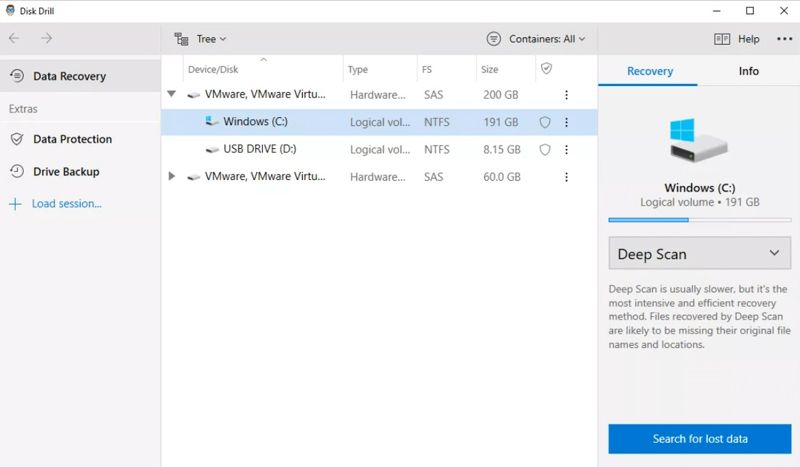
Disk Drill er en annen ledende SanDisk-programvare for filgjenoppretting for Mac og Windows. Den har et tydelig og brukervennlig grensesnitt. Det lar nybegynnere gjenopprette filer fra SanDisk SD-kort uten tekniske ferdigheter.
- Enkel å bruke.
- Støtter et bredt utvalg av filtyper.
- Tilby en dyp skanningsmodus.
- Tilgjengelig for noen få situasjoner.
- Pro-utgaven er dyr.
- Dyp skanning kan være tidkrevende.
Topp 3. R-Studio

R-Studio
Plattform: Windows/macOS/Linux
Viktige funksjoner
- Kompatibel med nesten alle filsystemer.
- Utstyrt med avanserte funksjoner for å gjenopprette SD-kort.
- Tilby en forhåndsvisning av gjenopprettelige filer med ulike parametere.
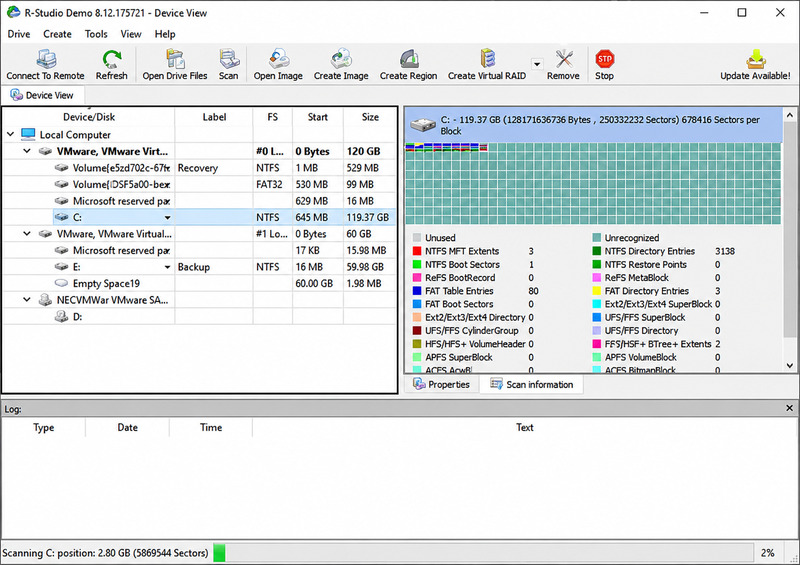
Hvis du trenger SanDisk-programvare for filgjenoppretting, er R-Studio et proffalternativ. Det kan gjenopprette filer som allerede er slettet på SanDisk-kort i komplekse scenarier med avanserte funksjoner og verktøy. Mange IT-eksperter bruker det.
- Støtter en rekke filsystemer.
- Lett og rask.
- Avanserte funksjoner for komplekse situasjoner.
- Arbeid på Windows, macOS og Linux.
- Prøveversjonen gjenoppretter filer på opptil 256 KB.
- Grensesnittet er utdatert.
- Krever teknisk bakgrunn.
Topp 4. Stellar Data Recovery
Stellar Data Recovery
Plattform: windows/macOS
Viktige funksjoner
- Tilby hurtigskanning og dypskanning for raskere gjenoppretting.
- Reparer delvis skadede JPEG-, AVI-filer og andre formater etter gjenoppretting.
- Lag byte-til-byte-sikkerhetskopier av SanDisk-kort.
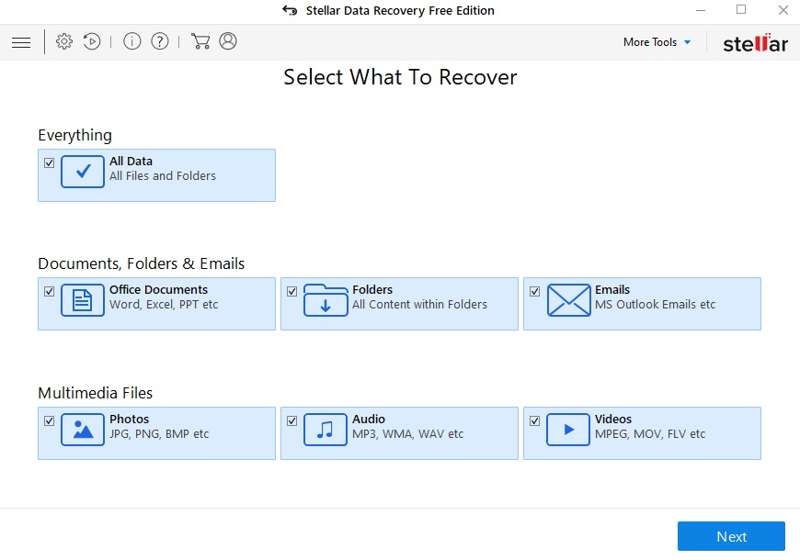
Stellar Data Recovery er et fleksibelt gjenopprettingsverktøy for SD-kort fra SanDisk. Det lar brukere gjenopprette slettede, tapte eller formaterte filer fra SD-kort, USB-minnepinne og andre lagringsenheter, med avanserte funksjoner. Optimalisert for mediegjenoppretting, er det et godt alternativ for å gjenopprette tapte videoer og bilder.
- Gjenopprett filer opptil 1 GB gratis.
- Tilbyr avanserte funksjoner for datagjenoppretting.
- Skann SanDisk-kort raskt.
- Støtter både mediefiler og dokumenter.
- Dypskanningen er treg.
- Det er dyrt.
Topp 5. Recuva
Recuva
Plattform: Windows
Viktige funksjoner
- Tilbyr grunnleggende gjenopprettingsfunksjoner uten filbegrensninger.
- Tilbyr et intuitivt og brukervennlig grensesnitt for enkel navigering.
- Inkluder en dyp skannemodus for å søke grundig etter data.
- Oversatt til over 30 språk, tilgjengelig for brukere over hele verden.
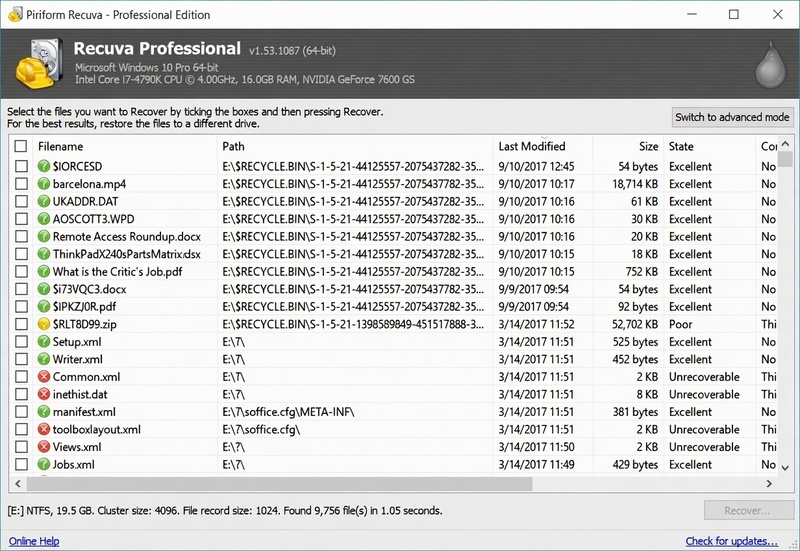
Recuvas gratisversjon lar deg gjenopprette data på SD-kortene dine med enkle trinn. Professional-versjonen kan hente flere tapte filer og håndtere mer komplekse situasjoner.
- Tilby en gratisversjon.
- Integrer et tydelig brukergrensesnitt.
- Forhåndsvis tapte filer.
- Gi en bærbar versjon.
- Forhåndsvisningen er begrenset.
- Det fungerer kanskje ikke for formaterte disker.
Topp 6. GratisGjenopprett sletting
Freeundelete
Plattform: Windows
Viktige funksjoner
- Tilbyr helt gratis gjenoppretting av slettede filer uten grense for gjenopprettingsstørrelse.
- Støtter flere filsystemer, inkludert FAT12, FAT16, FAT32 og NTFS.
- Vis gjenopprettingsstatusen for hver gjenopprettelige fil: Utmerket, God, Dårlig eller Overskrevet.
- Tilbyr et enkelt grensesnitt i Windows Utforsker-stil.
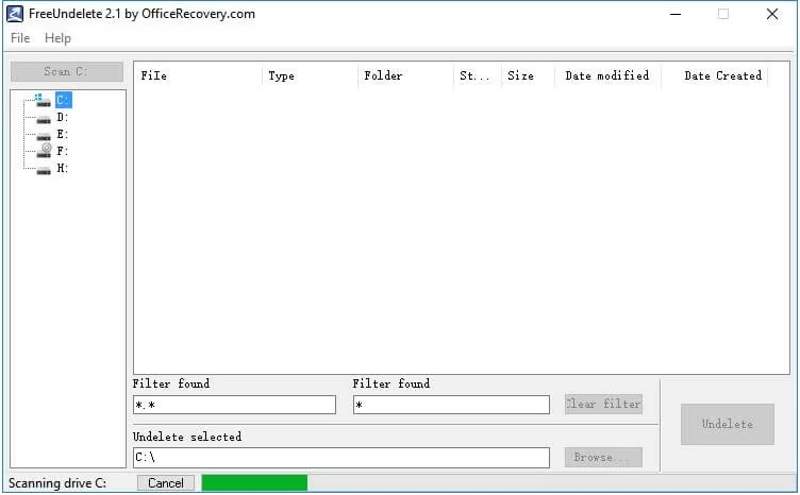
FreeUndelete er en gratis SanDisk-programvare for datagjenoppretting for personlig bruk. Den kan gjenopprette slettede filer fra både SD-kort og lokale harddisker. Det rene brukergrensesnittet gjør SanDisk-filgjenopprettingen problemfri og problemfri. Den er best for grunnleggende gjenoppretting.
- Gratis for personlig bruk.
- Finn bestemte filer med filter.
- Bevar kvaliteten på den opprinnelige filen.
- Bare tilgjengelig på Windows.
- Kan ikke gjenopprette filer som har vært borte lenge.
Topp 7. PhotoRec

PhotoRec
Plattform: Windows / Mac / Linux
Viktige funksjoner
- Gjenopprett mer enn 480 filtyper ved å identifisere filsignaturer.
- Arbeid med skadede, formaterte eller utilgjengelige SD-kort og andre lagringsenheter.
- Støtter et bredt spekter av filsystemer, inkludert FAT, exFAT, NTFS, ext2/3/4, HFS+ og APFS.
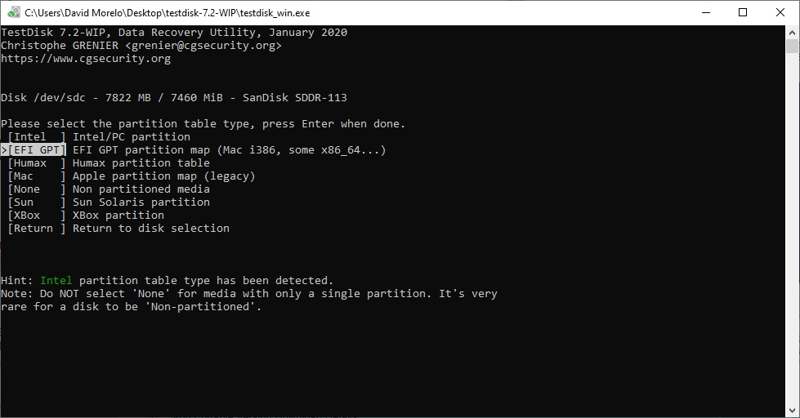
PhotoRec er et flott verktøy for gjenoppretting av bilder fra SanDisk-kort for teknologikyndige brukere. Det bruker kommandolinjer for å skanne kortene dine og gjenopprette bilder fra SD-kortI følge testene våre fungerer det selv for filer som har vært borte lenge.
- Tilgjengelig for mange plattformer.
- Gratis og åpen kildekode.
- Støtter ulike formater.
- Fungerer for filer som har gått tapt for lenge siden.
- Kundesupporten er dårlig.
- Grensesnittet kan være frustrerende for nybegynnere.
Topp 8. SanDisk RescuePRO Deluxe
SanDisk RescuePRO Deluxe
Plattform: Windows / Mac
Viktige funksjoner
- Optimaliser gjenoppretting for minnekort som brukes i digitale kameraer, videokameraer, droner og mobile enheter.
- Tilby en forhåndsvisningsfunksjon for å identifisere gjenopprettelige filer før du gjenoppretter dem.
- Tilbyr et brukervennlig veivisergrensesnitt som veileder brukerne gjennom gjenopprettingsprosessen.
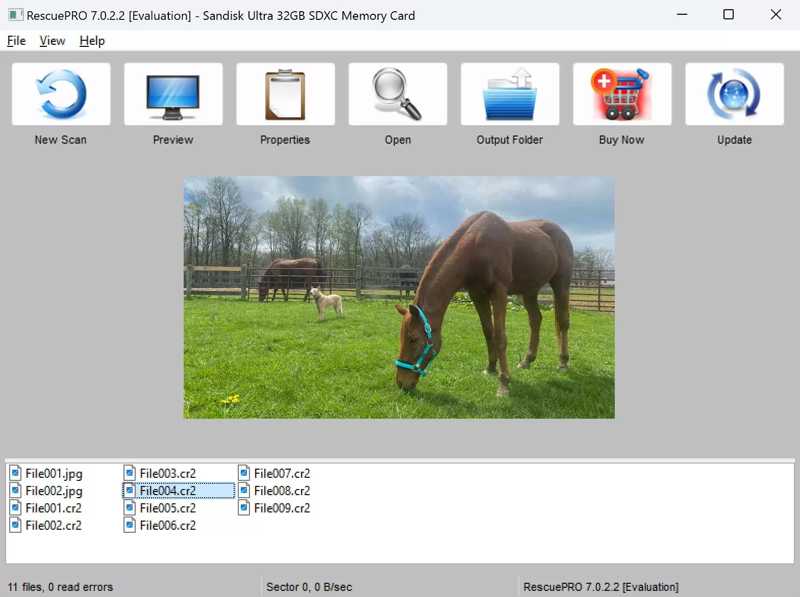
RescuePRO Deluxe har et langvarig samarbeid med SanDisk. En gratis ettårig lisens eller nedlastingskode for programvaren er inkludert for gjenoppretting av mange microSD- og SanDisk SD-kort. I tillegg kommer den med avanserte sikkerhetskopieringsfunksjoner.
- Kompatibel med de fleste mediefiler.
- Arbeid med formaterte SanDisk-kort.
- Gjenopprett ødelagte filer fra minnekort.
- Forhåndsvis filer før gjenoppretting.
- RAW-gjenopprettingen er bare tilgjengelig i Deluxe-utgaven.
- Grensesnittet er uintuitivt.
Profftips du trenger å vite om SD-kortgjenoppretting
Slutt å bruke SanDisk-kortet umiddelbart hvis det går galt.
Når nye filer overskriver de slettede filene, blir de ekstremt vanskelige å gjenopprette. Så slutt å bruke kortet umiddelbart for å forhindre at nye data kommer inn.
Et kort som sier «format kreves» betyr ikke at du må formatere det.
Mange ser noe sånt som «Du må formatere disken før du kan bruke den» på skjermen og klikker umiddelbart på Format, noe som er unødvendig. Vanligvis betyr denne meldingen at datamaskinen ikke forstår SanDisk-kortets filsystem. Siden det vil være vanskeligere å gjenopprette en formatert SD-kort, er et bedre alternativ å kjøre gjenopprettingsprogramvare og gjenopprette filer til en annen disk.
Når bør du stoppe gjør-det-selv-gjenoppretting?
Når problemet er digitalt, som slettede filer eller et kort som er formatert ved et uhell, er det nok med gjør-det-selv-verktøy. Men når datamaskinen ikke kan oppdage SD-kortet, eller kortet lager lyder og blir uvanlig varmt, betyr det vanligvis at kortet er fysisk skadet. Det er bedre å søke profesjonell hjelp.
Konklusjon
Vi har vurdert de 8 beste SanDisk-kortgjenoppretting programvare, gratis eller betalt. Velg et grunnleggende eller avansert verktøy basert på disken du trenger å gjenopprette. Totalt sett, Apeaksoft Data Recovery er det beste alternativet for folk uten teknisk kunnskap for å enkelt få tilbake tapte og slettede filer fra SanDisk-kort.
 Apeaksoft Data Recovery
 Gjenopprett slettede eller tapte data på Windows- og Mac-datamaskiner.
Sikker nedlasting
Sikker nedlasting
Relaterte artikler