Hva er FRPFile Firmwarebd og hvordan bruker man det for å omgå FRP

Google introduserer noen sikkerhetstiltak på Android. Google FRP, eller Factory Reset Protection, er en innebygd sikkerhetsfunksjon introdusert av Google på Android 5.1 Lollipop. Når du får en ny Android-enhet, blir du bedt om å aktivere den med en Google-konto. Deretter aktiveres Google FRP automatisk. Uten den tilknyttede Google-kontoen kan du ikke fjerne FRP. Denne artikkelen introduserer FRPFile FirmwareDB, en nettplattform for å dele relaterte verktøy.
SIDEINNHOLD:
Del 1: Hva er FRPFile FirmwareDB
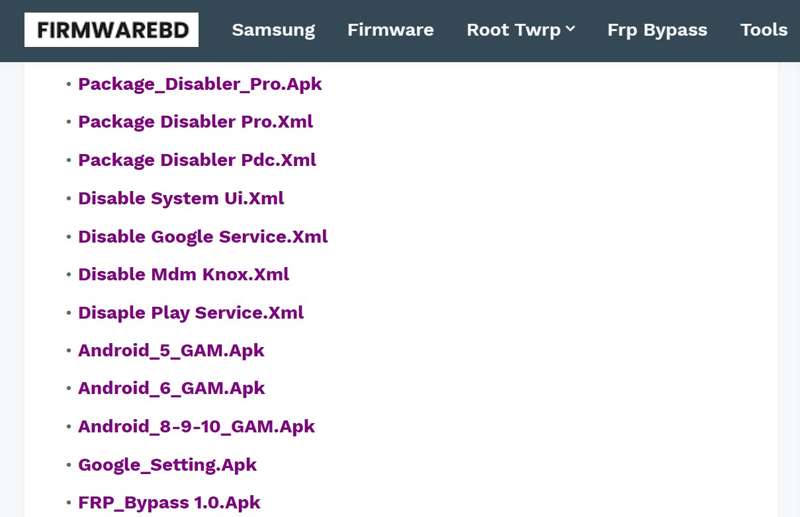
FRPFile FirmwareDB er en tredjeparts nettportal som samler FRP-bypassverktøy, firmwarefiler og relevante verktøy. Det er ikke et offisielt nettsted fra Google. Plattformen er et fellesskapsdrevet filarkiv.
Kjernefunksjoner i FRPFile FirmwareDB
- 1. Sørg for FRP-omgåelses-APK-er for å omgå Google FRP uten passord.
- 2. Tilbyr firmwarefilene for Samsung, Pixel, Oppo, OnePlus, Moto og mer.
- 3. Lås opp Android-enheter når du glemmer skjermlåser.
- 4. Lever veiledninger for å flashe standard-ROM-er for å forbedre ytelsen.
- 5. Reparer det skadede IMEI-nummeret og gjenopprett nettverkstilkoblingen.
- 6. Root Android-enheter for mer kontroll.
- 7. Oppdater nye verktøy, fastvare og mer regelmessig.
- 8. Tilby ROM-er og flash-filer for de viktigste telefonmerkene.
- 9. Søk etter fastvarefiler og verktøy i henhold til merker og modeller.
- 10. Tilgjengelig for merker som Samsung, Oppo, OnePlus, Xiaomi og flere.
Hva vi liker
- Tilbyr et bredt utvalg av FRP-verktøy og APK-er.
- Dekk firmwarefiler for alle større telefonmerker.
- Oppdater jevnlig med nye verktøy for de nyeste versjonene av Android.
- Helt gratis å bruke og ingen krav til innlogging eller betaling.
Det vi ikke liker
- Litt Frp bypass verktøy og verktøy krever tekniske ferdigheter.
- Fastvaren og flash-filene er kanskje ikke trygge.
- Kundestøtten er begrenset.
Er FRPFile Firmwarebd gratis
Ja, FRPFile Firmwarebd er gratis å bruke og tilgjengelig i de fleste nettlesere. De fleste filer og verktøy på plattformen er gratis å laste ned og bruke. Noen verktøy krever imidlertid ekstra gebyrer når man låser opp telefoner eller omgår FRP.
Er FRPFile Firmwarebd lovlig
FRPFile Firmwarebd er basert på fellesskapet. Alle verktøy og filer er fra andre utviklere. Ikke alle elementer er trygge og lovlige å bruke.
Del 2: Slik bruker du FRPFile FirmwareDB
Trinn 1. Åpne innstillinger app på telefonen din.
Trinn 2. naviger til Apper og varsler, Avansertog Spesiell apptilgang.
Trinn 3. Pek Installer ukjente apper, og velg nettleseren din.
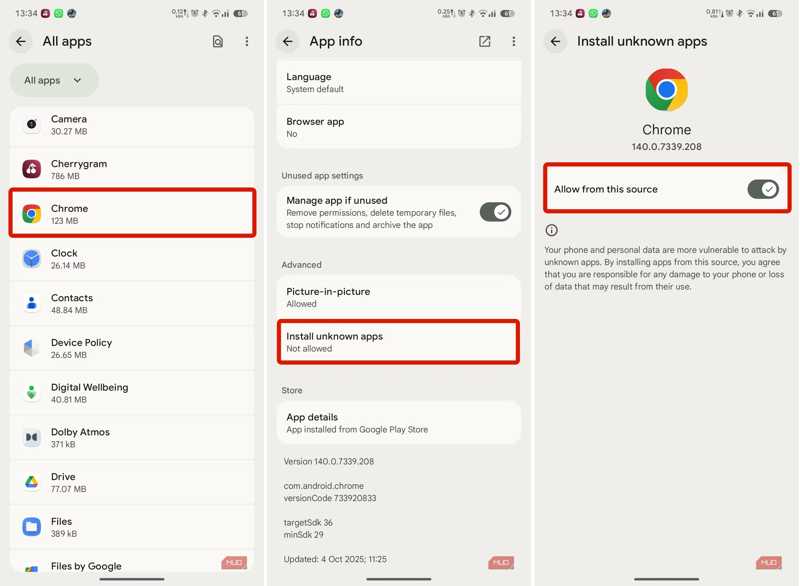
Trinn 4. Slå på Tillat fra denne kilden.
Trinn 5. Gå tilbake til startgrensesnittet og åpne nettleseren din.
Trinn 6. Søk etter frpfile/firmwarebd.com og åpne nettstedet fra resultatet.
Trinn 7. Finn FRP bypass APK-en på listen og trykk på den.
Tips: Du kan utforske andre APK-er på nettsiden, for eksempel Smart Switch.
Trinn 8. Etter nedlastingen kjører du den innebygde filbehandlingsappen.
Trinn 9. Gå til Nedlastinger mappen og trykk på APK-filen.
Trinn 10. Trykk på INSTALLER knappen for å installere APK-en.
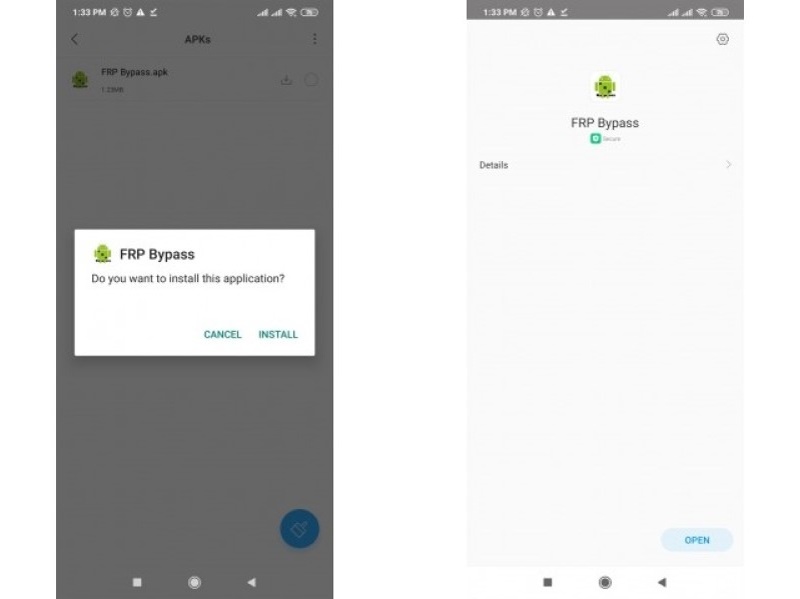
Trinn 11. Når det er ferdig, åpner du innstillinger app.
Trinn 12. Gå til Generell ledelseog Tilbakestill.
Trinn 13. Pek Tilbakestill fabrikkdata og treffer Tilbakestill.
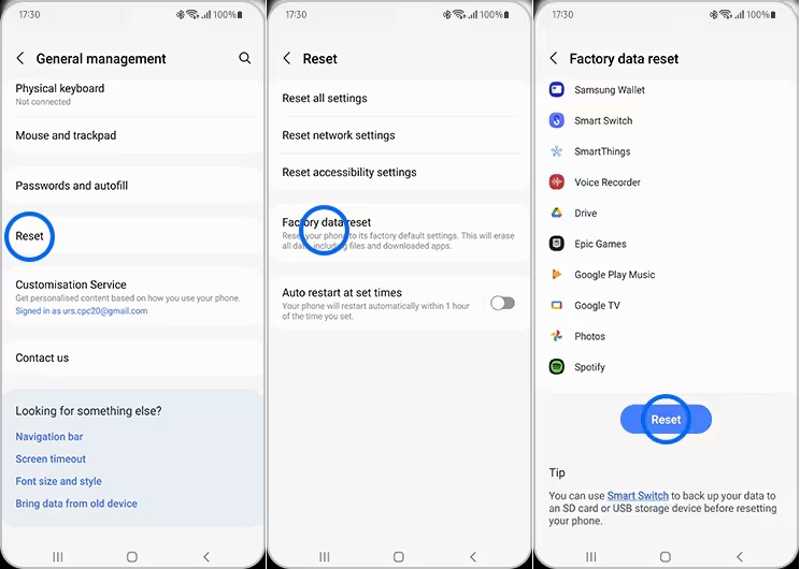
Trinn 14. Når telefonen har startet på nytt, konfigurerer du den som en ny enhet.
Del 3: Et bedre alternativ til FRPFile FirmwareDB
FRPFile FirmwareDB er ikke tilgjengelig for alle telefoner. Dessuten er suksessraten lav. Heldigvis, Apeaksoft DroidAide Android Unlocker kan hjelpe deg med å omgå FRP-låsen fra Android-enheten din uten den tilknyttede Google-kontoen. Det brukervennlige grensesnittet kan forenkle arbeidsflyten.

Lastet ned av over 1,000,000 Brukere
- Omgå FRP-låsen fra Android-telefonen din raskt.
- Ikke krev den tilknyttede Google-kontoen.
- Fungerer i alle situasjoner, for eksempel tilbakestilling av telefoner.
- Støtte for store Android-merker, som Samsung, Moto, Google, osv.
- Tilby en bonusfunksjon, for eksempel Android-opplåsing.
Sikker nedlasting
Slik omgår du FRP fra telefonen din uten FRPFile FirmwareDB
Trinn 1. Installer FRP-bypassverktøyet
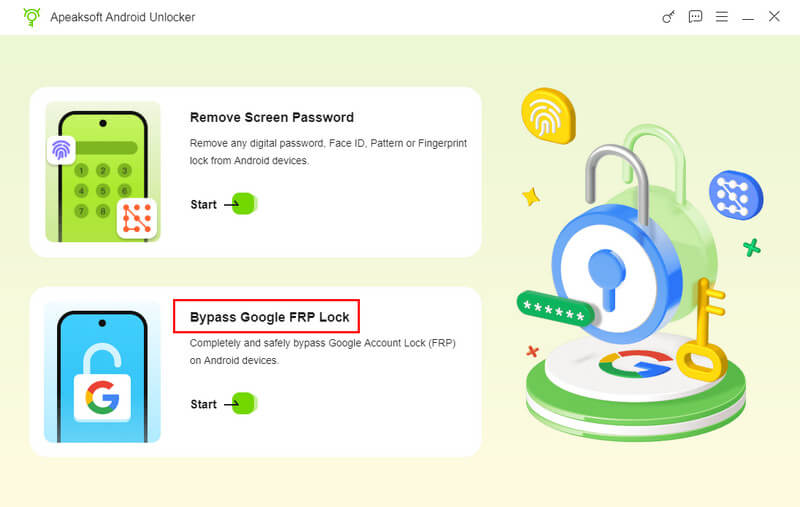
Last ned og installer alternativet til FRPFile FirmwareDB på datamaskinen din. Start det deretter og velg Omgå Google FRP-lås modus for å fortsette.
Trinn 2. Koble til telefonen din
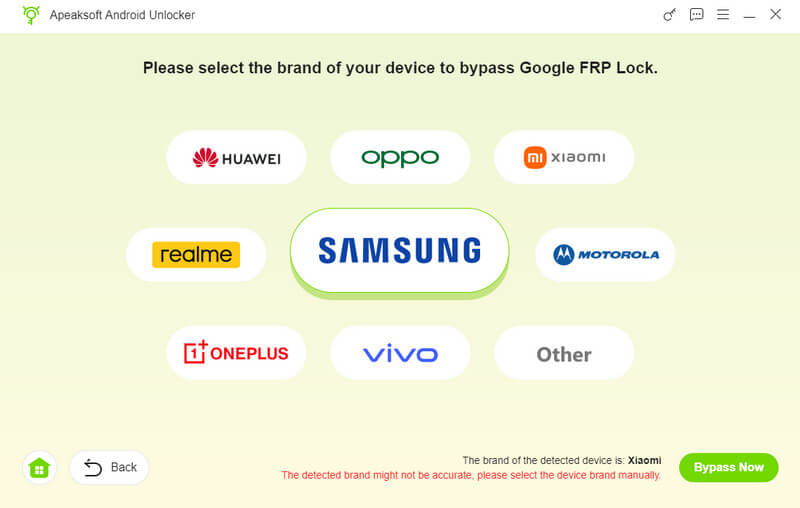
Velg telefonmerket ditt og koble enheten til datamaskinen med en kompatibel USB-kabel. Sørg for at du stoler på denne datamaskinen. Programvaren vil gjenkjenne telefonen din umiddelbart.
Trinn 3. Frp-bypass
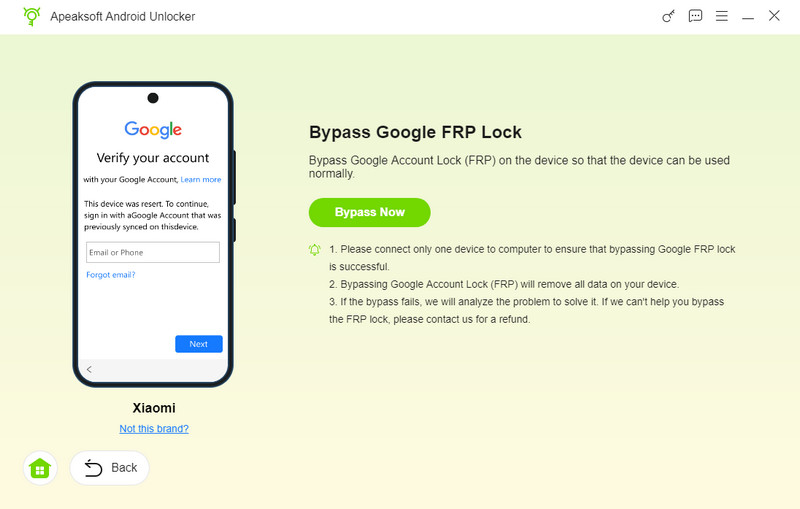
Klikk på Omgå nå -knappen for å begynne å omgå FRP-låsen automatisk. Følg deretter instruksjonene på skjermen for å aktivere enheten etter at konfigurasjonen er fullført. Vent til prosessen er ferdig, koble fra telefonen og lukk programvaren.
Videre Reading
Konklusjon
Denne guiden delte hvordan man omgår FRP ved hjelp av FRPFile FirmwareBD på Motorola, Samsung og andre enheter. Nå bør du lære hva plattformen er og hvordan den fungerer. Husk at gratisplattformen ikke fungerer for alle Android-merker eller -enheter. Derfor anbefaler vi et alternativ: Apeaksoft DroidAide Android UnlockerDen kan omgå FRP-lås på nesten alle Android-enheter.
Relaterte artikler