

Topp gratis programvara för återställning av diskpartitioner för nybörjare

Har du någonsin upplevt att en hårddisk plötsligt förlorat en partition? Viktiga dokument, foton och andra föremål verkar försvinna på ett ögonblick. Den första reaktionen hos många användare är: Nej, informationen är borta. Faktum är att denna situation inte betyder att den är oåterkallelig. Så länge ny data inte har skrivit över partitionen kan du fortfarande hitta den förlorade informationen och partitionen med hjälp av gratis programvara för partitionsåterställning.
SIDINNEHÅLL:
Del 1. Vad är en hårddiskpartition
Innan vi pratar om återställning, kommer en förståelse av konceptet hårddiskpartitioner att hjälpa till att klargöra vad man ska göra härnäst. Hårddiskpartitionering hänvisar till uppdelningen av en fysisk hårddisk i flera oberoende områden, såsom den gemensamma systempartitionen C-disken och lagringspartitionen D-disken. Fördelarna med detta är enklare datahantering, effektivare systemdrift och mer ordnad säkerhetskopiering och fillagring.
När en partition av misstag raderas, blir RAW eller inte känns igen på grund av ett systemfel kan informationen vara tillfälligt oåtkomlig. Men så länge partitionsstrukturen inte har skrivits över kan gratis programvara för partitionsåterställning fortfarande skanna de underliggande sektorerna och återskapa partitionstabellen för att göra filerna synliga igen.
Del 2. Vanliga orsaker till partitionsförlust i Windows
När du väl förstår hur partitioner fungerar får du en bättre uppfattning om varför de går förlorade och varför återställning inte är hopplös. Låt oss nu titta på de vanliga situationer som gör att partitioner försvinner för att avgöra vilken av dessa situationer din hårddisk hamnar i.
Radering av misstag
När du använder diskhanteringsverktyg för att justera, omformatera eller konvertera partitioner kan felaktig användning radera den ursprungliga partitionen direkt.
Filsystem korruption
Strömavbrott, systemkrascher och påtvingade avstängningar kan skada partitionstabeller och förvandla partitioner till RAW, vilket gör dem oåtkomliga.
Virus
Vissa attacker modifierar systempartitionstabellen eller döljer partitioner, vilket gör att hårddisken ser ut som om den "saknas".
Maskinvarufel
En åldrande eller skadad hårddisk kanske inte kan läsa partitionsstrukturen, vilket är vanligt efter åratal av hårddiskanvändning.
Systemuppdatering
Partitionsstrukturer kan skrivas över eller överskrivas när du uppgraderar systemet, konverterar från MBR till GPT eller installerar om Windows.
Hur som helst, så länge ny data inte skriver över partitionen, har du fortfarande chansen att återställa den förlorade partitionen med verktyg som gratis programvara för återställning av hårddiskpartitioner. Innan du använder återställningsverktyget är den viktigaste punkten: fortsätt inte att skriva eller formatera hårddisken, annars kommer andelen framgångsrika återställningar att minska avsevärt.
Del 3. Topp 5 bästa verktygen för partitionsåterställning
Att välja rätt återställningsverktyg påverkar direkt hur framgångsrikt det är att återställa partitioner. Olika program varierar i skanningsförmåga, användarvänlighet och återställningsstabilitet. Följande alternativ används ofta och rankas högt av användare, och alla stöder gratis återställning av hårddiskpartitioner.
Apeaksoft Data Recovery [Mest rekommenderad]
Apeaksoft Data Recovery är utformad för dataförlustscenarier orsakade av oavsiktlig radering, formatering, RAW-partitionering och systemfel. Den har ett användarvänligt gränssnitt och kan enkelt slutföras även för första gången. Stöder återställning av partitionsdata från hårddisk, SSD, USB, SD-kort och andra enheter, och tillhandahåller förhandsgranskningsfunktion före skanning för att undvika ogiltig återställning.
Bästa verktyget för att återställa hårddiskpartitioner gratis
- Stöder NTFS, FAT32, exFAT och andra vanliga format
- Snabbskanning och djupskanning i dubbelt läge
- Återställer dokument, foton, ljud, video och komprimerade paket
- Hög återställningsfrekvens på RAW-partitioner

Steg 1. Om du gör detta för första gången är det bäst att spara aktuell data med en backup-app i förväg. Ladda sedan ner och öppna Apeaksoft-programvaran på din dator.
Steg 2. Välj den typ av data du vill återställa (flera alternativ finns) och måldisken. Klicka sedan på scan knapp.
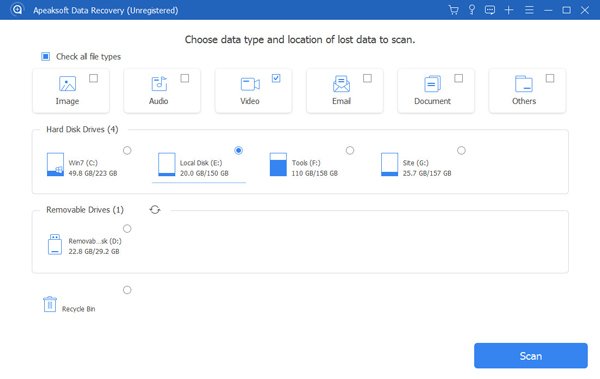
Steg 3. Om snabbsökningen misslyckas med att hitta målfilen eller om partitionsstrukturen är onormal, välj Deep Scan.
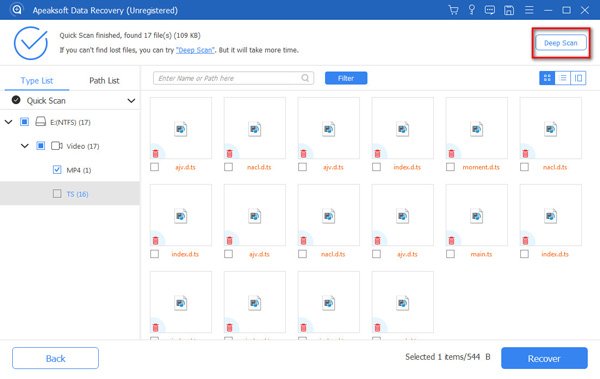
Steg 4. När skanningen är klar använder du den vänstra katalogen eller de övre filtren för att begränsa resultaten efter filtyp/tid/storlek.
Steg 5. När du har valt den fil eller mapp du vill återställa klickar du på RecoverI dialogrutan Spara som visas, se till att spara den återställda filen till en annan disk eller extern lagringsenhet för att undvika att skriva över kvarvarande data som inte har skannats.
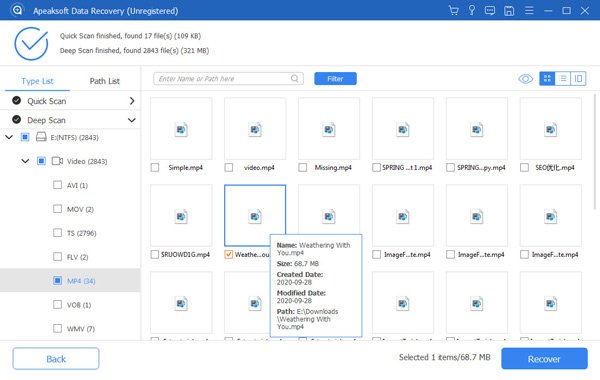
Tips: Här demonstrerar vi hur man använder en Mac. Stegen i Windows är något annorlunda, så vänligen se produktens styra sidan för mer information.
Disk Borrmaskin
Kort överblick
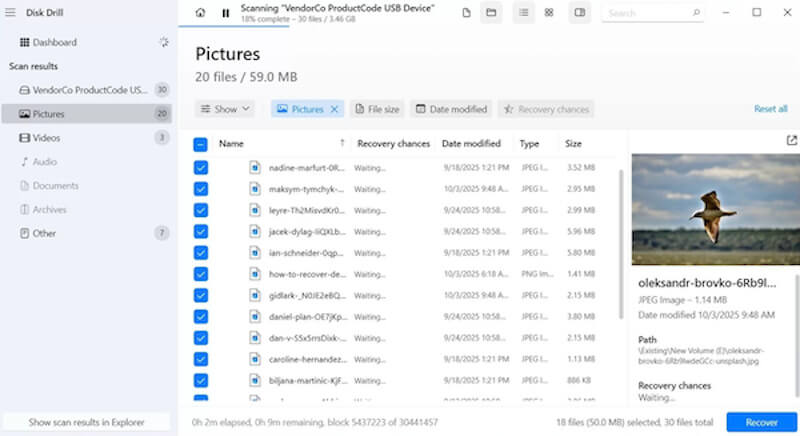
Disk Drill är ett modernt verktyg som kombinerar återställning och användarupplevelse. Förutom återställningsfunktionen har det även inbyggda dataskydds- och säkerhetskopieringsmoduler, så det används ofta i scenarier med gratis programvara för återställning av diskpartitioner, särskilt för användare som vill organisera data visuellt före återställning.
- Stöd för igenkänning av 700+ filformat
- Ger förhandsgranskning av skanning, filter och etikettklassificering
- Enkelt gränssnitt och tydlig driftlogik
- Gratisversionen är begränsad i mängden data den kan återställa
- Vissa funktioner är partiska för macOS-ekosystemet
Testdisk
Kort överblick
TestDisk är en professionell och gratis programvara för återställning av partitionsdata med öppen källkod. Jämfört med annan programvara för återställning på filnivå är TestDisk närmare den underliggande strukturen, vilket är mycket lämpligt i fall med allvarliga partitionsskador eller avsaknad av partitionstabell. Det är ett vanligt verktyg för tekniska användare.
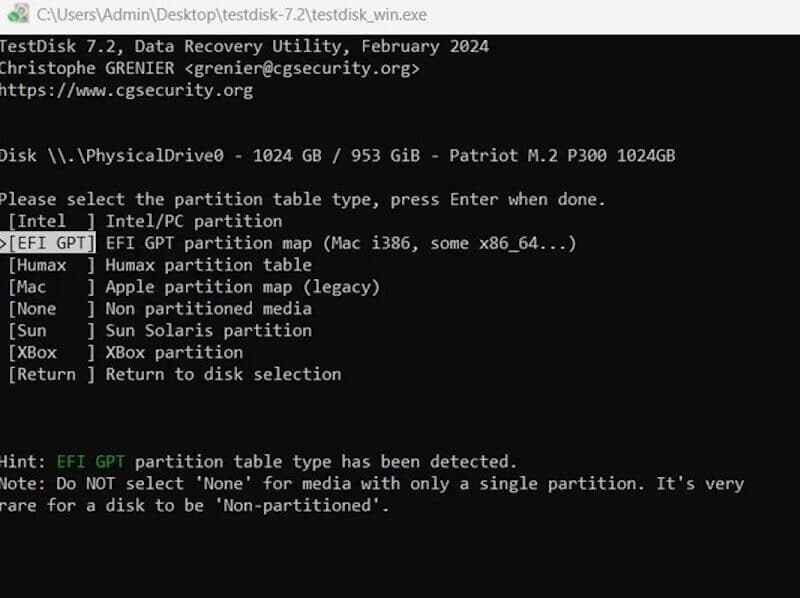
- Återställer ostartbara systemdiskar
- Fungerar med PhotoRec för filåterställning
- Helt gratis utan begränsning på antalet återställningar
- Kommandoradsoperationer är dyra för nybörjare att lära sig
- Inget visuellt gränssnitt
Diskgenius
Kort överblick
DiskGenius stöder inte bara återställning av förlorade partitioner, utan har även diskhanteringsfunktioner som formatkonvertering, detektering av dåliga spår och du kan till och med rensa cachen på partitionenDet är ett mångsidigt verktyg. Det är särskilt lämpligt för scenarier som kräver djupare bearbetning och är ett populärt val för många ingenjörer för att implementera gratis programvara för återställning av hårddiskpartitioner.
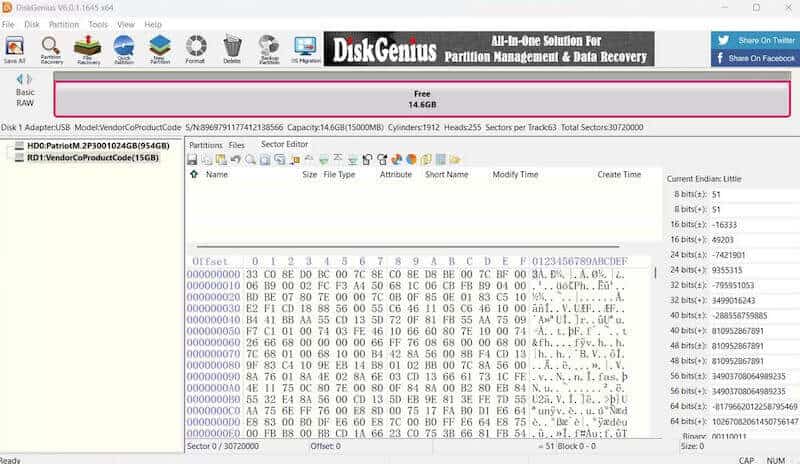
- Reparerbara partitionstabeller, MBR och katalogstrukturer
- Stöd för WinPE-startmiljön
- Allt-i-ett-verktyg utan behov av att installera flera programvaror
- Begränsade gratisfunktioner
- Fler installationsalternativ för nybörjare
MiniTool Partition Wizard
Kort överblick
MiniTool Partition Wizard är en programvara för att hantera diskstruktur som kärna, och tillhandahåller funktioner för skanning och återställning av partitioner utan kostnad. Den är särskilt lämplig för att justera diskstrukturen vid återställning av partitioner, såsom ompartitionering, migrering av system, detektering av diskstatus etc.
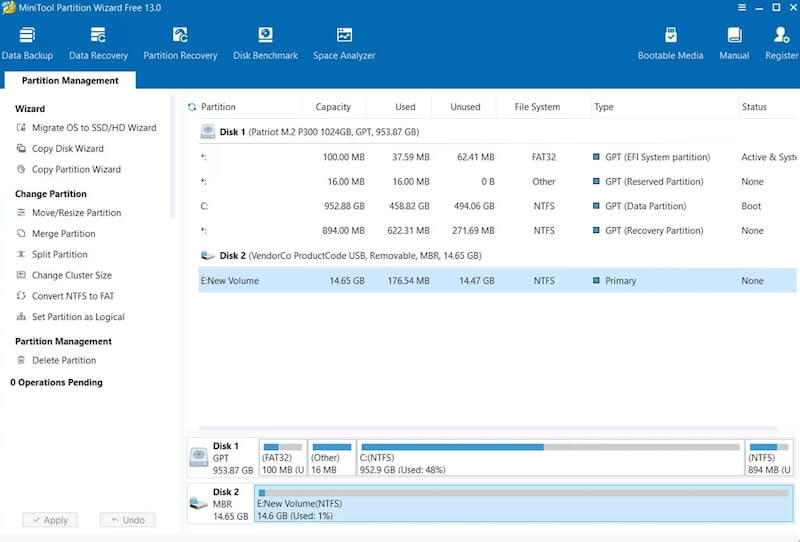
- Tillhandahåll zonhälsodetektering (SMART)
- Kan skanna och återställa oavsiktligt raderade eller förlorade partitioner
- Funktionsklassificeringen är tydlig, lämplig för dagligt underhåll
- Gratisversionen begränsar återställningsintegriteten
- Långsam skanningshastighet, särskilt för äldre hårddiskar
Slutsats
Därför kan du försöka gratis programvara för återställning av diskpartitioner först innan du faktiskt ger upp dina data. Många gånger får du tillbaka dina förlorade partitioner och viktiga filer snabbare än du tror. Om du letar efter en kombination av återställningsnoggrannhet, effektivitet och enkelhet, Apeaksoft Data Recovery är oftast ett säkrare och mindre problemfritt val.
Relaterade artiklar




