Vad är FRPFile Firmwarebd och hur man använder det för att kringgå FRP

Google introducerar några säkerhetsåtgärder på Android. Google FRP, eller Factory Reset Protection, är en inbyggd säkerhetsfunktion som introducerats av Google på Android 5.1 Lollipop. När du får en ny Android-enhet ombeds du att aktivera den med ett Google-konto. Sedan aktiveras Google FRP automatiskt. Utan det länkade Google-kontot kan du inte ta bort FRP. Den här artikeln introducerar FRPFile FirmwareDB, en onlineplattform för att dela relaterade verktyg.
SIDINNEHÅLL:
Del 1: Vad är FRPFile FirmwareDB
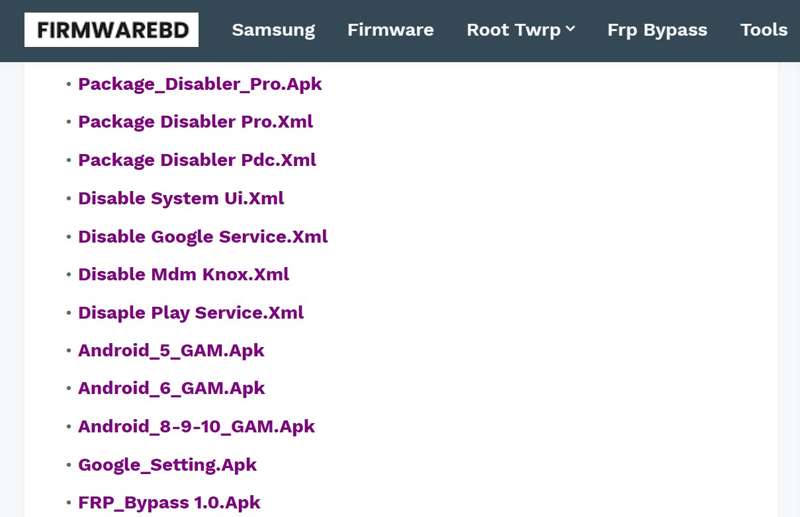
FRPFile FirmwareDB är en tredjepartsportal online som samlar in verktyg för FRP-bypass, firmwarefiler och relevanta verktyg. Det är inte en officiell webbplats från Google. Plattformen är ett communitydrivet filarkiv.
Kärnfunktioner i FRPFile FirmwareDB
- 1. Tillhandahåll FRP-bypass-APK:er för att kringgå Google FRP utan lösenord.
- 2. Erbjud firmwarefilerna för Samsung, Pixel, Oppo, OnePlus, Moto och fler.
- 3. Lås upp Android-enheter när du glömmer skärmlås.
- 4. Leverera handledningar för att flasha standard-ROM för att förbättra prestandan.
- 5. Reparera det skadade IMEI-numret och återställ nätverksanslutningen.
- 6. Roota Android-enheter för mer kontroll.
- 7. Uppdatera nya verktyg, firmware och mer regelbundet.
- 8. Tillhandahåll ROM-skivor och flashfiler för de viktigaste telefonmärkena.
- 9. Sök efter firmwarefiler och verktyg enligt märken och modeller.
- 10. Tillgänglig för märken som Samsung, Oppo, OnePlus, Xiaomi med flera.
Vad vi gillar
- Erbjuder ett brett utbud av FRP-verktyg och APK:er.
- Täck firmwarefiler för alla större telefonmärken.
- Uppdatera regelbundet med nya verktyg för de senaste versionerna av Android.
- Helt gratis att använda och inget krav på inloggning eller betalning.
Vad vi inte gillar
- Några FRP-förbikopplingsverktyg och verktyg kräver teknisk kompetens.
- Firmware- och flashfilerna kanske inte är säkra.
- Kundsupporten är begränsad.
Är FRPFile Firmwarebd gratis?
Ja, FRPFile Firmwarebd är gratis att använda och tillgängligt i de flesta webbläsare. De flesta filer och verktyg på plattformen är gratis att ladda ner och använda. Vissa verktyg kräver dock extra avgifter när man låser upp telefoner eller kringgår FRP.
Är FRPFile Firmwarebd lagligt?
FRPFile Firmwarebd är baserat på communityn. Alla verktyg och filer kommer från andra utvecklare. Alla objekt är inte säkra och lagliga att använda.
Del 2: Hur man använder FRPFile FirmwareDB
Steg 1. Öppna Inställningar app på din telefon.
Steg 2. Navigera till Appar och aviseringar, Advanced Open wateroch Särskild appåtkomst.
Steg 3. Tryck Installera okända apparoch välj din webbläsare.
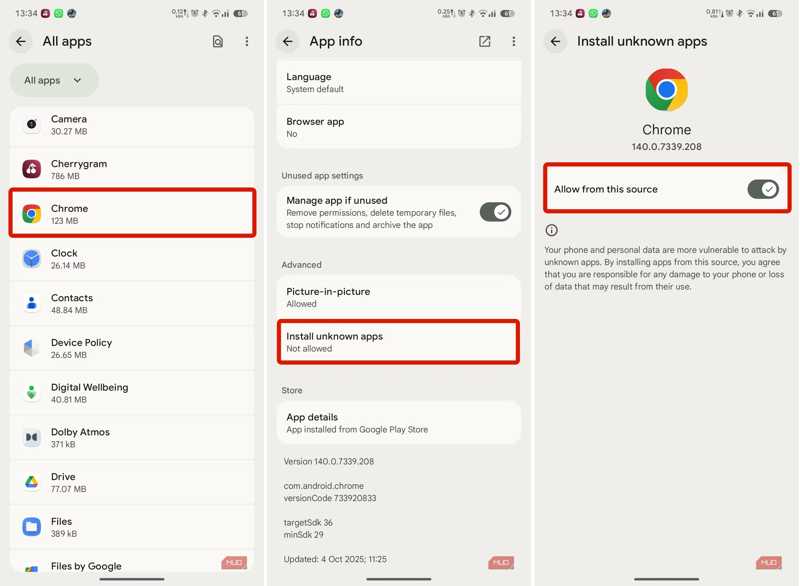
Steg 4. Växla på Tillåt från den här källan.
Steg 5. Gå tillbaka till startgränssnittet och öppna din webbläsare.
Steg 6. Sök efter frpfile/firmwarebd.com och öppna webbplatsen från resultatet.
Steg 7. Hitta FRP bypass APK:n i listan och tryck på den.
Tips: Du kan utforska andra APK:er på webbsidan, till exempel Smart Switch.
Steg 8. Kör den inbyggda filhanterarappen efter nedladdningen.
Steg 9. Gå till Nedladdningar mappen och tryck på APK-filen.
Steg 10. Tryck på INSTALLERA knappen för att installera APK:n.
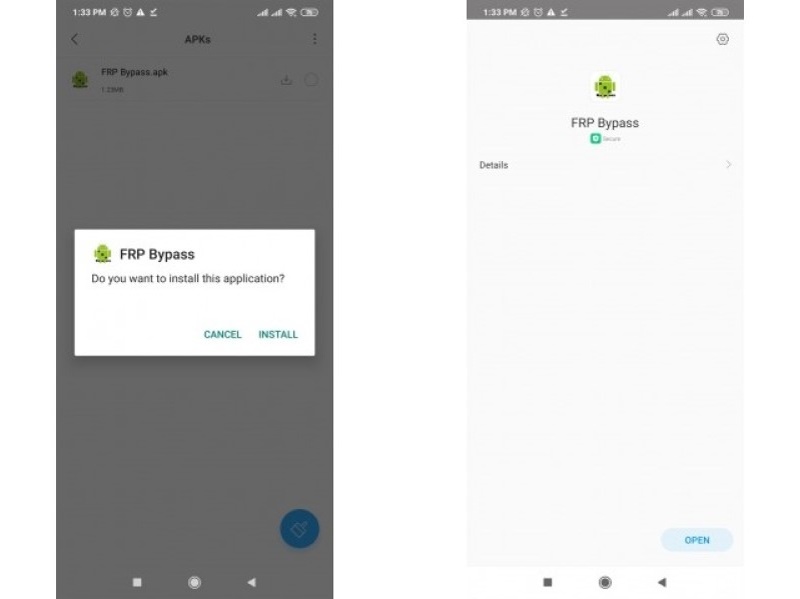
Steg 11. När det är klart, öppna Inställningar app.
Steg 12. Gå till Allmän förvaltningoch Återställa.
Steg 13. Tryck Fabriksåterställning av data och slå Återställa.
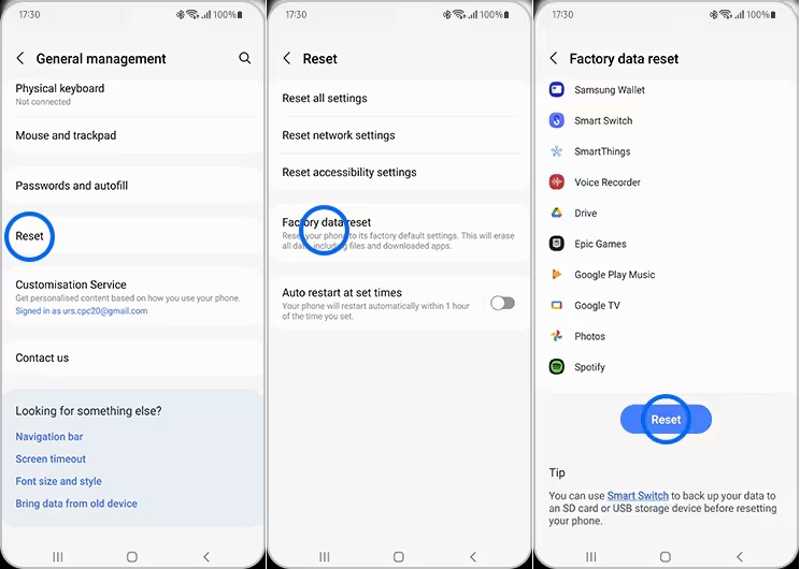
Steg 14. När din telefon har startats om, konfigurera den som en ny enhet.
Del 3: Ett bättre alternativ till FRPFile FirmwareDB
FRPFile FirmwareDB är inte tillgänglig för alla telefoner. Dessutom är framgångsgraden låg. Lyckligtvis, Apeaksoft DroidAide Android Unlocker kan hjälpa dig att kringgå FRP-låset från din Android-enhet utan det länkade Google-kontot. Det användarvänliga gränssnittet kan förenkla arbetsflödet.

Nedladdad av över 1,000,000 användare
- Kringgå FRP-låset från din Android-telefon snabbt.
- Kräv inte det länkade Google-kontot.
- Fungerar för alla situationer, till exempel att återställa telefoner.
- Stöd för stora Android-märken, som Samsung, Moto, Google, etc.
- Erbjud en bonusfunktion, som till exempel Android-upplåsning.
Säker nedladdning
Hur man kringgår FRP från din telefon utan FRPFile FirmwareDB
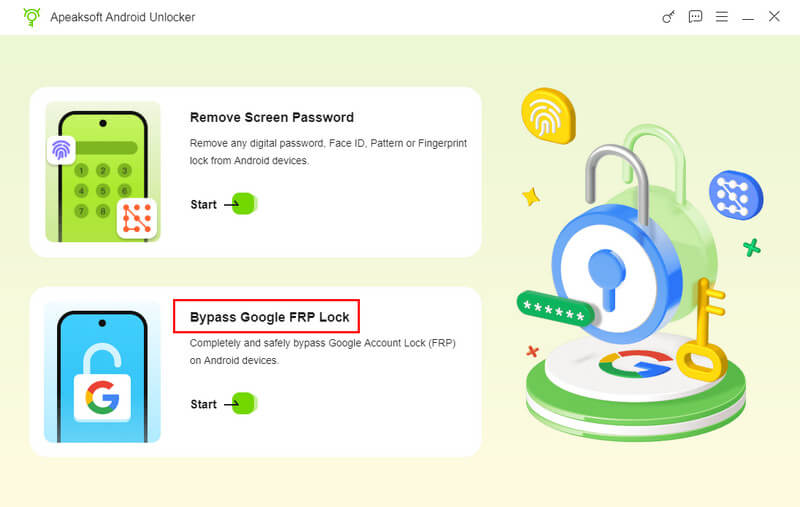
Steg 1. Installera FRP-bypassverktyget
Ladda ner och installera alternativet till FRPFile FirmwareDB på din dator. Starta det sedan och välj Förbigå Google FRP-lås läge för att fortsätta.
Steg 2. Anslut till din telefon
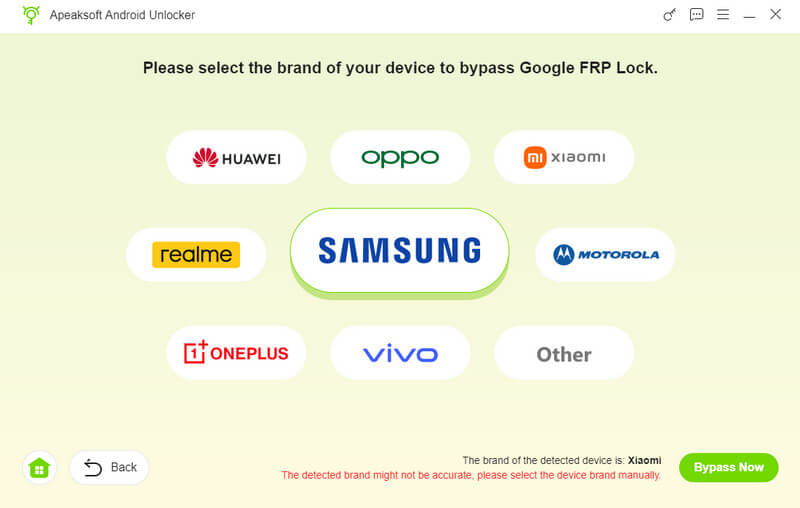
Välj ditt telefonmärke och anslut enheten till datorn med en kompatibel USB-kabel. Se till att du litar på den här datorn. Programvaran kommer att känna igen din telefon omedelbart.
Steg 3. FRP-förbikoppling
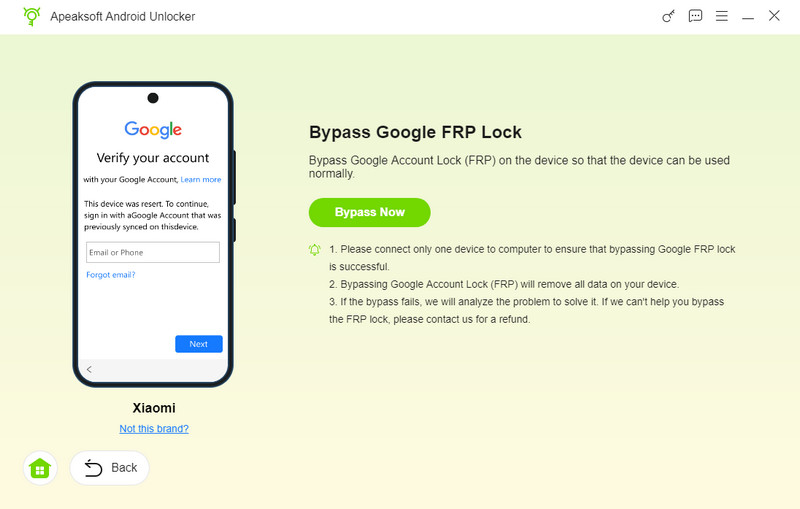
Klicka på Gå förbi nu knappen för att börja kringgå FRP-låset automatiskt. Följ sedan instruktionerna på skärmen för att aktivera din enhet efter att konfigurationen är klar. Vänta tills processen är klar, koppla bort telefonen och stäng programvaran.
Ytterligare läsning
Slutsats
Den här guiden delade hur man kringgår FRP med hjälp av FRPFile FirmwareBD på Motorola, Samsung och andra enheter. Nu bör du lära dig vad plattformen är och hur den fungerar. Tänk på att gratisplattformen inte fungerar för alla Android-märken eller enheter. Därför rekommenderade vi ett alternativ: Apeaksoft DroidAide Android UnlockerDen kan kringgå FRP-låset på nästan alla Android-enheter.
Relaterade artiklar