

Yedekleme ile veya Yedekleme Olmadan Samsung Kişi Rehberini Nasıl Kurtarabilirsiniz?

Günümüzde akıllı telefonlarımızda çok fazla veri saklıyoruz. Örneğin, kişi listesi ve telefon numaraları bir telefondaki en önemli verilerdir. Günlük hayatımızda, insan hatası, yanlışlıkla silme, fabrika ayarlarına sıfırlama, güncelleme hatası, yazılım aksaklıkları ve daha fazlası nedeniyle önemli kişileri kaybedebiliriz. Samsung kullanıcıları arasında bu sorun yaygın olarak yaşanmaktadır. Rehberimiz, size kanıtlanmış yöntemler sunmaya odaklanacaktır. Samsung telefonda kişileri geri yükle cihaz.
SAYFA İÇERİĞİ:
Bölüm 1: Samsung Cihazlarda Geri Dönüşüm Kutusundan Kişileri Kurtarma
Geri Dönüşüm Kutusu klasörü, Samsung telefonunuzdaki kişileri kurtarmanın en kolay yoludur. Bu özellik, 30 gün içinde silinen kişileri kurtarmanıza olanak tanır. Bu, Kişiler uygulamasında yerleşik bir özelliktir.
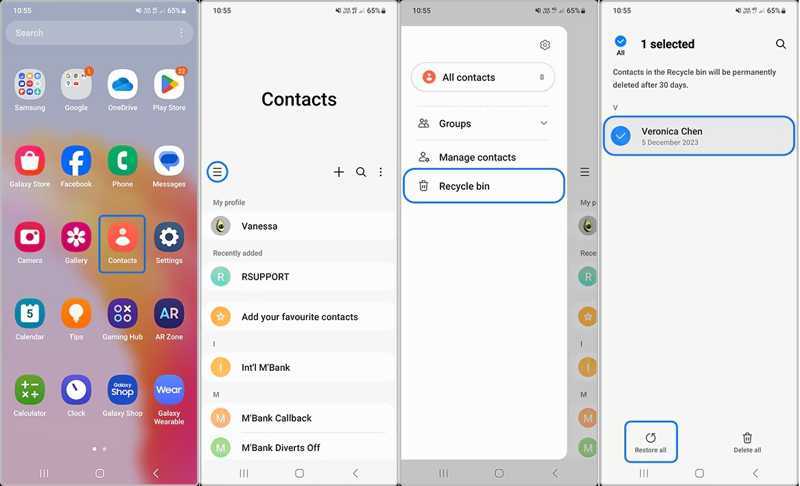
1 Adım. Çalıştır İletişim Samsung telefonunuzda uygulaması.
2 Adım. Dokunun Hamburger düğmesine basın ve seçin Geri dönüşüm kutusu.
3 Adım. Burada yakın zamanda silinen tüm kişileri görüntüleyebilirsiniz.
4 Adım. Düzenle düğmesine dokunun, istediğiniz kişileri seçin ve Geri Yükle'ye basın..
Bölüm 2: Samsung Cloud'dan Samsung Kişilerini Alma
Samsung Cloud, Samsung'un müşterileri için sunduğu bulut hizmetidir. Kişilerinizi yedeklemenizi sağlar. Bazı kişilerinizi kaybettikten sonra, Samsung Cloud'dan Samsung cihazınızdaki kişileri geri yükleyebilirsiniz.
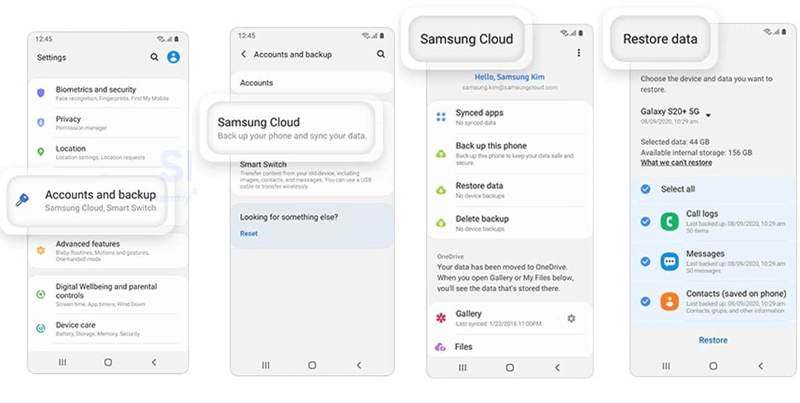
1 Adım. Açın Ayarlar Samsung telefonunuzda uygulaması.
2 Adım. Musluk Samsung hesabı, ve Seç samsung Bulut.
3 Adım. Basın Verileri geri yükle düğmesine basın.
4 Adım. Ardından, kayıp kişileri içerebilecek yedeklemeyi seçin.
5 Adım. Seç İletişim ve Restore düğme. Bu işlem gerçekleşmeyecek. fabrika ayarları cihazınız.
Bölüm 3: Smart Switch ile Samsung Kişilerini Geri Yükleme
Smart Switch, Samsung cihazlar için yedekleme özelliğidir. Verilerinizi bir SD karta veya bilgisayara yedekleyebilir. Elbette, silinen kişileri Samsung cihazınıza geri getirmenizi sağlar. Bunun ön koşulu, Smart Switch yedeğinizin olmasıdır.
SD Karttan Samsung'a Kişileri Nasıl Geri Yükleyebilirsiniz?
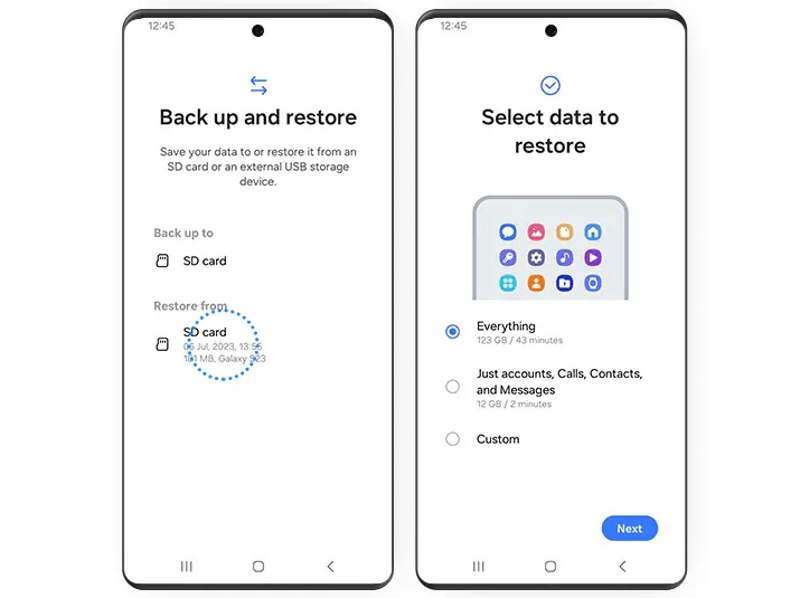
1 Adım. Yedek SD kartınızı telefonunuza takın.
2 Adım. Smart Switch uygulamasını açın.
3 Adım. Klinik Verilerinizi yedekleyin ve geri yükleyin., ve vur Devam et.
4 Adım. Musluk SD kartı altında Geri yükleme alanı.
5 Adım. Seç Sadece hesaplar, aramalar, kişiler ve mesajlar..
6 Adım. Musluk Sonraki Samsung cihazınızda kayıp kişileri bulmak için ekrandaki yönergeleri izleyin.
Bilgisayardan Samsung'a Kişileri Nasıl Geri Yükleyebilirsiniz?
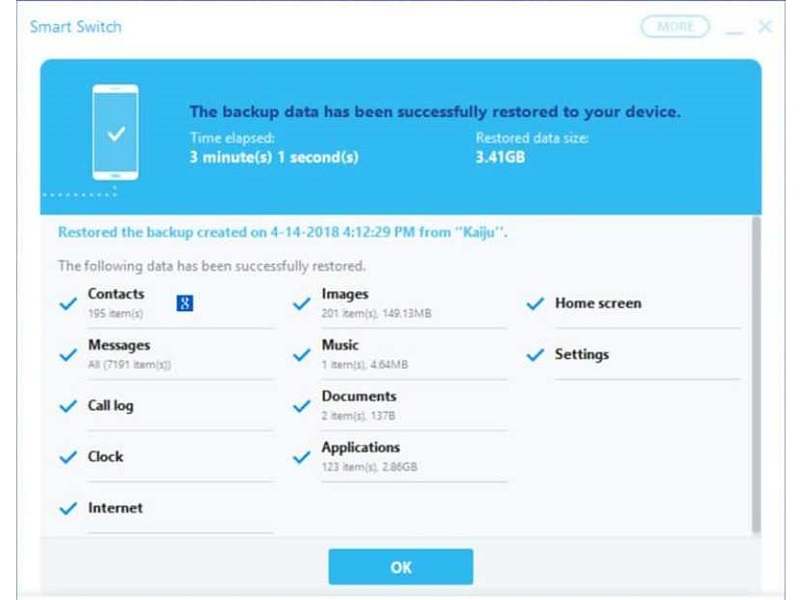
1 Adım. Bilgisayarınızda Smart Switch istemcisini açın.
2 Adım. Samsung telefonunuzu bir USB kablosuyla bilgisayara bağlayın.
3 Adım. Cihazınız tanındıktan sonra tıklayın. Restore.
4 Adım. Tıkla Dosyayı manuel olarak seçve kişileri seçin.
5 Adım. Son olarak, Samsung telefonunuzdaki kişilerin kurtarılmasını başlatmak için tekrar Geri Yükle'ye tıklayın.
Bölüm 4: Samsung'da Silinen Kişileri Google'dan Bulma
Kişilerinizi Google hesabınızla senkronize ettiyseniz veya yedeklediyseniz, Samsung'dan silinen numaraları geri alabilirsiniz. Kişileri hesabınızdan içe aktarabilir ve mevcut kişilerle birleştirebilirsiniz.
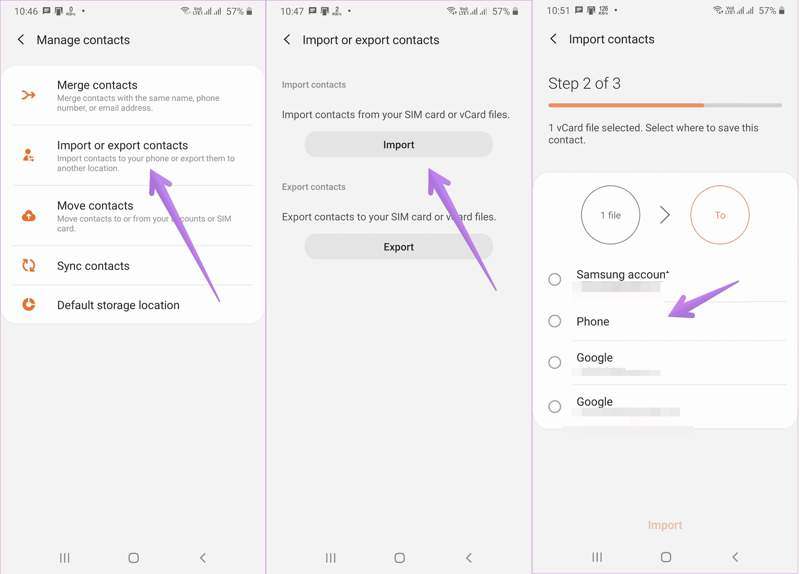
1 Adım. Koş senin İletişim app.
2 Adım. Dokunun Menü düğmesine basın ve seçin Kişileri içe veya dışa aktarma.
3 Adım. Dokunun ithalat düğmesine basın.
4 Adım. Google hesabınızı veya Google'dan dışa aktardığınız kişi dosyasını seçin.
5 Adım. Sonra seçin Telefon ve dokunun ithalat.
Bölüm 5: Yedekleme Olmadan Samsung'da Kişileri Kurtarma
Yedeklemeniz yoksa Samsung telefonunuzdan silinen kişileri geri alabilir misiniz? Cevap evet ve tek ihtiyacınız olan şey... Apeaksoft Android Veri KurtarmaHafızanızı tarayabilir ve silinmiş kişileri bulabilir.
Yedekleme Olmadan Samsung'da Kişileri Kurtarmanın En İyi Yolu
- Samsung telefonlarda silinen kişileri tek tıklamayla kurtarın.
- Cihazınızda kayıp kişilerin önizlemesini yapın.
- Arızalı bir Samsung cihazdan kişileri çıkarın.
- Hemen hemen tüm Samsung telefon ve tabletlerle uyumludur.
Güvenli indirme
Güvenli indirme
Samsung'da Silinen Kişileri Nasıl Kurtarabilirsiniz?
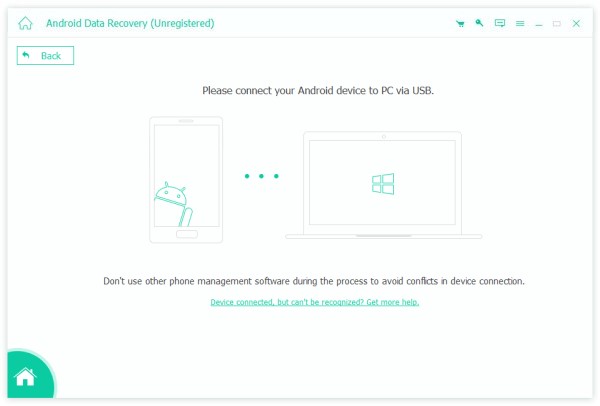
1 Adım. İletişim kurtarma aracını yükleyin.
Bilgisayarınıza kurduktan sonra Samsung için en iyi kişi kurtarma yazılımını çalıştırın. Cihazınızı USB kablosuyla bilgisayarınıza bağlayın. Etkinleştirdiğinizden emin olun. USB hata ayıklama Telefonunuzdaki modu seçin ve Dosyaları aktar.
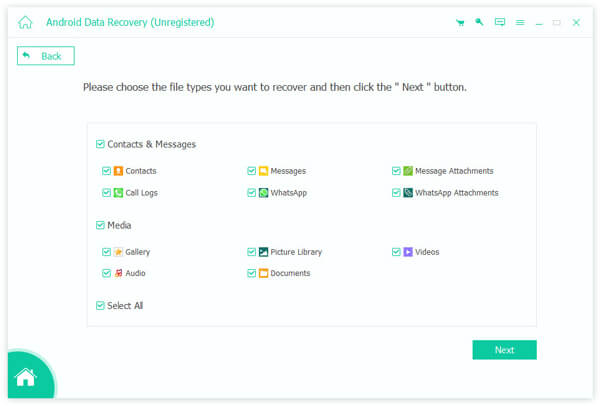
2 Adım. Telefonunuzdaki kişileri tarayın.
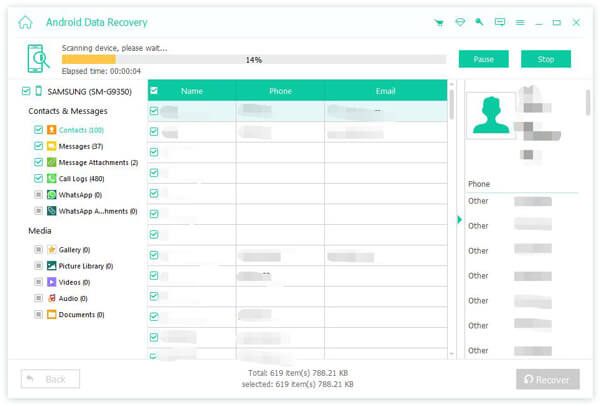
Samsung telefonunuz algılandıktan sonra, aşağıdaki seçeneklerden birini seçin. İletişimseçeneğini tıklayın ve Sonraki Hafızanızdaki kişileri taramaya başlamak için düğmeye basın. İşlem tamamlandığında, özelliği açın. Sadece silinmiş öğeleri gösterve silinen kişileri görüntüleyin.
3 Adım. Samsung'da kişileri alma
Son olarak, almak istediğiniz kişileri seçin ve tıklayın. Kurtarmak Alttaki düğmeye tıklayın. Çıkış klasörünü ayarlayın ve Samsung telefon rehberi kurtarma işlemini onaylayın. Ayrıca şunları da yapabilirsiniz: Android'de silinen sesli mesajı kurtarma.
Sonuç
Bu makale, birden fazla yöntemi paylaştı Samsung telefonlardan kişileri almaGeri Dönüşüm Kutusu klasörü, yakın zamanda sildiğiniz kişileri geri almanın en kolay yoludur. Yedekleme ile, kayıp kişileri Samsung Cloud'dan, Smart Switch'i kullanarak veya Google'dan bulabilirsiniz. Apeaksoft Android Veri Kurtarma Bu, yedekleme yapmadan Samsung telefonunuzdaki kaybolmuş kişileri kurtarmanın basit bir yoludur.
İlgili Makaleler
Android'de silinen kısa mesajların nerede saklandığını öğrenin ve Android'de kısa mesajların nasıl kurtarılacağını çeşitli kanıtlanmış yollarla keşfedin!
Android'de yanlışlıkla bir oyunu veya veriyi silerseniz bunları Google Play'den veya diğer kaynaklardan kurtarmayı bu makaleden öğrenin.
Android'inizdeki dosyaları yanlışlıkla sildiniz mi? Bu gönderi, daha önce yedeklememiş olsanız bile Android'den silinen dosyaları nasıl kurtaracağınızı gösterecek!
Farklı yöntemlerle bir Android telefonda kaybolan videoları kurtarabilirsiniz. Ayrıca, yedeklemeler olmadan Android'de silinen videoları kurtarabilirsiniz.



