Detailed Answer for If FaceTime Notifies Screen Recording
FaceTime is the pre-installed video chat app developed by Apple for two or more users to see and talk to each other in real time. Apple keeps FaceTime private and simple. Suppose you are laughing with a friend on FaceTime, and suddenly a thought hits you: what if they are recording it? According to our research, such doubt is not rare. This article answers whether FaceTime notifies when screen recording 在 iPhone 或 Mac 上。
頁面內容:
Part 1: Does FaceTime Notify Screen Recording
Does Apple notify when you screen record FaceTime? No, FaceTime doesn't notify users if someone screen records a video call, making it less secure for private conversations. When someone records FaceTime on either an iPhone, iPad, or a Mac computer, no pop-up, no sound, no notification.
Apple designed FaceTime this way for a few reasons, such as a lack of recording controls, the built-in screen recording feature doesn't report activity to apps, no interrupt conversations, and more.
Part 2: How Can You Tell If Someone Is Recording FaceTime
Even if FaceTime doesn't notify you of screen recording, you can learn the action by following a few signs. Technically, there is no guaranteed method. Learn these signs to keep your chat private and confident.
Sign 1: Recording Dot
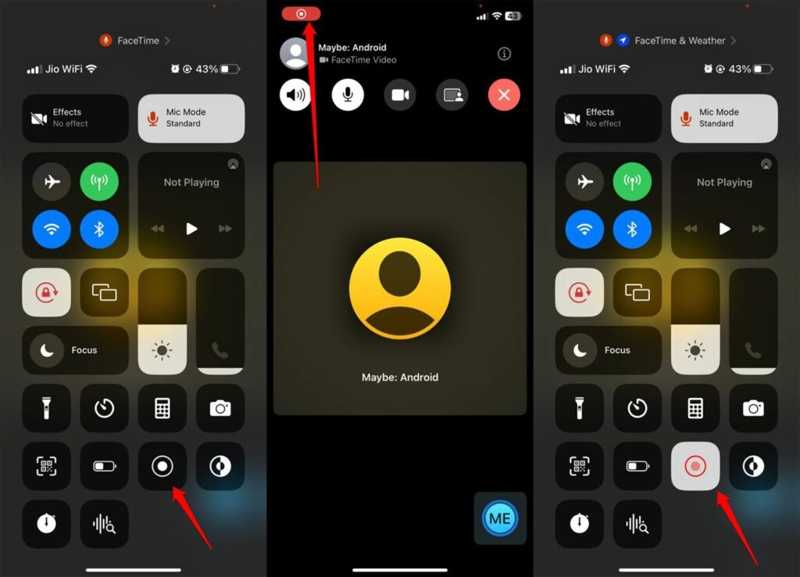
When screen recording FaceTime, whether using the built-in screen recording feature or a third-party screen recorder app, a red recording dot will appear on the screen. If you can see the recording indicator on your friend's screen, they are screen recording your video call. You can ask your friend to share the phone screen through FaceTime when making a call.
Sign 2: Lag or Delay
One important symbol is lag and delay. When calling in FaceTime, it uses lots of sources. If someone turns on screen recording for FaceTime, the video can suddenly lag and delay due to device stutter or heat up.
Sign 3: Suspicious Sound or Actions
至 記錄FaceTime on an iPhone or Mac, the caller needs to go to the Control Center and access the Screen Recording feature. You may hear the suspicious click sound or see the odd activities when calling FaceTime.
Sign 4: Unusual Request
Another clue to tell if someone is screen recording FaceTime is the unusual requests or behaviors during the call. If you encounter these problems, chances are that the caller is trying to record your FaceTime call to achieve a specific purpose.
Part 3: How to Protect Your Privacy on FaceTime
If you prefer to keep in touch with your friends and family on FaceTime, you can protect your privacy by following a few tips. We share the practical tips and tricks to stay safe when calling through FaceTime:
- 1.Only call trusted people.
- 2.Don't show private information in your camera view.
- 3.Ask your friends and family directly when using FaceTime.
- 4.Use an alternative app that notifies when screen recording chats, like Zoom.
Part 4: Ultimate Way to Record FaceTime Without Lagging
If you wish to record FaceTime without notifying others, Apeaksoft屏幕錄像機 is a good option. It lets you record video calls on your iPhone or iPad with a computer. Thus, the chat won't be interrupted. Moreover, the intuitive design simplifies the workflow.
下載量超過 1,000,000 用戶
- Record FaceTime calls on your iPhone smoothly.
- Save FaceTime calls in HD videos.
- 支持多種視頻格式。
- Won't notify others when screen recording.
- Offer bonus features, like making scheduled recordings.
How to Record FaceTime on Your iPhone Without Lagging
步驟二 Install FaceTime recorder
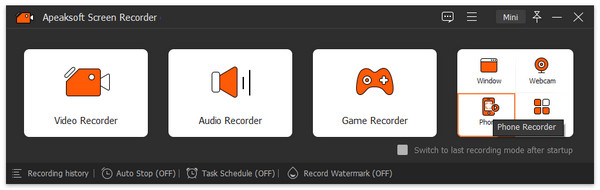
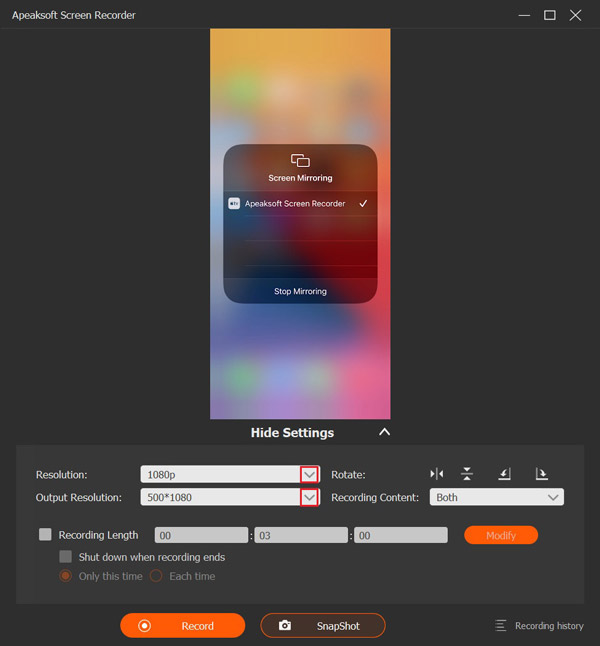
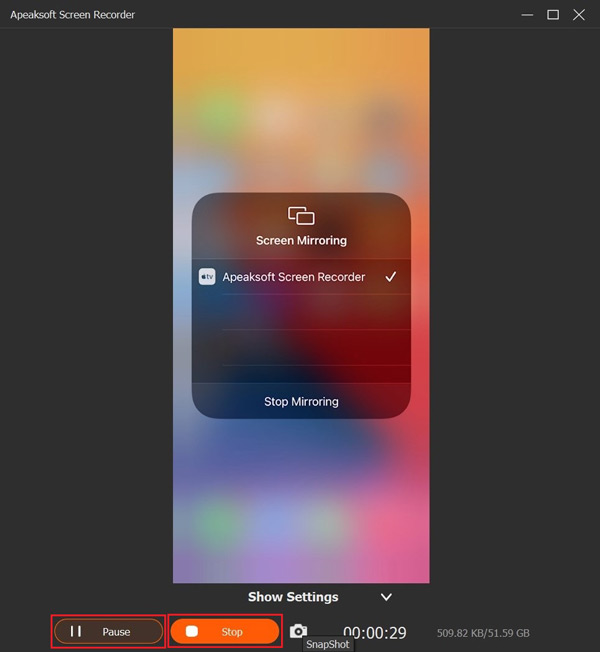
Launch the FaceTime recorder software once you install it on your computer. It is available on Windows 11/10/8/7/XP/Vista and Mac OS X 10.13 or above. Choose 電話錄音機 並選擇 iOS 錄音機. Next, follow the onscreen instructions to mirror your iPhone screen.
步驟二 記錄FaceTime
Set the resolution and recording content, such as 手機揚聲器. Start a call in FaceTime on your iPhone and click the Record button to begin recording the call.
步驟二 Save the call recording
When the call is complete, click the 停止 button on the window to save the call recording to your hard drive. During the process, you can temporarily stop recording by hitting the 暫停 button. To view the recording, click 錄製歷史 and open the latest video.
提示: If you want to change the video format or output folder, click the Settings menu in the main interface and go to the 輸出 tab on the Preferences dialog.
結語
This article answered whether FaceTime notifies when you screen record on your iPhone, iPad, or Mac. Now, you should learn the answer and the relevant knowledge. If you suspect others are screen recording your FaceTime calls, follow our clues to tell the truth. If you want to save a FaceTime call secretly, Apeaksoft屏幕錄像機 is an excellent option for ordinary people.