

5 Proven Methods to Recover Deleted Files from Google Drive

Google Drive是一個值得信賴的雲端儲存平台,供人們保存和分享文件,包括照片、表格、文件、PPT等。如果您也遇到過這樣的問題,您可以有效地 recover deleted Google Drive files by reading this methodical post with five methods listed.
頁面內容:
- Part 1: How to Recover Deleted Files from Google Drive Within 30 Days
- Part 2: How to Recover Deleted Google Drive Files via Admin Restore
- Part 3: How to Recover Permanently Deleted Files on Google Drive from Backup
- Part 4: How to Recover Lost Google Drive Files Through Official Support
- Part 5: How to Recover Deleted Files from Google Drive Without Limitation
- Part 6: FAQs about Google Drive File Recovery
Part 1: How to Recover Deleted Files from Google Drive Within 30 Days
There is a Trash folder in Google Drive to store your deleted files from Google Drive. However, the downside of this Trash folder is time limitation, which means you can only recover these items within 30 days. If your files are still within the 30-day time limit, you can follow the steps below to recover lost Google Drive files quickly and easily.
步驟二 Launch Google Drive on your device, or you can run it in the browser by visiting drive.google.com.
步驟二 在 Google Drive 介面中,您可以看到 垃圾桶 左側面板中的資料夾。點選 垃圾桶 查看所有最近刪除的 Google 雲端硬碟檔案。
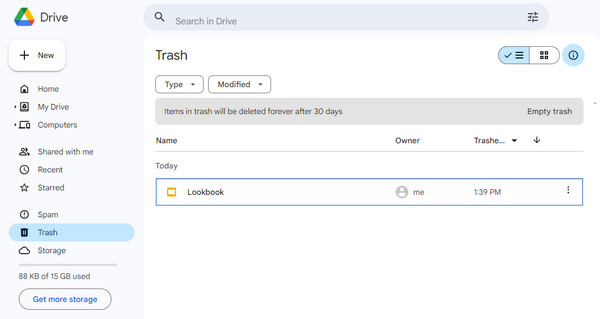
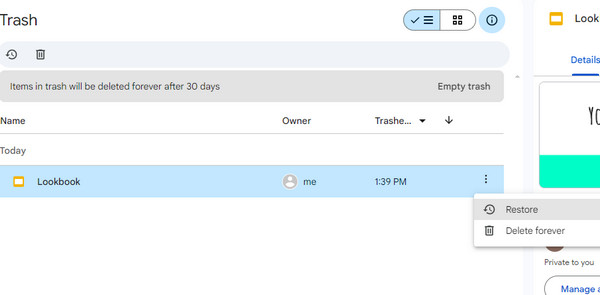
步驟二 您可以透過點擊過濾所有已刪除的文件 類型 以及 修改時間 紐扣。找到所需的檔案並點擊三點符號。選擇 恢復 下拉清單中的按鈕。如果您想從 Google 雲端硬碟中永久刪除該文件,您可以選擇 永遠刪除 選項。
Part 2: How to Recover Deleted Google Drive Files via Admin Restore
If you are using a Google Workspace account and have administrator privileges, don't worry even if you have emptied the Trash folder. You are still able to recover Google Drive files by using the Google Admin console. This method can restore a user’s Drive data within a limited recovery window (typically up to 25 days after permanent deletion. It also applies to recovering deleted Gmail messages.
步驟二 Please sign in to your Google Admin console with an administrator account, not your personal Google account.
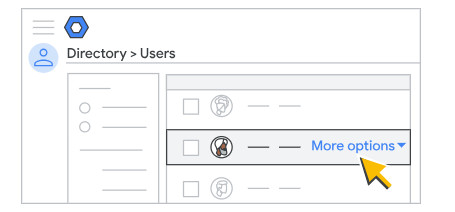
步驟二 在管理控制台中,按一下 寵物服務及好去處 > 用戶 在左側邊欄。
步驟二 選擇 來自所有組織部門的用戶 or 來自選定組織部門的用戶 from the Users list. Then, tick one user and select 更多的選擇 > 恢復數據.
提示: This method only applies to business or school accounts. Personal Gmail users cannot access the Admin Console recovery feature. Moreover, it usually restores data within a certain time range, rather than a specific individual file. Therefore, before moving on, you should first determine the approximate deletion date to avoid restoring incorrect data versions.
Part 3: How to Recover Permanently Deleted Files on Google Drive from Backup
If you have enabled system backup tools like 備份和同步 and created a Google Drive backup copy on your computer previously that has not been overwritten, you still have a chance to recover permanently deleted Google Drive files.
步驟二 Launch the backup tool.
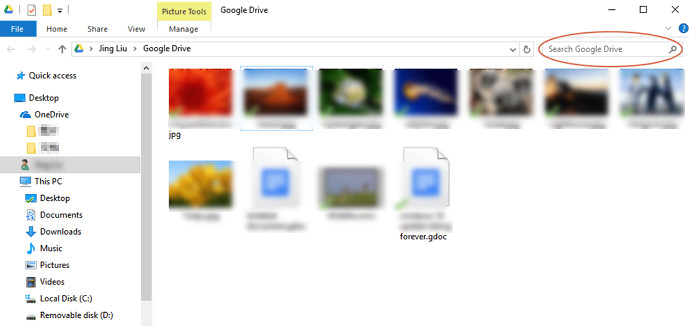
步驟二 You will see a window under the path: C:\Users\Your name\Google Drive.
步驟二 You can check the thumbnails or the file names to search for deleted Google Drive files. You can also search in the top-right box.
Part 4: How to Recover Lost Google Drive Files Through Official Support
You can still contact the Google Official Support to request a data recovery attempt. This method is typically used when files have been permanently deleted and are no longer available in the Trash.
步驟二 Open Google Drive and click the "?" pattern in the top right.
步驟二 選擇 Send feedback to Google 在下拉列表中。
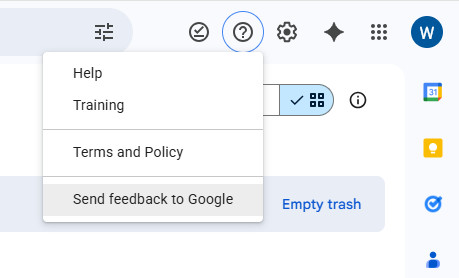
步驟二 Illustrate your problem in the form. The Google official support team will contact you later.
Part 5: How to Recover Deleted Files from Google Drive Without Limitation
If you usually process files on your local computer first and then sync or upload them to Google Drive, or if you have downloaded and saved the Google Drive files on your computer, even if the files have been permanently deleted from the cloud, the local copies may still exist. When the built-in recovery method of Google Drive fails to retrieve the files, you can try using Apeaksoft數據恢復 to scan your computer's hard drive. It supports deep scanning of deleted/lost files and has a high success rate of recovering even if the files have been emptied from the recycle bin.
Alternative Google Drive Recovery Method
- 專業掃描電腦上的各種文件類型。
- Store all scanned Google Drive files in SPF format for future restoration.
- Fast scanning speed and high recovery possibility.
- Preview the file in detail before the recovery.
- Applicable for various data loss scenarios.

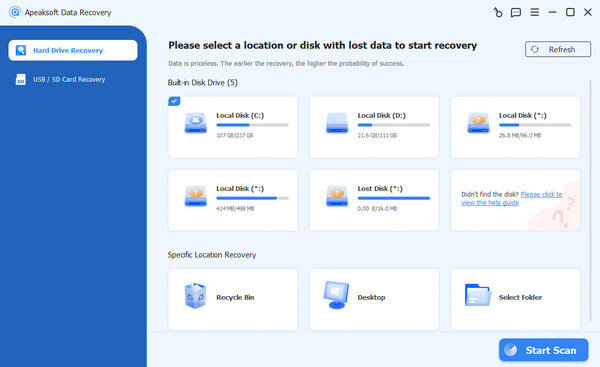
步驟二 在您的電腦上免費下載多功能復原工具。
步驟二 Select the location where you stored the Google Drive files. Then, click the 開始掃描 按鈕。
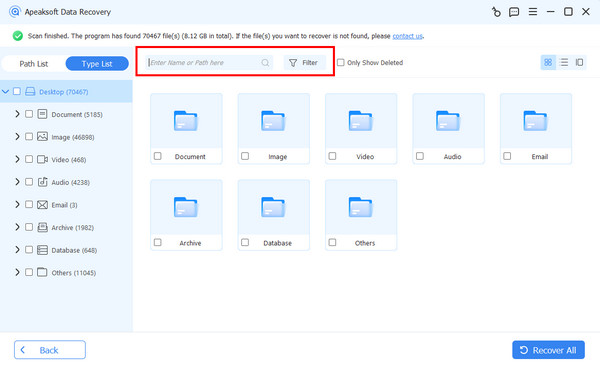
步驟二 Go to the left panel to search for target files by category. You can also use the Filter feature to quickly locate them by entering file names.
步驟二 Check the files you want to recover and then click the 恢復 按鈕。
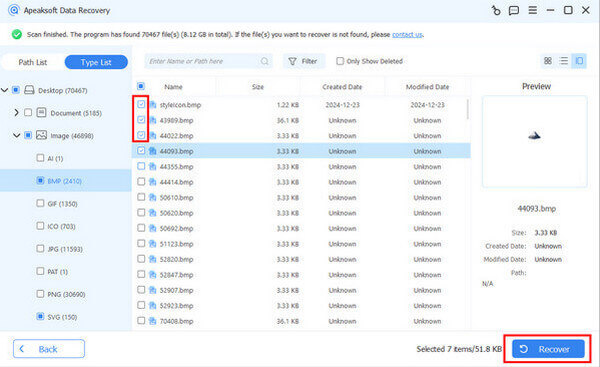
步驟二 Select a saving path, and the process will be initiated automatically.
Part 6: FAQs about Google Drive File Recovery
How to Use the Backup and Sync app?
When you want to recover deleted Google Drive files after 30 days from backup, you need to install the Backup and Sync app on your computer first. To do it, you can
1. Download it from the official Google Drive website.
2. 使用您的 Google 帳戶登錄。
3. Choose the folders you want to sync.
4。 選擇 Sync My Drive to this computer.
5. Select a local folder to store the synced Drive files.
6。 點擊 START 按鈕。
如何刪除 Google 雲端硬碟中的檔案?
在瀏覽器上存取 Google 雲端硬碟。右鍵單擊要刪除的文件或單擊三點按鈕選擇要刪除的文件 移到廢紙簍 選項。現在,您可以在「垃圾箱」資料夾中看到該檔案。您可以透過選擇永久刪除它 永久刪除 選項。
刪除 Google 帳戶後,我的 Google 雲端硬碟檔案會消失嗎?
絕對是的。如果你 刪除Gmail帳戶 without transferring your Google Drive files, you cannot access or recover any files from Google Drive.
結語
Until now, you can understand 如何從 Google 雲端硬碟恢復已刪除的文件 within/beyond 30 days. If you have stored Google Drive files on your computer, you can use Apeaksoft數據恢復 to scan and recover your lost Google Drive files without restrictions. Hope you can get back the deleted Google Drive files successfully!
相關文章
您不需要 Google Drive 應用程序即可通過 Web 界面備份文件。 本指南告訴您如何從 Mac 上完全卸載 Google Drive 應用程序。
如果您忘記了您的 Google 帳戶,您可以使用 Gmail、電話號碼、安全性問題和瀏覽器密碼管理器來還原 Google 帳戶。
更換設備後找不到聯絡人?本指南提供從 Google 備份還原聯絡人的快捷方法,即使是新手也能輕鬆上手。
您知道如何在 60 天內或超過 XNUMX 天內從 Google 相簿中擷取已刪除的照片嗎?閱讀本指南並掌握三種實用方法。



