How to Recover Deleted Bookmarks in Firefox Browser

As a free and open-source web browser, Firefox is popular worldwide. It loads websites fast and supports a wide range of add-ons. To quickly access specific websites, you can set them as bookmarks and manage them on the top bookmark bar. If you accidentally delete important bookmarks, you will lose quick access. Fortunately, this guide outlines several ways to recover lost Firefox bookmarks 在各種情況下。
頁面內容:
Part 1: How to Recover Firefox Bookmarks by Undo
Recovering bookmarks in Firefox is a lot easier if you just deleted a bookmark or a bookmark folder. Firefox supports the Undo command in the Library window. Of course, this option is only available for the bookmark you just deleted.
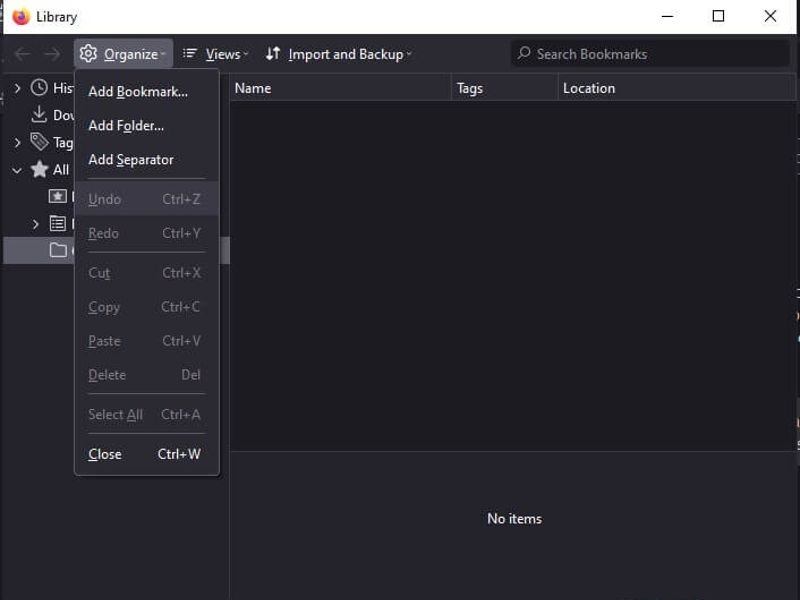
步驟二 媒體中心 按Ctrl + 轉移 + B in Firefox to open the Library window.
步驟二 在操作欄點擊 組織 菜單並選擇 復原.
步驟二 Next, check the bookmark bar to see if the deleted bookmark has been retrieved.
Part 2: How to Recover Firefox Bookmarks
If you have exported your bookmarks, you can recover lost bookmarks in Firefox by importing the old items. The prerequisite is that you export all your bookmarks before you delete important items.
步驟二 在操作欄點擊 更多 button at the top right corner of Firefox.
步驟二 選擇 書籤 並選擇 管理書籤.
步驟二 在操作欄點擊 導入和備份 菜單。
Option 1: Import Bookmarks from HTML
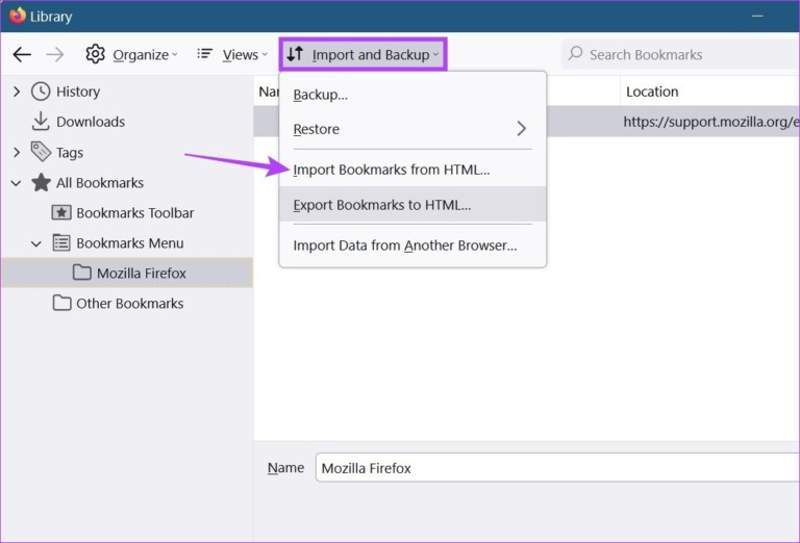
步驟二 選擇 從HTML導入書籤.
步驟二 Select the bookmark file and open it.
Option 2: Import Bookmarks from Other Browsers
步驟二 選擇 Import Data from Another Browser.
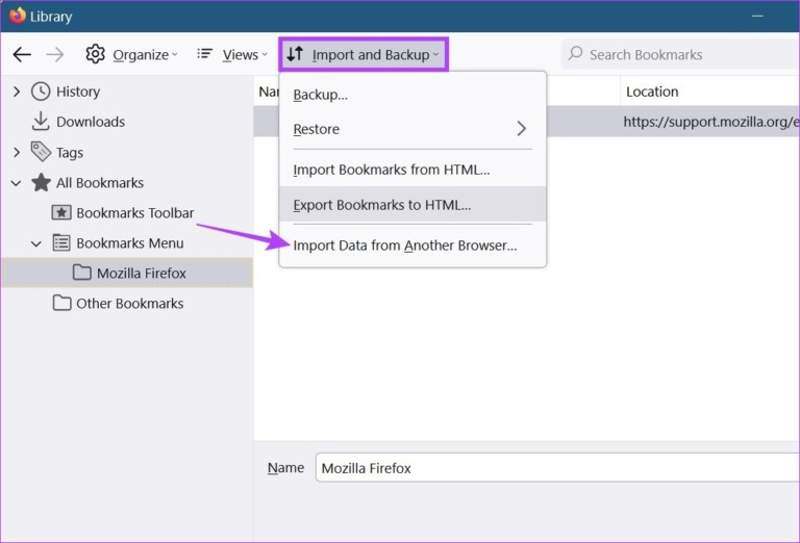
步驟二 Select the target browser and click 下一則.
步驟二 看看 書籤 並點擊 下一則.
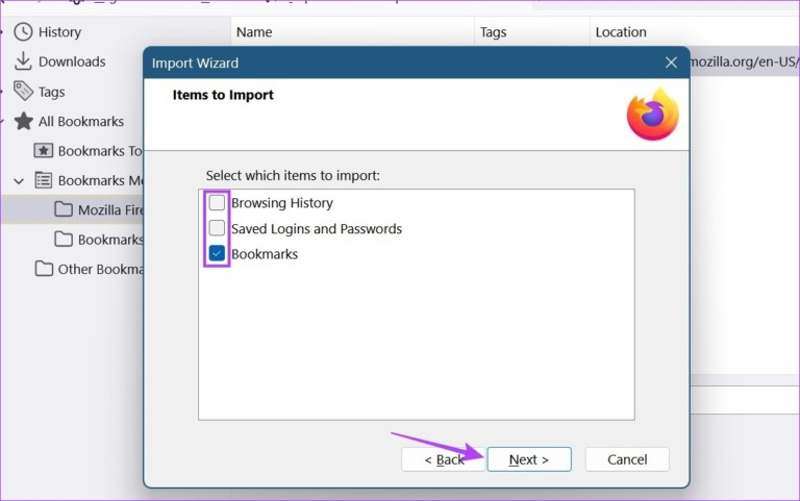
步驟二 最後,點擊 下一則 按鈕確認它。
Part 3: How to Restore Firefox Bookmark Backup
Firefox creates automatic bookmark backups and stores the last 15 backups as jsonlz4 files. Besides, you can schedule automatic backups using the Auto Bookmark Backup extension. This means that you can recover deleted bookmarks in Firefox from the backup.
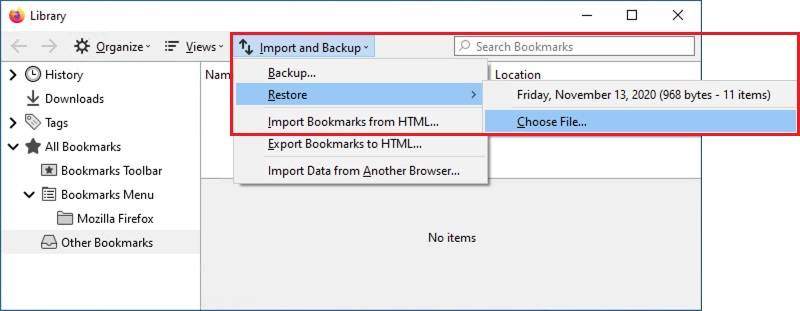
步驟二 點擊 更多 在火狐瀏覽器中。
步驟二 選擇 書籤 並點擊 管理書籤 to open the Library window.
步驟二 在操作欄點擊 導入和備份 菜單並選擇 恢復.
步驟二 Browse to the location where you saved the bookmark backup files.
步驟二 Select a backup and click the 未結案工單 button to restore it.
步驟二 出現提示時,單擊 OK to replace the current bookmarks in Firefox.
Part 4: How to Recover Firefox Bookmarks Without Backup
Without a backup, it is difficult to recover deleted bookmarks in Firefox. A web browser won’t save your bookmarks to cloud storage. Alternatively, Firefox saves all bookmarks with different dates in a database file named places.sqlite in your profile folder. In other words, if you can retrieve the database, deleted Firefox bookmarks are recovered. Fortunately, Apeaksoft數據恢復 can help you resolve this problem. It can recover any lost files from your hard drive without a backup.

下載量超過 1,000,000 用戶
- Recover deleted bookmark files of Firefox in three steps.
- Deliver a recovery rate up to 99% for supported scenarios.
- 在恢復之前預覽遺失的文件。
- 支持多種文件類型和格式。
- Work for accidental deletion, system crashes, partition loss, and more.

How to Recover Deleted Bookmarks in Firefox Without Backup
步驟二 安裝數據恢復
Launch the Data Recovery software once you install it on your PC. It is compatible with Windows 11 to XP. There is another version for Mac OS X 10.7 or above. Go to the 硬盤恢復 標籤在左側。
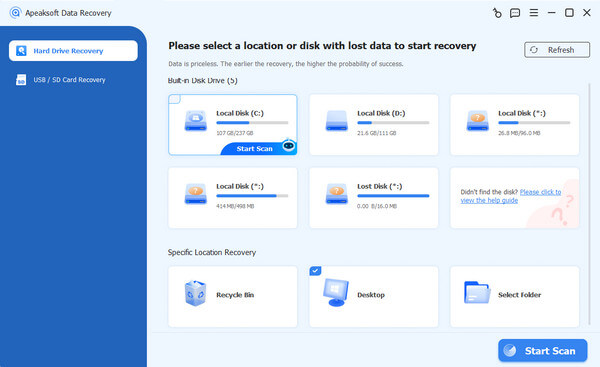
提示: If you need to recover data from an external drive, choose USB/SD 卡恢復 代替。
步驟二 掃描您的磁碟機
Select the disk where your Firefox is installed. By default, it is installed on Drive C. Click the 開始掃描 button to begin looking for lost data. It may take a while if there are too many files. When it is done, go to the 路徑列表 and navigate to the path: C:\Users\UserName\AppData\Roaming\Mozilla\Firefox\Profiles. Or type 地方.sqlite in the search bar to quickly locate the directory.
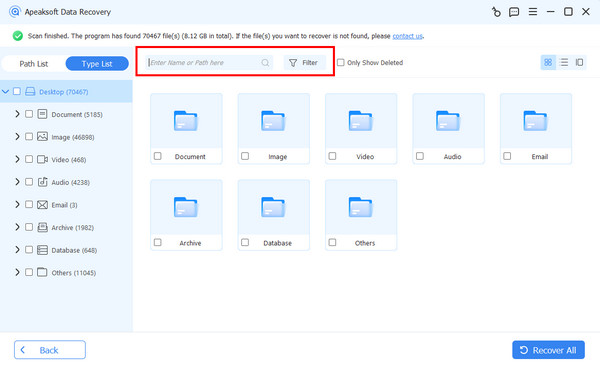
步驟二 Recover Firefox bookmarks
Find the deleted bookmark file by date and select it. Click the 恢復 button at the bottom right corner, select a different location, and hit 恢復 again. Then, you can move the database file to the Firefox profiles folder or use a Firefox History Viewer to read it.
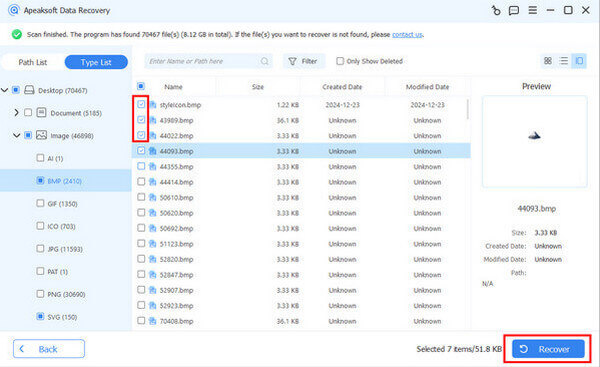
結語
本指南分享了多種方法 恢復 Firefox 書籤 if you accidentally deleted important bookmarks. Whether you have exported or backed up your bookmarks, you can quickly import and restore the lost URLs. Moreover, you can import lost bookmarks from other browsers into Firefox. Apeaksoft數據恢復 enables you to retrieve lost bookmarks for any web browser, including Firefox.

相關文章