Proč a co dělat, když se váš iPad neustále restartuje

Má vaše iPad se neustále restartuje sám od sebe? Možná jste se s tímto nepříjemným problémem již setkali, když čtete tento článek. Nebojte se - tento průvodce vám pomůže zjistit všechny možné příčiny problému a poskytne vám podrobná řešení, jak opravit iPad, který se neustále restartuje. Čtěte dále!
OBSAH STRÁNKY:
Část 1: Proč se můj iPad stále restartuje
Softwarové závady (nejčastější)
Softwarová závada je nejčastějším důvodem problémů s restartováním iPadu. Často se stává, když jste nainstalovali aplikace s chybami nebo aplikace, které nejsou kompatibilní s vaší aktuální verzí iPadOS. V takovém případě systém zhroutí a automaticky se restartuje. Neočekávaný restart mohou způsobit také aplikace na pozadí, poškozené soubory mezipaměti nebo konfliktní nastavení.
Systémová chyba
Systémové chyby mohou také způsobovat neustálé restartování iPadu, zejména po aktualizaci systému nebo pokud jste deaktivovali určité funkce. Někdy se může iPad zasekávat.
Špatné skladování
Váš iPad se může neustále restartovat, když je jeho úložiště plné nebo téměř plné. V takovém případě je velmi obtížné naplánovat dočasné zdroje v systému. Systém se proto může stát nestabilním.
Problém s baterií
Stárnoucí nebo poškozená baterie může také přispívat k náhodnému restartu iPadu, protože způsobuje nestabilní napájení z baterie, což má za následek vypnutí nebo restart. Proto se váš iPad při nabíjení neustále restartuje.
Hardware problémy
Ve vzácných případech může být iPad, který se neustále restartuje, způsoben také fyzickými hardwarovými problémy, jako je selhání základní desky nebo poškození vnitřních součástí. K takovým situacím obvykle dochází, když iPad upadl, byl vystaven vodě nebo byl jinak fyzicky poškozen.
Část 2: Nejúčinnější způsob, jak opravit iPad, který se neustále restartuje
Pokud se váš iPad neustále restartuje kvůli softwarovému nebo systémovému problému, nikoli kvůli hardwarovému problému, můžete vyzkoušet profesionální nástroj pro opravu iOS, jako je například Apeaksoft Recovery systému iOSJe určen především k řešení problémů, jako jsou neustálé restarty, černobílé obrazovky, pády systému a další.
Komplexní řešení pro opravu restartování iPadu
- Navrženo k efektivní opravě iPadů zaseknutých v restartovacích smyčkách.
- Nabízí funkci „Rychlá oprava zdarma“, která vyřeší drobné problémy s restartem během několika sekund.
- Opravuje smyčky restartu iPadu bez smazání osobních dat ve standardním režimu.
- Funguje se všemi modely iPadů a nejnovějšími verzemi iPadOS.
- Vhodné pro začátečníky s průvodcem opravou v rozhraní.
Bezpečné stahování
Bezpečné stahování
Krok 1. Stáhněte si tento nástroj pro obnovení systému iOS zdarma stisknutím příslušného tlačítka pro stažení výše.
Krok 2. Vybrat Nástroj pro obnovu systému iOS na hlavním rozhraní.
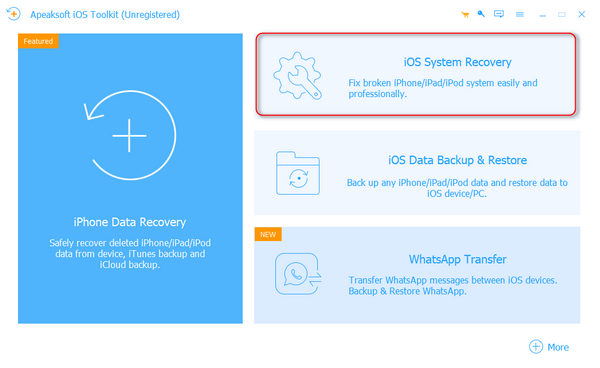
Krok 3. Klepněte na tlačítko Home pod tlačítkem System Repair Karta.
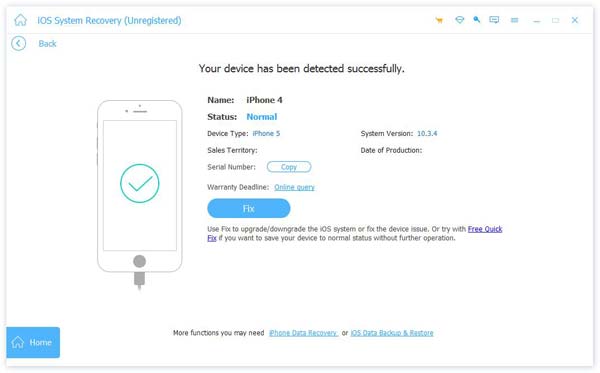
Krok 4. Připojte svůj iPad k počítači pomocí USB kabelu.
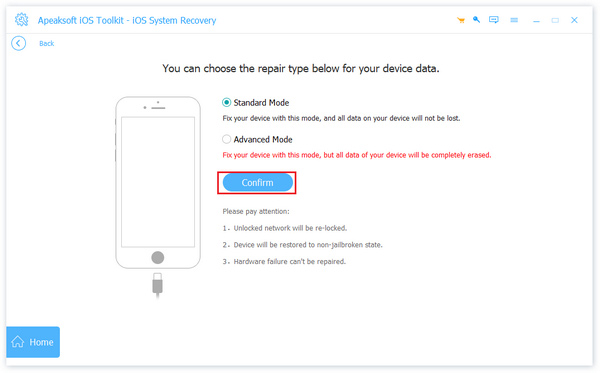
Krok 5. Poté vyberte režim opravy podle svých potřeb a stiskněte tlačítko Potvrdit .
Tip:
Standardní režim: Opravuje běžné problémy se systémem iPhone bez smazání dat.
Pokročilý mód: Opravuje závažnější systémové problémy iPhonu, ale vymaže všechna data v zařízení. Tento režim nabízí vyšší míru úspěšnosti a dokáže vyřešit hlubší systémové chyby.
Krok 6. Pro stažení odpovídajícího firmwaru zadejte na následující stránce základní informace o vašem iPadu.
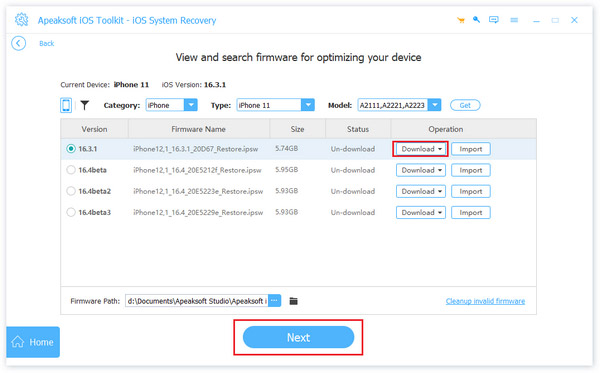
Krok 7. klikněte dalšía proces opravy bude spuštěn automaticky.
Tip:
Tento software vám také může pomoci Oprava nenabíjejícího se iPadu.
Část 3: Běžné způsoby, jak opravit iPad uvízlý v restartovací smyčce
Místo profesionálního softwaru můžete také použít některé běžné způsoby. Tato část představí 4 běžná a praktická řešení: vynucení restartujte iPad, aktualizovat iPadOS, uvolnit úložný prostor a odinstalovat problematické aplikace. Tyto metody mohou do určité míry vyřešit problémy s restartem způsobené dočasnými chybami systému, softwarovými konflikty, nedostatkem úložného prostoru nebo nekompatibilními aplikacemi.
Vynucení restartování iPadu
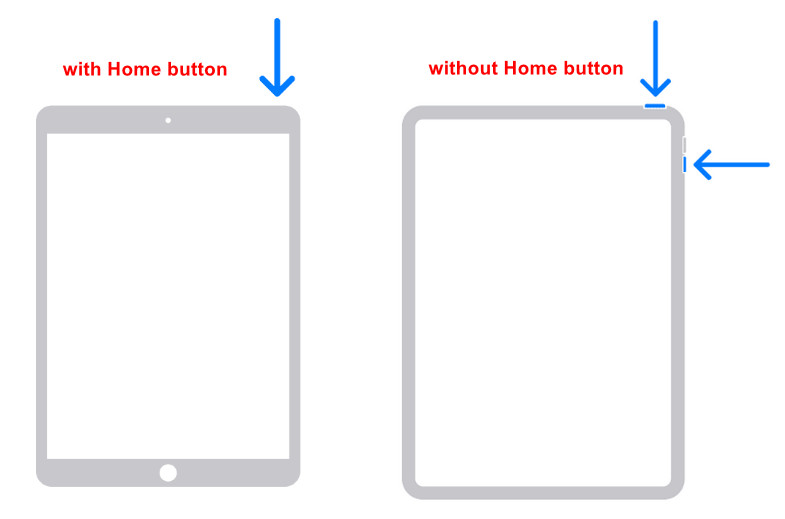
Pro iPady s tlačítkem Domů:
Krok 1. Stiskněte a podržte současně tlačítko Domů a tlačítko Napájení.
Krok 2. Uvolněte, dokud se neobjeví logo Apple.
Pro iPady bez tlačítka Domů:
Krok 1. Stiskněte a uvolněte tlačítko objem Up tlačítko rychle.
Krok 2. Poté rychle stiskněte a uvolněte objem Down .
Krok 3. Stiskněte a přidržte tlačítko Výkon , dokud se neobjeví logo Apple.
Aktualizujte iPadOS
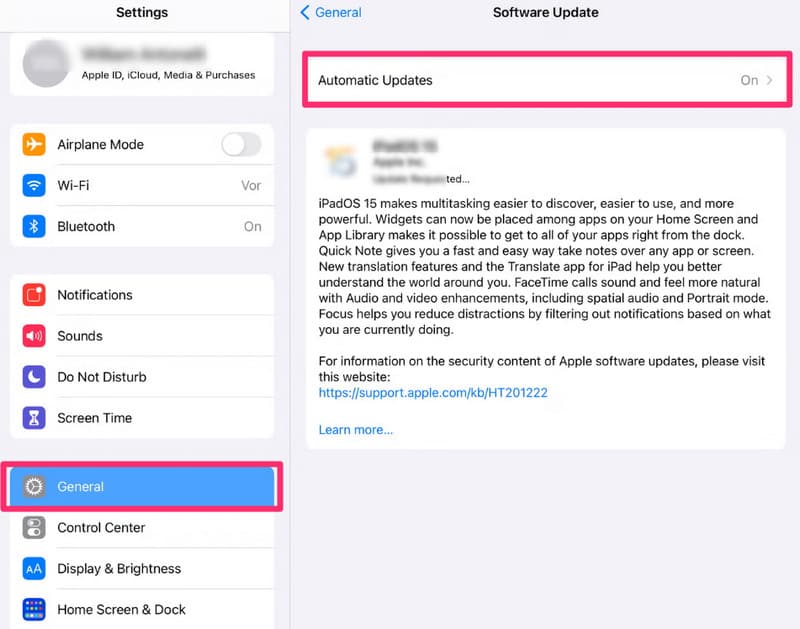
Krok 1. Otevřená Nastavení.
Krok 2. klikněte obecně.
Krok 3. Vybrat Aktualizace softwaru.
Krok 4. klikněte Stažení a instalace.
Tip:
1. Připojte se k Wi-Fi místo mobilních dat.
2. Ujistěte se, že je baterie vašeho iPadu dostatečně nabitá.
3. Rezervovaný úložný prostor (doporučeno 5–10 GB)
Uvolněte úložný prostor
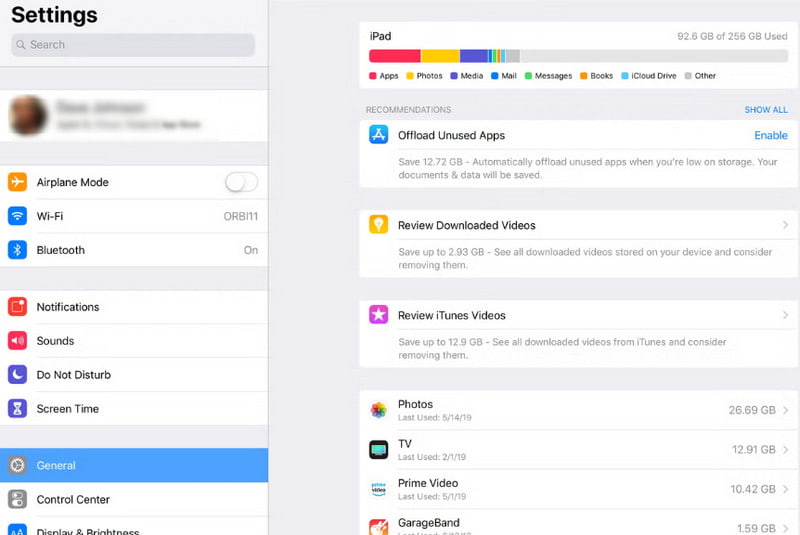
Krok 1. Otevřená Nastavení a klepněte na tlačítko obecně.
Krok 2. klikněte Úložiště iPad.
Krok 3. Odinstalujte nebo stáhněte aplikace nebo velké soubory.
Odinstalujte problematické aplikace
Krok 1. Sledujte, zda se iPad restartuje ihned po otevření určité aplikace.
Krok 2. Dlouze stiskněte aplikaci a vyberte Odebrat aplikaci.
Závěr
Proč se můj iPad stále restartujePo přečtení našeho průvodce nyní chápete, že většina problémů s restartem je způsobena softwarovými problémy, a doufáme, že vám naše opravy pomohou.
Související články