


Jak obnovit smazané textové zprávy na vašem iPhonu

Textové zprávy obsahují spoustu informací, jako jsou důležité propagační akce, základní odkazy a další. Ztráta těchto zpráv může být stresující. Pokud se ocitnete v situaci, kdy jste smazali textové zprávy na svém zařízení iOS, nepanikařte. V tomto příspěvku si můžete prohlédnout různé metody a nástroje, které vám mohou pomoci s jejich odstraněním. iPhone SMS recovery, což zajišťuje, že v různých situacích neztratíte cenné konverzace.
OBSAH STRÁNKY:
Část 1: Jak obnovit nedávno smazané SMS na iPhone
Složka Nedávno smazané je snadný způsob, jak zdarma obnovit nedávno smazané SMS zprávy na iPhonu. Tato možnost je samozřejmě k dispozici pouze pro zprávy smazané během posledních 30 dnů. Ujistěte se, že máte aktualizovaný systém iOS na nejnovější verzi.
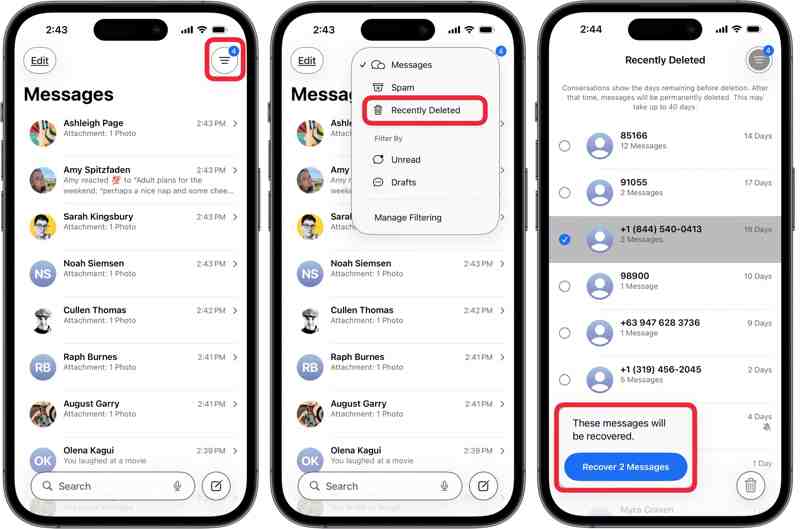
Krok 1. Otevřete Zprávy aplikace z domovské obrazovky.
Krok 2. Klepněte na Změnit or Filtr Tlačítko v horní části.
Krok 3. Vybrat Nedávno byl smazán z kontextové nabídky.
Krok 4. Zobrazte všechny nedávno smazané SMS na vašem iPhonu.
Krok 5. Vyberte požadované chaty a klepněte na Obnovit [číslo] zprávy.
Část 2: Jak obnovit smazaný text na iPhone pomocí iCloudu
iCloud je cloudová služba od společnosti Apple, která uživatelům umožňuje rozšířit úložiště. Ať už synchronizujete nebo zálohujete SMS do iCloudu, můžete obnovit smazané textové zprávy na iPhonu.
Jak obnovit smazaný text na iPhone
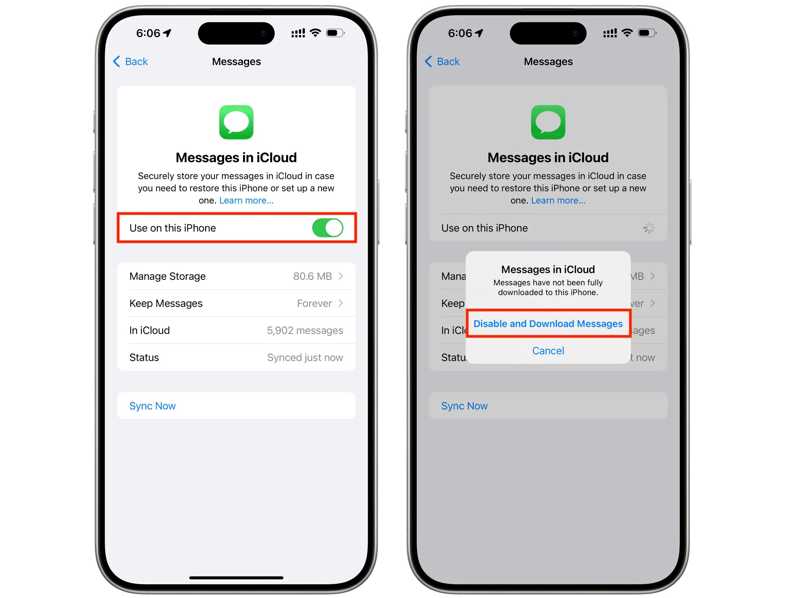
Krok 1. Pokud jste synchronizovali zprávy s iCloudem, přejděte na Nastavení.
Krok 2. Klepněte na svůj profil a poté vyberte iCloud.
Krok 3. Využít Zprávy pod APLIKACE POUŽÍVÁNÍ ICLOUD nadpis.
Krok 4. Vypnout Použijte na tomto iPhone or Synchronizujte tento iPhone.
Krok 5. Po zobrazení výzvy klepněte na Zakázat a stáhnout zprávy.
Jak obnovit smazané SMS na iPhone
Krok 1. Pokud jste si zálohovali SMS do iCloudu, spusťte Nastavení.
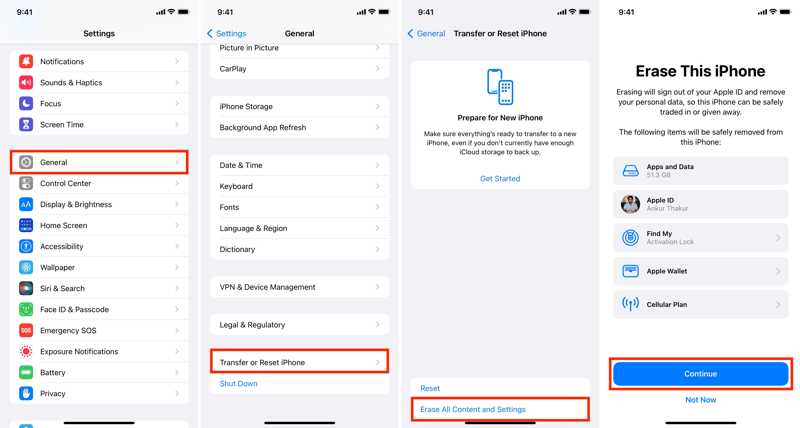
Krok 2. Přejít obecně, a Přeneste nebo resetujte iPhone.
Krok 3. Využít Vymazat veškerý obsah a nastavení, potom klepněte na tlačítko Pokračovat.
Krok 4. Zadejte své heslo Apple ID.
Krok 5. Po restartování iPhonu jej nastavte jako nové zařízení.
Krok 6. Připojte se k Wi-Fi.
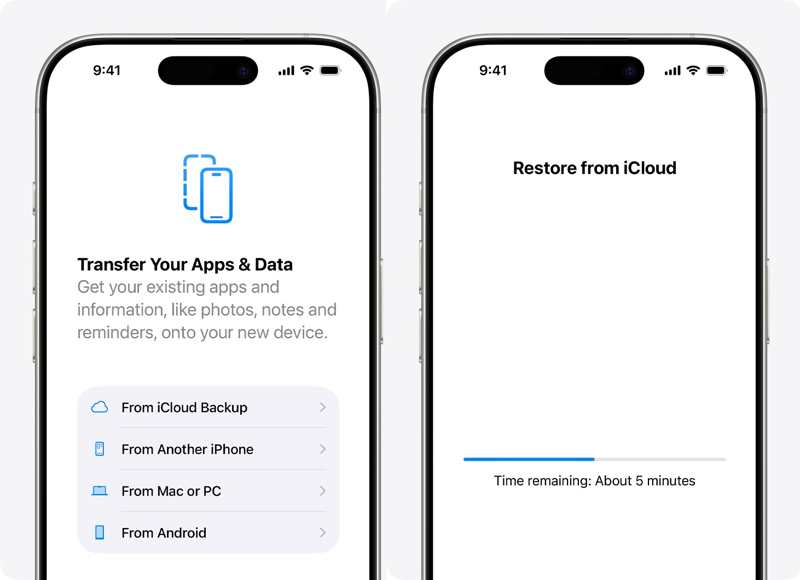
Krok 7. Vyberte Ze zálohy iCloud možnost z nabídky Přeneste své aplikace a data obrazovka.
Krok 8. Zadejte své přihlašovací údaje k Apple ID a vyberte nejnovější zálohu.
Krok 9. Po dokončení dokončete nastavení.
Část 3: Jak obnovit smazané SMS z iPhone ze zálohy
Pokud jste si zálohovali iPhone do počítače, iTunes a Finder jsou aplikace pro obnovení smazaných textových zpráv z iPhonu. Nezapomeňte, že záloha přepíše aktuální data v zařízení.
Krok 1. Připojte svůj iPhone k počítači pomocí kabelu USB.
Krok 2. Otevřete Finder v systému macOS Catalina a novějším. Ve Windows a macOS Mojave nebo starším otevřete iTunes.
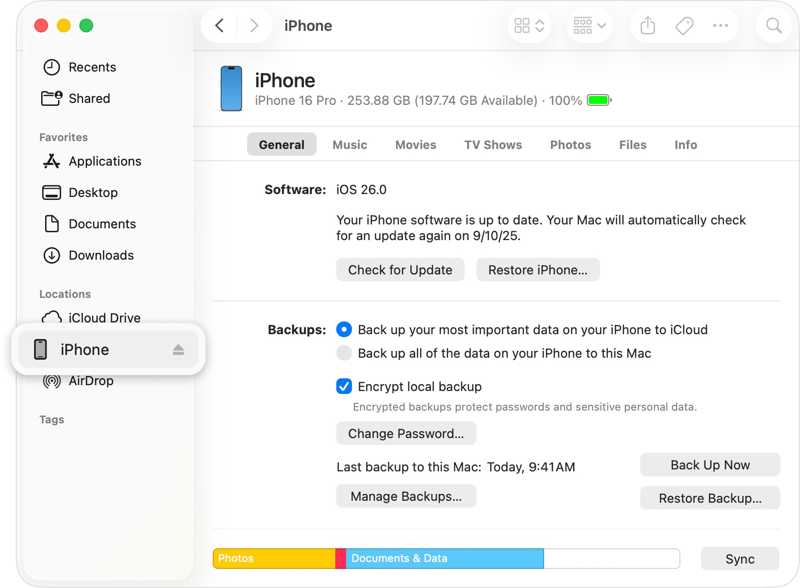
Krok 3. Klepněte na tlačítko Telefon a přejděte na Shrnutí v iTunes nebo klikněte na název telefonu a přejděte na obecně ve Finderu.
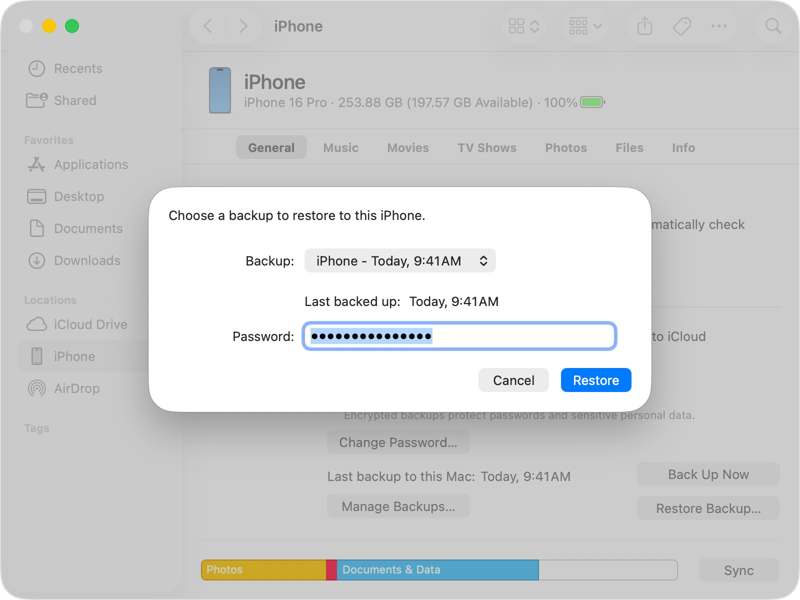
Krok 4. klikněte Obnovit Zálohu, vyberte správnou zálohu a klikněte na Obnovit tlačítko. Možná budete muset zadat heslo, pokud jste někdy zašifroval zálohu iPhonu.
Část 4: 2 nejlepší nástroje pro obnovu SMS zpráv z iPhone
Nahoru 1: Apeaksoft iPhone Data Recovery
Apeaksoft iPhone Obnova dat je jeden z nejvýkonnějších programů pro obnovu SMS zpráv na iPhonu. Dokáže prohledat paměť a vyhledat smazané textové zprávy. Navíc má intuitivní rozhraní.

Staženo více než 1,000,000 uživatelé
- Obnovte smazané SMS na vašem iPhone bez zálohy.
- Extrahujte SMS ze zálohy iTunes nebo iCloud.
- Podpůrné texty a přílohy.
- Kompatibilní s nejnovějšími verzemi iOS a iPadOS.
Bezpečné stahování
Bezpečné stahování
Zde jsou kroky k obnovení smazaných SMS zpráv na vašem iPhone bez zálohy:
Krok 1. Skenujte svůj iPhone
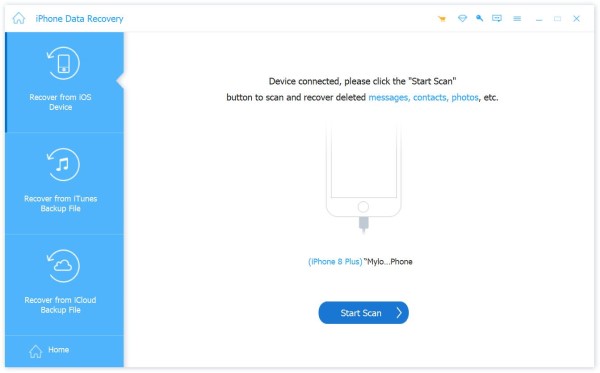
Spusťte software pro obnovu SMS z iPhonu po jeho instalaci do počítače. Připojte iPhone k počítači pomocí kabelu Lightning. Vyberte Obnovení z zařízení iOS a klepněte na tlačítko Spustit skenování.
Krok 2. Náhled SMS
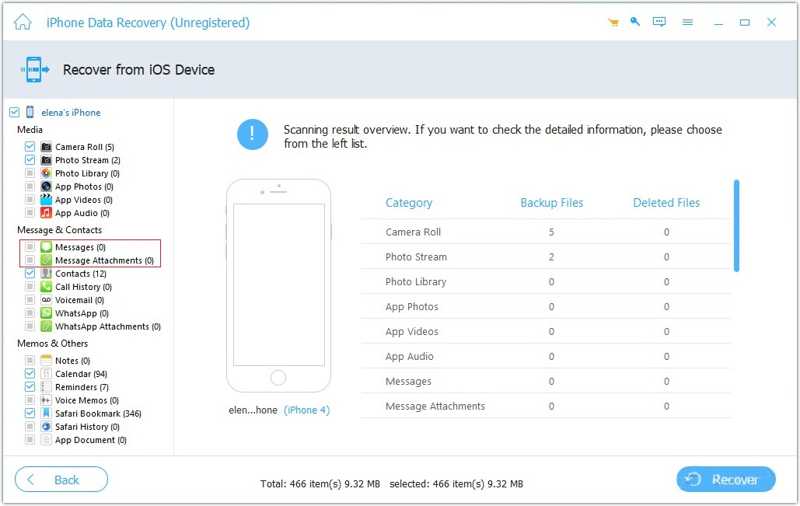
Po skenování vyberte Zprávy a Zprávy příloh na postranním panelu. Vyberte Zobrazit pouze smazané z rozbalovací nabídky a zobrazte si náhled smazané SMS.
Krok 3. Obnovit smazané SMS
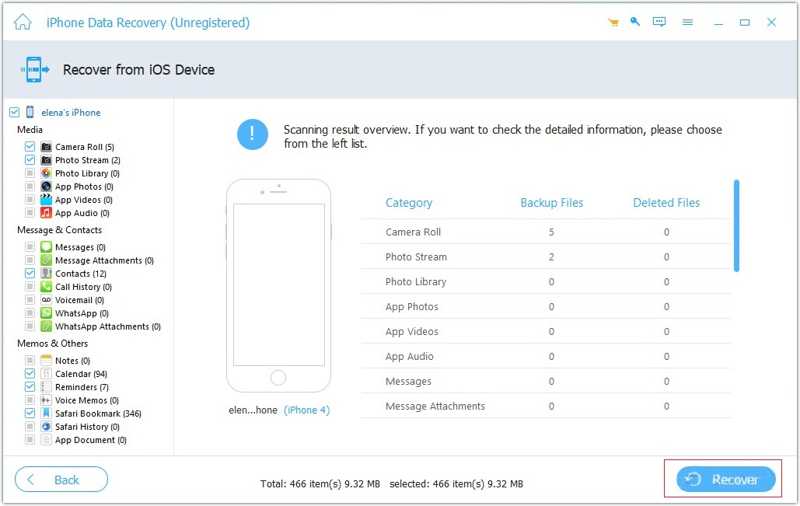
Vyberte zprávy a přílohy, které chcete načíst. Klikněte na Zotavit se tlačítko, nastavte výstupní složku a stiskněte Zotavit se.
Top 2: 3uTools
3uTools je bezplatný software pro obnovu SMS zpráv z iPhonu pro PC. Umožňuje vám otevřít zálohu iTunes a rychle obnovit smazané textové zprávy. Mějte na paměti, že nemůže obnovit SMS zprávy do vašeho iPhonu.
Hlavní vlastnosti softwaru 3uTools pro obnovu SMS
- 1.Zcela zdarma.
- 2.Obnovení SMS ze zálohy iTunes.
- 3.Zobrazit smazané textové zprávy.
- 4.Export SMS ve formátu 3u nebo PDF.
Zde jsou kroky pro načtení SMS pomocí 3uTools:
Krok 1. Nainstalujte si 3uTools do počítače a otevřete jej.
Krok 2. Propojte svůj iPhone s počítačem pomocí kabelu USB.
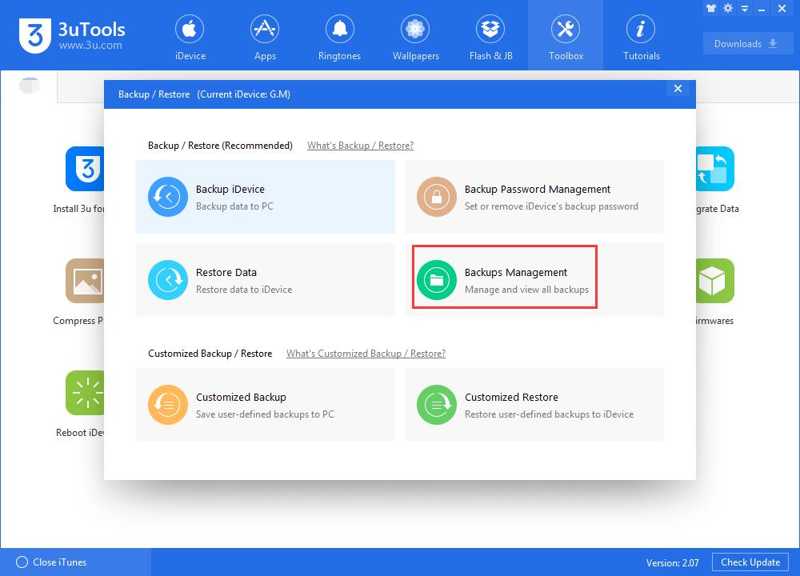
Krok 3. Přejít Toolboxzvolte Backup / Restore, a klepněte na tlačítko Správa záloh.
Krok 4. Vyberte správnou zálohu a klikněte na Zobrazit nyní.
Krok 5. Vybrat Zprávy a náhled chatů.
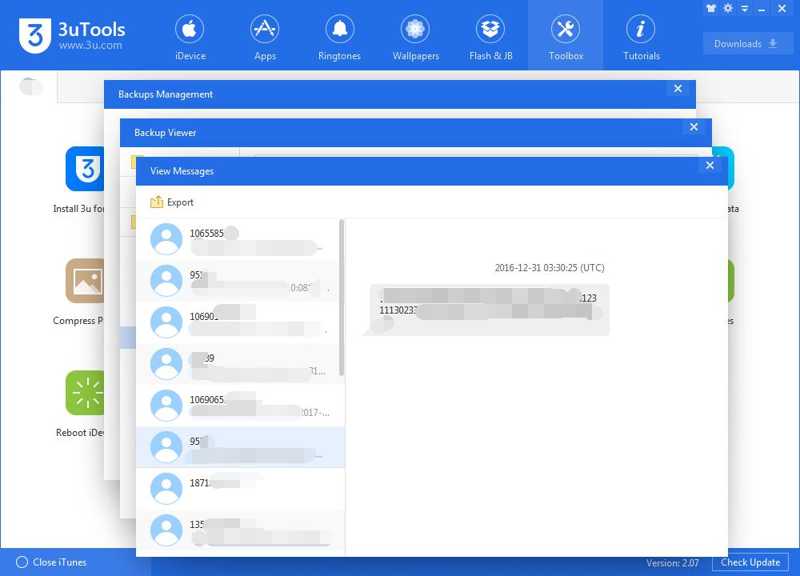
Krok 6. Vyberte požadované chaty a klikněte na Vývoza vyberte formát.
Další čtení
Závěr
Nyní byste se měli naučit, Software pro obnovu SMS zpráv na iPhonu a funkce. Složka Nedávno smazané je rychlý způsob, jak obnovit SMS zprávy smazané během posledních 30 dnů. Ztracené SMS můžete také zkusit obnovit pomocí iCloudu a zálohy počítače. Také jsme sdíleli software pro obnovu SMS, jako například Apeaksoft iPhone Obnova dat.
 Apeaksoft iPhone Obnova dat
 Obnovte smazaná nebo ztracená data ze zařízení iOS, iTunes a záloh iCloud.
Bezpečné stahování
Bezpečné stahování
Související články




