Screen Recorder Benchmark Test on Quality, Performance, Stability

Keskeiset ostokset
- Yleinen suoritus: Apeaksoft Screen Recorder (4.76/5) and OBS (4.74/5) are the top 2 screen recorders with the best overall performance.
- Recording Quality & Stability: Apeaksoft Screen Recorder and OBS performed particularly well in recording quality and long recording stability, both scoring 4.8/5 in these areas.
- Best Audio Performance: Apeaksoft Screen Recorder and OBS Studio provided clear audio with stable synchronization.
- Lowest Performance Impact: Bandicam used the fewest system resources while maintaining strong recording quality.
- Best Gaming Recording Performance: Bandicam delivered the most consistent FPS and smoothest gameplay footage.
- Best Long-Recording Stability: OBS Studio and Apeaksoft Screen Recorder performed reliably during extended recording sessions.
When you are looking for screen recording software, you will see many recommendations with keywords like "free", "4K", "60 FPS", "best", etc. However, the actual performance of the screen recording software is unknown.
This post conducted screen recorder benchmark tests on six popular screen recording tools under strictly controlled test scenarios, using the same hardware and recording settings. We conducted a screen recording test on six popular screen recording software tools, including OBS Studio, Bandicam, Camtasia, Movavi Screen Recorder, Loom, and Apeaksoft Screen Recorder, and compared and ranked them in terms of recording quality, performance, stability, sound effects, and recording functions. Read more to see which screen recorder performs best in real-world tests.
SIVUN SISÄLTÖ:
Kuinka testaamme näitä näytön tallentimia
Tested Screen Recorders & Versions
| Screen Recorder | Uusin versio | Lisenssi |
| Apeaksoft Screen Recorder | 2.5.10 | Täysversio |
| OBS Studio | 33.0.2 | Ilmainen ja avoin lähdekoodi |
| Bandicam | 8.3.2 | Täysversio |
| Camtasia | 2027 | Täysversio |
| Movavi-näytön tallennin | 24.8.2 | Täysversio |
| Kangaspuiden | 0.387.0 | Täysversio |
Tested Materials
| Testimateriaali | Erityinen sisältö | Päätarkoitus |
| Pitkä video | A 30-minute 1080p video featuring a talking-head presentation, subtitles, outdoor scenery, fast-moving shots, scene changes, and background music | Test recording quality, motion handling, audio quality, and A/V sync |
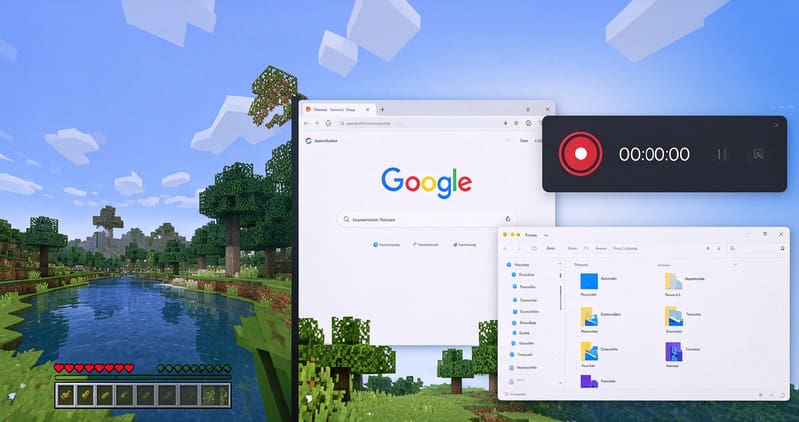
| Desktop Tasks | Browsing a text-heavy webpage in Chrome, scrolling, playing a YouTube video, switching between Chrome and File Explorer, and typing or dragging files | Test text clarity, scrolling smoothness, cursor movement, and everyday recording performance |
| pelaamista | Minecraft at 1080p with the same graphics settings and a fixed 10-minute gameplay route, including movement, combat, camera rotation, and scene transitions | Test FPS, FPS drop, CPU/GPU usage, and recording smoothness |
Laitteiston kokoonpano
| komponentti | Windows Test | Mac Test |
| prosessori | Intel Core i7-14700K | Apple M-series chip |
| GPU | NVIDIA GeForce RTX 4070 SUPER | Integroitu Apple-grafiikkasuoritin |
| RAM | 32 GB DDR5 | 16 / 24 Gt |
| varastointi | 1 Tt NVMe SSD | 512 GB / 1 TB SSD |
| näyttö | 2560 × 1440, 165 Hz | 2560 × 1440 / 4K |
| Käyttöjärjestelmä | Windows 11 Pro 24H2 | Latest macOS |
Testausmenettely
Standardized Recording Settings
| Asetus | Konfigurointi |
| päätöslauselma | 1920 × 1080 |
| Frame Rate | 60 FPS |
| Videoformaatti | MP4 |
| Audio- | System Audio + Microphone |
| Encoder | Hardware Encoder, where supported |
| Äänityksen kesto | 30 minuuttia |
Repeated Execution
To minimize the impact of random fluctuations, we used the same high-quality screen recording software to conduct three tests under the same conditions and in the same recording scenarios, and then took the average result.
Suorituskyvyn seuraaminen
We checked CPU, GPU, RAM, and FPS while each recorder was running. After each test, we watched the recordings to check the picture, sound, frame drops, and audio-video sync.
Benchmark 1: Recording Quality
| Screen Recorder | Pisteet | Avainlöydökset |
| Apeaksoft Screen Recorder | 4.8/5 | Sharp details, smooth motion, good A/V synchronization |
| OBS Studio | 4.8/5 | Excellent detail and motion handling with flexible encoding controls |
| Bandicam | 4.7/5 | Clear output and particularly smooth high-FPS recording |
| Camtasia | 4.5/5 | Clear output and good motion handling |
| Movavi-näytön tallennin | 4.4/5 | Sharp text, smooth motion, and clean overall output |
| Kangaspuiden | 4.1/5 | Clear output, but quality options vary by plan and platform |
Kuvan selkeys: OBS Screen Recorder and Apeaksoft Screen Recorder delivered the clearest overall footage, with sharp text and well-defined UI elements in 1080p recordings.
Motion Käsittely: Bandicam handled fast-moving scenes well. The footage stayed smooth when the video changed scenes quickly or when we moved around in the game.
Yksityiskohtien säilyttäminen: OBS Studio kept small text, icons, and other UI details clear in our desktop recordings. Apeaksoft Screen Recorder and Bandicam also produced clear details, but some fine details looked a little softer in busy scenes.
Benchmark 2: Audio Performance
| Screen Recorder | Pisteet | Avainlöydökset |
| OBS Studio | 4.8/5 | Excellent audio control and multi-source recording and control |
| Apeaksoft Screen Recorder | 4.8/5 | Clear system and microphone audio quality |
| Bandicam | 4.6/5 | Clear voice recording with reliable system audio capture |
| Camtasia | 4.5/5 | Clean audio with convenient editing controls |
| Movavi-näytön tallennin | 4.4/5 | Clear microphone and system audio |
| Kangaspuiden | 4.2/5 | Clear voice recording with simpler audio controls |
Äänen selkeys: Apeaksoft Screen Recorder and OBS Studio delivered clear microphone recordings with good voice definition. Bandicam also performed well, particularly for straightforward voice capture.
System Audio: OBS-näytön tallennin provided the most flexible system-audio configuration and multi-source control. Apeaksoft Screen Recorder and Bandicam also captured system audio clearly without noticeable distortion.
Äänen synkronointi: Apeaksoft Screen Recorder kept the recorded audio and video in sync perfectly. OBS Studio and Bandicam also showed stable sync during our recording scenarios.
Benchmark 3: Gaming Recording
| Screen Recorder | Pisteet | Avainlöydökset |
| Bandicam | 4.9/5 | Smooth gameplay with strong high-FPS performance |
| OBS Studio | 4.8/5 | Excellent performance with flexible hardware encoding |
| Apeaksoft Screen Recorder | 4.6/5 | Smooth gameplay with stable recording |
| Movavi-näytön tallennin | 4.3/5 | Good performance for casual gameplay |
| Camtasia | 4.1/5 | Stable recording but less gaming-focused |
| Kangaspuiden | 3.8/5 | Better suited to desktop and presentation recording |
FPS Stability: Bandicam-näytön tallennin maintained the most consistent FPS during gameplay recording. OBS Studio also performed strongly with hardware encoding enabled.
Liikkeen tasaisuus: Bandicam kept the gameplay smooth when we moved the camera quickly or switched between scenes with the best results. Apeaksoft Screen Recorder and OBS Studio also handled fast motion well.
Suorituskyky kuormitettuna: OBS Studio and Bandicam kept the gameplay recording stable while the game was running.
Benchmark 4: Long Recording Stability
| Screen Recorder | Pisteet | Avainlöydökset |
| OBS Studio | 4.8/5 | Highly reliable for extended recording sessions |
| Apeaksoft Screen Recorder | 4.8/5 | Stable long recordings with consistent output |
| Bandicam | 4.6/5 | Stable performance with large recording files |
| Camtasia | 4.4/5 | Reliable long recordings with consistent output |
| Movavi-näytön tallennin | 4.3/5 | Stable for extended everyday recordings |
| Kangaspuiden | 4.0/5 | Reliable but more dependent on account and network conditions |
Tallennuksen jatkuvuus: Apeaksoft Screen Recorder and Bandicam maintained continuous recording without noticeable interruptions during long sessions.
Output Integrity: Apeaksoft Screen Recorder and OBS Studio both complete long recordings without missing parts, and the files can play normally after recording. Some of the other tools showed less consistent results during the longer tests.
Audio-video Sync: Overall, all six screen recorders kept the audio and video reasonably well synchronized during the longer tests. Apeaksoft Screen Recorder and OBS Studio were the most consistent.
Benchmark 5: System Resource Usage
| Screen Recorder | Pisteet | Avainlöydökset |
| Bandicam | 4.9/5 | Low resource usage with strong recording performance |
| Apeaksoft Screen Recorder | 4.8/5 | Efficient resource usage with hardware acceleration |
| OBS Studio | 4.5/5 | Efficient with hardware encoding but more configuration-dependent |
| Movavi-näytön tallennin | 4.3/5 | Moderate resource usage during standard recording |
| Camtasia | 4.1/5 | Higher resource usage during demanding recordings |
| Kangaspuiden | 4.0/5 | Moderate resource usage with additional background processes |
Prosessorin käyttö: Bandicam used the least CPU in our tests while keeping the recording quality high.
GPU-käyttö: Apeaksoft Screen Recorder and OBS made good use of the GPU during recording. Bandicam also kept a relatively balanced CPU/GPU load during recording.
RAM-muistin käyttö: Bandicam used the least RAM overall. However, OBS Studio used more RAM during our tests, due to its more extensive recording and encoding controls.
Final Results & Ranking
| Luokka | Paino |
| Äänityksen laatu | 30% |
| Järjestelmäresurssien käyttö | 20% |
| Pelien suorituskyky | 20% |
| Äänentoisto | 15% |
| Pitkä tallennusvakaus | 15% |
| Yhteensä | 100% |
| arvo | Screen Recorder | Recording Quality 30% | System Resource 20% | Gaming 20% | Audio 15% | Long Recording 15% | Lopullinen tulos |
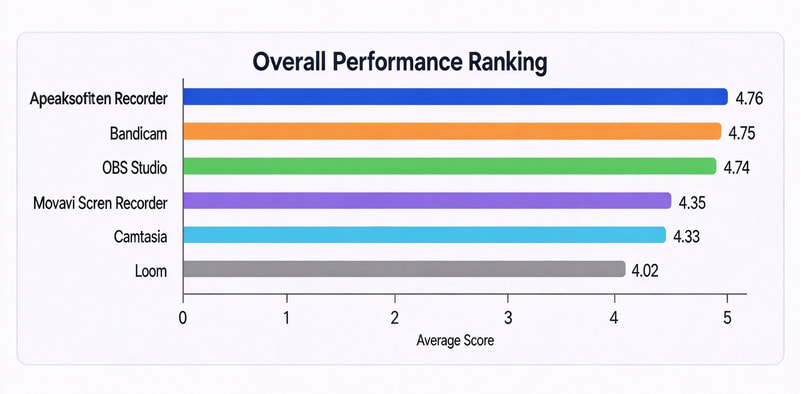
| 1 | Apeaksoft Screen Recorder | 4.8 | 4.8 | 4.6 | 4.8 | 4.8 | 4.76/5 |
| 2 | Bandicam | 4.7 | 4.9 | 4.9 | 4.6 | 4.6 | 4.75/5 |
| 3 | OBS Studio | 4.8 | 4.5 | 4.8 | 4.8 | 4.8 | 4.74/5 |
| 4 | Movavi-näytön tallennin | 4.4 | 4.3 | 4.3 | 4.4 | 4.3 | 4.35/5 |
| 5 | Camtasia | 4.5 | 4.1 | 4.1 | 4.5 | 4.4 | 4.33/5 |
| 6 | Kangaspuiden | 4.1 | 4 | 3.8 | 4.2 | 4 | 4.02/5 |
From the table, we can see that Apeaksoft Screen Recorder and OBS Studio stand out as the best overall choices, scoring 4.76/5 and 4.74/5, respectively. Bandicam is best suited for gaming and low-resource recording, while Camtasia is a better fit for recording and editing. Movavi-näytön tallennin works well for everyday recording, while Loom is better suited to quick screen sharing and presentations.
Vastuun kieltäminen
These benchmark results are based on our real-world testing of each screen recorder across the same benchmark scenarios. Each benchmark was scored separately based on the tested results. Then, the separate scores are weighted according to the percentages shown below to calculate the overall score.
Our testing environment, hardware configuration, software versions, recording settings, and test scenarios are as of the time of testing. Performance may vary depending on hardware, operating system, recording resolution, codec, and other settings. The scores are intended for comparative reference rather than a guarantee of performance on every system.
Yhteenveto
Overall, no single screen recorder leads in every category. You can choose the paras näytön tallennusohjelmisto according to your specific needs. Bandicam is suitable for gaming, and OBS performs well in recording quality and long-term stability. If you want to find an overall balanced option, Apeaksoft Screen Recorder is an ideal choice.
 Apeaksoft Screen Recorder
Tallenna mitä tahansa videota ja ääntä puhelimen ja tietokoneen näytölle.
Suojattu lataus
Suojattu lataus
Aiheeseen liittyvät artikkelit