Mikä on Advance Turbo Flasher -työkalu ja miten sitä käytetään

Toisin kuin Applen ekosysteemi, Google ei tarjoa Android-käyttäjille monipuolisia työkalupaketteja, osittain siksi, että Android-merkkejä ja -valmistajia on liikaa. Onneksi kehittäjät ovat julkaisseet kolmannen osapuolen työkalupaketteja Android-käyttäjille. Advance Turbo Flasher Esimerkiksi Tool on välttämätön apuohjelma Nokia-puhelimille, erityisesti BB5-, MeeGo- ja MediaTek-piirisarjoja käyttäville laitteille. Tässä artikkelissa tarkastellaan Nokian työkalupakkia ja jaetaan tarvittavat tiedot, jotka sinun tulisi oppia.
SIVUN SISÄLTÖ:
Osa 1: Mikä on Advance Turbo Flasher -työkalu?
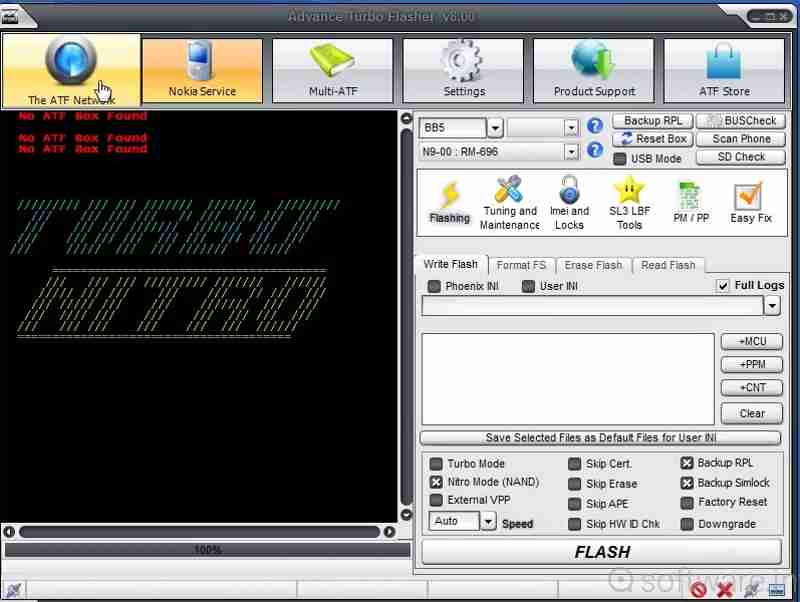
Kuten aiemmin mainittiin, Advance Turbo Flasher on suunniteltu Nokia-käyttäjille ongelmien korjaamiseen ja näytön lukituksen avaamiseen. Nokia-matkapuhelinten lisäksi se tukee Windows-puhelimia. Uusin versio on Advance Turbo Flasher v12.70, joka julkaistiin vuonna 2017.
Advance Turbo Flasher -työkalun tärkeimmät ominaisuudet
- 1.Asenna Nokia-puhelimiin vakiolaiteohjelmisto.
- 2.Avaa SIM-korttien lukitukset ja vaihda operaattoria.
- 3.Palauta Android-puhelin ja käyttöjärjestelmä.
- 4.Päivitä laiteohjelmisto uusimpaan versioon.
- 5.Tukee sekä virallista että mukautettua laiteohjelmistoa.
- 6.Päivitä tai asenna Android-käyttöjärjestelmä uudelleen.
- 7.Korjaa rikotut Nokia-puhelimet.
- 8.Avaa Nokian peruspuhelimet.
- 9.Yhteensopiva BB5:n, MeeGon, MediaTekin ja NXPlatformin kanssa.
Arvostelu Advance Turbo Flasher -työkalusta
- Tarjoamme kattavia ratkaisuja Nokia-puhelimien flash-asennukseen, lukituksen avaamiseen ja korjaamiseen.
- Vaikka se on suunniteltu Nokialle, se toimii myös Samsungin, HTC:n, LG:n ja muiden puhelimien kanssa.
- Saatavilla Windows 11/10/8/7/XP:lle.
- Se vaatii maksullisen lisenssin kaikkien ominaisuuksien avaamiseen, mutta Advance Turbo Flasherin hinta ei ole korkea.
- Se ei tue uudempia malleja.
- Käyttöliittymä näyttää sekavalta.
Osa 2: Advance Turbo Flasherin asentaminen
Nokia-puhelimesi lukituksen avaamiseksi tai korjaamiseksi sinun on ladattava Advance Turbo Flasher. Työkalulle ei kuitenkaan ole virallista verkkosivustoa. Vaihtoehtoisesti sinun on ladattava se kolmannen osapuolen resurssista.
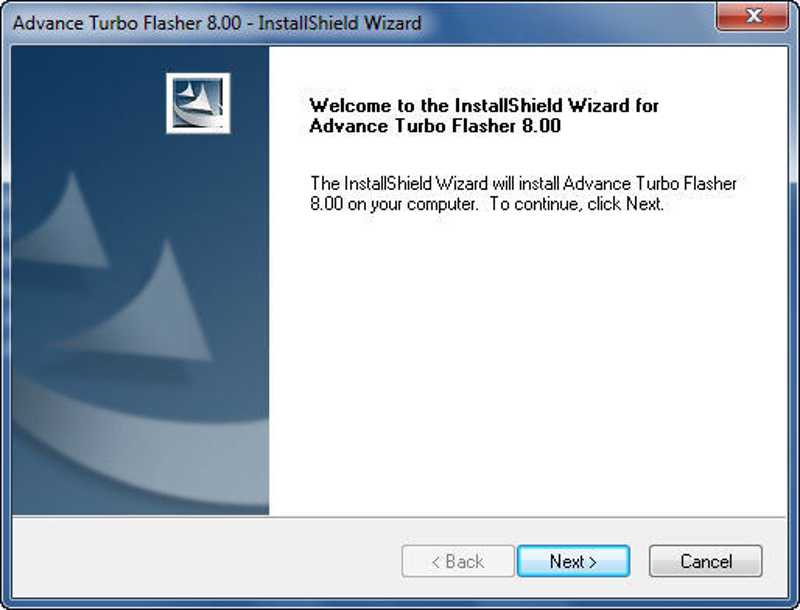
Vaihe 1. Lataa Advance Turbo Flasher -asennustiedosto luotettavalta alustalta.
Vaihe 2. Pura zip-tiedosto ja suorita exe-tiedosto.
Vaihe 3. Valitse seuraava -painiketta ja asenna se tietokoneellesi noudattamalla ohjeita.
Vaihe 4. Etsi pakkauksen mukana tullut USB-ajuri ja asenna se. Muuten ATF-työkalu ei tunnista puhelintasi.
Kirjallisuutta
Osa 3: Advance Turbo Flasherin käyttö
Nokia-puhelimen laiteohjelmiston flash-asennus
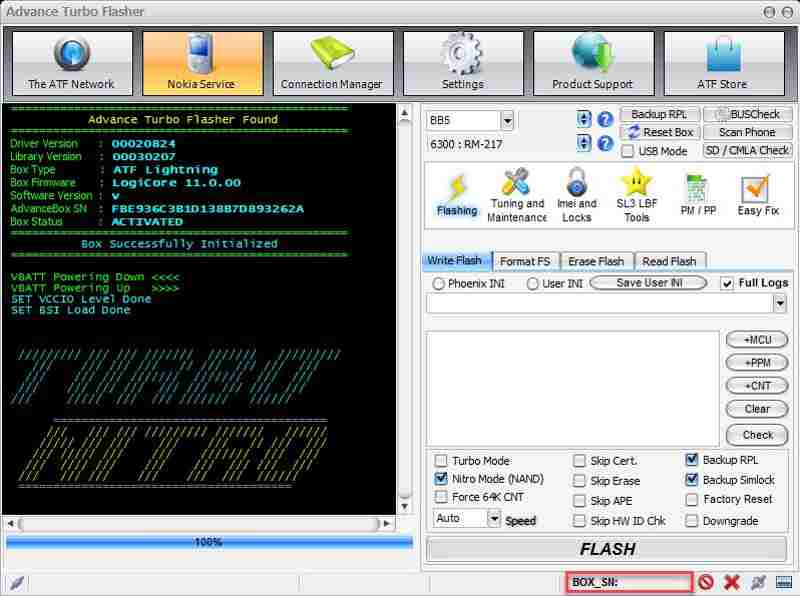
Vaihe 1. Avaa Advance Turbo Flasher Tool asennuksen jälkeen.
Vaihe 2. Valitse laitteesi malli alasvetovalikosta.
Vaihe 3. Liitä puhelin tietokoneeseen USB-kaapelilla.
Vaihe 4. Siirry Vilkkuu välilehti ja valitse haluttu laiteohjelmistotiedosto.
Vaihe 5. Valitse FLASH -painiketta alhaalla aloittaaksesi laiteohjelmiston flash-asennuksen.
Näin avaat näytön ilman salasanaa
Vaihe 1. Jos puhelimesi on lukittu, siirry osoitteeseen Palvelu välilehti Advance Turbo Flasherissa.
Vaihe 2. Yhdistä puhelimesi tietokoneeseen yhteensopivalla kaapelilla.
Vaihe 3. Klikkaa Nollaa (käyttäjäkoodi) -painiketta aloittaaksesi lukituksen avaamisen.
Osa 4: Vaihtoehto Advance Turbo Flasherille
Advance Turbo Flasher on saatavilla vain useille puhelinmerkeille. Lisäksi se ei ole saatavilla kaikkiin puhelinmalleihin. Siksi saatat tarvita vaihtoehtoisen työkalupakin. Tästä eteenpäin suosittelemme Apeaksoft DroidAide Android UnlockerSe pystyy poistamaan näytön lukitukset puhelimestasi ja ohittamaan FRP-lukituksen ilman salasanaa.

Ladannut yli 1,000,000 Käyttäjät
- Avaa Android-puhelimen näyttö ilman salasanaa.
- Poista PIN-koodit, salasanat, kuviot, sormenjäljet ja paljon muuta.
- Avaa vanhojen Samsung-puhelimien lukitus ilman tietojen menetystä.
- Ohita Googlen FRP-lukko ilman Google-tiliä.
- Tukee lähes kaikkia Android-puhelinmerkkejä ja -malleja.
Suojattu lataus
Puhelimen lukituksen avaaminen Advance Turbo Flasher -vaihtoehdolla
Vaihe 1. Asenna lukituksen avaustyökalu
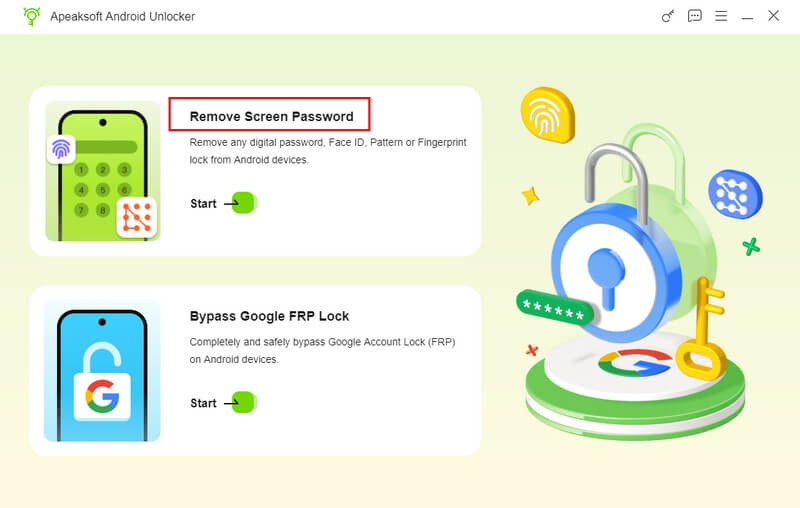
Käynnistä puhelimen lukituksen avausohjelmisto asennettuasi sen tietokoneellesi. Valitse Poista näytön salasana tila siirtyäksesi eteenpäin. Jos sinun on ohitettava FRP-lukitus laitteestasi, valitse Ohita Google FRP Lock sen sijaan.
Vaihe 2. Yhdistä puhelimeesi
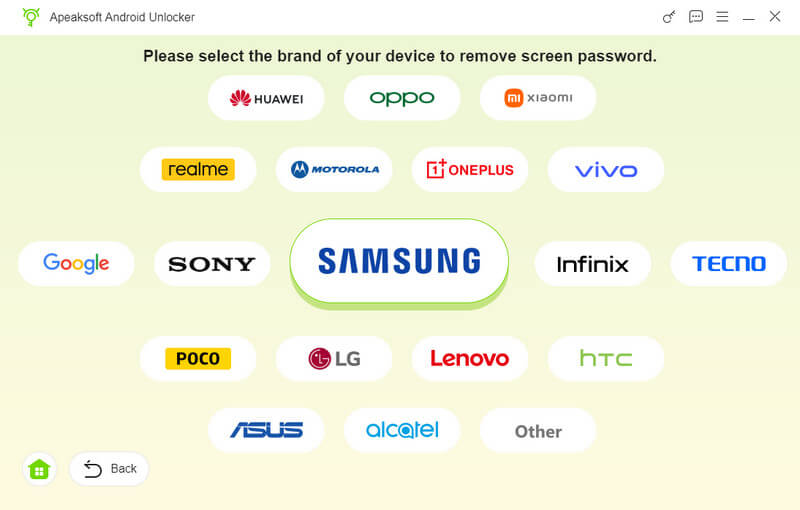
Valitse puhelimesi merkki ikkunassa. Yhdistä puhelimesi tietokoneeseen yhteensopivalla USB-kaapelilla. Varmista pyydettäessä, että luotat tähän tietokoneeseen. Tämän jälkeen ohjelmisto tunnistaa laitteesi välittömästi.
Vaihe 3. Avaa puhelimesi lukitus
Valitse Poista nyt -painiketta aloittaaksesi puhelimesi lukituksen avaamisen ilman salasanaa. Kun se on tehty, puhelimesi käynnistyy uudelleen automaattisesti. Irrota sitten laite ja asenna se uudelleen.
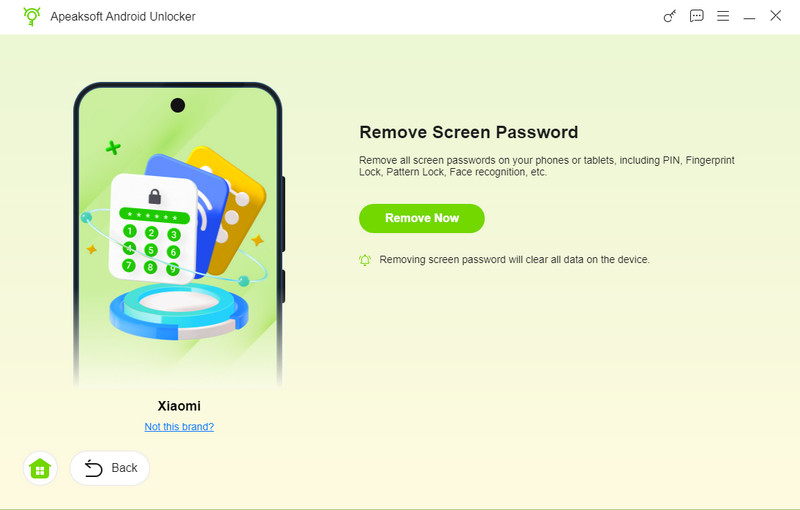
Vinkki: Prosessi poistaa kaikki laitteesi tiedot, joten kannattaa varmuuskopioida puhelimesi ensin.
Yhteenveto
Tässä artikkelissa jaettiin ja arvioitiin yksi Android-työkalupaketeista, Advance Turbo Flasher Työkalu. Sen avulla voit salata ja avata Nokia-puhelimesi tai muun merkin puhelimen lukituksen tietokoneella, kun se jumiutuu, on tiilitetty tai lukittu. Voit seurata yksityiskohtaisia ohjeitamme prosessin loppuun saattamiseksi. Tässä artikkelissa suositellaan myös Apeaksoft DroidAide Android Unlocker auttaaksesi sinua avaamaan puhelimesi lukituksen ilman salasanaa tai ohittamaan Google FRP -lukituksen.
Aiheeseen liittyvät artikkelit