

[Handleiding 2026] Hoe data te herstellen van een Toshiba harde schijf (HDD)

Toshiba is een beroemd technologiebedrijf dat consumentenelektronica voor uiteenlopende doeleinden produceert, waaronder vaste schijven van harde schijven.
Stel, u hebt een Toshiba harde schijf die voorheen prima werkte, maar plotseling beschadigd is geraakt en al uw officiële documenten ontoegankelijk zijn. Wat kunt u doen om bestanden van een Toshiba harde schijf te herstellen?
In deze handleiding analyseren we waarom de gegevens op uw Toshiba HDD verloren zijn gegaan en hoe u dit kunt herstellen. Toshiba HDD-herstel in detail.
PAGINA-INHOUD:
Deel 1: Veelvoorkomende oorzaken van gegevensverlies op Toshiba-harde schijven
Laten we allereerst bespreken wat dataverlies veroorzaakt en waarom dataherstel van een Toshiba-harde schijf nodig is. In de onderstaande tabel hebben we de mogelijke oorzaken en de mogelijkheden voor dataherstel in dergelijke gevallen gedetailleerd beschreven.
| Oorzaak van gegevensverlies | Beschrijving | Mogelijkheid tot gegevensherstel |
| Per ongeluk verwijderen | Verwijder per ongeluk bestanden van je Toshiba-harde schijf door op de toetsen Shift + Delete te drukken. Of leeg de prullenbak nadat je bestanden van je Toshiba-harde schijf hebt verwijderd. | Hoog – Herstelbaar voordat de gegevens worden overschreven |
| Onbedoelde opmaak | Per ongeluk de harde schijf van mijn Toshiba geformatteerd. | Gemiddeld tot hoog – Snel formatteren is vaak nog te herstellen. |
| Bestandssysteem corruptie | Het bestandssysteem raakt beschadigd of wordt niet meer door het systeem ondersteund. | Medium – Afhankelijk van de ernst van de corruptie |
| Onjuiste verwijdering | De harde schijf van een Toshiba met geweld en op onjuiste wijze verwijderen. | Medium Bestanden kunnen ontoegankelijk worden als gevolg van problemen met het bestandssysteem. |
| Stroomstoot | Plotseling stroomverlies of elektrische problemen tijdens het lezen of schrijven van gegevens op de harde schijf. | Medium – Kan het bestandssysteem beschadigen of het schrijven van bestanden onderbreken. |
| Virus- of malware-aanval | Virussen, Trojaanse paarden, ransomware en andere kwaadaardige programma's vallen aan. | Laag tot gemiddeld – Herstel is afhankelijk van of de bestanden versleuteld of overschreven zijn. |
| Hardwaregerelateerde problemen | Hardwareschade, bijvoorbeeld een defecte kabel tussen de externe harde schijf en uw computer. | Laag – Bij fysieke schade is vaak professionele hulp nodig. |
Deel 2: Veelvoorkomende manieren om een Toshiba HDD te herstellen
Voordat u begint met het herstellen van de harde schijf van uw Toshiba: belangrijke stappen
- 1.Stop met het schrijven van gegevens naar de betreffende Toshiba-harde schijf. Dit kan leiden tot het overschrijven van gegevens, waardoor de kans op herstel kleiner wordt.
- 2.Voer geen systeemherstel of fabrieksreset uit. Hierdoor worden alle bestaande gegevens permanent gewist.
- 3.Formatteer uw Toshiba-harde schijf niet vóór het herstelproces.
- 4.Sla de herstelde schijfgegevens nooit op dezelfde locatie op.
Probeer Toshiba HDD-herstel met een andere computer.
Of uw interne of externe Toshiba-harde schijf nu problemen vertoont, u kunt deze uit de computer halen en in een andere computer aansluiten. Mogelijk zijn er slechts conflicten tussen de Toshiba-harde schijf en de computer, maar geen echte problemen. U kunt daarom proberen uw Toshiba-harde schijf in een andere computer aan te sluiten om het probleem op te lossen.
Zorg ervoor dat de Toshiba-harde schijf correct op de computer is aangesloten en controleer of de kabel in goede staat is.
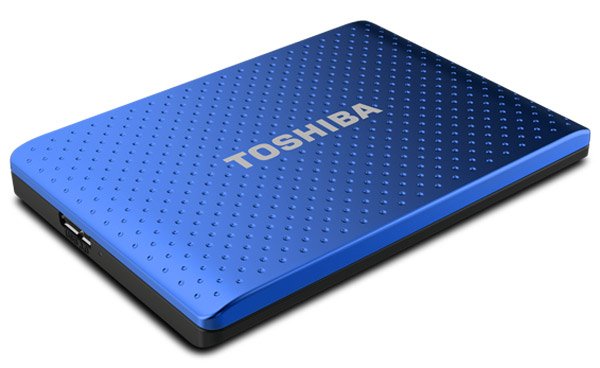
Herstel een externe Toshiba-harde schijf met behulp van professionele software.
Als uw externe Toshiba-harde schijf bestanden is kwijtgeraakt door per ongeluk verwijderen, formatteren of systeemfouten, is het gebruik van professionele software voor gegevensherstel de veiligste en meest tijdbesparende manier om ze terug te halen. Apeaksoft Data Recovery Het is een ideaal hulpmiddel. Je kunt deze tool ook gebruiken om andere harde schijfherstelwerkzaamheden uit te voeren op een Toshiba-laptop.
Betrouwbaar hulpmiddel voor gegevensherstel van Toshiba-harde schijven
- Herstel uw Toshiba-schijf met één klik.
- Herstel gegevens van RAM-station van Toshiba.
- Ondersteuning voor het herstellen van afbeeldingen, video's, audio, documenten, e-mails, archieven en meer.
- Verwijderde bestanden herstellen naar hun oorspronkelijke formaat en kwaliteit.
- Voorbeeldweergave voor selectief herstel van Toshiba-harde schijven.
- Beschikbaar voor Windows 11/10/8.1/8/Vista/XP en NTFS, FAT16, FAT32, exFAT, EXT, enz.
Veilige download
Veilige download

Hoe u verloren gegevens op een Toshiba-harde schijf kunt herstellen
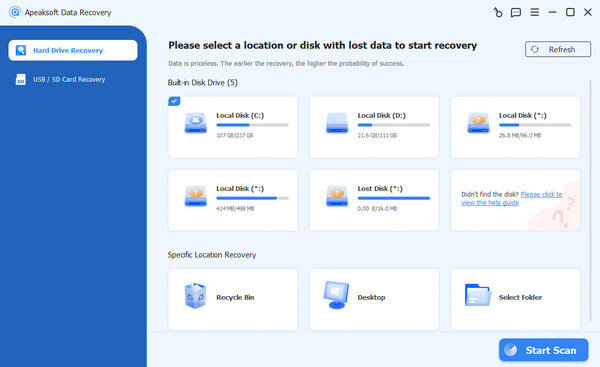
Stap 1. Scan de volledige Toshiba-harde schijf op zoek naar gegevens.
Zorg ervoor dat je je Toshiba-harde schijf op je computer aansluit. Download en installeer de beste tool voor het herstellen van Toshiba-harde schijven op je pc.
Start het programma en selecteer je Toshiba HDD, of het nu een interne of externe harde schijf is.
Klik eenmaal op de Start scannen Als u op de knop drukt, zal Toshiba Data Recovery automatisch aan de slag gaan.
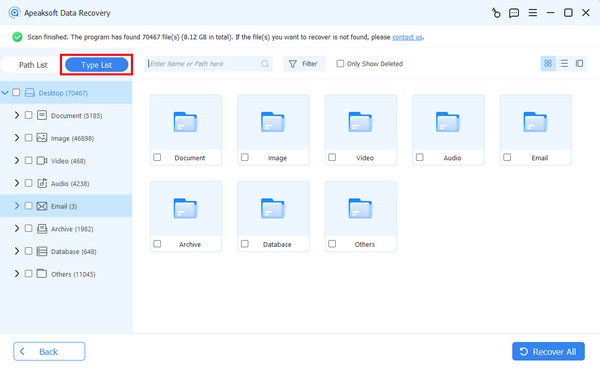
Stap 2. Voorbeeldweergave vóór Toshiba HDD-herstel
Wanneer het resultatenvenster verschijnt, selecteer dan een gegevenstype aan de linkerkant en open de mappen in het rechterdeelvenster om de verloren gegevens te bekijken. Filter Met de functie in de bovenste menubalk kan snel een specifiek bestand worden gevonden.
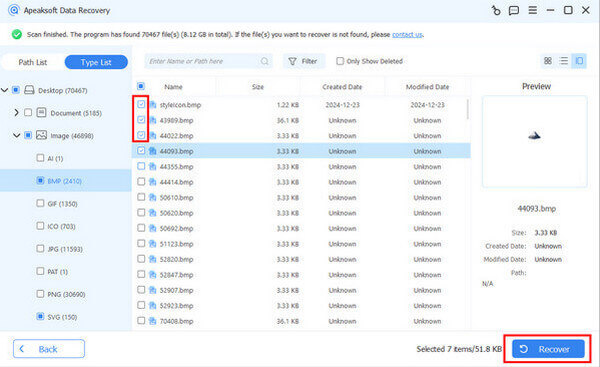
Stap 3. Herstel gegevens van de Toshiba-harde schijf met één klik.
Selecteer alle bestanden die u wilt terughalen van de beschadigde Toshiba-harde schijf. Klik vervolgens op de Recover All knop om het herstelproces van de Toshiba-harde schijf te starten.
Tips:
Houd er rekening mee dat deze software geen bestanden kan herstellen die al zijn overschreven. De kans op succesvolle herstel varieert afhankelijk van hoe de schijf werd gebruikt na het gegevensverlies.
Als uw Toshiba-harde schijf fysiek beschadigd is, kunt u hulp vragen aan een reparatiewinkel in de buurt. gegevensherstelservice shop in shop.
Deel 3: Aanbevolen tips om gegevensverlies op Toshiba-harde schijven te voorkomen
Hoewel je gegevens van een Toshiba-harde schijf na een onbedoeld verlies kunt herstellen, is het beter om vooraf een aantal eenvoudige preventieve maatregelen te nemen om veel onnodige problemen te voorkomen en belangrijke gegevens te beschermen tegen verlies.
- 1.Maak regelmatig een back-up van uw belangrijke bestanden op een andere locatie.
- 2.Verwijder de externe harde schijf van Toshiba altijd op een veilige manier voordat u de stekker uit het stopcontact haalt.
- 3.Gebruik een UPS met overspanningsbeveiliging om stroompieken te voorkomen.
Conclusie
Toshiba HDD's zijn wereldwijd populair vanwege hun kosteneffectieve karakter. Het is dan ook niet verwonderlijk dat veel mensen zoeken naar informatie over hoe ze er zelf een kunnen maken. Herstel van Toshiba-harde schijven Op sociale media en forums, gezien het grote aantal mensen dat Toshiba-harde schijven gebruikt.
Op basis van onze bovenstaande inleiding begrijpt u wellicht hoe u gegevens van een Toshiba-harde schijf kunt herstellen en waar u op moet letten vóór en na het herstelproces. Apeaksoft Data Recovery Het is altijd de beste keuze om de gegevens op uw Toshiba HDD te beschermen.
Gerelateerde artikelen
Dit artikel beschrijft en beoordeelt de 10 beste betaalde en gratis softwareprogramma's en applicaties voor het herstellen van geheugenkaartgegevens voor pc en Mac.
Ontdek de beste 6 SD-kaartherstelprogramma's voor Mac en Windows om u te helpen verloren of verwijderde bestanden, zoals foto's, video's, enz., van SD-kaarten te herstellen!
Dit bericht biedt gerichte oplossingen voor verschillende scenario's om verloren gegevens van een externe harde schijf efficiënt te herstellen. Red uw harde schijf nu!
Hoe ga je om met gegevensverlies op een kleine USB-stick? Lees hoe je verwijderde bestanden van een flashdrive of beschadigde USB kunt herstellen.



