


Jak odzyskać usunięte wiadomości tekstowe z telefonu z Androidem

Przypadkowe usunięcie ważnych wiadomości tekstowych z telefonu z Androidem może być sporym wyzwaniem. Próbowałeś różnych metod odzyskiwania ich z telefonu. Prawidłowe użycie i przestrzeganie odpowiednich kroków może jednak zwiększyć prawdopodobieństwo sukcesu. Ten konkretny przewodnik przeprowadzi Cię przez praktyczne sposoby. odzyskaj usunięte wiadomości tekstowe z Androida prawidłowo korzystać z telefonu lub tabletu.
TREŚĆ STRONY:
- Część 1: Jak odzyskać trwale usunięte SMS-y z Androida bez kopii zapasowej
- Część 2: Jak odzyskać usunięty tekst na Androidzie za pomocą Sendera
- Część 3: Jak odzyskać usunięte SMS-y na Androidzie z Google Messages
- Część 4: Jak odzyskać usunięte SMS-y na Samsungu
- Część 5: Jak przywrócić usunięty tekst na Androidzie z kopii zapasowej
Część 1: Jak odzyskać trwale usunięte SMS-y z Androida bez kopii zapasowej
Apeaksoft Android Data Recovery to szybki sposób na odzyskanie trwale usuniętych wiadomości tekstowych na urządzeniu z Androidem. Aplikacja potrafi wyszukać utracone dane w pamięci telefonu i odzyskać je, zanim zostaną nadpisane. Ponadto, przyjazny dla użytkownika interfejs sprawia, że jest to łatwa opcja dla początkujących.

Pobrano przez ponad 1,000,000 już nam zaufało
- Odzyskaj utracone dane z Androida bez kopii zapasowej.
- Obsługa wiadomości SMS, zdjęć, filmów, kontaktów i innych.
- Odzyskiwanie danych utraconych z powodu rootowania, awarii systemu lub przypadkowego usunięcia.
- Podgląd usuniętych plików na urządzeniach z systemem Android.
- Kompatybilny z szeroką gamą marek i modeli urządzeń z systemem Android.
Jak odzyskać trwale usunięte SMS-y na Androidzie bez kopii zapasowej
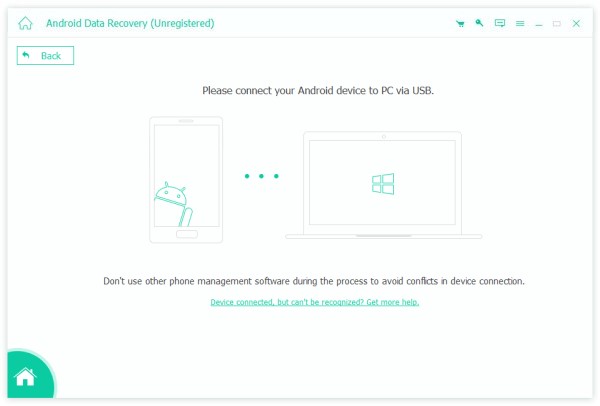
Krok 1. Połącz się z telefonem
Uruchom najlepszą aplikację do odzyskiwania skasowanych wiadomości tekstowych z Androida po zainstalowaniu jej na komputerze. Dostępna jest również wersja na Maca. Włącz telefon i włącz USB Debugging tryb w Ustawienia Aplikacja. Podłącz telefon do komputera kablem Lightning. Po wyświetleniu monitu wybierz Przenieś pliki w sekcji Użyj USB do dialogu.
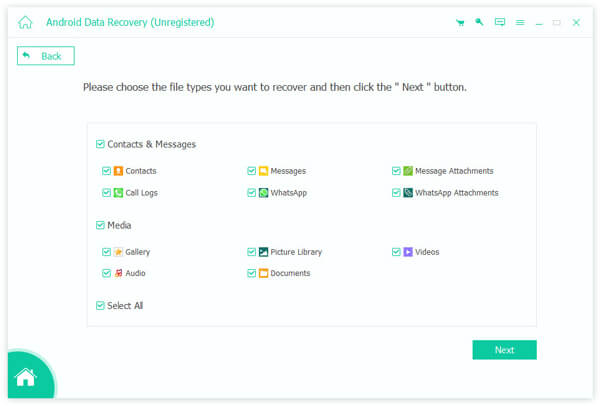
Krok 2. Podgląd usuniętych SMS-ów
Po wykryciu telefonu wybierz Wiadomości oraz Załączniki wiadomości, Kliknij Następna Naciśnij przycisk, aby rozpocząć skanowanie usuniętych wiadomości SMS w telefonie. Następnie włącz Wyświetlaj tylko usunięte elementy aby wyświetlić usunięte SMS-y.
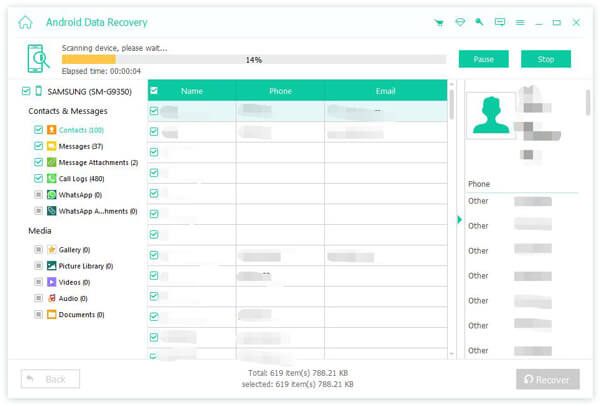
Krok 3. Odzyskiwanie SMS-ów na Androidzie bez kopii zapasowej
Następnie wybierz wiadomości tekstowe, które chcesz odzyskać i kliknij Recover przycisk. Przejdź do folderu docelowego i potwierdź Odzyskiwanie SMS-ów. Po zakończeniu możesz sprawdzić usunięte wiadomości tekstowe na swoim komputerze.
Część 2: Jak odzyskać usunięty tekst na Androidzie za pomocą Sendera
Jeśli przypadkowo usuniesz wiadomość tekstową, możesz poprosić nadawcę o jej ponowne wysłanie. Jeśli nie możesz się z nim skontaktować, spróbuj poprosić o pomoc operatora sieci. Według naszych badań, wielu operatorów komórkowych przechowuje zapisy wiadomości SMS przez określony czas.
Pamiętaj, że aby odzyskać usunięte SMS-y na urządzeniach z Androidem, musisz podać niezbędne informacje, takie jak numer telefonu. Co więcej, musisz odwiedzić sklep swojego operatora.
Część 3: Jak odzyskać usunięte SMS-y na Androidzie z Google Messages
Wbudowana aplikacja Wiadomości Google nie posiada folderu Kosz ani Kosz. Alternatywnie, posiada funkcję Archiwum. Prawdopodobnie po prostu archiwizujesz wiadomości, ale ich nie usuwasz. Dlatego możesz spróbować odzyskać usunięte SMS-y z telefonu z Androidem.
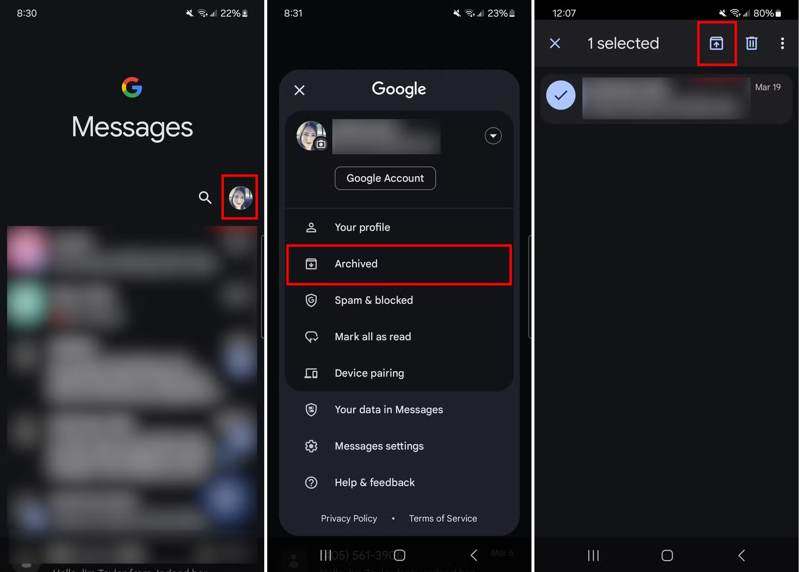
Krok 1. Uruchom Wiadomości Google aplikację z paska aplikacji.
Krok 2. Kliknij swoje zdjęcie profilowe i wybierz Archiwizowane.
Krok 3. Wybierz interesujące Cię wiadomości.
Krok 4. Naciśnij i przytrzymaj wybraną wiadomość, a następnie dotknij Zdezarchiwizuj przycisk.
Część 4: Jak odzyskać usunięte SMS-y na Samsungu
Android to otwarty system operacyjny. Producenci dostosowują system Android do swoich smartfonów. Na przykład Samsung dodał do swoich produktów aplikację do obsługi wiadomości, która znajduje się w folderze Kosz. Po usunięciu wiadomości, trafi ona do folderu Kosz i będzie tam przechowywana przez 30 dni. Zanim SMS-y zostaną trwale usunięte, można je odzyskać na Androidzie bez tworzenia kopii zapasowej.
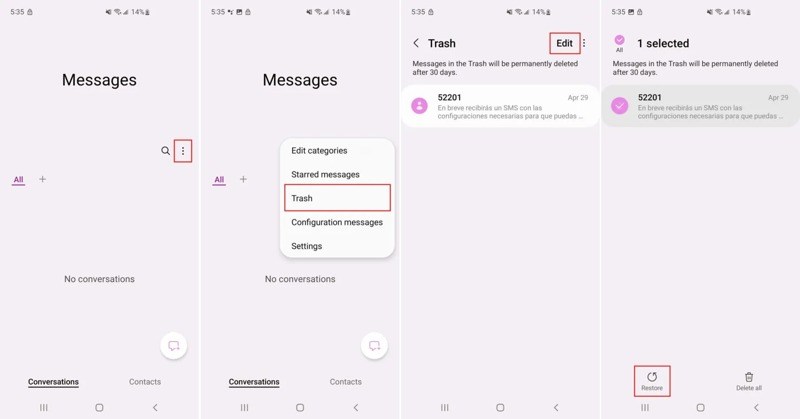
Krok 1. Otwórz aplikację Wiadomości Samsung.
Krok 2. Stuknij w Więcej przycisk z ikoną trzech kropek.
Krok 3. Dodaj Kosz aby wyświetlić ostatnio usunięte wiadomości tekstowe.
Krok 4. Stuknij w Edytuj naciśnij przycisk i wybierz interesujące Cię wiadomości.
Krok 5. Następnie dotknij Przywracać przycisk na dole.
Krok 6. Na koniec wróć do aplikacji Wiadomości i sprawdź, czy usunięte wiadomości zostały odzyskane.
Uwaga: Samsung wprowadził aplikację Wiadomości Google w nowych telefonach. Jeśli nie możesz znaleźć folderu Kosz, ta metoda jest niedostępna.
Część 5: Jak przywrócić usunięty tekst na Androidzie z kopii zapasowej
Innym sposobem na odzyskanie usuniętych wiadomości tekstowych na telefonach z Androidem jest utworzenie ich kopii zapasowej. Jeśli masz skonfigurowaną kopię zapasową na telefonie, np. w Google One lub aplikacjach innych firm do tworzenia kopii zapasowych SMS-ów, możesz szybko odzyskać trwale usunięte dane.
Jak odzyskać usunięte wiadomości SMS na Androidzie za pomocą funkcji SMS Backup & Restore
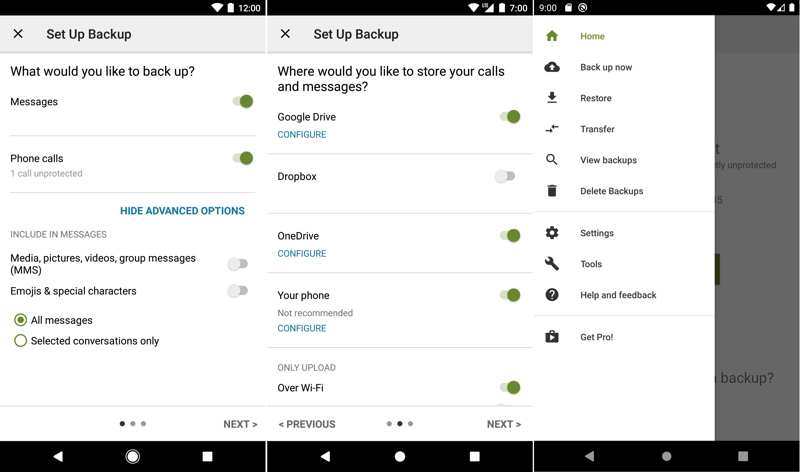
Krok 1. Uruchom aplikację SMS Backup & Restore.
Krok 2. Stuknij w Hamburger i wybierz Przywracać.
Krok 3. Wybierz lokalizację, w której chcesz zapisać kopię zapasową wiadomości.
Krok 4. Wybierz Dostęp tylko do plików i folderów otwartych lub utworzonych za pomocą SMS Backup & Restorei dotknij OK.
Krok 5. Wybierz odpowiednią kopię zapasową i dotknij Przywracać.
Krok 6. Po pobraniu wiadomości uruchom aplikację Wiadomości i sprawdź swoje SMS-y.
Jak przywrócić usunięty tekst na Androidzie z kopii zapasowej Google One
Krok 1. Jeśli skonfigurowałeś kopię zapasową Google One na swoim telefonie z systemem Android, uruchom Ustawienia app.
Krok 2. Iść do Konfiguracja oraz Resetuj opcje.
Krok 3. Stuknij Wymaż wszystkie dane (przywróć ustawienia fabryczne). To będzie przywracanie ustawień fabrycznych Twój telefon z systemem Android.
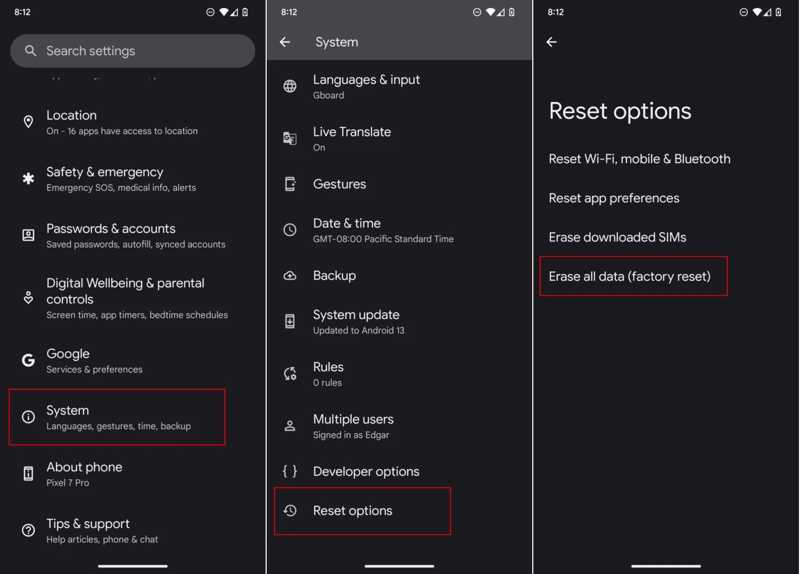
Krok 4. Po ponownym uruchomieniu telefonu skonfiguruj go jako nowe urządzenie.
Krok 5. Upewnij się, że jesteś połączony z siecią Wi-Fi.
Krok 6. Kiedy dotrzesz do Kopiuj aplikacje i dane ekran, stuknij Następna.
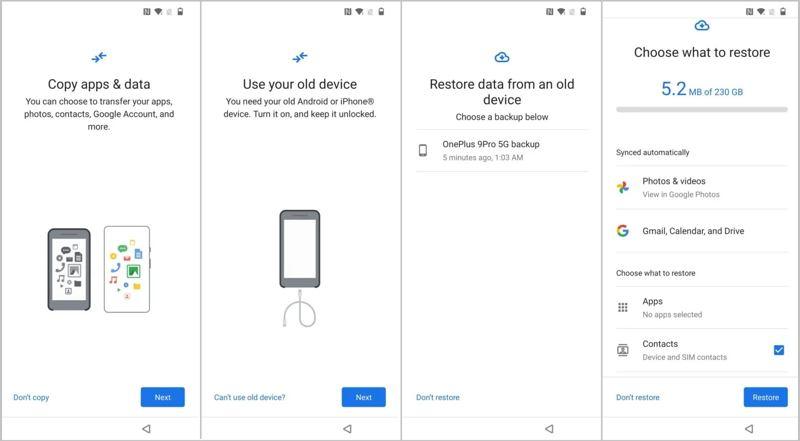
Krok 4. Wybierz Nie można używać starego urządzenia i zaloguj się na swoje konto Google.
Krok 5. Wybierz ostatnią dostępną kopię zapasową, wybierz SMS-y i inne żądane typy danych i dotknij Przywracać.
Inne dokumenty
Wniosek
W tym przewodniku przedstawiono wiele sposobów odzyskać skasowane wiadomości tekstowe na Androida telefony i tablety. Możesz spróbować przywrócić wiadomości z archiwum, jeśli zostały zarchiwizowane w Wiadomościach Google. Na niektórych telefonach Samsung możesz odzyskać utracone wiadomości z folderu Kosz. Jeśli masz kopię zapasową, przywróć usunięte wiadomości z kopii zapasowej. Apeaksoft Android Data Recovery umożliwia odzyskanie usuniętych wiadomości SMS bez konieczności tworzenia kopii zapasowej.
 Apeaksoft Android Data Recovery
 Odzyskaj usunięte lub utracone dane ze wszystkich popularnych urządzeń z systemem Android.
Powiązane artykuły




