

How to Get Samsung Contacts Recovery With or Without Backup

Today, we save lots of data on our smartphones. The contact list and phone numbers, for example, are the most important data on a phone. In our daily life, we may lose important contacts due to human error, accidental deletion, factory reset, update failure, software glitches, and more. Among Samsung users, this problem commonly happens. Our guide will concentrate on providing you with proven methods to restore contacts on a Samsung urządzeń.
TREŚĆ STRONY:
Part 1: Recover Contacts on Samsung from the Recycle Bin
The Recycle Bin folder is the easiest way to recover Samsung phone contacts. It allows you to recover contacts that were deleted within 30 days. That is the built-in feature in the Contacts app.
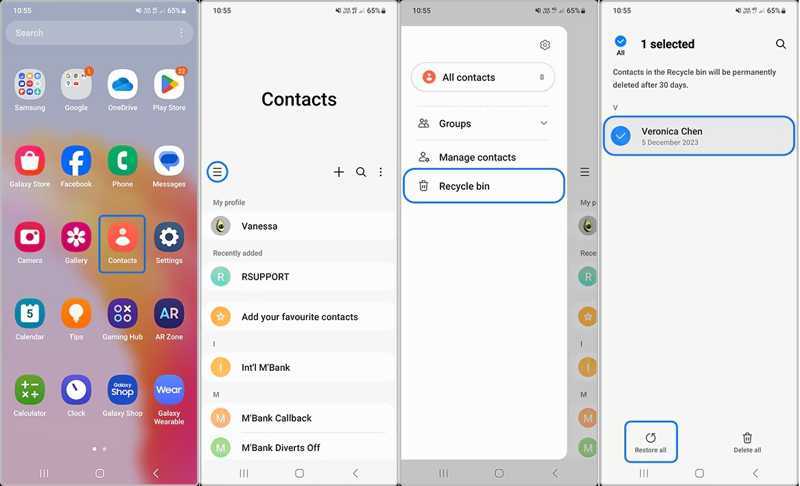
Krok 1. Uruchom Kontakt aplikacja na telefonie Samsung.
Krok 2. Stuknij w Hamburger i wybierz Kosz.
Krok 3. Here you can view all recently deleted contacts.
Krok 4. Tap the Edit button, select the desired contacts, and hit Restore.
Part 2: Retrieve Samsung Contacts from Samsung Cloud
Samsung Cloud is the cloud service released by Samsung for its customers. It allows you to back up your contacts. After you lose some contacts, you can retrieve contacts on your Samsung device from Samsung Cloud.
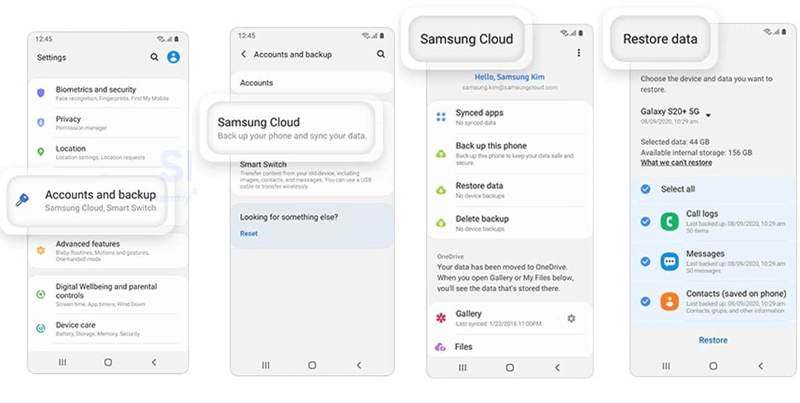
Krok 1. Otwórz Ustawienia aplikacja na telefonie Samsung.
Krok 2. Stuknij Konto Samsungi wybierz Samsung Chmura.
Krok 3. Naciśnij Przywróć dane przycisk.
Krok 4. Then, choose the backup that may include the lost contacts.
Krok 5. Wybierz Kontakt i dotknij Przywracać button. This process won't przywracanie ustawień fabrycznych Twoje urządzenie.
Part 3: Restore Samsung Contacts via Smart Switch
Smart Switch is the backup feature for Samsung devices. It can back up your data to an SD card or a computer. Of course, it allows you to get deleted contacts back on your Samsung. The prerequisite is that you have a Smart Switch backup.
How to Restore Contacts to Samsung from SD Card
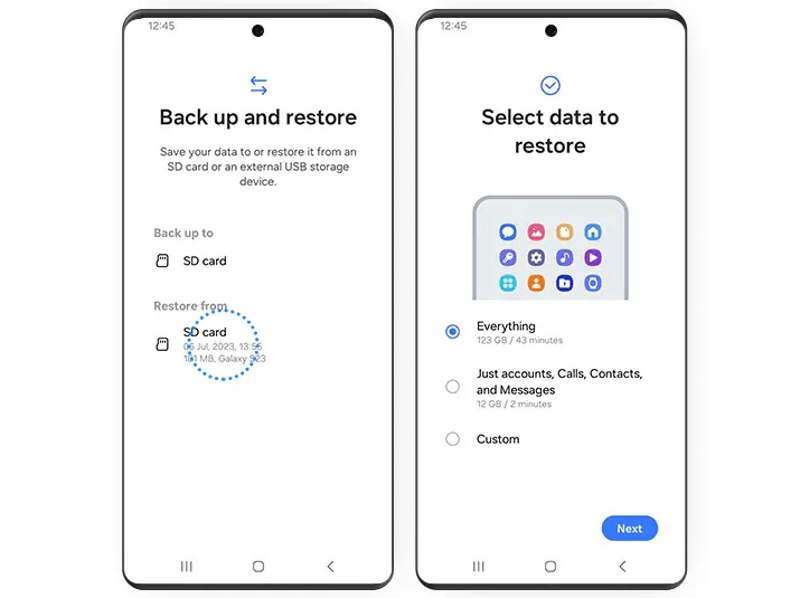
Krok 1. Insert your backup SD card into your phone.
Krok 2. Open the Smart Switch app.
Krok 3. Dodaj Back up and restore your datai uderz KONTUNUUJ.
Krok 4. Stuknij karta SD pod Przywrócić z powierzchnia.
Krok 5. Wybierz Just accounts, Calls, Contacts, and Messages.
Krok 6. Stuknij Następna and follow the onscreen instructions to find lost contacts on Samsung.
How to Restore Contacts to Samsung from a Computer
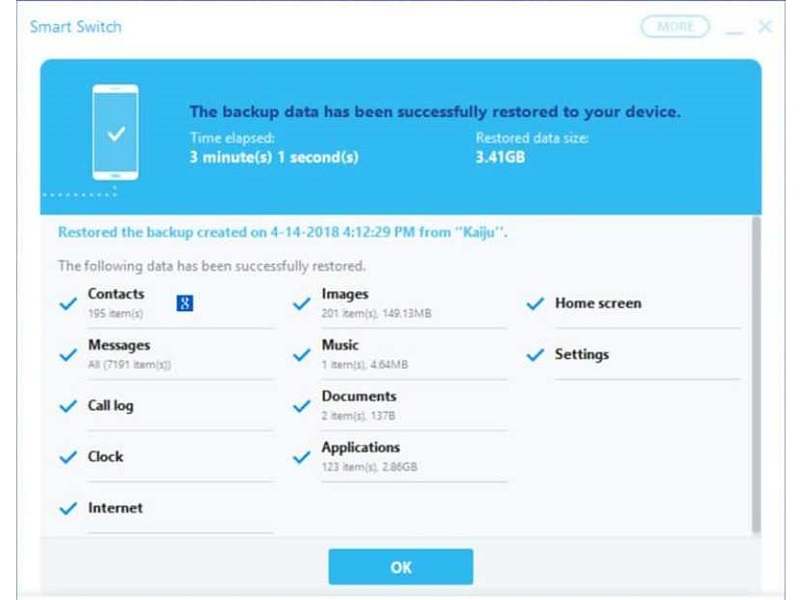
Krok 1. Open the Smart Switch client on your computer.
Krok 2. Plug your Samsung phone into the computer with a USB cable.
Krok 3. After your device is recognized, click Przywracać.
Krok 4. Kliknij Ręcznie wybierz plik, and select contacts.
Krok 5. Finally, hit Restore again to initiate Samsung phone contacts recovery.
Part 4: Find Deleted Contacts on Samsung from Google
If you have synced or backed up your contacts to your Google account, you can retrieve deleted numbers from Samsung. You can import the contacts from your account and merge them with existing contacts.
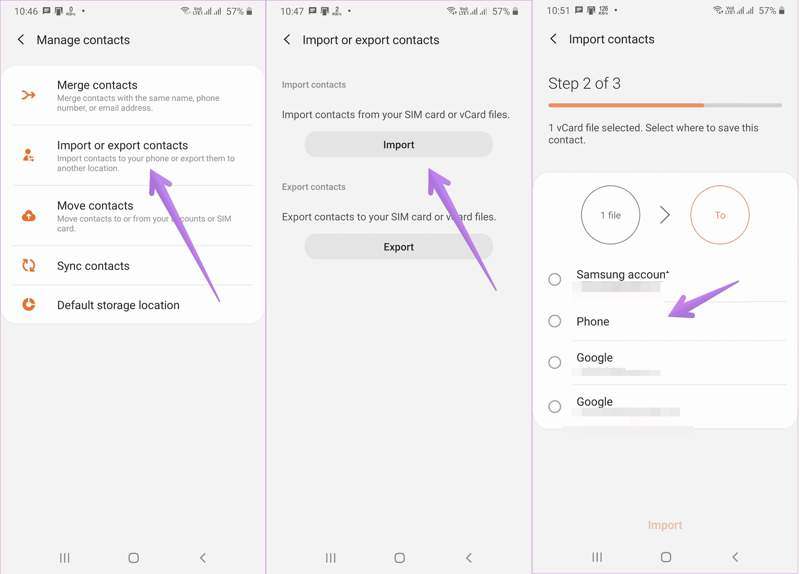
Krok 1. Uruchom swój Kontakt app.
Krok 2. Stuknij w Menu i wybierz Importuj lub eksportuj kontakty.
Krok 3. Stuknij w import przycisk.
Krok 4. Select your Google account or the contact file you exported from Google.
Krok 5. Następnie wybierz Telefon i dotknij import.
Part 5: Recover Contacts on Samsung Without Backup
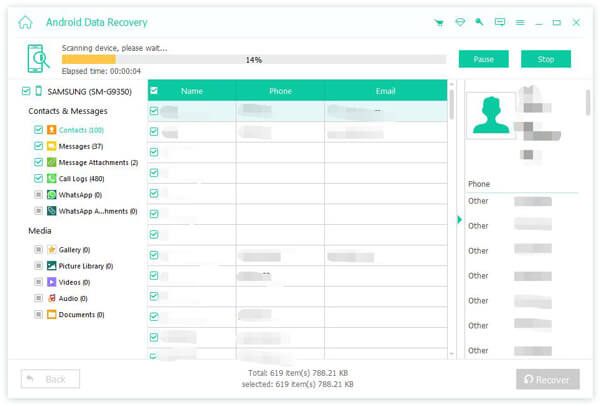
Can you get deleted contacts back on Samsung if you don’t have a backup? The answer is yes, and all you need is Apeaksoft Android Data Recovery. It can scan your memory and look for deleted contacts.
The Best Way to Recover Contacts on Samsung Without Backup
- Recover deleted contacts on Samsung phones in one click.
- Preview lost contacts on your device.
- Extract contacts from a broken Samsung device.
- Compatible with almost all Samsung phones and tablets.
How to Recover Deleted Contacts on Samsung
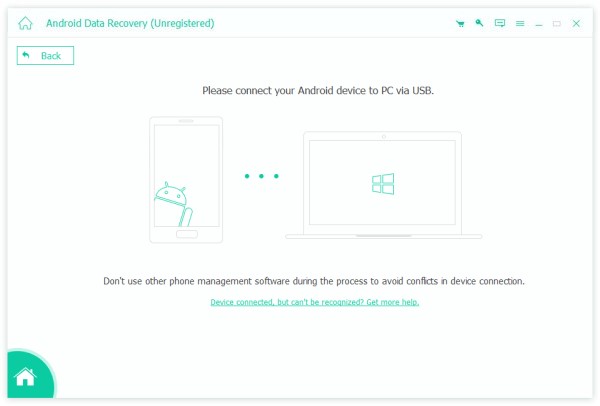
Krok 1. Install the contact recovery tool
Run the best contact recovery software for Samsung after installing it on your computer. Connect your device to your computer with a USB cable. Make sure to enable USB Debugging tryb w telefonie i wybierz Przenieś pliki.
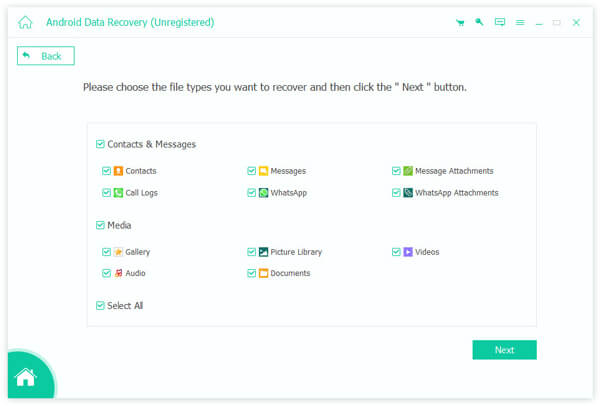
Krok 2. Scan contacts on your phone
Once your Samsung phone is detected, select Kontakti kliknij przycisk Następna button to begin scanning contacts in your memory. When it is done, toggle on Wyświetlaj tylko usunięte elementy, and view deleted contacts.
Krok 3. Retrieve contacts on Samsung
Finally, select the contacts you want to retrieve and click the Recover button at the bottom. Set the output folder and confirm Samsung phone contacts recovery. You can also odzyskaj usuniętą pocztę głosową na Androidzie.
Podsumowanie
W tym artykule przedstawiono wiele metod retrieve contacts from Samsung phones. The Recycle Bin folder is the easiest way to get back the contacts you recently deleted. With a backup, you can find the lost contacts from Samsung Cloud, using Smart Switch, or from Google. Apeaksoft Android Data Recovery is a simple way to recover disappeared contacts on your Samsung phone without a backup.
Powiązane artykuły
Dowiedz się, gdzie są przechowywane usunięte wiadomości tekstowe w systemie Android i poznaj kilka sprawdzonych sposobów odzyskiwania wiadomości tekstowych w systemie Android!
Jeśli przypadkowo usuniesz grę lub dane na Androidzie, dowiedz się z tego artykułu, jak odzyskać je z Google Play lub innych źródeł.
Czy kiedykolwiek przypadkowo usunąłeś pliki na swoim Androidzie? Ten post pokaże, jak odzyskać usunięte pliki z Androida, nawet jeśli wcześniej nie zrobiłeś kopii zapasowej!
Możesz odzyskać utracone filmy na telefonie z Androidem różnymi metodami. Ponadto możesz odzyskać usunięte filmy na Androidzie bez kopii zapasowych.



