Detaljerat svar på om FaceTime meddelar skärminspelning

FaceTime är den förinstallerade videochattappen som utvecklats av Apple för att två eller fler användare ska kunna se och prata med varandra i realtid. Apple håller FaceTime privat och enkelt. Anta att du skrattar med en vän på FaceTime och plötsligt får du en tanke: tänk om de spelar in det? Enligt vår forskning är sådan tvekan inte ovanlig. Den här artikeln svarar på om FaceTime meddelar vid skärminspelning på iPhone eller Mac.
SIDINNEHÅLL:
Del 1: Meddelar FaceTime skärminspelning
Meddelar Apple när du spelar in FaceTime via skärm? Nej, FaceTime meddelar inte användare om någon spelar in ett videosamtal via skärm, vilket gör det mindre säkert för privata samtal. När någon spelar in FaceTime på antingen en iPhone, iPad eller en Mac-dator visas inget popup-fönster, inget ljud, ingen avisering.
Apple designade FaceTime på det här sättet av några anledningar, till exempel brist på inspelningskontroller, den inbyggda skärminspelningsfunktionen rapporterar inte aktivitet till appar, inga avbrott i samtal och mer.
Del 2: Hur kan du se om någon spelar in FaceTime
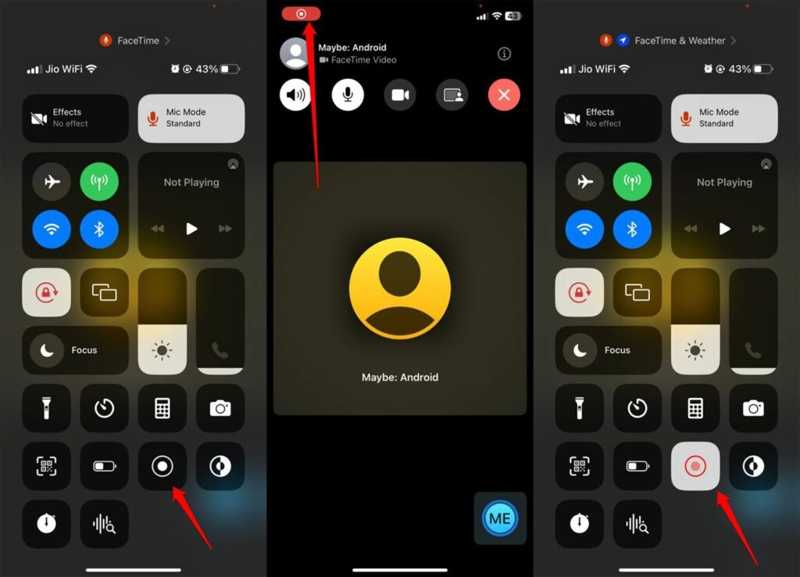
Även om FaceTime inte meddelar dig om skärminspelning kan du ta reda på vad som händer genom att följa några tecken. Tekniskt sett finns det ingen garanterad metod. Lär dig dessa tecken för att hålla din chatt privat och säker.
Skylt 1: Inspelningspunkt
När du spelar in skärmbilden med FaceTime, oavsett om du använder den inbyggda skärminspelningsfunktionen eller en tredjepartsapp för skärminspelning, visas en röd inspelningsprick på skärmen. Om du kan se inspelningsindikatorn på din väns skärm spelar de in ditt videosamtal. Du kan be din vän att dela telefonskärmen via FaceTime när de ringer.
Tecken 2: Fördröjning eller fördröjning
En viktig symbol är lagg och fördröjning. När man ringer i FaceTime används många källor. Om någon aktiverar skärminspelning för FaceTime kan videon plötsligt lagga och bli försenad på grund av att enheten hackar eller blir varm.
Tecken 3: Misstänkta ljud eller handlingar
Till spela in FaceTime På en iPhone eller Mac måste den som ringer gå till Kontrollcenter och öppna skärminspelningsfunktionen. Du kan höra det misstänkta klickljudet eller se udda aktiviteter när du ringer FaceTime.
Skylt 4: Ovanlig begäran
En annan ledtråd för att se om någon spelar in FaceTime på skärmen är ovanliga förfrågningar eller beteenden under samtalet. Om du stöter på dessa problem är chansen stor att den som ringer försöker spela in ditt FaceTime-samtal för att uppnå ett specifikt syfte.
Del 3: Så här skyddar du din integritet på FaceTime
Om du föredrar att hålla kontakten med dina vänner och familj via FaceTime kan du skydda din integritet genom att följa några tips. Vi delar med oss av praktiska tips och tricks för att hålla dig säker när du ringer via FaceTime:
- 1.Ring bara betrodda personer.
- 2.Visa inte privat information i kamerans vyn.
- 3.Fråga dina vänner och familj direkt när du använder FaceTime.
- 4.Använd en alternativ app som meddelar när skärminspelningar pågår, som Zoom.
Ytterligare läsning
Del 4: Det ultimata sättet att spela in FaceTime utan lagg
Om du vill spela in FaceTime utan att meddela andra, Apeaksoft skärminspelare är ett bra alternativ. Det låter dig spela in videosamtal på din iPhone eller iPad med en dator. Således avbryts inte chatten. Dessutom förenklar den intuitiva designen arbetsflödet.

Nedladdad av över 1,000,000 användare
- Spela in FaceTime-samtal på din iPhone smidigt.
- Spara FaceTime-samtal i HD-videor.
- Stöd en mängd olika videoformat.
- Meddelar inte andra vid skärminspelning.
- Erbjud bonusfunktioner, som att göra schemalagda inspelningar.

Hur man spelar in FaceTime på din iPhone utan att lagga
Steg 1. Installera FaceTime-inspelaren
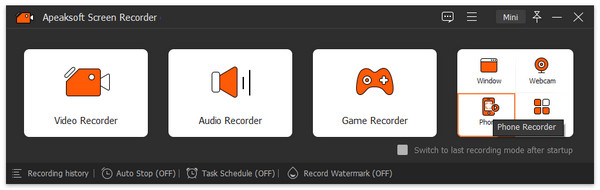
Starta FaceTime-inspelaren när du har installerat den på din dator. Den är tillgänglig på Windows 11/10/8/7/XP/Vista och Mac OS X 10.13 eller senare. Välj Telefoninspelare och välj iOS -inspelareFölj sedan instruktionerna på skärmen för att spegla din iPhone-skärm.
Steg 2. Spela in FaceTime
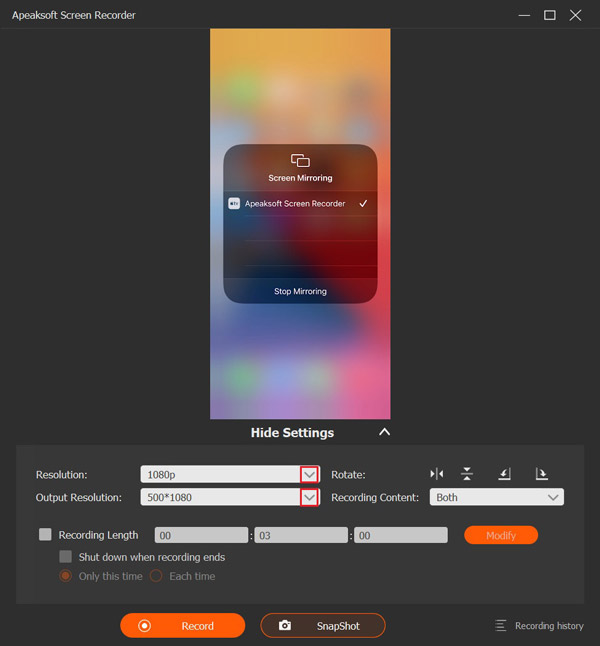
Ställ in upplösning och inspelningsinnehåll, till exempel Telefon högtalareStarta ett samtal i FaceTime på din iPhone och klicka på Spela in knappen för att börja spela in samtalet.
Steg 3. Spara samtalsinspelningen
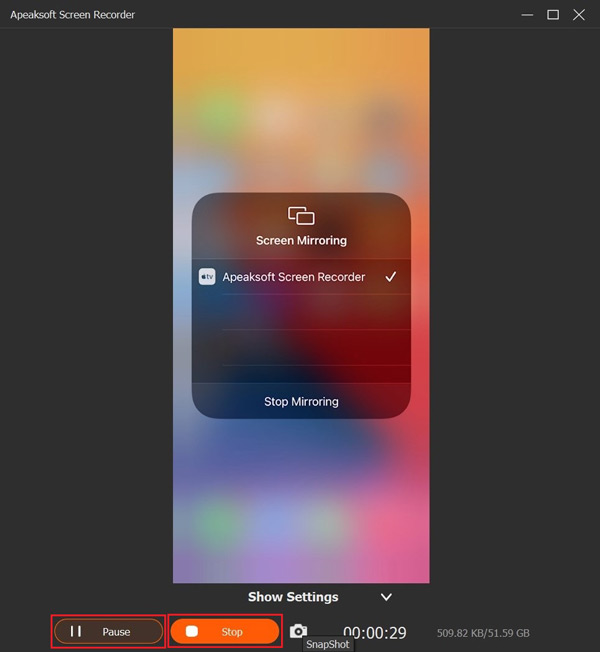
När samtalet är klart klickar du på Sluta knappen i fönstret för att spara samtalsinspelningen på din hårddisk. Under processen kan du tillfälligt stoppa inspelningen genom att trycka på Paus knappen. För att visa inspelningen, klicka på Inspelningshistorik och öppna den senaste videon.
Tips: Om du vill ändra videoformat eller utdatamapp klickar du på Inställningar-menyn i huvudgränssnittet och går till Produktion fliken i dialogrutan Inställningar.
Slutsats
Den här artikeln besvarade frågan om FaceTime meddelar när du spelar in skärmen på din iPhone, iPad eller Mac. Nu borde du lära dig svaret och relevant kunskap. Om du misstänker att andra spelar in dina FaceTime-samtal på skärmen, följ våra ledtrådar för att berätta sanningen. Om du vill spara ett FaceTime-samtal i hemlighet, Apeaksoft skärminspelare är ett utmärkt alternativ för vanliga människor.
Relaterade artiklar