[2026 Tested] 4 Best HD Screen Recorders for Different Needs

If you want to record your screen in HD, choosing the right screen recorder is necessary. To help you find the right option that suits you, we tested 4 popular HD-skärminspelare in terms of quality, ease of use, features, price, and overall performance.
SIDINNEHÅLL:
Our editorial team independently tests each HD screen recorder to evaluate its recording quality, features, ease of use, and overall performance. We test each tool in real-world recording scenarios and compare the results to determine which recorder works best for different needs.
- Testmiljö: We test each recorder on a Windows 11 PC and a MacBook Pro under the same hardware and network conditions
- Inspelningsscenarier: We use each recorder for common recording tasks, such as screen, window, gameplay, and webcam recording.
- Testade funktioner: We check HD screen recording quality, system and microphone audio capture, editing tools, and overall performance.
- Enkel användning: We evaluate the setup process, recording controls, interface, and how easily users can start, pause, stop, save, and manage recordings.
Comparison of the Best HD Screen Recorders
| Verktyget | bäst för | Inspelningskvalitet | Inspelningslägen | Redigera | Gratis version |
| Apeaksoft skärminspelare | Easy all-in-one recording | HD/4K | Screen, window, game, webcam, etc. | Grundläggande | fri rättegång |
| OBS Studio | Free & advanced recording | HD/4K | Screen, window, game, webcam, etc. | Grundläggande | Gratis |
| Bandicam | HD/4K game recording | HD/4K | Screen, game, webcam | Grundläggande | fri rättegång |
| Camtasia | Tutorial recording & editing | HD/4K | Screen, window, webcam | Advanced Open water | fri rättegång |
Apeaksoft Screen Recorder - Easy All-in-One HD Screen Recorder
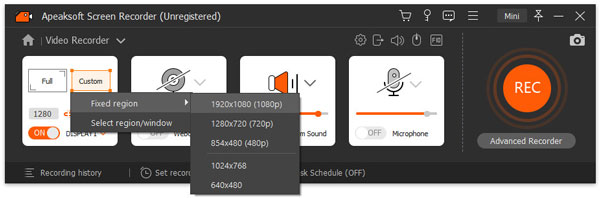
If you want an HD computer screen recorder that is easy to use, Apeaksoft skärminspelare is a good choice. It is the best overall option among the 4 HD screen recorders that can meet nearly all your daily needs. It supports screen, audio, game, window, webcam, and even phone recording. Moreover, it enables you to take and edit a screenshot for free.
During our test, we found that the whole recording workflow is quite simple. Unlike OBS (which we test first), it doesn't require you to configure complicated settings. You can select the recording area, adjust the audio and camera settings, and then start recording. It supports 4K recording, and the recorded video is clear and sharp at 1080p, with no obvious quality loss. During the recording, you can add highlights, captions, or images at any time.
This tool also offers basic editing features, such as trimming, compressing, converting, and merging. Although they are not as advanced as Camtasia's, they are sufficient for basic editing tasks.
- Lätt att använda.
- Supports HD/4K recording.
- Record your screen and audio at the same time in high quality.
- Provides basic editing features.
- Some advanced controls are less extensive than OBS.
- Some features require a paid version.
OBS Studio - Free & Advanced HD Screen Recorder
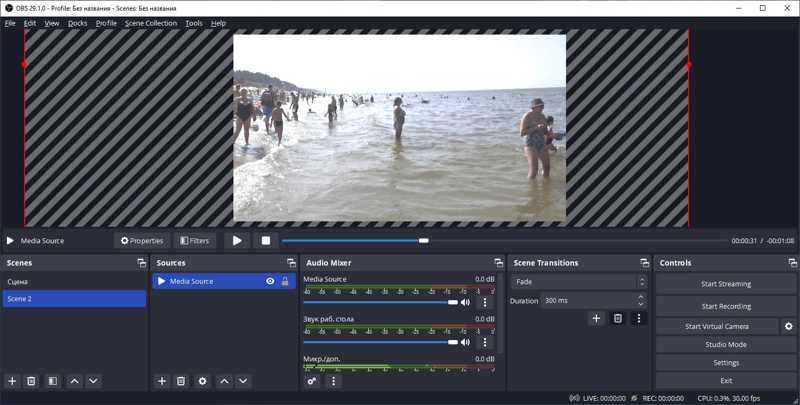
OBS Studio is a strong choice when you want a free HD screen recorder with advanced and extensive recording controls. You can customize scenes, sources, audio mixer, output, and encoding settings to suit your recording needs in OBS. Moreover, OBS is widely used for live streaming on platforms like YouTube and Twitch, which is a popular choice for streamers and content creators.
During the OBS test, our team spent quite some time following the guide to learn how to set up and start using this HD recorder. The many settings can be a little confusing at first, but once everything was set up, OBS delivered clear and sharp recordings with no obvious quality loss. We also tested its live streaming feature on YouTube, and the streaming process was smooth and stable as said.
- Det är gratis och öppen källkod.
- It provides multiple advanced recording controls.
- It is perfect for gameplay recording and streaming.
- A relatively steeper learning curve.
- För många inställningar för nybörjare.
Bandicam - HD Screen and Gameplay Recorder
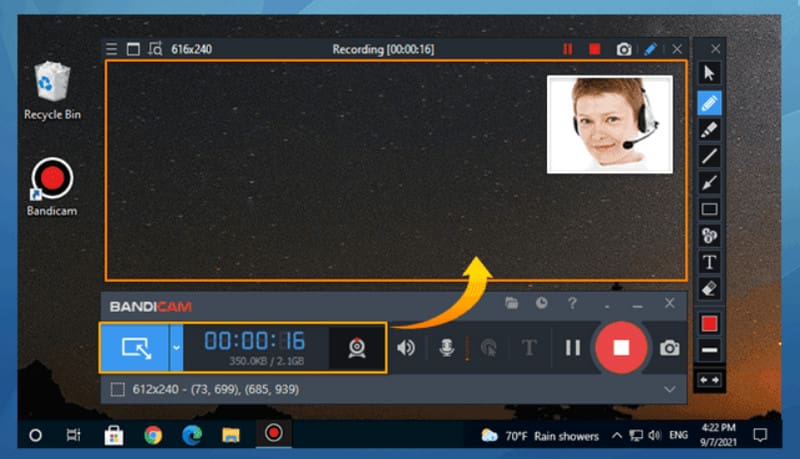
Bandicam skärminspelare is mainly designed for users who want to record gameplay in high quality. It provides a dedicated Spelinspelningsläge for recording gameplay in high quality.
According to Bandicam Official, it supports games using DirectX, OpenGL, and Vulkan, and can record gameplay at up to 4K UHD and 480 FPS. In our test, the recorded gameplay was clear and sharp as it claimed.
Unlike some other HD screen recorders, Bandicam supports hardware encoding technologies such as NVIDIA NVENC, Intel Quick Sync, and AMD VCE/VCN. This helps reduce the load on your system during recording, so you can play and record gameplay smoothly at the same time.
- You can record gameplay in HD/4K quality.
- It provides a dedicated game recording mode.
- It supports webcam overlays.
- The hardware encoding helps reduce system load during recording.
- Gratisversionen har begränsningar.
Camtasia - HD Screen Recorder & Video Editor
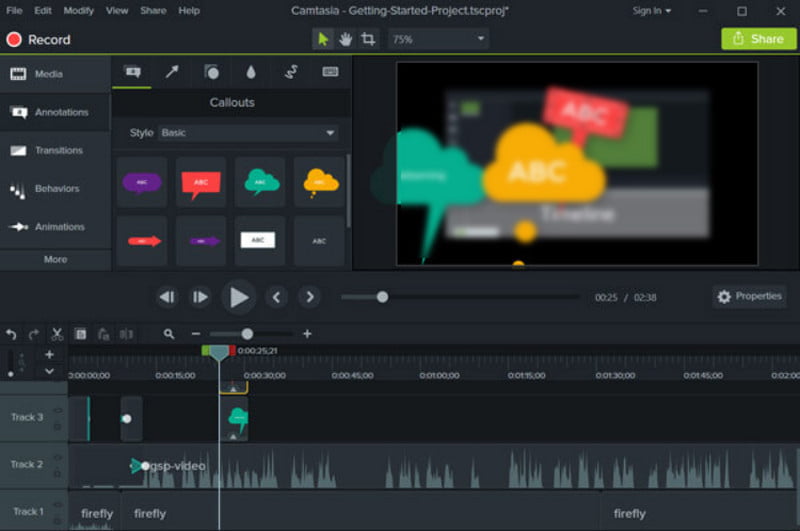
Camtasia Screen Recorder stands out from the other tools because it combines screen recording with video editing. It is particularly suitable for recording tutorials, online courses, and other videos that require post-editing.
During our test, its editing workflow was one of its strongest points. You can edit recordings, add annotations, transitions, text, and other elements without uploading the video to another editing software. This makes Camtasia more suitable for users who want to turn raw screen recordings into polished tutorial videos.
- It combines screen recording and editing in one program.
- It provides multiple editing features to make your videos intuitive and attractive.
- Suitable for educational and tutorial videos.
- It is more expensive than free options.
- It may offer more features than casual users need.
How to Choose an HD Screen Recorder
You can combine factors like what you mainly want to record, how much you can afford, and which features matter most to you when choosing an HD screen recorder.
If you want an easy, all-in-one tool for different daily recording tasks, Apeaksoft skärminspelare is a good choice. OBS Studio is the best free HD screen recorder, but it is more suitable for advanced users. If you mainly need an HD screen recorder for gameplay, Bandicam is worth considering. If you need to edit tutorials after recording, Camtasia is the better fit.
Slutsats
Bland de 4 Programvara för skärminspelning i HD options we tested, Apeaksoft skärminspelare is our top pick for its balance of recording quality, features, and ease of use. OBS Studio is better for users who want advanced controls for free, while Bandicam is more suitable for HD/4K gameplay recording. If you need to record and edit tutorials in the same program, Camtasia is the better choice.
Relaterade artiklar