RAID Veri Kurtarma İçin Nihai Kılavuz: Yazılım ve Servis

Yedekli Bağımsız Disk Dizisi (RAID) teknolojisi, modern veri depolamanın temelini oluşturmaktadır. Ancak RAID bir yedekleme çözümü değildir. Disk arızaları, kontrolcü arızaları, kötü amaçlı yazılımlar ve insan hataları veri dizinizi etkileyebilir.
Felaketler baş gösterdiğinde, nasıl hareket edeceğinizi anlamak önemlidir. RAID veri kurtarma Bu, sorunsuz veri kurtarma ile kalıcı veri kaybı arasındaki fark anlamına gelebilir.
Bu kapsamlı kılavuz, yazılım çözümleri, profesyonel hizmetler ve platforma özgü kurtarma yöntemleri de dahil olmak üzere RAID sürücü veri kurtarma hakkında bilmeniz gereken her şeyi kapsar.
SAYFA İÇERİĞİ:
Bölüm 1: RAID Başarısızlığının Nasıl Gerçekleştiğini Anlamak
RAID kurtarma yöntemlerine geçmeden önce, bir RAID dizisinin neden başarısız olduğunu anlamak çok önemlidir. RAID kurulumları (RAID 0, 1, 5, 6 ve 10 gibi) verileri birden fazla sabit sürücüye dağıtır.
RAID arızasının yaygın nedenleri şunlardır:
- Çok Fazla Bozuk Sürücü: Her RAID sisteminin aynı anda kaç sürücünün arızalanabileceğine dair bir kuralı vardır. Örneğin, bir RAID 5 sistemi yalnızca bir arızalı sürücüye dayanabilir. İki sürücü aynı anda çalışmayı durdurursa, tüm sistem çöker.
- Yanlış Biçimlendirme veya Hatalı Kurulum: Bu durum, birinin yanlışlıkla tüm sürücü sistemini biçimlendirmesi veya onarım sırasında yanlış düğmelere tıklaması sonucu oluşur. Bu hata, sistemin verilerinizi nasıl bir araya getireceğini belirten önemli gizli dosyaların üzerine yazılmasına neden olur.
Bölüm 2: En İyi RAID Veri Kurtarma Yazılımı
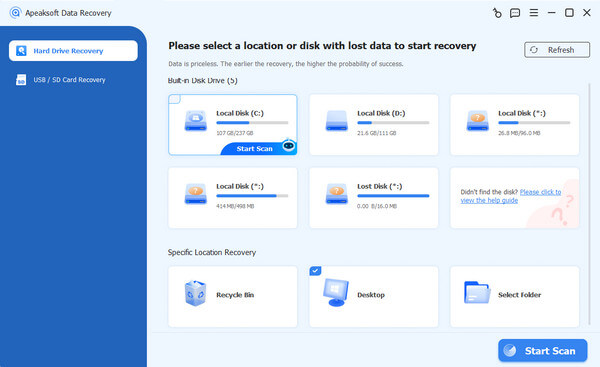
RAID veri kurtarma yazılımı seçerken, derin tarama yeteneği en önemli faktördür. Sabit diskinizdeki kayıp verileri tespit edebilmelidir. Apeaksoft Veri Kurtarma En iyi çözüm budur. RAID sabit disklerini hızlıca tarayabilir ve kayıp verileri ve dosyaları kırmızı renkte gösterebilir. Kayıp dosyaları kolayca seçebilir ve tek bir tıklamayla kurtarabilirsiniz.
Adım Adım: RAID Veri Kurtarma Yazılımı Nasıl Kullanılır?
1 Adım. Apeaksoft Veri Kurtarma Yazılımını Edinin
Tıkla Bedava indir Aşağıdaki düğmeye tıklayarak indirebilir, kurabilir ve başlatabilirsiniz. Apeaksoft Veri Kurtarma PC'nizde.
Güvenli indirme
Güvenli indirme
2 Adım. RAID Sabit Disklerini Tarama İşlemine Başla
Ana arayüzde, C, D, E gibi farklı disk birimlerini seçebilirsiniz. RAID disklerden veri kurtaracağınız için, hepsini seçmeniz yeterlidir. Ardından, tıklayın. Taramayı Başlat sağ alt köşedeki düğmesi.
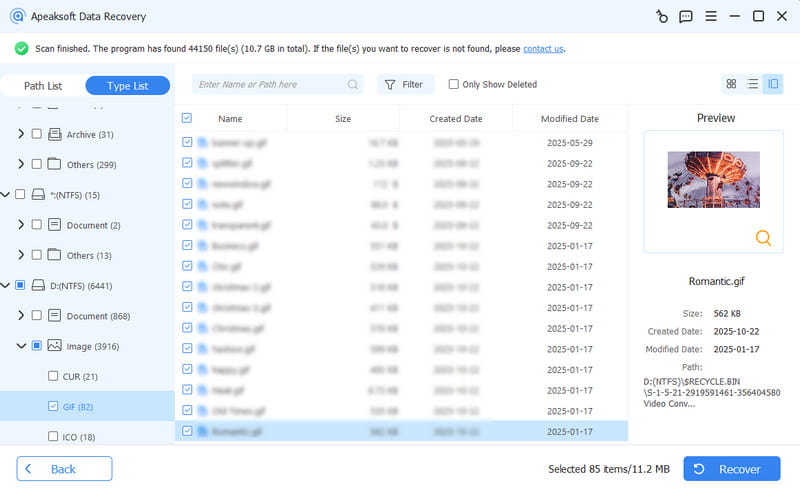
3 Adım. Verileri Seç ve Kurtar
Bu RAID veri kurtarma yazılımı, sabit disklerinizi hızlı bir şekilde tarayacaktır. Tarama işlemi sırasında dosyaları önizleyebilir ve seçebilirsiniz.
Sen kullanabilirsiniz Yol Listesi hem de Tip Listesi İstediğiniz dosyaları taramak ve seçmek için filtreler.
Son olarak, sadece tıklayın Kurtarmak RAID sabit disklerinizden kayıp verilerinizi kurtarmak için sağ alt köşedeki düğmeyi kullanın.
Kritik Uyarı: Asla bir veri kurtarma yazılımı Eğer bir sabit disk tıklama, gıcırdama veya sürtünme sesleri çıkarıyorsa, fiziksel olarak hasar görmüş disklerde yazılım çalıştırmak kalıcı veri kaybına neden olur.
Daha fazla Okuma
Bölüm 3: Profesyonel RAID Veri Kurtarma Hizmetleri
Kritik iş verileri, fiziksel sürücü arızaları veya karmaşık sunucu ortamlarıyla uğraşırken, sıradan RAID veri yazılımları muhtemelen hiç yardımcı olmayacaktır. Bu senaryolarda, güvenli RAID veri kurtarma hizmetleri en iyi çözümünüzdür.
RAID Veri Kurtarma İşlemi İçin Profesyonelleri Ne Zaman Çağırmalısınız?
Aşağıdaki durumlarda yazılım kullanımını derhal atlayıp profesyonel bir laboratuvara başvurmalısınız:
- Birden fazla sabit diskte sorun var.
- RAID dizisi yangın, duman, su veya diğer fiziksel felaketler nedeniyle hasar gördü.
- Veriler son derece hassas kurumsal bilgiler içermektedir.
Bir Hizmet Sağlayıcısında Nelere Dikkat Edilmeli?
Tüm veri kurtarma laboratuvarları karmaşık RAID mimarilerini işleyebilecek donanıma sahip değildir. Seçtiğiniz sağlayıcının aşağıdakileri sunabildiğinden emin olun:
- Sertifikalı Temiz Oda Ortamları: Mekanik olarak hasar görmüş RAID sabit disklerini, havada uçuşan toz parçacıklarının disk plakalarına zarar vermeden güvenli bir şekilde açmak.
- SOC 2 Tip II Güvenlik Uyumluluğu: Kurtarma işlemi sırasında kurumsal verilerinizin tamamen güvenli ve gizli kalmasını sağlıyoruz.
- Veri Yoksa Ücret Yok Garantisi: RAID veri kurtarma mühendisleri kritik dosyalarınızı kurtaramazsa, tam kurtarma ücretini ödememelisiniz.
Bölüm 4: Çevrimiçi RAID Veri Kurtarmanın Gerçekliği
Birçok kullanıcı, tamamen uzaktan, bulut tabanlı bir çözüm umarak RAID veri kurtarma işlemini çevrimiçi olarak yapmak istiyor. Ancak, internet üzerinden nelerin yapılıp nelerin yapılamayacağını bilmek çok önemlidir.
Uzaktan/Çevrimiçi RAID Veri Kurtarma Nedir?
Bazı veri kurtarma şirketleri uzaktan kurtarma oturumları sunmaktadır. Bir mühendis, çalışan Windows veya Linux ana makinenize özel bir ağ bağlantısı üzerinden güvenli bir şekilde bağlanarak mantıksal RAID sorunlarını analiz eder ve yeniden birleştirir.

Çevrimiçi RAID Sürücü Veri Kurtarma İşleminin Sınırlamaları
- Fiziksel Hasarlar Çevrimiçi Olarak Onarılamaz: RAID sabit diskinizin motoru arızalıysa, bir parçası yanmışsa veya okuma kolu kırılmışsa, hiçbir çevrimiçi araç bunu onaramaz. Fiziksel olarak bozulmuş bir donanım parçasını internet üzerinden tamir edemezsiniz. Bu durumda, diski paketleyip fiziksel bir tamir laboratuvarına göndermeniz gerekir.
- Çok Yüksek Bant Genişliği Gereksinimleri: İnternet üzerinden terabaytlarca veriyi taramak ve taşımak muazzam miktarda ağ gücü gerektirir. Son derece yavaştır ve sıklıkla yarıda kesilir veya başarısız olur, bu da tamamen çevrimiçi olarak yapılmasını çok zorlaştırır.
Öneri: Çevrimiçi/uzaktan kurtarma hizmetlerini yalnızca donanımın %100 sağlıklı olduğu durumlarda, küçük mantıksal bozulmalar veya bölüm hasarları için kullanın.
Bölüm 5: RAID Veri Kaybını Önlemek İçin En İyi İpuçları
RAID sürücü kurtarma işleminin her zaman son çareniz olmasını umuyoruz. Veri altyapınızı korumak için bu proaktif depolama stratejilerini inceleyebilirsiniz:
- Verilerinizin üç kopyasını saklayın: Önemli dosyalarınızın her zaman 3 kopyasını saklayın. Bunları 2 farklı cihaza (örneğin bilgisayarınız ve harici bir sabit diske) kaydedin ve 1 kopyayı evinizin dışında veya bulutta saklayın. Unutmayın: RAID yalnızca bir sürücü bozulduğunda sisteminizin çalışmasını sağlar; yanlışlıkla dosyaları silmenizi engellemez.
- Sürücünüzün Sağlığını Kontrol Edin: Disk dizinizdeki her bir sürücünün durumunu aktif olarak izlemek için izleme araçları kullanın. Eskiyen veya bozulan sürücüleri derhal değiştirin.
- Her zaman yepyeni bir yedek parça satın alın: RAID 5 veya 6 yapılandırmasında bir sürücü arızalandığında, yoğun yeniden oluşturma işlemi sırasında oluşacak stresi en aza indirmek için, aynı hız ve kapasiteye sahip yepyeni bir sürücüyle değiştirin.
- Sürücülerinize Yapışkan Notlar Ekleyin: Eğer tüm sisteminiz çökerse ve sabit diskleri çıkarmak zorunda kalırsanız, çıkarmadan önce her diskin üzerindeki yuva numarasını (örneğin Disk 1, Disk 2) not edin. Diskleri yanlış sırayla geri takmak dosyalarınızı sonsuza dek bozabilir.
Sonuç
RAID sürücülerinizde veri kaybı yaşamak gerçekten can sıkıcı olabilir, ancak endişelenmeyin; durumunuzu analiz edip doğru çözümü seçebilirsiniz. RAID veri kurtarma yazılımı veya profesyonellere başvurun. Apeaksoft Veri Kurtarma Doğru tarama ve gelişmiş kurtarma teknikleri sayesinde en güvenilir veri kurtarma programınızdır. Ancak en önemli koruma, verilerinizi her zaman güvende tutmaktır.
 Apeaksoft Veri Kurtarma
 Windows ve Mac bilgisayarınızda silinen veya kaybolan verileri kurtarın.
Güvenli indirme
Güvenli indirme
İlgili Makaleler