


如何使用addROM FRP绕过工具绕过谷歌FRP锁

关键精华
- addROM FRP Bypass 是一种基于 APK 的非官方方法,主要用于移除较旧的 Android 6-9 系统上的 FRP 锁。
- 你应该使用另一部手机来协助你。
- 成功率很大程度上取决于设备型号和安全补丁级别。
- 虽然是免费的,但过程很复杂。
- 建议在 2026 年对 Android 10 及以上版本使用基于 PC 的 FRP 工具。
FRP(出厂重置保护)是一项安全功能,可在恢复出厂设置后锁定安卓设备。许多用户都在寻找类似 FRP 的工具。 附加ROM FRP 当他们卡在谷歌验证界面时。
addROM FRP 安全吗?它在 2026 年还能用吗?本文将解释 addROM FRP 的原理、兼容性、风险和局限性,以便您判断此方法是否适合您,并决定是否使用它。
页面内容:
第一部分:什么是addROM FRP
什么是 addROM FRP?addROM 是一个为 Android 和 iOS 用户提供众多技术技巧的网站。您可以学习如何解锁手机上的许多限制,特别是如何绕过 Android 手机上的 Google 锁。它提供许多 FRP 解锁 APK、指南和其他 FRP 解锁程序。
在 addROM FRP 网站上,您可以找到许多技术技巧、程序和科技新闻。对于推荐的第三方绕过程序,该网站也提供详细的评测和指南。然而,如果您想进一步了解 FRP Bypass addROM APK,除了 APK 文件本身之外,您将找不到其他有用的信息,这可能表明该网站已停止对其 Android 应用的支持。
addROM FRP 的主要功能
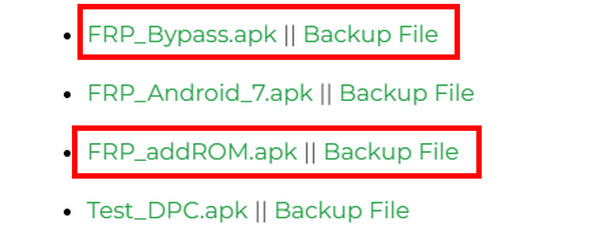
addROM 网站提供各种 Android 相关工具和指南,包括 FRP 绕过 APK 文件。
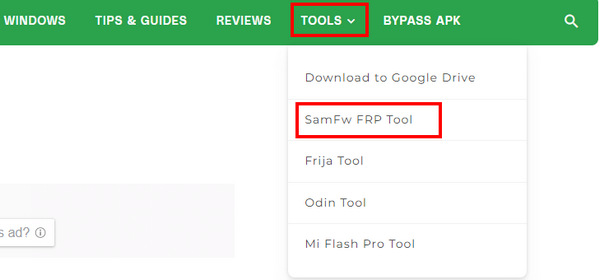
在某些情况下,您还可以在addROM FRP网站上查看其他桌面绕过程序。您可以点击 工具 点击按钮即可查看。但这些程序均为第三方程序,并非由addROM官方开发或维护。
第二部分:addROM FRP 解锁工具的优缺点
经过对多款安卓设备的测试,我们发现实际效果会因设备型号和系统版本而异。在老款设备上可能运行流畅,但在安装了最新安全补丁的较新安卓版本上,性能可能会变得不稳定。以下是我们基于自身测试经验和论坛反馈撰写的addROM FRP评测。
- FRP绕过过程中无需安装电脑或其他软件。
- 所有工具都是完全免费的。
- 您无需进行深层次的系统级修改。
- 在我们测试的运行 Android 10 及更高版本的设备上,效果有限。
- 我们无法从网站上找到官方用户支持。
- 使用此方法绕过安卓FRP锁可能会使您的设备失去保修资格。
- 适合初学者的陡峭学习曲线。
- 操作不当可能导致砖块堆积的风险。
第三部分:如何下载和使用addROM FRP绕过工具
addROM 是一种基于 APK 的 FRP 解锁方法,它通过浏览器或应用入口点触发系统级重定向来绕过 Google 验证。本节提供关于如何在安全补丁更新不完整的旧款 Android 设备上使用 addROM FRP 工具的一般指南。建议在 Android 5.1 Lollipop、6.0 Marshmallow、7.0 Nougat、8.0 Oreo 和 9.0 Pie 系统上使用。在 Android 10 及更高版本上的性能有限。
测试环境
设备: 三星 Galaxy J 系列 / Galaxy A10-A20,小米 Redmi 6-8,华为 Y 系列。
安卓版本: Android 6.0 - Android 9.0
网络状况: 稳定的互联网接入
在你开始之前
- 锁定的设备中插入了SIM卡。
- 准备另一部普通的安卓手机。
- 您已了解数据丢失和账户安全方面的风险。
- 请注意,成功率无法保证,尤其是在较新的安卓版本上。
成功率说明
| Android版本 | 成功率 |
| Android 6.0 - 8.1 | 高 |
| 安卓9.0 | 中 |
| Android 10-11 | 低 |
| Android 12的+ | 非常低(不推荐) |
*成功率取决于 Android 安全补丁级别和 OEM 限制,这些限制会越来越多地阻止基于 APK 的 FRP 绕过方法在新版本中生效。
总体指南
在了解了基本细节和可能存在的局限性之后,如果您仍然选择使用 addROM FRP Bypass,本节将引导您完成整个过程的一般步骤。此过程需要另一部安卓手机。
请仔细参考以下addROM FRP Bypass详细指南:
步骤 1。 请先将SIM卡插入已锁定FRP的手机中。
步骤 2。 使用另一部安卓手机,访问 addROM FRP 官方网站 (https://addrom.com/bypass/)。
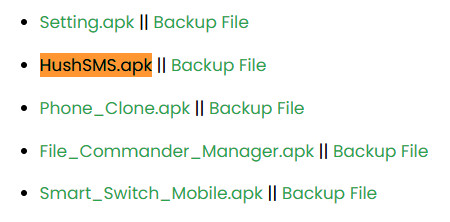
步骤 3。 点击 嘘短信.apk.
步骤 4。 安装 APK 文件。您可能需要在设置中允许安装未知来源的应用。
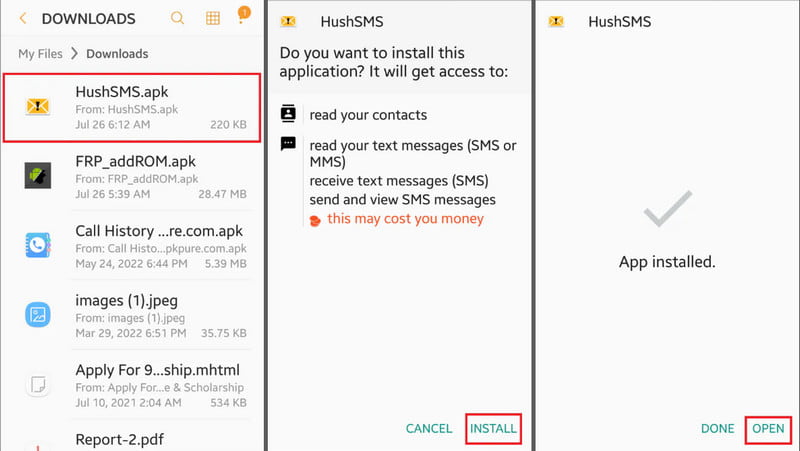
步骤 5。 启动程序并点击 WAP推送SL在收件人栏中输入您已锁定FRP的手机号码。在消息框中,输入www.youtube.com/@addROMcom。然后,点击 发送 WAP PUSH SL.
步骤 6。 然后,您的FRP锁定手机将显示提示。点击“确定”按钮进入YouTube。选择 目录 然后 条款和隐私政策 在 YouTube 上。
步骤 7。 当页面显示浏览器页面时,在搜索框中输入 addrom.com/bypass。选择两个特定的 APK 文件进行下载: Google 客户经理 (GAM) APK 与你的设备安卓版本相匹配的 玻璃钢旁路APK.
步骤 8。 安装完成后,启动 FRP 解锁 APK 文件。点击菜单并选择 浏览器 登录。使用新的 Google 帐户登录。
步骤 9。 重启设备后,FRP锁应该就会被移除。
第四部分:addROM FRP 使用安全吗?
使用addROM FRP解锁工具是否安全取决于文件来源、设备状况以及操作方式。由于该工具来自第三方,因此在操作前应考虑一定的风险。
- 未知或第三方APK文件可能携带恶意软件。
- 某些FRP绕过工具可能会请求敏感权限。
- 操作不当可能导致系统错误、应用程序崩溃或手机变砖。
- 使用诸如addROM FRP绕过之类的方法可能会使您的保修失效。
第五部分:当addROM FRP失效时,绕过FRP的其他方法
如上所述,addROM FRP绕过工具在新版Android系统(带有更新的安全补丁)上的有效性会降低。在这种情况下,用户可能需要考虑其他兼容性和稳定性更好的解决方案。一种常用的替代方案是基于桌面的FRP解锁软件,例如…… Apeaksoft DroidAide Android 解锁器例如 iMyFone LockWiper(安卓版)等等。与基于 APK 的方法相比,这种方法依赖于锁定手机和电脑之间的 USB 连接。
这类基于PC的FRP绕过工具通常
- 与基于 APK 的方法相比,支持更广泛的 Android 版本。
- 提供 24/7/365 全天候客户支持,随时为您提供帮助。
- 提供引导式界面,而不是手动逐步进行漏洞利用。
- 利用自动化工作流程绕过FRP锁。
| 特色 | 附加ROM FRP | 基于PC的FRP软件 |
| 所需设备 | 第二部安卓手机 | Windows/Mac 电脑 |
| 安装 | 在设备上安装 APK | 在桌面上安装软件 |
| 兼容性 | 主要支持较旧的安卓版本(安卓 6-9) | 更广泛的安卓版本(较新的安卓版本) |
| 易用性 | 多个复杂的手动步骤 | 引导式界面 |
| 所需的技术技能 | 先进的 | 基础版 |
步骤 1。 积极 Apeaksoft DroidAide Android 解锁器 点击上方链接即可免费下载。
安全下载
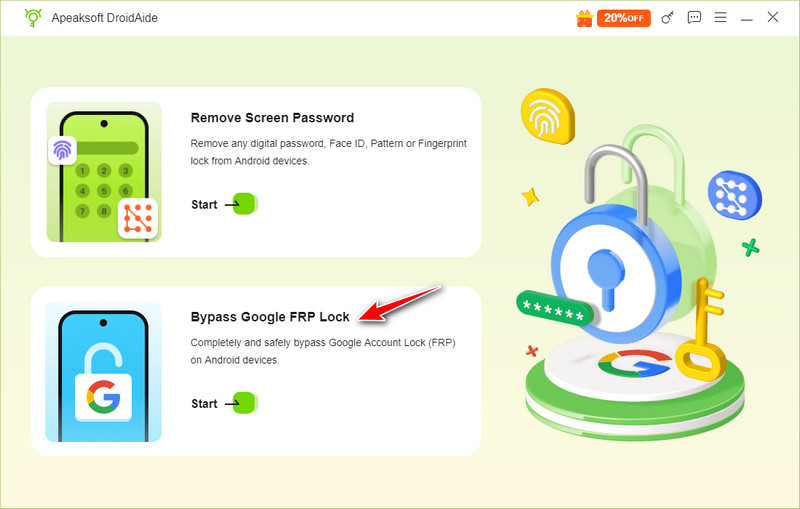
步骤 2。 选择 绕过 Google FRP 锁 主界面上的选项。
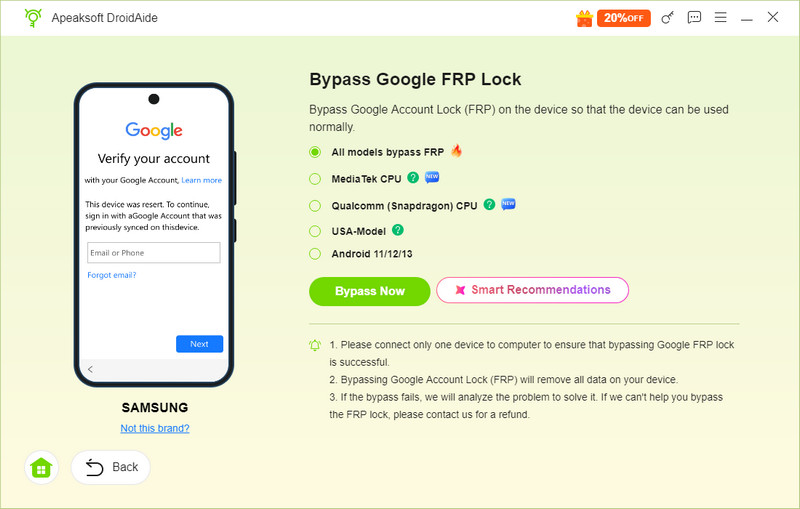
步骤 3。 使用 USB 数据线将设备连接到电脑,检查手机型号,然后点击 立即绕过.
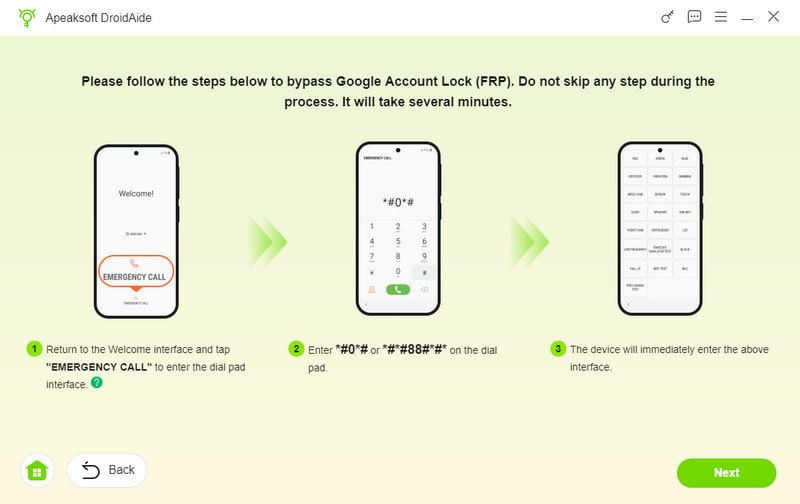
步骤 4。 按照界面上的说明设置您的安卓手机。然后,您就可以轻松…… 绕过 Schok 中的 FRP、三星、TCL、摩托罗拉或其他 Android 品牌。
第 6 部分:addROM FRP 常见问题解答
addROM 是否停止服务?
不,它并没有停止运营。它仍然维护着自己的网站,并提供许多实用工具和技巧。然而,这个网站似乎在addROM FRP Bypass方面投入的精力较少。
我可以下载 addROM FRP Bypass 桌面程序吗?
不可以。addROM 不提供其官方桌面程序来解锁 FRP。它提供其他桌面 FRP 绕过工具的链接。如果您打算使用桌面程序,请尝试 Apeaksoft Android解锁器.
FRP Bypass addROM APK 是否适用于较新的 Android 版本?
遗憾的是,到 2026 年,由于持续的安全更新和系统限制,addROM FRP 绕过 APK 在大多数现代 Android 设备上已变得非常不可靠。
结语
这篇文章对……进行了详细的评述。 addROM FRP 旁路 工具。总体而言,该工具的兼容性有限,且由于安全补丁的更新,其在新版本上的性能往往不稳定。
因此,建议使用桌面工具,例如 Apeaksoft DroidAide 绕过谷歌账号锁定。但结果仍可能因设备型号和安卓版本而异。
免责声明
我们再次提醒您,使用addROM FRP Bypass工具会使设备保修失效。不当使用可能导致数据丢失。同时,请务必遵守所有适用的当地法律法规。

相关文章




