關於我們

How to Download Twitter Videos: Best Ways & Step-by-Step Guide

Twitter video download has been haunting us for years. Although a native download feature was eventually added in 2023, it's available only to Premium. Can we do nothing but pay for another subscription to save videos we like? Luckily, that's not the case. In this article, I will guide you step-by-step through 5 ways to 下載 Twitter 視頻 without giving your money to Musk. Pick the one that works best for you.

Twitter Won't Let Me Save Videos. Why?

Generally, it's their commercial strategy. Twitter wants to keep users inside the app for maximum engagement, but easy downloads interrupt browsing and thus reduce time spent on the platform. For now, only Premium users are allowed to download videos from Twitter.

But that doesn't mean we are spared from all trouble after subscription. Videos in DMs and streams, and videos whose download option is disabled, cannot be saved, whether you are a regular user or a Premium.

All of these lead to the constant thrive of third-party Twitter video savers. They appear in all sorts of looks: extensions, websites, software, and more. After collecting and testing a variety of methods myself, I'm going to show you a quick comparison of 5 recommended ways to save video from Twitter, before diving into each one.

請注意: Whatever you do with the videos, keep 版權 in mind. You must understand that saving the video does not mean you own it. It’s best to use the videos for personal matters only – better not use them for commercial purposes or other situations where you probably are not allowed.

A Quick Glance: Which Way Shall I Try?

方法 服務流程與內容 易於使用 穩定性 設備
Apeaksoft屏幕錄像機 錄屏 ☆☆☆☆☆ ☆☆☆☆☆ Windows / Mac
Record Screen on mobile 錄屏 ☆☆☆ ☆☆☆☆☆ iPhone /安卓
Media Harvest A download button on browser ☆☆☆☆☆ ☆☆☆☆ Any device with Chrome/Edge/Firefox
ssstwitter Link paste ☆☆☆ ☆☆☆☆ Any device with Chrome/Edge/Firefox
BetterTwitFix Link paste ☆☆☆☆ ☆☆☆☆☆ Any device with Discord
畫廊-dl Command Lines ☆☆ ☆☆☆☆☆ Windows / Mac的/ Linux的

Part 1: Save Twitter Videos with a Browser Extension

Media Harvest is one of the best extensions for downloading Twitter videos. Once installed, it adds a download button on your Twitter video pages. It is compatible with Google Chrome, Microsoft Edge, and Mozilla Firefox.

步驟二 搜索 Media Harvest in Chrome Web Store or Edge Add-ons.

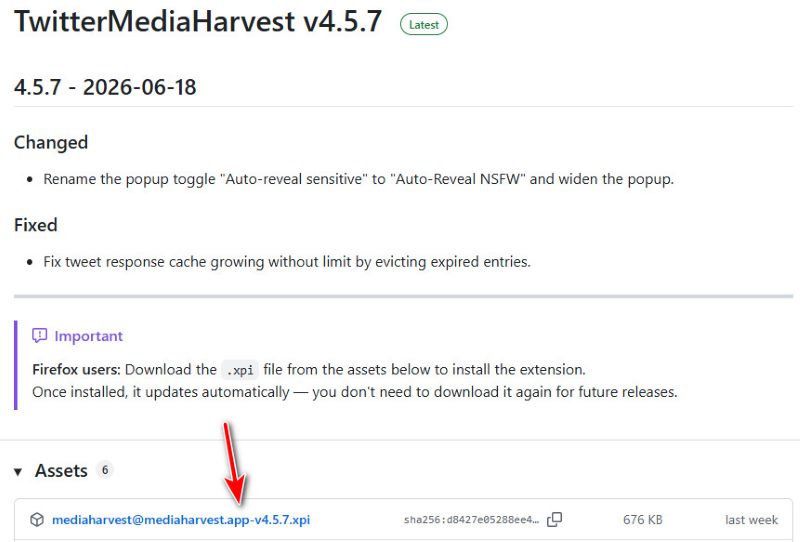
If you are using Firefox, though, you have to work a little harder: go to GitHub for TwitterMediaHarvest's latest release, and download the .xpi file from the assets to install the extension.

Install Firefox Media Harvest from GitHub

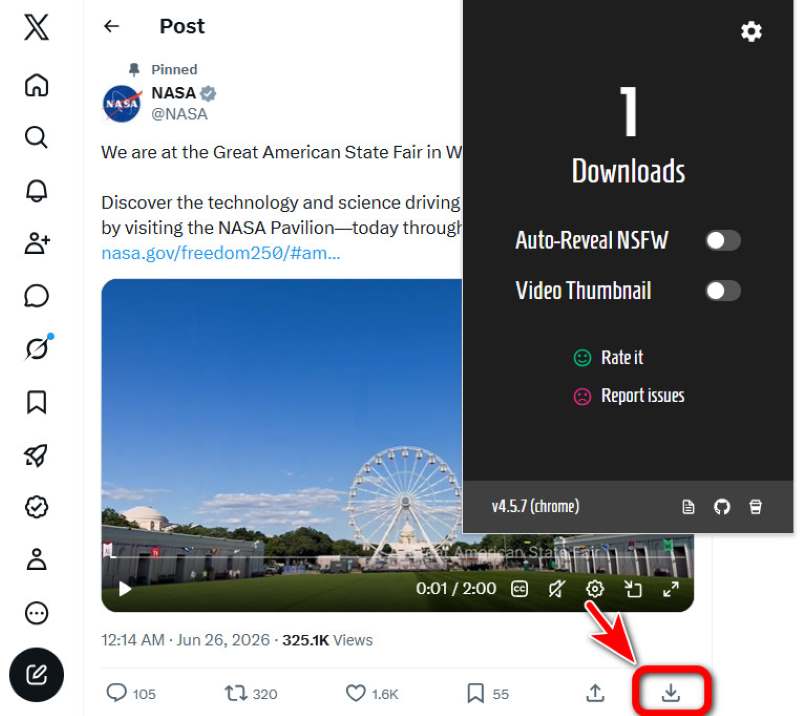
步驟二 Install and launch the extension. Now, when you play a video on Twitter, you'll see a 下載按鈕 right in the bottom-right corner of the post. Click and save.

Media Harvest Download Button

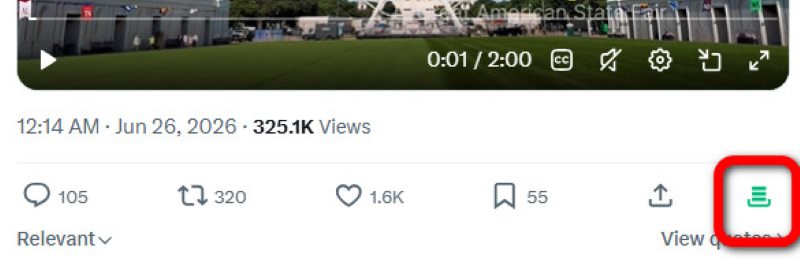
步驟二 The download button turns green once the download is complete. The video is saved by default to a new folder named twitter-media-harvest in your browser's save location.

Media Harvest Video Saved

提示: Browsers save files at these locations by default. Change your save location if needed.
•Windows: C:\Users\<YourUsername>\Downloads
• 蘋果: /Users/<YourUsername>/Downloads
• iPhone/Android: Go to Files app → Downloads to find them

Part 2: Download Twitter Videos Online on a Website

There are tons of websites for downloading Twitter videos online, but many of them fail for mysterious reasons (mysterious to me, at least). This one, ssstwitter.com, is the most stable and smoothest website of all.

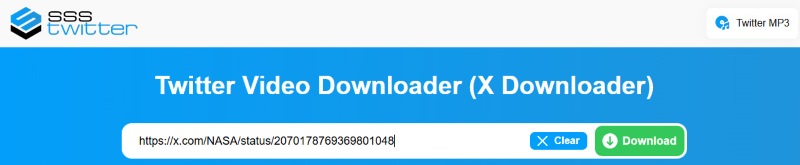
步驟二 Copy the link of your target video post. Open ssstwitter.com and paste it to the input box in the middle. Then click 下載.

Insert Link on ssstwitter.com

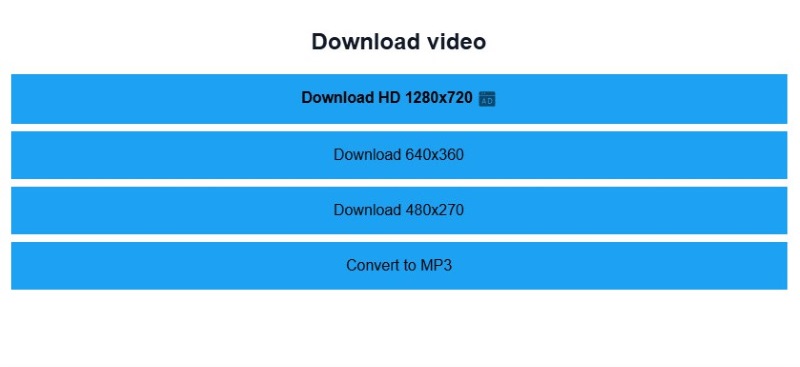
步驟二 Choose a resolution for the video. To download Twitter videos in HD you have to watch an ad. The other three options just start the download right away.

Choose Download Resolution

步驟二 Now you can check on your downloaded video in your browser's save location.

Part 3: How to Download Videos from Twitter Using Discord

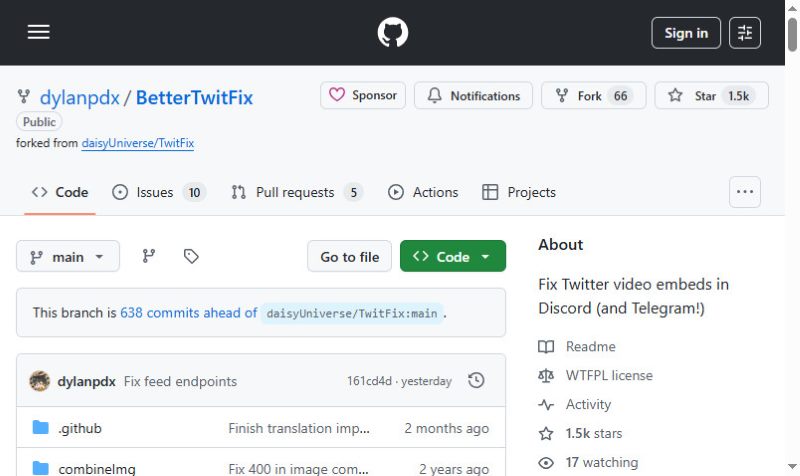
This is a clever workaround using BetterTwitFix, an open-source program that was designed originally to send playable videos on Discord from Twitter. The trick is: this program can fetch the direct video file, and Discord can open it in-browser. So what we do is team them up – use BetterTwitFix to get the Twitter video file for Discord to open. Then you can simply download it from the browser.

BetterTwitFix on GitHub

步驟二 Copy the Twitter video link, and replace x.com with vxtwitter.com or fixvx.com. For example, if my original link is https://x.com/NASA/status/207020555885913703, then after replacement, it goes like https://fixvx.com/NASA/status/207020555885913703.

步驟二 新增 Mp4。 to the end of the link. This is like telling BetterTwitFix to "get me the video, not the page". Now my link is like: https://fixvx.com/NASA/status/207020555885913703Mp4。.

步驟二 Send this link to whoever on Discord. Then click the sent link, so the video opens in your browser. Click the 三個點 at the bottom right and select 下載. You will download the Twitter video in MP4.

Click Three Dots on Browser

Part 4: Download a Twitter Video Using Command Lines

Gallery-dl is an open-source command-line tool to help you download high-quality media from many platforms, Twitter included. You give it a link, and it grabs the media for you. It is totally clean and ad-free, and is especially fantastic for bulk downloads, which many tools can't handle.

If you already have a great deal of knowledge on command lines, gallery-dl is perfect for you. But if you don't, you can still make it by following my steps on Windows.

步驟二 下載 Exe的。 file from gallery-dl.com.

步驟二 媒體中心 Windows + R 打開 運行 dialog, and type in CMD 打開 命令提示符.

步驟二 Enter this into the window: cd /d "[your target save location]",然後按 進入.

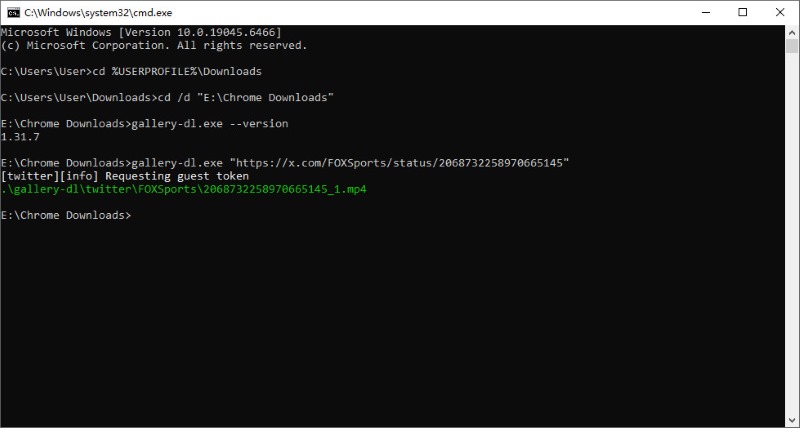
步驟二 Then copy the tweet's link, and type a command like this: gallery-dl.exe "[the link]". Take my video link as an example: gallery-dl.exe "https://x.com/NASA/status/207020555885913703". Press 進入 運行它

Now you have successfully downloaded the video to your target location.

提示: If you have problems with operating systems other than Windows, you can find a guide on gallery-dl.com's homepage.

Gallery-dl Command Lines

To download a batch of videos at once, enter commands like these at 步驟 4

  • One user's media: gallery-dl.exe --cookies-from-browser chrome "https://x.com/username/media"
  • Entire timeline: gallery-dl.exe --cookies-from-browser chrome "https://x.com/username"
  • 多個帳戶: Create a text file accounts.txt with one URL per line, then run: gallery-dl.exe --cookies-from-browser chrome -i accounts.txt

Part 5. Ultimate Workaround: Record Your Screen

Video savers from Twitter can go wrong in many, many ways. An update from Twitter may trigger breakdowns of many extensions. Websites sometimes perform badly and we don't know why. Creators may delete tweets or turn them private at any moment – refresh and the video is gone.

But you always have a universal fallback: screen recording. It never fails you. So long as the video can play on your screen, it'll do great. You won't get the original video file, but you can have a fancy recording of it in decent quality.

How to Record Screen on Windows/Mac

使用其中之一 最好的螢幕錄影機 to capture your target video in HD – Apeaksoft屏幕錄像機. It allows you to customize your recording range so that it fits perfectly with the Twitter video. You can also trim and crop the video straight after finishing the recording, so that you get the video exactly as you want.

Apeaksoft屏幕錄像機 Trustpilot 評論

下載量超過 1,000,000 用戶

  • 以各種格式錄製螢幕和影片。
  • 高品質地錄製來自系統/麥克風的音訊。
  • 輕鬆錄製遊戲、手機螢幕、網路攝影機並截取螢幕截圖。
  • 以全螢幕或自訂螢幕尺寸錄製。
  • 安排錄音自動開始和停止。
免費下載

安全下載

免費下載

安全下載

屏幕錄像大師

步驟二 Download and install the software according to your operating system.

步驟二 Open the Twitter web page and get your Twitter video paused at the start.

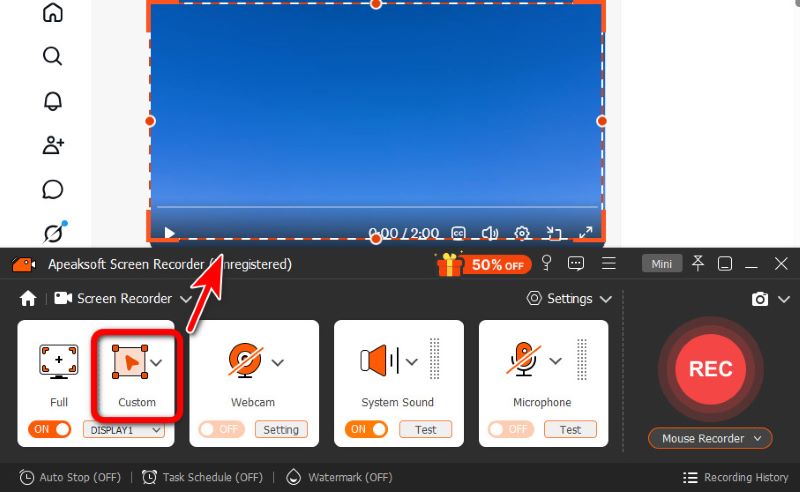
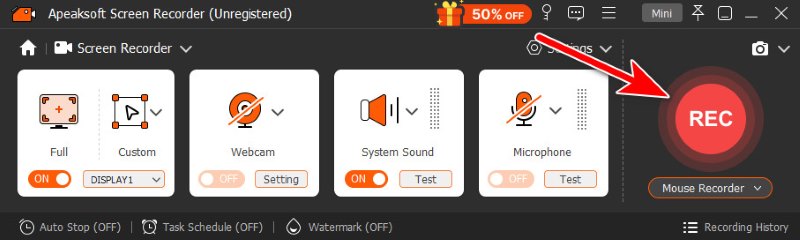
步驟二 Launch Apeaksoft Screen Recorder. Click 定制配框, and select the range of your video.

Custom Recording Range in Apeaksoft Screen Recorder

步驟二 首先,單擊 REC on Apeaksoft. You will see a 3-second countdown before it starts recording. Get yourself ready. When the recording begins, play the video.

Click REC on Apeaksoft Screen Recorder

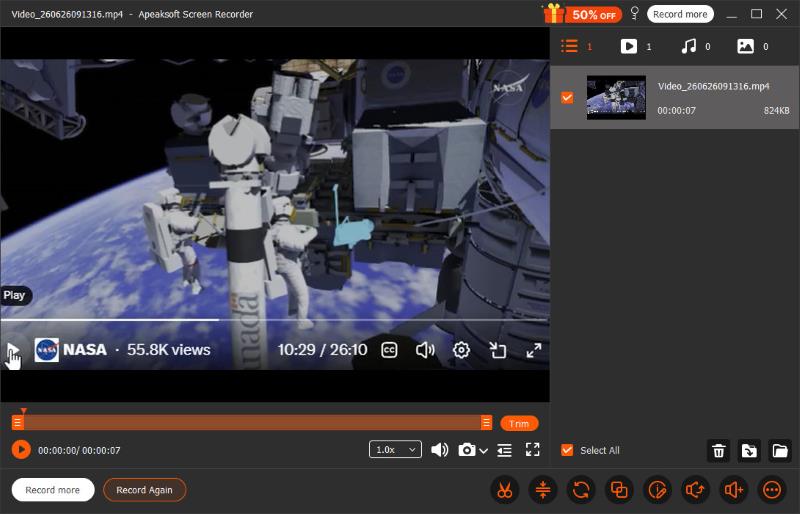
步驟二 When the video ends, you click the red square so the recording stops too. Apeaksoft will automatically open an editing window for you. You can trim off extra parts in the beginning or at the end, where your mouse pointer has clicked on the screen. You can also crop the video if you accidentally recorded blank spaces you don't want.

Trim and Edit Recording on Apeaksoft Screen Recorder

請注意: The video is auto-saved once you stop recording. To see where it is saved, put your mouse pointer on the video file in the right part of the editing window. A folder button shows up at the bottom-right. Click on it, and it will direct you to the folder where your video lies.

如何在 iPhone 上錄製螢幕

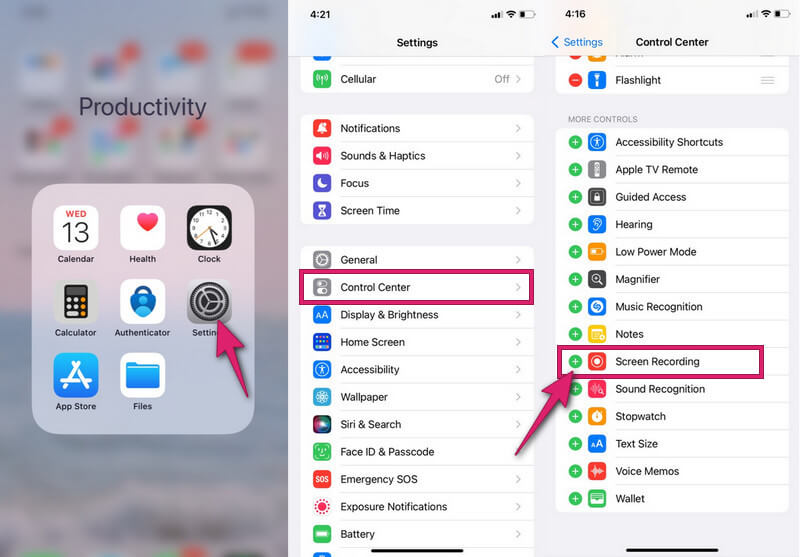
步驟二 Enable the built-in recorder on your iPhone. How? Go to 設定,並選擇 控制中心 option. Then, scroll down till you find the 屏幕錄製 應用程序,然後點擊 green plus icon to turn it on. If it's already on, then let it be.

Activate Screen Recording on iPhone

步驟二 Now swipe down your screen to summon the 控制中心。 點按 circular button 說明 Record. When it turns red, it means the recording has started. Now start playing your Twitter video to capture.

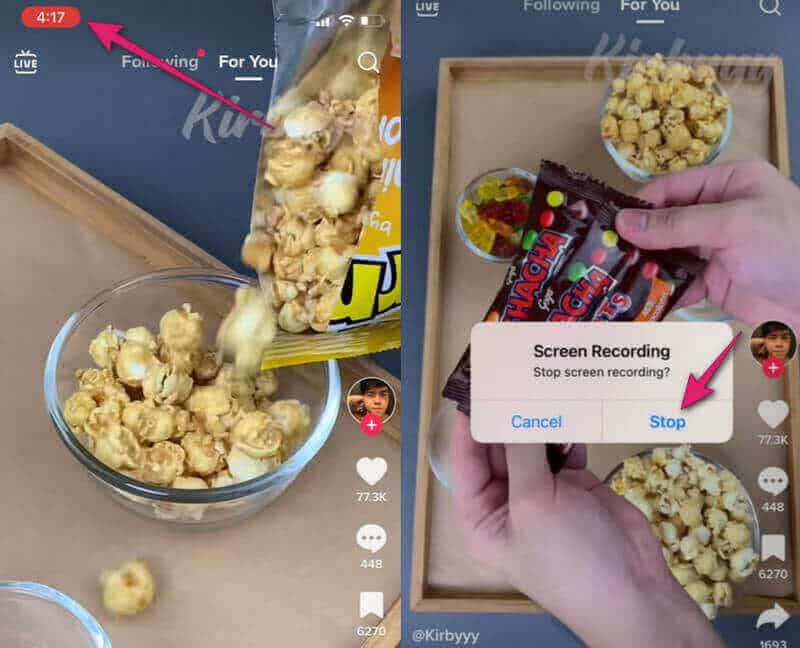
步驟二 To end the recording, tap the red-shaded timer. On the small window that appears, tap 停止.

End Recording on iPhone

If the video wasn't full screen, you probably need to crop the video on your iPhone, so that only the video itself remains.

如何在安卓裝置上錄製螢幕

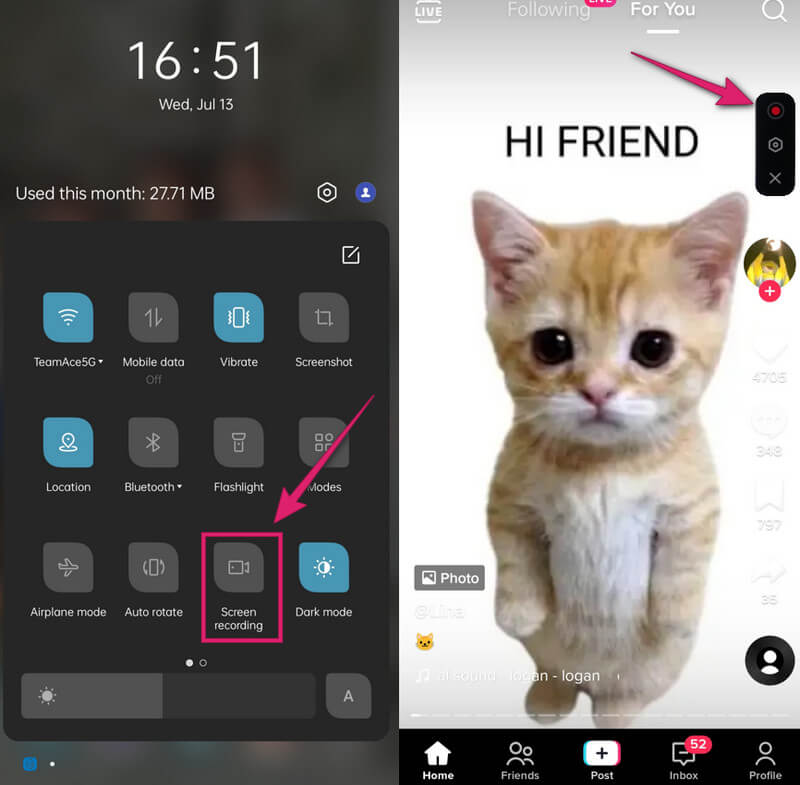
步驟二 Swipe down your screen to access the 快速設定. From there, look for the 屏幕錄製 工具並打開它。

步驟二 On the floating bar, tap the 紅色圓圈 開始錄製。

Start Recording on Android

步驟二 To finish recording, tap the same red circle button again. Then, check your recorded video in your photo gallery, and trim your video on Android 如果需要的話。

結語

Now you have a complete grasp of how to 從 Twitter 下載視頻. Overall, the most stable way to save videos for Twitter is to record your screen using Apeaksoft Screen Recorder on PC, or with built-in recorders on mobile phones. You can also easily download videos from Twitter on websites, with browser extensions, through Discord, or using command-line tools. Hopefully, Twitter's video download will not bother you anymore!

屏幕錄像機圖標 Apeaksoft屏幕錄像機

錄製手機和電腦螢幕上的任何視訊和音訊。

免費下載

安全下載

免費下載

安全下載

相關文章

Ella Jones
Ella Jones

專長: 清除資料 · 錄製影片 · 錄製音訊 · 編輯音訊

Ella Jones是Apeaksoft的高級編輯,專長於資料清理、音訊錄製和多媒體編輯工具。她測試過各種數據管理和影音軟體。她撰寫有關資料清理、錄製、編輯和管理數位內容的教學。