

How to Retrieve Deleted WhatsApp Messages on Android & iPhone

Accidentally deleted your WhatsApp messages, and you don't have a backup? Changed to a new phone and lost your WhatsApp chats? You are not alone.
Fortunately, it is still possible to restore WhatsApp chats, whether you are using an Android phone or iPhone.
This guide will walk you through proven methods to 恢復WhatsApp消息, including solutions that work without backup and options using Google Drive or iCloud if available.
頁面內容:
- Part 1: Can you Recover Deleted WhatsApp Messages Without Backup
- Part 2: How to Recover Deleted WhatsApp Messages Without Backup [iPhone & Android]
- Part 3: How to See Deleted WhatsApp Messages Using Google Drive on Android
- Part 4: How to Get Back WhatsApp Messages from iCloud Backup
- Part 5: FAQs About Recovering Deleted WhatsApp Messages
Part 1: Can you Recover Deleted WhatsApp Messages Without Backup
Can you recover deleted WhatsApp messages without a backup? The answer is Yes - but with limitations.
When you delete WhatsApp messages, they are not immediately erased from your device. Instead, they remain in the device storage until new data overwrites them.
This means that as long as the deleted data hasn’t been overwritten, there is still a chance to recover your WhatsApp chat history.
Part 2: How to Recover Deleted WhatsApp Messages Without Backup [iPhone & Android]
Haven't backed up your WhatsApp before the messages are lost? Or, your WhatsApp backup is missing or failed? Don't worry! There are still solutions to recover deleted WhatsApp messages without backup. This section will walk you through the most reliable solutions step by step on Android and iPhone.
如何在 iPhone 上無需備份即可恢復已刪除的 WhatsApp 訊息:
If you don’t have a backup, recovering deleted WhatsApp messages on iPhone can be challenging - but not impossible. You can seek help from free WhatsApp data recovery software to make WhatsApp chat recovery simpler. For example, Apeaksoft iPhone數據恢復 provides multiple recovery modes to help you retrieve deleted WhatsApp messages on an iPhone in different situations.
在iPhone上恢復已刪除的WhatsApp消息
- Recover WhatsApp messages directly from iPhone storage.
- 恢復之前預覽數據。
- 支援所有 iOS 裝置和 iOS 版本。
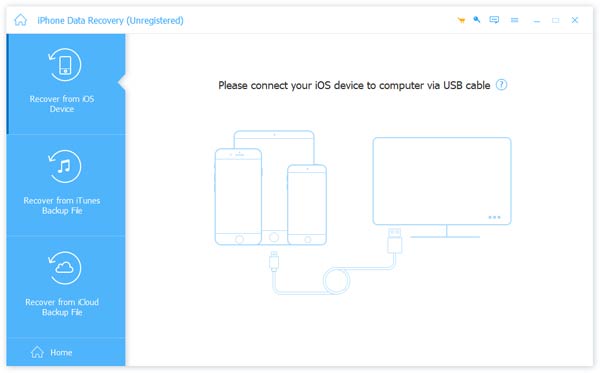
步驟二 在您的電腦上安裝 iPhone 資料恢復
在您的電腦上下載並安裝此已刪除的 WhatsApp 聊天復原軟體。將您的 iPhone 連接到電腦並運行此應用程式。它會自動偵測您的 iPhone。
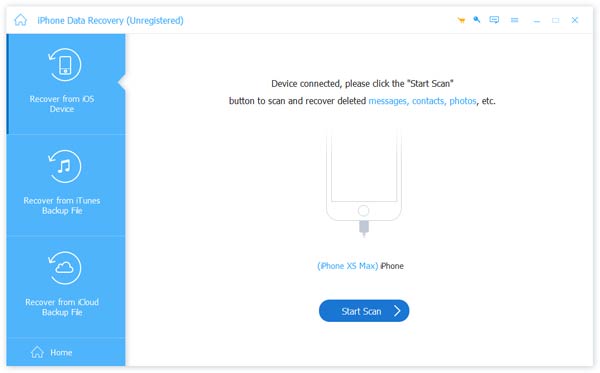
步驟二 掃描整支手機以恢復 WhatsApp
當您的iPhone準備就緒時,請單擊 開始掃描 按鈕分析您的手機並發現可恢復的數據。
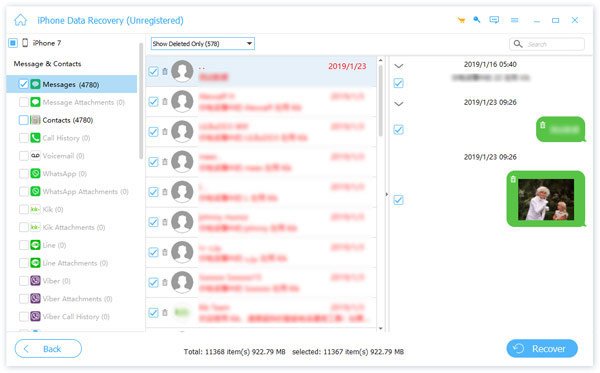
步驟二 預覽 WhatsApp 聊天記錄
在詳細資訊視窗中,選擇 Whatsapp 選項下 留言和聯繫方式 部分。然後,所有已刪除的 WhatsApp 訊息將顯示在右側。您可以預覽並選擇任何要還原的重要 WhatsApp 資料。
步驟二 從 WhatsApp 恢復已刪除的訊息
選擇後,單擊 恢復 按鈕即可完成恢復已刪除的 WhatsApp 訊息。然後,您已經掌握瞭如何從智慧型手機恢復已刪除的 WhatsApp 訊息。它能讓你恢復 最近刪除的應用程式 輕鬆。
提示: 你也可以 在 iPhone 上尋找已刪除的歷史記錄 透過此工具。
How to Recover Deleted WhatsApp Chats Without Backup on Android:
Our research found that fewer Android users back up their phones frequently. In this case, using a professional data recovery tool can improve your chances. For example, specialized software like Apeaksoft Android數據恢復 supports WhatsApp message recovery on most Android devices.
在Android上恢復已刪除的WhatsApp消息
- Recover deleted WhatsApp messages directly from Android devices.
- 還原、備份和還原已刪除的 WhatsApp 訊息。
- Preview chat content before the recovery.
- Support a wide range of Android models and systems.
步驟二 將Android數據恢復安裝到您的計算機上
You can download and install the corresponding version on your computer from the button above.
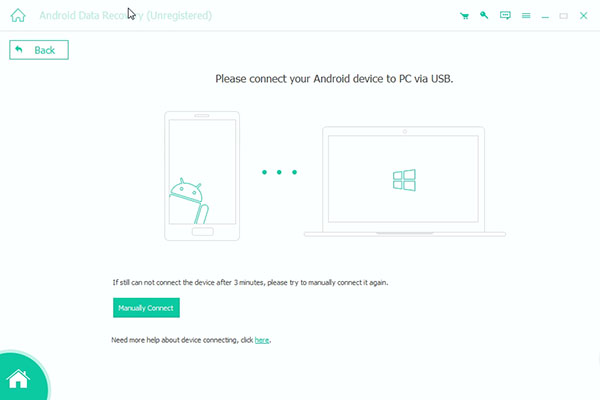
步驟二 將Android手機連接到PC
透過 USB 線將您的 Android 手機連接到電腦。按照螢幕上的指示在手機上開啟 USB 偵錯模式。
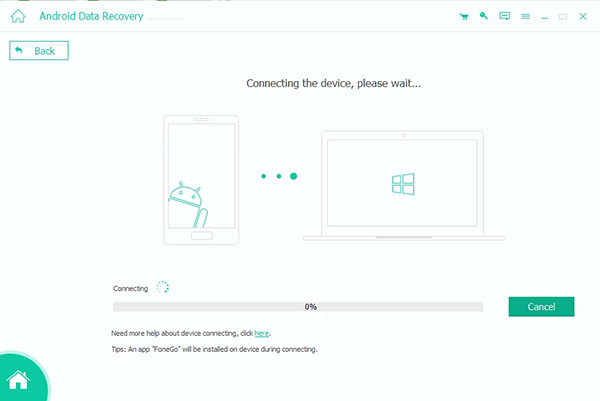
步驟二 預覽WhatsApp消息
連線成功後,您可以選擇 Whatsapp 左側欄上的選項可開啟右側的訊息歷史記錄面板。在這裡,您可以預覽所有 WhatsApp 訊息並選擇您想要恢復的訊息。
步驟二 如何恢復已刪除的WhatsApp消息
如果你已經準備好,請點擊 恢復 按鈕將選定的 WhatsApp 訊息還原到您的電腦。
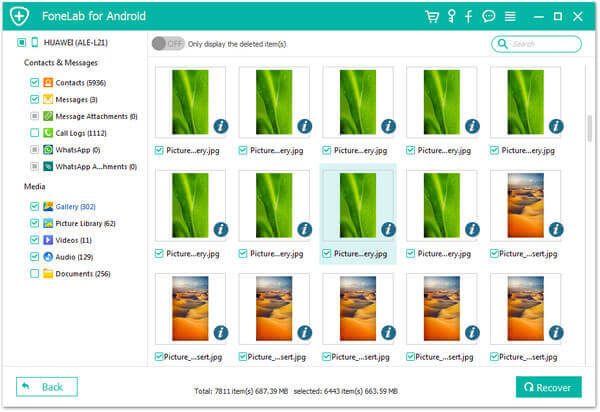
提示: 您也可以按照類似的步驟 恢復已刪除的WhatsApp圖像.
Part 3: How to See Deleted WhatsApp Messages Using Google Drive on Android
If you have Google Drive on your Android device, you may be able to recover deleted WhatsApp messages after uninstalling WhatsApp using your backup.
步驟二 從您的手機中徹底卸載 WhatsApp 應用程式。
步驟二 前往 Google Play 商店,在您的 Android 上再次下載並安裝 WhatsApp。
步驟二 打開 WhatsApp,登入您的原始帳戶並按照指示驗證您的電話號碼。
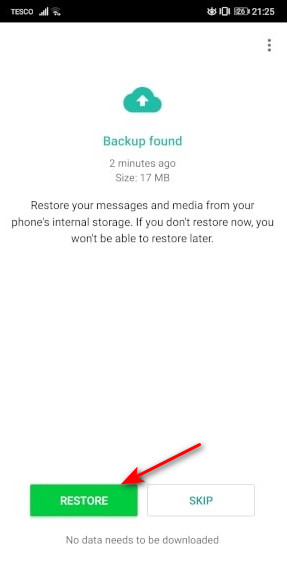
步驟二 當彈出對話框詢問您是否要將 WhatsApp 從 Google Drive 恢復到 Android 時,您應該點擊「恢復」以開始該過程。
步驟二 如果您看到螢幕上出現“恭喜”,則 Google Drive 備份中的所有 WhatsApp 聊天都將恢復到您的 Android 手機中。您可以在 WhatsApp 中閱讀它們。
提示: How to Check Whether You Have a WhatsApp Backup?
Sign in to your Google account the same as your WhatsApp account, go to the 選項 interface, and choose 備份. You can check your recent WhatsApp backups there.
Part 4: How to Get Back WhatsApp Messages from iCloud Backup
If you have previously enabled iCloud backup on your iPhone, you retrieve deleted WhatsApp messages after uninstalling WhatsApp by restoring your chat history from backup. This process will overwrite your current WhatsApp data.
步驟二 Uninstall WhatsApp from your iPhone first.
步驟二 Reinstall it from the App Store.
步驟二 Open and verify with your previous phone number.
步驟二 Choose Restore Chat History on the screen when prompt.
提示: How to Check Whether You Have an available iCloud Backup
啟動 WhatsApp 並前往 設定。 選 聊天 以及 聊天備份 one after another. You can check when you last performed the iCloud backup.
Part 5: FAQs About Recovering Deleted WhatsApp Messages
Can I recover WhatsApp messages without backup?
Yes. As long as the deleted message data haven't been overwritten, you can use professional data recovery software to scan and recover them - no backup needed.
How far back can WhatsApp messages be recovered?
It depends on whether the data has been overwritten and if a backup is available.
If you have a backup, you can restore messages from the last backup date.
If you don't have a backup, you can usually recover only recently deleted messages before new data replaces them.
Are WhatsApp messages permanently deleted?
It will not be deleted immediately. After a WhatsApp message is deleted, it may temporarily remain on your device's storage space until it is overwritten by new data.
結語
In this guide, we cover several effective ways to 恢復已刪除的WhatsApp消息 在iPhone和Android手機上。
If you’re using Android, you can restore chats from a Google Drive backup or try a reliable recovery tool like Apeaksoft Android數據恢復 when no backup is available. For iPhone users, restoring from iCloud or using a professional recovery solution like Apeaksoft iPhone數據恢復 can also help retrieve lost messages.
As you can see, recovering deleted WhatsApp messages is not as difficult as you thought if you choose the right method and tool.
相關文章
本文匯總了在 iPhone 或 Android 裝置上備份和恢復 WhatsApp 訊息、圖片、影片等的最佳方法。
如果您剛從舊裝置升級到新的安卓手機,請按照我們的步驟快速將 WhatsApp 轉移到新的安卓手機。
以下是四種將 iPhone 上的 WhatsApp 訊息無線傳輸或使用 USB 線傳輸到 Android 手機的方法。
避免遺失重要 WhatsApp 資訊的最可靠方法是定期備份。本文將指導您如何備份 WhatsApp。



