關於我們

How to Recover Deleted Saved Game Data on PS4 Easily

Developed by Sony, the PlayStation 4 is a home video game console for players around the world to enjoy their games. You can enjoy various exclusive games on PS4, including Death Stranding, The Last of Us Remastered, Marvel’s Spider-Man, God of War, etc., which can never be found on Xbox or Switch.

However, you still can be put in a plight where you lose saved game data on PS4. Imagine you spent countless hours and days on your games. Suddenly, all your game captures and installation packs are gone. If you don’t want to start with a “new game”, you can learn 如何恢復 PS4 上已刪除的已儲存遊戲數據 in several ways from this guide.

解決方案 實踐應用
重新下載 The game supports automatic synchronization.
Professional Data Recovery Software The lost files were located on a removable storage device (USB or external hard drive).
PS+Cloud Service PS Plus was enabled, and the saved data was previously uploaded to cloud storage.
Recover from an External USB Drive You’ve backed up your saved data to an external hard drive.

Method 1: Re-download Lost PS4 Saved Game Data

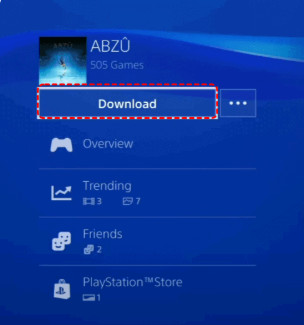
For those PS4 games that automatically sync saved data to the cloud or server, you can retrieve your original progress by re-downloading even if your local data is accidentally deleted. Therefore, before attempting other recovery methods, you can try re-downloading the relevant saved data from the game library or the server.

步驟二 Go to the PS Store and navigate to Library - Purchased.

步驟二 Choose the game you want to recover saved data from.

步驟二下載 按鈕。

Redownload From Ps Store

Method 2: Restore PS4 Deleted Data with Professional Data Recovery Software

可以從硬碟恢復 PS4 上已刪除的遊戲資料嗎?是的。由於您的所有遊戲、影片和其他資料都儲存在 PS4 硬碟中,因此您可以使用專業的遊戲資料恢復工具,稱為 Apeaksoft數據恢復 從 PS4 硬碟檢索 PS4 上所有遺失的已儲存遊戲資料。這個強大的軟體可以從硬碟、隨身碟、記憶卡等恢復各種檔案。

Apeaksoft數據恢復

Best PS Saved Game Data Recovery

  • Recover deleted/lost saved game data on PS4 easily.
  • Effortlessly tackle any data loss due to PS4 hard drive damage.
  • Save your game data in its own SPF format files so you can restore it at any time.
  • Retrieve corrupted files from SD cards, hard drives, mobile devices, etc.
免費下載

安全下載

免費下載

安全下載

數據恢復

步驟二 點擊上面的下載按鈕,將 Apeaksoft Data Recovery 下載到您的電腦上。安裝後雙擊軟體啟動。

步驟二 在使用此軟體從 PS4 硬碟恢復遺失的保存資料之前,您應該使用 USB 轉 SATA 轉接器或 USB 外殼將 PS4 硬碟連接到電腦。一旦您的電腦成功偵測到該硬碟,您就可以讀取並解密 PS4 硬碟上的遊戲資料。

步驟二 Check your PS4 hard drive and press the 開始掃描 按鈕。

步驟二 A Deep Scan will be performed automatically to scan your PS4 hard drive thoroughly for more files related to your game data.

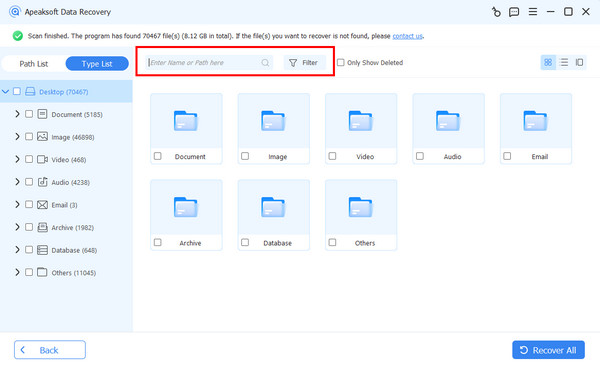
步驟二 掃描後,您可以單擊 類型列表或路徑列表 to see all your data from the PS4 hard drive. Then, you can select your game data manually or use the Filter feature to find your desired game-related file in the scanning interface.

篩選

步驟二 Once you tick all related game files you want to recover from, you can click the 恢復 按鈕繼續。在彈出視窗中,您應該選擇儲存恢復的遊戲資料的目的地。然後,您可以在那裡看到恢復的遊戲資料。
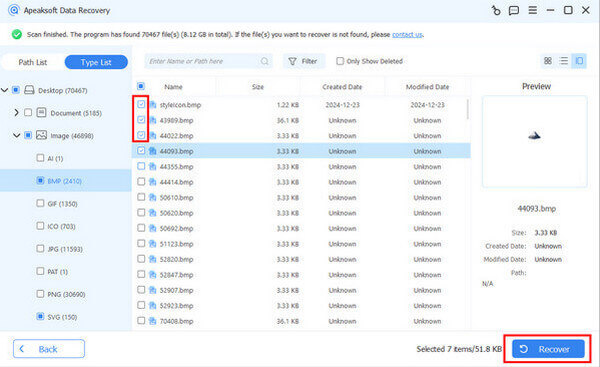
檢查恢復

提示: This software can also do Compact Flash 資料復原 有效。

Method 3: Recover PS4 Saved Data from PS Plus Cloud Service

If you are a PlayStation Plus subscriber and enable the cloud backup feature when you play games, then your saves are automatically uploaded to the cloud. So, if you find that saved game data on PS4 is lost, you can manually download it again from the cloud.

步驟二 造訪 設定 >向下滾動到 應用保存的數據管理.

步驟二 塞萊茨 在線存儲中保存的數據。現在,您可以找到您想要的遊戲並選擇它以繼續。

步驟二 您可以勾選遊戲並點擊 下載 按鈕將已儲存的遊戲資料下載到系統儲存。
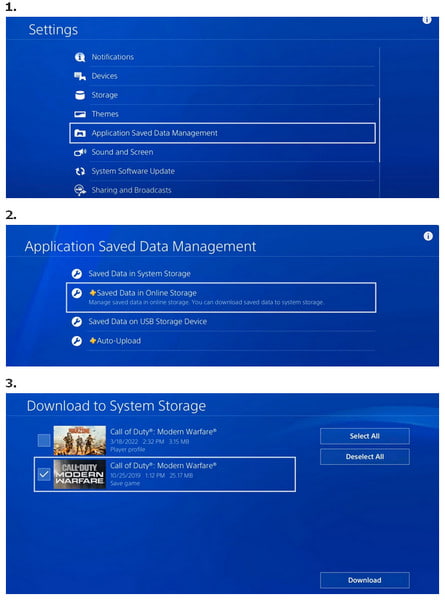
Recover PS Game Data Using Cloud

Method 4: Retrieve Deleted PS4 Saved Game Data from External USB Drive

可以將 PS4 遊戲資料保存在外在硬碟上嗎?是的。因此,如果您使用外部 USB 驅動器備份 PS4 遊戲數據,則可以輕鬆地從 USB 驅動器恢復已刪除/丟失的已保存遊戲數據。

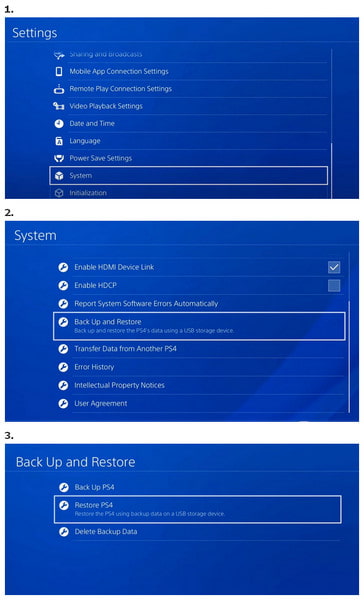
步驟二 造訪 設定 > 定位 系統 >選擇 備份還原.

步驟二 將 USB 儲存裝置插入 PS4 主機。

步驟二 選擇 恢復PS4 > locate the backup game file you want to recover > select 可以 恢復。

Restore PS Game Data Using USB

結語

This guide shows you 4 methods on how to recover lost saved game data on PS4。 您可以使用 Apeaksoft數據恢復 to restore your game data from PS4 hard drive. Suppose you can save game data on an external hard drive PS4, you can easily retrieve your lost game data from an external hard drive.

相關文章

在 iPhone 上停用遊戲中心,不再彈出

如果您不使用 iPhone 上的遊戲中心功能,請來學習如何停用它。它將永遠不會再彈出。

如何使用/不使用擷取卡錄製 PS3 遊戲

錄製 PS3 遊戲畫面比錄製其他內容更棘手,因為通常需要擷取卡片。本文將介紹使用/不使用電腦錄製 PS3 遊戲畫面的方法。

Android/iOS 遊戲屏幕錄製的 8 個最佳應用

還在尋找最好的遊戲屏幕錄像機應用程序嗎? 這篇文章分享了在手機或電腦上錄製遊戲的 8 個最佳選擇。

在 Windows 上錄製遊戲時需要知道的頂級遊戲錄製器

這篇文章是在 Windows PC 上錄製遊戲的詳細指南。 您可以使用專業的遊戲捕獲軟件在 Windows 11/10/8/7 上錄製遊戲。