Sådan låser du hurtigt op for SIM-kortlåsen på din iPhone

At skifte udbyder kan åbne op for en verden af muligheder, så du kan bruge din enhed med omkostningseffektive abonnementer eller mens du rejser i udlandet. Derudover er det afgørende at sikre, at din iPhone fungerer problemfrit med din foretrukne udbyder. Hvis du køber en ny iPhone, der er låst til en bestemt udbyder, kan du ikke bruge et SIM-kort fra en anden udbyder. Denne guide forklarer, hvordan du får et SIM-oplåsning på din iPhone og brug din foretrukne udbyder.
SIDEINDHOLD:
Part 1: How to Check If Your iPhone Is Locked
Your iPhone might be locked to your carrier, but you can unlock the iPhone SIM lock. However, the method varies, depending on your situation. Most carriers have device unlock policies. If you follow the policy, your device may be SIM unlocked automatically, or you can ask your carrier to unlock your SIM card. If not, you have to use a third-party SIM unlock service. Before finding out how to unlock SIM card on iPhone, it is important to distinguish whether your iPhone is locked or not.
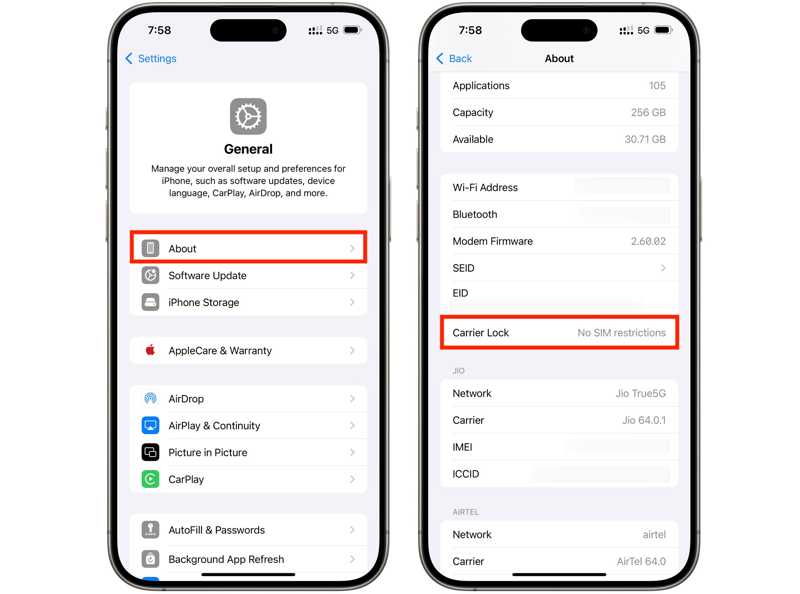
Trin 1 Kør din Indstillinger ca.
Trin 2 Gå til Generelt og Om os.
Trin 3 Hvis der er Ingen SIM-begrænsninger siden Bærelås, it means your iPhone is not locked to the SIM card. On the contrary, if there is a message like SIM-kort låst, it means your iPhone is locked to SIM card.
Del 2: Sådan låser du SIM-kort op på iPhone fra operatører
As mentioned previously, if you follow your carrier's device unlock policy, you can ask your carrier to unlock the iPhone SIM lock for free as long as you meet the unlock requirements.
Enhedsoplåsningspolitik
The policy is different, depending on your carrier. Here, we list the common device unlock policy below:
- Du skal købe din enhed i mindst 60 dage.
- Du skal købe din iPhone fra din udbyder eller autoriserede forhandlere.
- Du skal betale det fulde beløb eller restbeløbet i rater.
- Din kontostatus skal være aktuel.
- Din enhed må ikke være meldt stjålet eller bedragerisk.
You can find the detailed device unlocking policy on your carrier's website.
| Fragt-leverandør | Enhedsoplåsningspolitik |
| Tele Danmark Mobil | https://www.verizon.com/support/device-unlocking-policy/ |
| AT & T | https://www.att.com/deviceunlock/ |
| Telia Denmark | https://www.t-mobile.com/responsibility/consumer-info/policies/sim-unlock-policy |
| US Cellular | https://www.uscellular.com/legal/device-unlock-policy |
| Mint mobil | https://www.mintmobile.com/help/how-to-unlock-your-phone/ |
Essential Information Needed to Unlock iPhone SIM Card from Carrier
Ud over politikker for oplåsning af enheder forbereder du også vigtige oplysninger, såsom:
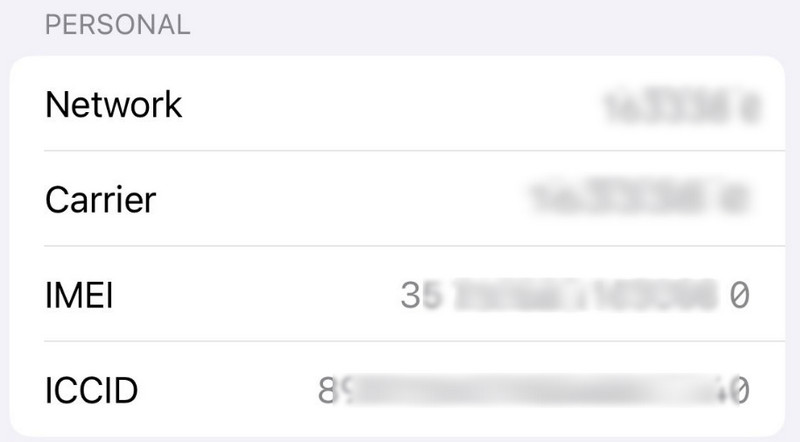
- Dit iPhone IMEI-nummer. Åbn Phone app, ring * # 06 #, and check the IMEI number. Or go to the Indstillinger app, naviger til Generelt, vælg Om os, og udsigt IMEI nummer.
- Din netværkskonto og adgangskode.
- Din kontrakt og relevante oplysninger.
How to Unlock SIM Card from Carrier on iPhone
Trin 1 Du har tre muligheder for at kontakte din udbyder:
Mulighed 1: Ring til din udbyders supportnummer
| Fragt-leverandør | Kundenummer |
| Tele Danmark Mobil | 800-922-0204 |
| AT & T | 800-331-0500 |
| Telia Denmark | 877-453-1304 |
| US Cellular | 888-944-9400 |
| Mint mobil | 800-683-7392 |
Mulighed 2: Besøg din udbyders hjemmeside.
| Fragt-leverandør | Officiel hjemmeside |
| Tele Danmark Mobil | https://www.verizon.com |
| AT & T | https://www.att.com |
| Telia Denmark | https://www.t-mobile.com |
| US Cellular | https://www.uscellular.com |
| Mint mobil | https://www.mintmobile.com |
Mulighed 3: Få adgang til din udbyders app.
Trin 2 Tilbyd dine oplysninger.
Trin 3 Anmod om oplåsning af SIM-kort.
Trin 4 Når din udbyder modtager din anmodning, låser den dit SIM-kort op.
Part 3: How to Unlock the SIM Card Without Carriers [Editor's Choice]
If you can't unlock the SIM card through your carrier or are unable to meet the carrier's requirements, a third-party iPhone unlocking tool, such as Apeaksoft iFoneKit iOS-oplåsning may be an alternative option. These tools are designed to unlock various iPhone locks including the SIM lock with a simple process.

Downloadet af over 1,000,000 brugere
- Unlock the SIM card and remove carrier restrictions easily.
- Help you use your iPhone with different compatible carriers.
- Tilbyd bonusfunktioner, som Fjernelse af Apple ID.
- Support various iPhone models and iOS versions.
Sikker download
Sikker download
How to Unlock iPhone SIM Card Without Carrier
Trin 1 Tilslut til din iPhone
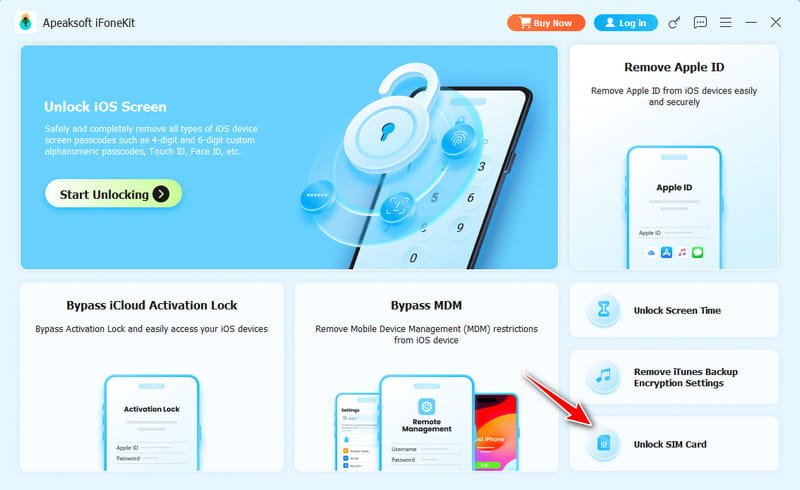
Launch the iPhone Unlocking software after you install it on your PC. Plug your iPhone into your PC with a Lightning cable. Choose the Lås SIM-kort op mode.
Trin 2 Start the SIM removal
Check your iPhone information and correct it if any item is wrong. Click the Begynd nu button to download the necessary firmware. Then, press the Start omgåelse button to continue. If there is no jailbreak, you need to follow the onscreen instructions to jailbreak your iPhone first.
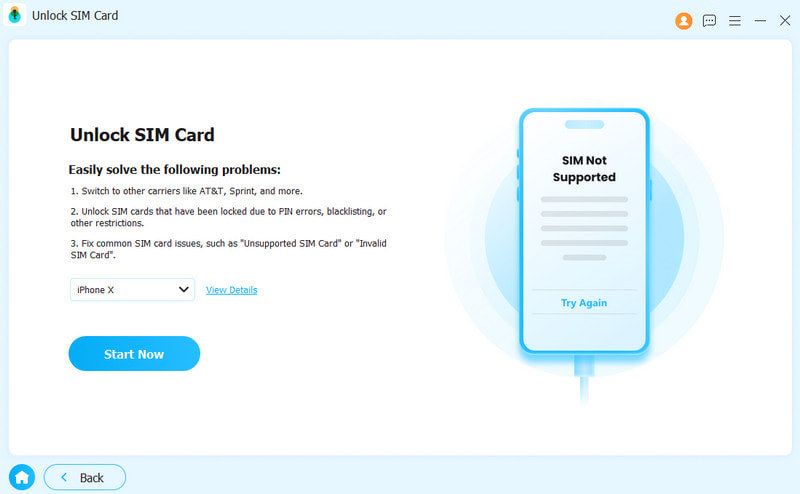
Trin 3 Set Your iPhone
Follow the onscreen instructions to adjust your iPhone settings. Then, press the OK knap til.
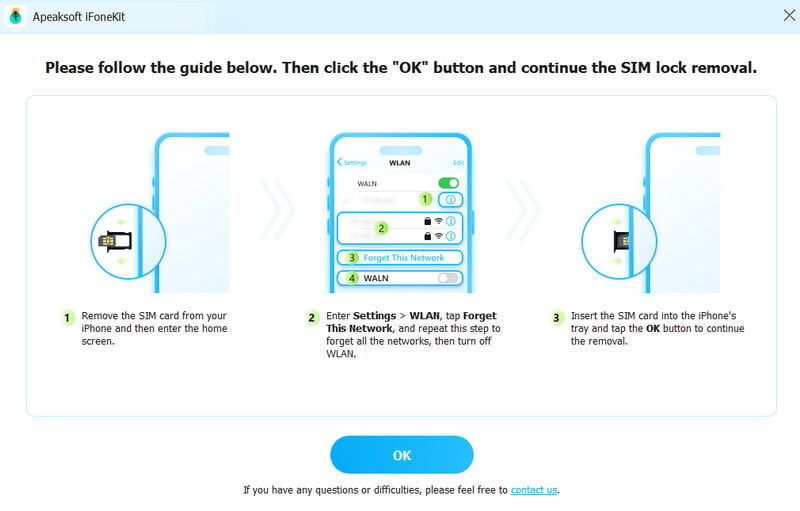
Trin 4 Unlock SIM card successfully.
Wait for a while. Your SIM restrictions will be removed soon.
Del 4: Sådan låser du op for iPhone SIM-kort online
Hvis din iPhone ikke overholder oplåsningspolitikken, eller du ikke kan give nok oplysninger, skal du låse dit iPhone SIM-kort op ved hjælp af et tredjepartsværktøj, f.eks. DirectUnlocks. Husk, at disse tjenester ikke er gratis, og priserne varierer afhængigt af din iPhone-model.
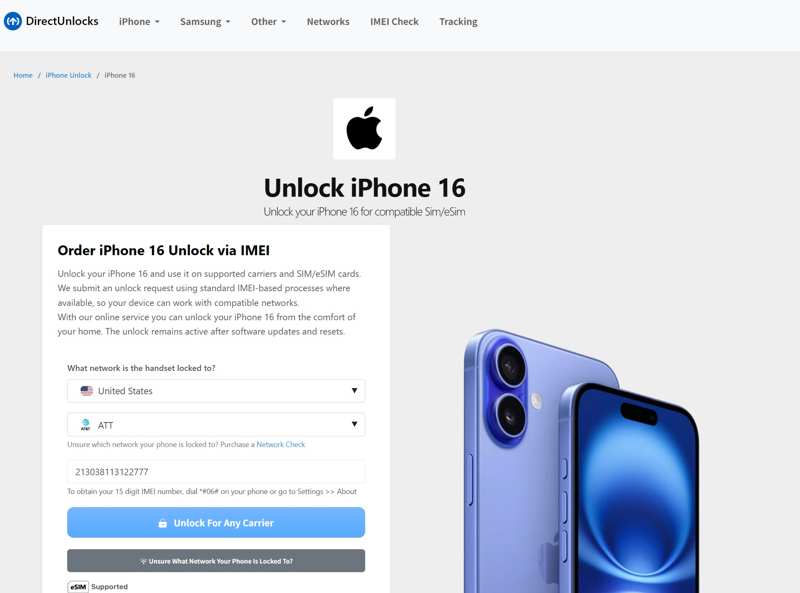
Trin 1 Gå til www.directunlocks.com i en browser.
Trin 2 Klik på knappen iPhone menuen og vælg din iPhone-model.
Trin 3 Vælg dit land, din udbyder, og indtast dit iPhone IMEI-nummer.
Trin 4 Klik på knappen Lås op for enhver udbyder knappen for at fortsætte.
Trin 5 Betal derefter din ordre med et kredit- eller betalingskort.
Trin 6 Efterlad din e-mailadresse og andre oplysninger.
Trin 7 Når tjenesten har låst dit SIM-kort op, sender den dig en e-mail med oplåsningskoden og de resterende trin.
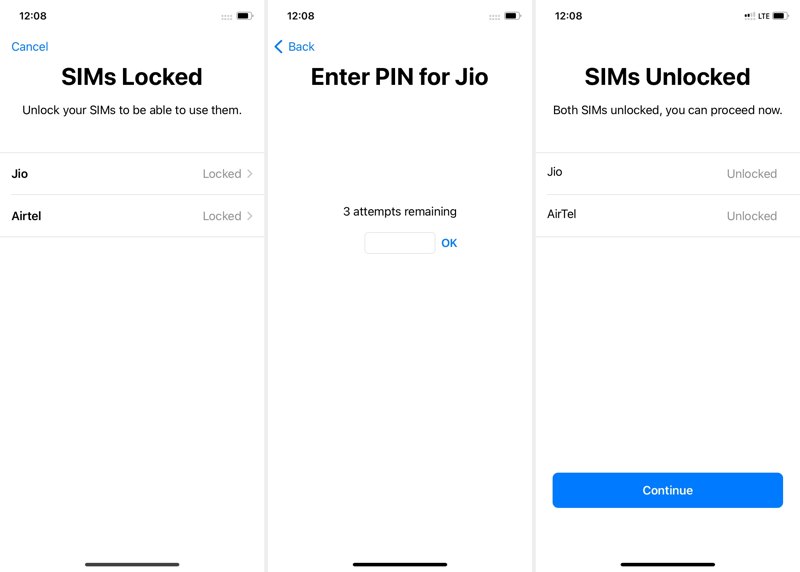
Trin 8 Tag derefter SIM-kortet fra din iPhone og indsæt det i en anden telefon.
Trin 9 Når du bliver bedt om det, skal du indtaste oplåsningskoden og bekræfte oplåsningen af iPhone SIM-kortet.
Part 5: FAQs About Unlocking SIM Card on iPhone
Can I unlock a SIM-locked iPhone with a PIN?
No. iPhone carrier locks are removed by the carrier after you meet their unlock requirements. You don't usually enter an unlock PIN manually.
Will unlocking the SIM card erase my iPhone data?
No. Unlocking an SIM-locked iPhone does not erase your data. Your apps, photos, contacts, messages, and other content will remain on the device.
Can I unlock my iPhone SIM card for free?
Yes. If you meet the carrier's unlock requirements, you can request a free SIM unlock from your carrier.
Konklusion
This guide shared 4 ways to lås SIM-kortet op på din iPhone. You can check whether your iPhone is SIM locked in your Settings app. Requesting a SIM unlock from your carrier is an easy method to get rid of the SIM lock. The PIN code is another method if you can meet your carrier's device unlocking policy. Another option is a third-party unlocking software like Apeaksoft iFoneKit iOS-oplåsning or online service.
 Apeaksoft iPhoneKit
 Lås op for alle typer iOS-adgangskoder fra iPhone, iPad og iPod.
Sikker download
Sikker download
Relaterede artikler