

 1009 Reviews
Days
Hours
Mins
Secs
$44.90 $22.45
100% Clean & Secure
50%
OFF
30-Day Money Back Guarantee
100% Clean & Secure
50%
OFF
30-Day Money Back Guarantee

This data recovery software can recover data from an emptied Recycle Bin, damaged memory cards, deleted partitions, system crashes, inaccessible drives, virus attacks, and more. This program for data recovery can scan your PC or Mac and quickly display all types of lost files, and then you can choose your desired files and recover them in a few clicks. The read-only recovery process ensures your existing data remains unchanged during recovery.

Accidental Deletion

Update Failure
Format Disk

Disk Partition
Disk Damage

CPU Failure
Virus Attack

Emptied Trash Bin
Apeaksoft Data Recovery supports data recovery of various file types across multiple data loss scenarios. It supports file recovery such as images (JPEG, PNG, GIF, BMP, RAW), audio files (MP3, WAV, AAC, FLAC), videos (MP4, MOV, AVI, MKV, WMV), documents (Word, Excel, PowerPoint, PDF, TXT, RTF), and emails (Outlook PST/OST, EML, MBOX). All your lost and existing files will stay safe without any change. As a free data recovery software, it also lets you recover up to 200MB of data at no cost before upgrading.

Images

Audio

Videos

Documents


Others

Apeaksoft Data Recovery can recover lost files not only on your Windows and Mac computer, but also from external drives, USB drives, memory cards, SD/CF cards, digital cameras, drones, and mobile devices including iPhone, iPad, iPod, Samsung, Android phones and tablets.
Compared with other data recovery tools, Apeaksoft Data Recovery has the capability to scan deleted files at a faster speed. When you restore lost videos, photos, music, documents, emails, etc. from your computer, Data Recovery won't steal or change any of these data. It will 100% guarantee your privacy, data, settings, and everything safe.
It highly supports any popular PC, Mac, hard drive, flash drive like Apple, Samsung, Dell, HP, IBM, HITACHI, TOSHIBA, Sony, Seagate, Kingston, SanDisk, and more.


Apeaksoft Data Recovery has been continuously improved and refined through over 8 years of development. Compared to traditional data recovery tools with complex, technician-oriented interfaces, this file recovery software delivers a cleaner and more modern interface with a more intuitive workflow. Users can recover deleted files in just 3 simple steps: select file location, scan your device, check data and recover. No technical skills are required.
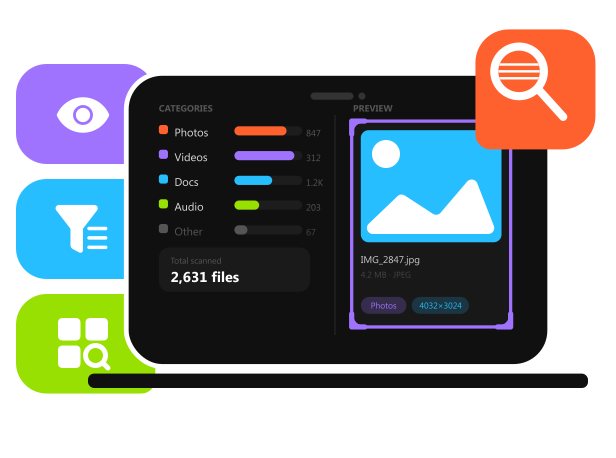
Apeaksoft Data Recovery is designed to help users recover deleted or lost files as quickly as possible. Its deep scan feature thoroughly scans your selected storage device to find as many recoverable files as possible. Once the scan is complete, all recoverable files are neatly organized by file type and file path. If you still remember the file name, simply use the built-in Search feature to locate it instantly. Before file data recovery, you can preview photos, videos, documents, emails, and other supported files to confirm you've found the right ones. Then, you can selectively choose to recover one or more files based on your needs.
100% Clean & Secure
50%
OFF
30-Day Money Back Guarantee
100% Clean & Secure
50%
OFF
30-Day Money Back Guarantee

Download and install.

Choose Target File Location.
Get Your Data Recovered!

Apeaksoft Data Recovery provides a straightforward and efficient way to recover lost or deleted files, with a simplified interface that makes the process easy for all users.
It offers a reliable solution for data recovery on Windows and Mac, allowing users to quickly scan and restore important files without any hassle.
This data recovery software combines ease of use with stable recovery performance, making it suitable for handling common data loss scenarios.
With its streamlined scanning process, users can efficiently locate and recover deleted files on Windows and Mac without complex steps.
Designed for practicality and daily use, this data recovery tool helps users restore lost data from various storage devices with ideal results.
This data recovery program delivers a user-friendly recovery experience with comprehensive data recovery results in recovering different file types on Windows and Mac.

Alistair Mercer

Thank goodness! I accidentally deleted some precious family photos while organizing pictures on my camera. Thanks to Apeaksoft Data Recovery, I was able to recover them all perfectly.

Callum Whitmore
I usually use Shift + Delete to remove files I don't need at work, but I accidentally deleted an important folder just now. I tried this data recovery tool, and it successfully helps me get it back.

Everett Brooks
My coworker accidentally formatted my USB drive. My heart sank because all of my important files were gone. Thankfully, Apeaksoft Data Recovery recovered data from my formatted drive successfully.
FAQs
Does Apeaksoft Data Recovery really work?
Yes. We promise a 99.7% success rate. We provide a free trial. You can recover 200MB of data for free before upgrading to the Pro version.
How long ago can deleted files be recovered with this software?
Apeaksoft Data Recovery can successfully recover lost data as long as new data do not overwrite it. Therefore, if you've added new data to your computer or disks, the success rate may decline.
How can I recover data from Windows/Mac?
Apeaksoft Data Recovery is the best data recovery software to recover lost data on your Windows and Mac computers. You only need to choose your target location and start scanning. During or after the process, you can choose your desired lost files and restore them easily.
Is it safe to use Apeaksoft Data Recovery?
Yes, it is. It's 100% safe and secure to use Apeaksoft Data Recovery. This software only helps you recover lost data and won't steal or cheat on your data or privacy. Your files and disks will stay safe and sound.
Why is the lost data on my computer recoverable?
When you delete a file, your computer just marks its space as available and doesn't really delete it. Until new data overwrites it, the file can still be recovered.
How long does it take to recover my lost files?
It depends on the size of your lost data. However, Apeaksoft Data Recovery applies an optimized scanning algorithm and enables you to preview while scanning.

Trusted data recovery software to scan, preview, and recover deleted, formatted, or inaccessible files on Windows and Mac.
100% Clean & Secure
50%
OFF
30-Day Money Back Guarantee
100% Clean & Secure
50%
OFF
30-Day Money Back Guarantee


Lost Files on PC or Drives?
1-Click Solution
Windows & macOS · 100% Safe
Copyright © 2026 Apeaksoft Studio. All rights reserved.


