Yksityiskohtainen vastaus kysymykseen, jos FaceTime ilmoittaa näytön tallennuksesta

FaceTime on Applen kehittämä esiasennettu videokeskustelusovellus, jonka avulla kaksi tai useampi käyttäjä voi nähdä ja keskustella keskenään reaaliajassa. Apple pitää FaceTimen yksityisenä ja yksinkertaisena. Oletetaan, että naurat ystäväsi kanssa FaceTimessa, ja yhtäkkiä mieleesi juolahtaa ajatus: entä jos he tallentavat sen? Tutkimuksemme mukaan tällainen epäilys ei ole harvinaista. Tämä artikkeli vastaa siihen, onko FaceTime ilmoittaa näytön tallennuksen aikana iPhonessa tai Macissa.
SIVUN SISÄLTÖ:
Osa 1: Ilmoittaako FaceTime näytön tallennuksesta
Ilmoittaako Apple, kun tallennat FaceTime-puhelun näytöltä? Ei, FaceTime ei ilmoita käyttäjille, jos joku tallentaa videopuhelun näytöltä, mikä tekee siitä vähemmän turvallisen yksityiskeskusteluissa. Kun joku tallentaa FaceTime-puhelun iPhonella, iPadilla tai Mac-tietokoneella, ei ponnahdusikkunaa, ääntä eikä ilmoitusta näy.
Apple suunnitteli FaceTimen tällä tavalla muutamista syistä, kuten tallennusohjainten puutteesta, sisäänrakennetun näytön tallennustoiminnon ei tarvitse raportoida toiminnasta sovelluksille, ei keskeytä keskusteluja ja paljon muuta.
Osa 2: Mistä tiedät, tallentaako joku FaceTimea
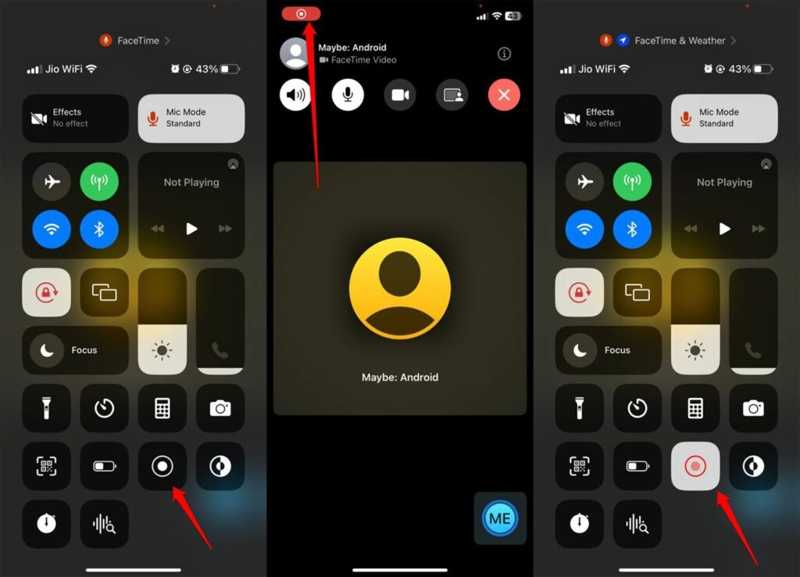
Vaikka FaceTime ei ilmoittaisikaan näytön tallennuksesta, voit oppia toiminnan seuraamalla muutamia merkkejä. Teknisesti ottaen ei ole olemassa taattua menetelmää. Opi nämä merkit pitääksesi keskustelusi yksityisenä ja luottamuksellisena.
Merkki 1: Tallennuspiste
Kun tallennat näyttöä FaceTime-puhelun kautta, joko sisäänrakennetulla näytöntallennustoiminnolla tai kolmannen osapuolen näytöntallennussovelluksella, näytölle ilmestyy punainen tallennuspiste. Jos näet tallennusilmaisimen ystäväsi näytöllä, hän tallentaa videopuheluasi. Voit pyytää ystävääsi jakamaan puhelimen näytön FaceTimen kautta puhelun aikana.
Merkki 2: Viive tai viive
Yksi tärkeä symboli on viive ja viive. FaceTimessa soitettaessa käytetään monia lähteitä. Jos joku ottaa näytön tallennuksen käyttöön FaceTimessa, videossa voi yhtäkkiä olla viivettä laitteen nykimisen tai kuumenemisen vuoksi.
Merkki 3: Epäilyttävä ääni tai toiminta
jotta nauhoittaa FaceTime iPhonella tai Macilla soittajan on mentävä Ohjauskeskukseen ja käytettävä Näytön tallennus -toimintoa. Saatat kuulla epäilyttävän napsautusäänen tai nähdä outoja toimintoja soittaessasi FaceTimeen.
Merkki 4: Epätavallinen pyyntö
Toinen vihje siitä, tallentaako joku FaceTime-näyttöä, on epätavalliset pyynnöt tai käytös puhelun aikana. Jos kohtaat näitä ongelmia, soittaja todennäköisesti yrittää tallentaa FaceTime-puheluasi saavuttaakseen tietyn tarkoituksen.
Osa 3: Kuinka suojata yksityisyyttäsi FaceTimessa
Jos haluat pitää yhteyttä ystäviisi ja perheeseesi FaceTimen kautta, voit suojata yksityisyyttäsi noudattamalla muutamia vinkkejä. Tässä on käytännön vinkkejä ja niksejä, joiden avulla pysyt turvassa soittaessasi FaceTimen kautta:
- 1.Soita vain luotettaville ihmisille.
- 2.Älä näytä yksityisiä tietoja kameranäkymässä.
- 3.Kysy suoraan ystäviltäsi ja perheenjäseniltäsi, kun käytät FaceTimea.
- 4.Käytä vaihtoehtoista sovellusta, kuten Zoomia, joka ilmoittaa näytön tallennuskeskusteluista.
Kirjallisuutta
Osa 4: Lopullinen tapa tallentaa FaceTime ilman viivettä
Jos haluat tallentaa FaceTime-puhelun ilmoittamatta siitä muille, Apeaksoft Screen Recorder on hyvä vaihtoehto. Sen avulla voit tallentaa videopuheluita iPhonella tai iPadilla tietokoneella. Näin keskustelu ei keskeydy. Lisäksi intuitiivinen muotoilu yksinkertaistaa työnkulkua.

Ladannut yli 1,000,000 Käyttäjät
- Tallenna FaceTime-puhelut iPhonellasi sujuvasti.
- Tallenna FaceTime-puhelut HD-videoina.
- Tukee useita videomuotoja.
- Ei ilmoita muille näytön tallennuksen aikana.
- Tarjoa bonusominaisuuksia, kuten ajastettuja tallennuksia.
Suojattu lataus
Suojattu lataus

Kuinka tallentaa FaceTime iPhonellesi ilman viivettä
Vaihe 1. Asenna FaceTime-tallennin
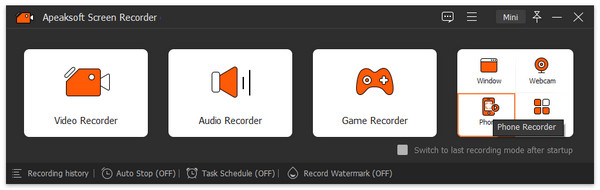
Käynnistä FaceTime-tallennusohjelmisto, kun olet asentanut sen tietokoneellesi. Se on saatavilla Windows 11/10/8/7/XP/Vista- ja Mac OS X 10.13-käyttöjärjestelmille tai uudemmille. Valitse Puhelimen tallennin ja valitse iOS -tallennin. Seuraavaksi seuraa näytön ohjeita iPhone-näytön peilaamiseksi.
Vaihe 2. Äänitä FaceTime
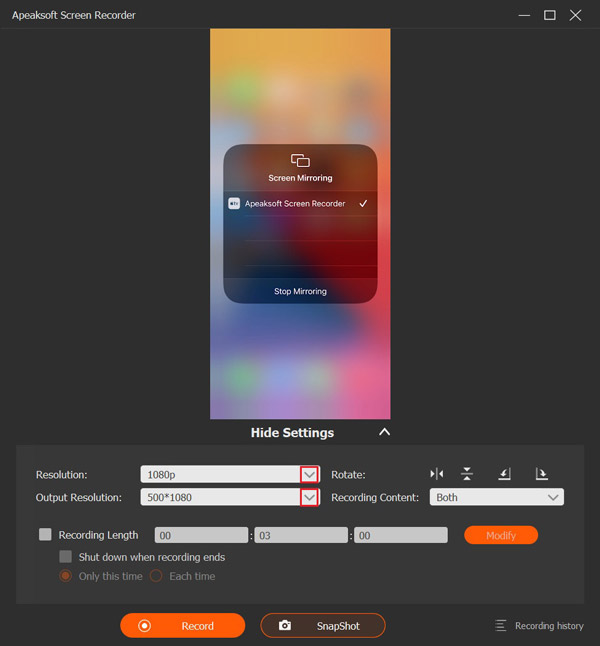
Aseta resoluutio ja tallennussisältö, kuten Puhelimen kaiutinAloita puhelu FaceTimessa iPhonellasi ja napsauta ennätys -painiketta aloittaaksesi puhelun tallennuksen.
Vaihe 3. Tallenna puhelun tallenne
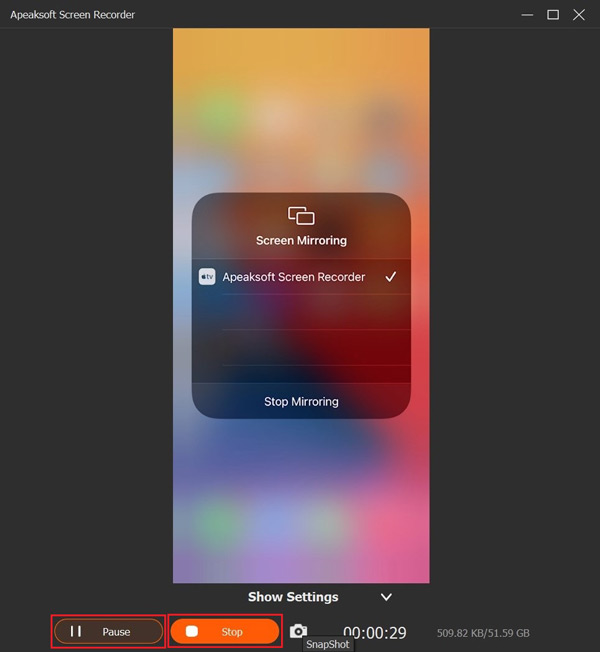
Kun puhelu on valmis, napsauta stop ikkunassa olevaa -painiketta tallentaaksesi puhelutallenteen kiintolevylle. Voit pysäyttää tallennuksen tilapäisesti prosessin aikana painamalla Tauko -painiketta. Voit katsoa tallenteen napsauttamalla Tallennushistoria ja avaa uusin video.
Vinkki: Jos haluat muuttaa videomuotoa tai lähtökansiota, napsauta pääkäyttöliittymän Asetukset-valikkoa ja siirry kohtaan ulostulo -välilehti Asetukset-valintaikkunassa.
Yhteenveto
Tämä artikkeli vastasi siihen, onko FaceTime ilmoittaa, kun tallennat näytön iPhonella, iPadilla tai Macilla. Nyt sinun pitäisi oppia vastaus ja asiaankuuluva tieto. Jos epäilet, että muut tallentavat FaceTime-puheluitasi näytöltä, seuraa vihjeitämme kertoaksesi totuuden. Jos haluat tallentaa FaceTime-puhelun salaa, Apeaksoft Screen Recorder on tavallisille ihmisille erinomainen vaihtoehto.
Aiheeseen liittyvät artikkelit