Si vous avez déjà envisagé de jailbreaker votre iPhone, vous avez probablement entendu le nom de 3uTools. Alors, en plus de 3uTools qui vous aide à réussir votre jailbreak, possède-t-il d'autres fonctionnalités qui peuvent vous intéresser, comme la localisation virtuelle ? Si vous êtes curieux de connaître ce logiciel, vous pouvez continuer à lire cette revue complète de 3uTools pour en acquérir une compréhension approfondie avant de consacrer du temps et des efforts à le télécharger et à l'utiliser. En dehors de cela, cet article vous présentera également une alternative plus sûre pour vous aider à usurper vos emplacements.

- Partie 1. Présentation explicite de 3uTools et de sa fonctionnalité d'usurpation d'emplacement
- Partie 2. Comment changer d'emplacement avec 3uTools
- Partie 3. Une alternative plus sûre à l'usurpation d'emplacement 3uTools
- Partie 4. FAQ sur 3uTools
Partie 1. Présentation explicite de 3uTools et de sa fonctionnalité d'usurpation d'emplacement
Sur Apeaksoft, nous nous engageons à vous proposer du contenu vérifié. Voici nos efforts pour y parvenir :
- Lorsqu'il s'agit de tous les produits sélectionnés dans nos revues, notre priorité est leur popularité et vos besoins.
- Notre équipe de contenu Apeaksoft a testé tous les produits mentionnés ci-dessous.
- Au cours du processus de test, notre équipe se concentre sur ses fonctionnalités exceptionnelles, ses avantages et ses inconvénients, la compatibilité des appareils, son prix, son utilisation et d'autres fonctionnalités remarquables.
- En ce qui concerne les ressources de ces avis, nous avons utilisé des plateformes et des sites Web d’avis fiables.
- Nous recueillons les suggestions de nos utilisateurs et analysons leurs retours sur les logiciels Apeaksoft ainsi que sur les programmes d'autres marques.

1. Qu'est-ce que 3uTools ?
Sur la base de son site officiel, 3uTools est défini comme un outil tout-en-un pour tous les appareils iOS. 3uTools est un outil logiciel conçu pour gérer et sauvegarder les fichiers de données des appareils iOS. 3uTools peut fournir aux utilisateurs une variété de fonctions de gestion, notamment des fonctions professionnelles de flashage, de sauvegarde, de récupération et de jailbreak. De plus, la puissante boîte à outils de 3uTools vous offre un outil puissant appelé localisation virtuelle, vous pouvez usurper la localisation dans 3uTools. Cependant, il est conçu pour les appareils iOS, donc si vous êtes un utilisateur Android, 3uTools ne peut pas vous fournir de services colorés.
2. Comment fonctionne la fonctionnalité d'usurpation d'emplacement de 3uTools
- AVANTAGES
- Vous pouvez définir l'emplacement virtuel dans n'importe quel coin du monde sans restrictions.
- Vous pouvez usurper votre véritable emplacement sans jailbreak dans 3uTools.
- INCONVENIENTS
- Si vous utilisez la fonction d'usurpation de localisation de 3uTools pour jouer à certains jeux basés sur la localisation comme Pokémon GO, vous serez probablement arrêté et banni définitivement de l'éditeur du jeu.
- Vous ne pouvez télécharger et utiliser la fonctionnalité que sur votre Windows.
- L'effet de la localisation virtuelle ne dure que 3 à 6 heures, ce qui est trop court pour les utilisateurs.
- Une fois que vous connectez votre appareil iOS à 3uTools, votre appareil et vos informations privées sont en danger.
- Il y a des retards dans le chargement d'un emplacement virtuel en raison de problèmes de carte et de serveur.
3. L'utilisation de 3uTools est-elle gratuite ?
La réponse est oui. L'un des plus grands avantages de cette plate-forme est que 3uTools est gratuit pour tous les utilisateurs et que vous pouvez utiliser autant de fonctionnalités que vous le souhaitez. Vous pouvez télécharger gratuitement la version Windows du logiciel depuis son site officiel pour l'utiliser, et il n'est pas du tout nécessaire d'acheter le service pendant l'utilisation du logiciel ! L'inconvénient est que même si 3uTools propose deux produits en téléchargement, la version iOS sera restreinte au niveau régional. Ainsi, si vous souhaitez utiliser ce logiciel gratuit mais puissant, vous ne pouvez le télécharger qu'avec Windows, ce qui le rend moins convivial pour les utilisateurs Mac.
4. L'utilisation de 3uTools est-elle sûre ?
Malheureusement, la réponse est non. Il est considéré comme un outil de piratage par Apple. Une fois que vous l’utilisez, votre iPhone et vos données sont en danger. Par exemple, votre système plantera fréquemment et deviendra moins stable. Il convient de mentionner que si vous utilisez 3uTools pour vous aider à jailbreaker votre appareil Apple avec succès, votre appareil Apple ne sera plus couvert par la garantie après-vente d'Apple.
Partie 2. Comment changer d'emplacement avec 3uTools
Comme la revue holistique 3uTools mentionnée précédemment, vous pouvez utiliser 3uTools pour modifier votre géolocalisation en fonction de vos besoins. Cependant, si vous voulez savoir comment changer d'emplacement avec 3uTools, la première chose pour vous est d'apprendre à utiliser 3uTools.
Tout d’abord, vous devez installer iTunes sur votre PC car iTunes est nécessaire pour utiliser 3uTools. Deuxièmement, téléchargez et installez la dernière version de 3uTools sur votre PC. Vous devez connecter votre appareil iOS à votre ordinateur avec un câble USB. Assurez-vous que le câble et le port USB sont en bon état.
Une fois toute cette préparation terminée, vous pouvez suivre des étapes concrètes pour changer l'emplacement de l'iPhone avec 3uTools.
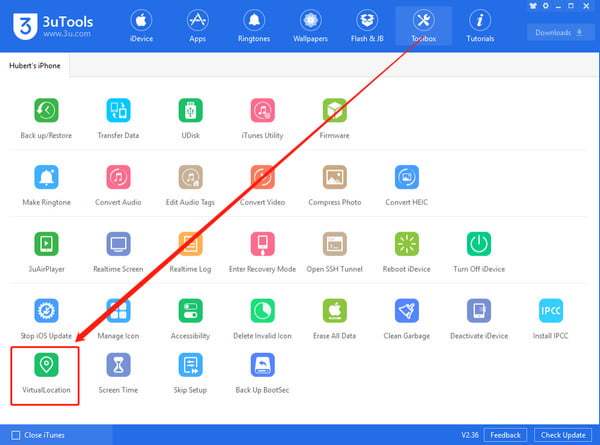
Étape 1 Lorsque votre iPhone est connecté à votre PC avec un câble USB, vous pouvez voir le barre d'outils bouton en haut à gauche de l’interface. Cliquez dessus et accédez au Emplacement virtuel .
Étape 2 Il y a une fenêtre contextuelle dans laquelle vous pouvez saisir le Longitude et latitude d'une adresse spécifique que vous souhaitez modifier ici. Ensuite, vous pouvez cliquer sur le Modifier l'emplacement virtuel bouton pour confirmer.
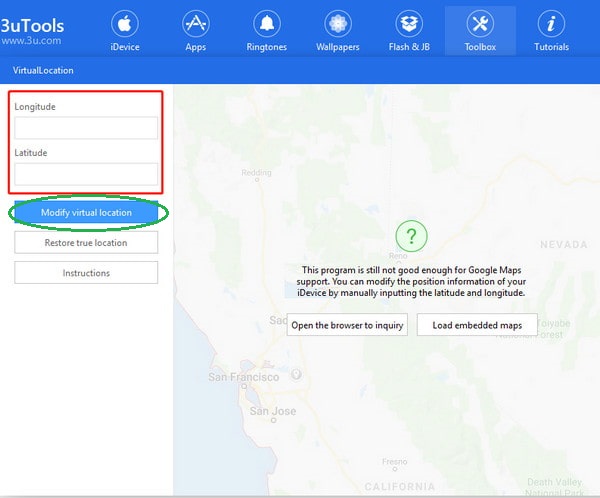
Étape 3 Pendant le processus, assurez-vous que l'écran de votre iPhone est déverrouillé. Une fois que vous avez cliqué sur le Modifier l'emplacement virtuel bouton, vous verrez si l'opération a réussi dans une fenêtre contextuelle.
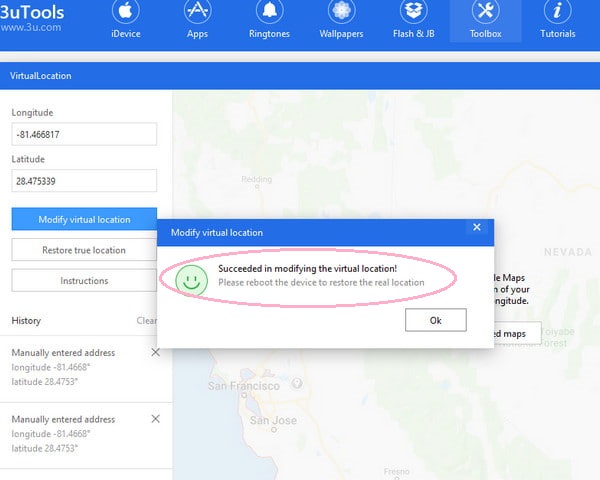
En trois étapes, vous pouvez créer un emplacement virtuel sur votre iPhone avec 3uTools. Si vous souhaitez récupérer votre véritable emplacement, vous pouvez cliquer sur le bouton Restaurer l'emplacement réel bouton pour le faire.
Partie 3. Une alternative plus sûre à l'usurpation d'emplacement 3uTools
Cependant, un grand nombre d'utilisateurs se plaignent du fait que 3uTools n'a pas réussi à modifier l'emplacement virtuel. Si vous ne voulez pas mettre votre appareil iOS et vos données en danger en modifiant votre position GPS sur votre appareil, Changeur d'emplacement iPhone Apeaksoft peut être la meilleure alternative à 3uTools.
4,000,000+ Téléchargements
Le plus haut niveau de protection de vos données et de votre vie privée.
Une interface simple et intuitive vous permet de changer de position GPS en un clic.
Compatible avec les dernières versions d'iOS 26/27, d'iPadOS 26/27 et de l'iPhone 18.
Le changeur d'emplacement peut être téléchargé pour Windows et Mac.
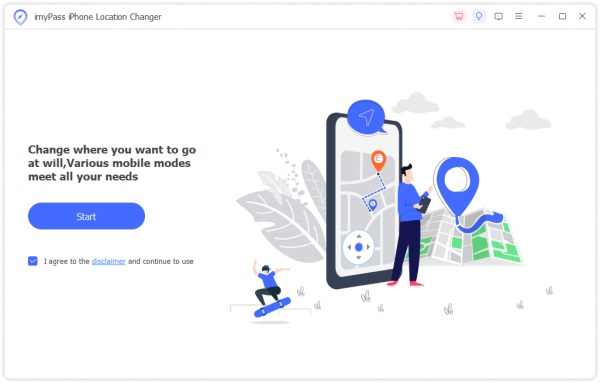
Étape 1 Installez-le gratuitement sur votre Windows ou Mac. Ensuite, connectez votre appareil iOS au logiciel avec un câble USB ou un câble Lightning. Clique le Commencer bouton pour en profiter. N'oubliez pas d'appuyer sur le Confiance lorsqu'il apparaît sur votre ordinateur et votre appareil iOS.
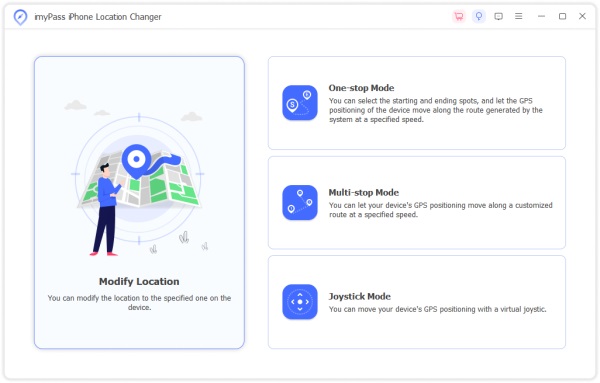
Étape 2 Il existe quatre modes dans l'interface principale : Modifier l'emplacement, Mode à guichet unique, Mode multi-arrêts et Mode joystick. Ici, choisissez le Modifier l'emplacement mode pour modifier votre position GPS. Les trois autres modes vous permettent de créer des itinéraires virtuels de différentes manières.
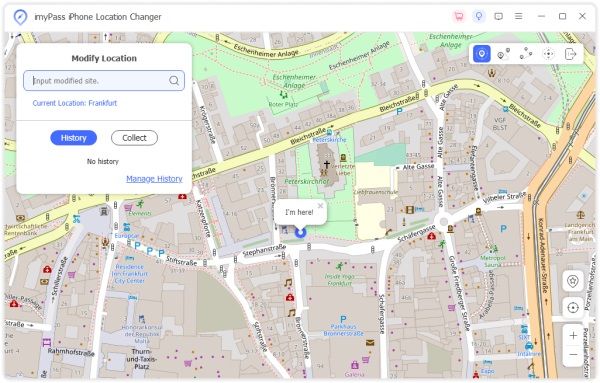
Étape 3 Par défaut, vous pouvez saisir l'adresse de votre choix dans la case du Modifier l'emplacement boîte de dialogue et cliquez sur Confirmer Modifier pour créer votre emplacement virtuel à la fois.
Si vous n'avez pas d'adresse spécifique, vous pouvez cliquer sur un emplacement aléatoire sur la carte. Ensuite, cliquez sur le Passer à dans la boîte de dialogue contextuelle pour confirmer votre nouvel emplacement virtuel.
Partie 4. FAQ sur 3uTools
Puis-je utiliser 3uTools pour modifier l’emplacement de mon PC ?
Non, tu ne peux pas. 3uTools est un outil tout-en-un pour tous les appareils iOS. Vous pouvez changer d'emplacement sur votre iPhone iPad via l'usurpation d'emplacement 3uTools. Cependant, vous pouvez utiliser Changeurs d'emplacement VPN pour changer l'emplacement de votre PC.
Puis-je tromper l’emplacement de mon ordinateur ?
Oui, vous pouvez. Avec un VPN, vous pouvez falsifier votre adresse IP sur votre ordinateur. De plus, vous pouvez utiliser le Lieu de garde pour ajouter du bruit à votre géolocalisation actuelle.
Puis-je usurper ma position sans VPN ?
Oui, il existe de nombreux produits permettant d’usurper votre localisation. Par exemple, vous pouvez utiliser Apeaksoft iPhone Location Changer pour modifier la position GPS de votre iPhone en quelques secondes.
Conclusion
Avec cette revue holistique de 3uTools, vous pouvez savoir ce qu'est 3uTools et ses principales fonctionnalités. De plus, vous pouvez saisir un supérieur alternative à 3uTools pour modifier l’emplacement virtuel – Apeaksoft iPhone Location Changer.