

Test de CapCut : Ce logiciel vaut-il la peine d’être utilisé pour le montage vidéo ?

CapCut offre de nombreuses fonctionnalités et outils pour créer et monter des vidéos sur ordinateur, mobile et en ligne. Étant donné sa popularité mondiale depuis sa sortie en 2020, beaucoup se demandent si elle vaut la peine d'être utilisée et recherchent un avis honnête et impartial. Avis CapCut Pour en savoir plus sur cet outil de montage vidéo, consultez notre article. Nous avons testé CapCut sur mobile, ordinateur et en ligne, en analysant en détail ses fonctionnalités, ses performances et en comparant ses meilleures alternatives. Lire la suite !
CONTENU DE LA PAGE :
Partie 1 : Principales caractéristiques de CapCut
CapCut est un logiciel de montage vidéo populaire offrant de nombreuses fonctionnalités pour la création et le montage de vidéos. Cette section présente ses principales caractéristiques, accompagnées d'avis d'utilisateurs.
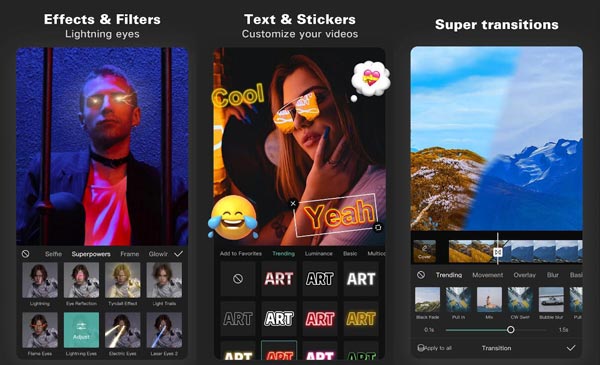
Outils d'édition: CapCut propose une variété d'outils de montage pour aider les utilisateurs à créer des vidéos uniques et de qualité professionnelle. Ces outils incluent : découpage vidéoIl propose des fonctions de fusion, de division et de réglage de la vitesse, largement suffisantes pour la plupart des projets vidéo courts. Cependant, comparé à d'autres logiciels de montage professionnels, il est moins flexible et précis.
Modèles: CapCut propose une vaste gamme de modèles. En un seul clic, les utilisateurs peuvent recréer des styles de montage populaires sur Internet et produire rapidement du contenu prêt pour les réseaux sociaux. Cependant, il est important de noter que les options de personnalisation des modèles sont relativement limitées.
Filtres et effets : CapCut propose une vaste collection de filtres et d'effets permettant d'embellir vos vidéos. Parmi eux, des filtres beauté, des outils de correction des couleurs et divers effets vidéo. Vous pouvez également apprendre à flouter l'image avec ces effets. Cependant, lors de nos tests sur mobile, nous avons constaté que de nombreux filtres et effets avancés et populaires sont réservés aux utilisateurs de CapCut Pro.
Musique et effets sonores : CapCut permet aux utilisateurs de ajouter des pistes musicales aux vidéos Vous pouvez aussi choisir parmi une bibliothèque de morceaux de musique libres de droits. L'application propose également divers effets sonores pour renforcer l'impact de vos vidéos. De plus, elle permet d'importer de la musique de fond depuis vos collections TikTok.
Texte et autocollants : CapCut propose différents styles de texte et polices pour ajouter des légendes ou des titres aux vidéos. Il offre également une vaste collection d'autocollants et d'émojis pour embellir les vidéos.
Effets de transition: CapCut propose une gamme d'effets de transition permettant de créer des transitions fluides entre les différentes scènes ou plans d'une vidéo. De plus, vous pouvez apprendre à réaliser des ralentis avec CapCut.
Partage social: CapCut permet aux utilisateurs de partager facilement leurs vidéos sur les réseaux sociaux tels qu'Instagram, TikTok et YouTube, ce qui leur permet d'atteindre un public plus large.
Partie 2 : Bref examen de CapCut
Forts de notre expérience pratique avec les logiciels de montage vidéo pour ordinateur, mobile et en ligne, nous avons constaté que CapCut offre un excellent équilibre entre facilité d'utilisation et fonctionnalités pratiques pour la création de contenu au quotidien.
Ce qui impressionne le plus, c'est son interface conviviale et intuitive, avec une présentation simple qui permet d'accéder rapidement aux fonctionnalités de l'application. Les utilisateurs peuvent importer des vidéos depuis la bibliothèque de leur appareil ou en enregistrer directement dans l'application. Celle-ci propose également une gamme de modèles CapCut permettant de créer des vidéos avec des effets et des filtres prédéfinis.
De plus, sa capacité à éditer et à partager des vidéos sur les réseaux sociaux comme Instagram, TikTok et YouTube est l'un des atouts majeurs de CapCut. L'application propose des formats d'image prédéfinis et des paramètres d'exportation optimisés pour ces plateformes, garantissant ainsi un rendu impeccable des contenus créés sur les réseaux sociaux.
Son principal atout réside dans sa flexibilité d'utilisation : CapCut propose un logiciel de bureau, une application mobile et une plateforme en ligne, permettant ainsi aux utilisateurs de passer d'un appareil à l'autre selon leurs besoins. Notez que la version en ligne de CapCut exige également une connexion avant toute modification.
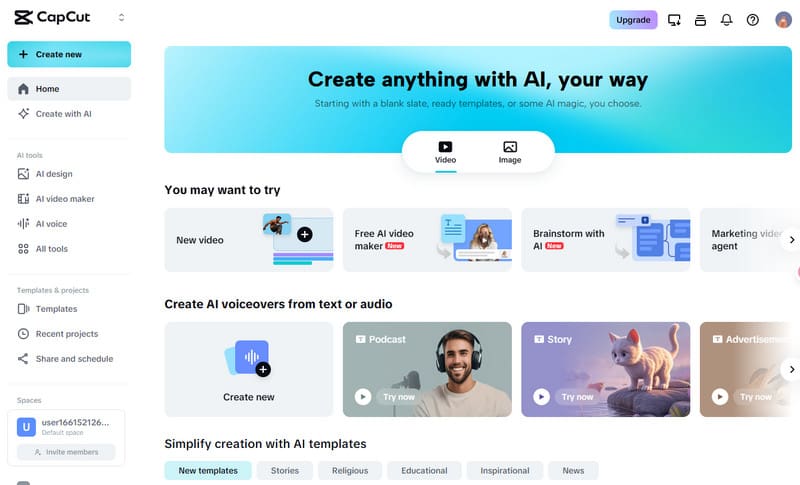
Dans l'ensemble, CapCut est une application de montage vidéo puissante et polyvalente qui offre une gamme de fonctionnalités et d'outils pour créer et éditer des vidéos. Son interface conviviale et ses paramètres d'exportation optimisés en font un excellent choix pour les créateurs de contenu qui souhaitent créer des vidéos de haute qualité sur leurs appareils mobiles. Bien que l'application présente certaines limites, telles que le manque de fonctionnalités avancées telles que l'animation d'images clés et l'édition multipiste, CapCut offre toujours un ensemble complet d'outils qui sont plus que suffisants pour la plupart des utilisateurs.
À qui CapCut est-il le mieux adapté ?
- Créateurs de contenu TikTok/Reels/format court
- Débutants qui souhaitent des résultats rapides
- Les utilisateurs qui préfèrent les modèles et les outils d'IA
- Gestionnaires de médias sociaux et petits créateurs
Qui pourrait ne pas apprécier CapCut ?
- Éditeurs YouTube de contenu long
- Utilisateurs nécessitant un étalonnage des couleurs avancé
- flux de travail de collaboration d'équipe
- Besoins de post-production hautement spécialisés
Partie 3 : Meilleure alternative de bureau à CapCut
Si vous travaillez souvent avec des vidéos longues, des formats multiples ou si vous devez traiter des fichiers par lots, CapCut peut s'avérer un peu limité ou lent. De plus, de nombreux modèles, effets et ressources premium de CapCut nécessitent désormais un abonnement CapCut Pro, qui coûte généralement environ 19.99 $ par mois ou 179.99 $ par an, selon la région et la plateforme.
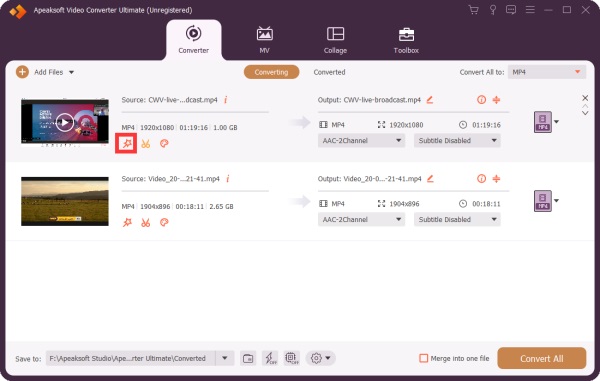
Dans ces cas, Apeaksoft Video Converter Ultimate offre une alternative fiable. Ce logiciel propose non seulement des fonctions de découpage, de fusion et d'amélioration vidéo de base, mais prend également en charge le traitement par lots et la conversion de format sans nécessiter d'abonnement à des modèles premium.
Téléchargement sécurisé
Téléchargement sécurisé
Ce logiciel utilise des algorithmes avancés pour garantir une conversion de haute qualité sans perte de données. Compatible avec de nombreux formats et appareils, il vous permet d'éditer vos vidéos en toute simplicité, contrairement à CapCut. Il prend en charge divers formats vidéo et audio, notamment les plus populaires comme MP4, AVI, MOV, WMV et MP3.
L'une de ses caractéristiques les plus remarquables est la préconfiguration des paramètres d'exportation pour différentes plateformes de médias sociaux : en un seul clic, vous pouvez exporter des vidéos prêtes pour TikTok, Instagram, YouTube et bien d'autres, sans avoir besoin d'ajuster manuellement les proportions, la résolution ou d'autres paramètres.
Bien qu'Apeaksoft Video Converter Ultimate offre un large éventail de fonctionnalités d'édition et de conversion, il présente quelques limitations dont les utilisateurs doivent être conscients. L'un de ses principaux inconvénients est l'absence de modèles pour les réseaux sociaux ; les créateurs ne peuvent donc pas appliquer rapidement des effets tendance ou des styles prédéfinis comme c'est le cas avec CapCut.
Dans l'ensemble, Apeaksoft Video Converter Ultimate est un outil puissant et polyvalent pour convertir et éditer des vidéos, avec une gamme de fonctionnalités pour répondre aux besoins des utilisateurs occasionnels et professionnels.
Partie 4 : FAQ sur CapCut
Quelle est la résolution vidéo maximale prise en charge par CapCut ?
L'éditeur vidéo CapCut prend en charge le montage vidéo jusqu'à 4K, la plus haute résolution disponible pour le montage vidéo grand public.
Puis-je utiliser CapCut sur mon PC ou mon Mac ?
Oui. Bien que CapCut soit principalement conçu pour les appareils mobiles et disponible sur iOS et Android, des versions pour ordinateur sont également disponibles. L'entreprise a par ailleurs lancé une plateforme en ligne, CapCut.
Est-ce que CapCut appose un filigrane sur les vidéos ?
Non, CapCut n'ajoute pas de filigrane aux vidéos éditées, contrairement à certaines autres applications de montage vidéo gratuites.
CapCut est-il gratuit ?
Oui, CapCut est gratuit pour les fonctions de base d'édition, comme le découpage, la fusion, les filtres et les modèles. Cependant, certains modèles premium et fonctionnalités avancées nécessitent un abonnement CapCut Pro, qui coûte environ 19.99 $ par mois ou 179.99 $ par an.
CapCut est-il sûr ?
Oui, CapCut est sûr d'utilisation. L'application est distribuée officiellement par Bytedance et ne contient aucun logiciel malveillant.
CapCut nécessite-t-il une connexion internet ?
Cela dépend. Si vous l'utilisez pour des tâches de montage vidéo basiques comme le découpage, la fusion, etc., une connexion internet est nécessaire pour télécharger des modèles, de la musique ou utiliser la synchronisation cloud.
Conclusion
Après avoir vu notre avis sur CapCutVous savez que c'est une application de montage vidéo impressionnante offrant diverses fonctionnalités et outils pour la création et le montage de vidéos. Ses puissantes capacités de montage en font un excellent choix pour les créateurs de contenu souhaitant réaliser des vidéos de haute qualité pour les réseaux sociaux. Et si vous cherchez une alternative à CapCut pour ordinateur, vous pouvez utiliser Apeaksoft Video Converter Ultimate.
Articles Relatifs
Si vous souhaitez publier une vidéo sur YouTube, vous feriez mieux d'apprendre à monter des vidéos YouTube en ligne et hors ligne grâce à ce guide unique.
Pour supprimer les bruits de fond et le son, vous pouvez suivre notre guide pour supprimer l'audio d'une vidéo sous Windows, macOS, iOS et Android.
Si vous souhaitez découper une vidéo MP4 mais que vous ne savez pas comment faire, prenez quelques minutes pour lire cet article et vous pourrez résoudre votre problème.
Voici plusieurs méthodes pour compresser une vidéo sur iPhone, Mac, Windows et appareils Android sans perte de qualité vidéo.



