

EaseUS MobiSaver pour Android : Test complet et meilleures alternatives

Comment récupérer des photos définitivement supprimées sur mon Android ? Comment retrouver mes données Android perdues ? C’est ici que ça se passe. EaseUS MobiSaver pour Android Ce logiciel est-il vraiment efficace pour la récupération de données Android ? Cet article vous présente ses fonctionnalités, sa sécurité, sa facilité d'utilisation et tout ce que vous devez savoir !
CONTENU DE LA PAGE :
Partie 1 : Analyse détaillée d’EaseUS Mobisaver
EaseUS MobiSaver pour Android est un logiciel professionnel de récupération de données conçu pour récupérer les fichiers perdus ou supprimés des appareils Android. Il prend en charge la récupération de divers types de données, notamment les photos, les vidéos, les messages WhatsApp Business et bien plus encore. Il permet aux utilisateurs de récupérer leurs données efficacement en 3 étapes simples.
Simplicité d’utilisation
EaseUS Mobisaver offre une interface claire et intuitive. Toutes les fonctionnalités et les boutons d'action sont faciles à trouver. Les utilisateurs peuvent le maîtriser sans aucun tutoriel.
Fonctionnalités clés
EaseUS Mobisaver propose les fonctionnalités puissantes suivantes :
- Récupérez les données perdues suite à divers scénarios, tels que la suppression accidentelle, une attaque de virus, une mauvaise manipulation, des problèmes de carte SD, des bugs de l'appareil ou du système, etc.
- Scannez, prévisualisez et récupérez tous types de données perdues sur votre appareil Android, y compris les documents, les photos, les contacts, les notes, les messages, la musique et bien plus encore.
- Exportez les fichiers perdus dans plusieurs formats tels que CSV, HTML et VCF.
- Compatible avec plus de 6000 appareils Android : Samsung, Google, Sony, HUAWEI, HTC, Motorola, LG, ZTE.
Sécurité sureté
EaseUS Mobisaver est-il sûr ? Mes données personnelles seront-elles compromises lors de l'analyse ? Des fichiers existants pourraient-ils être perdus pendant la récupération ? Ce sont des questions fréquentes. Rassurez-vous, MobiSaver est totalement sûr et ne contient aucun logiciel malveillant. Il protège vos données personnelles tout au long du processus.
Partie 2 : EaseUS Mobisaver pour Android est-il gratuit ?
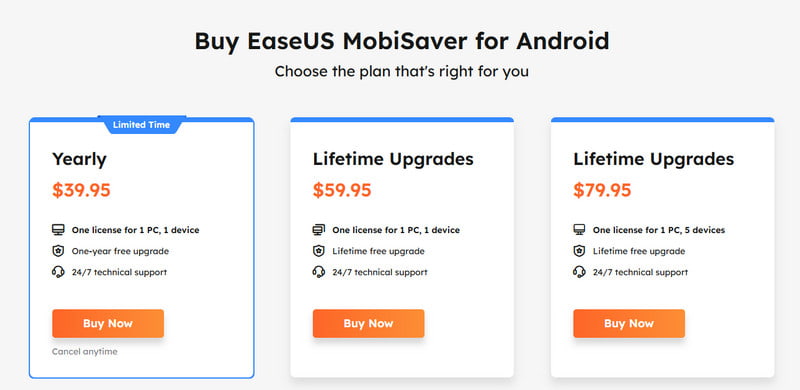
EaseUS Mobisaver pour Android propose une version gratuite, téléchargeable gratuitement sur son site officiel. Cependant, cette version gratuite présente des limitations : elle ne permet de récupérer que 2 Go de données, et la version complète… Récupération de données Android gratuite Cette version n'est pas disponible. Vous devez passer à la version Premium pour débloquer les fonctionnalités avancées et supprimer les limites de récupération. Voici les tarifs de chaque formule :
Partie 3 : Avantages et inconvénients
Après avoir consulté les commentaires et les avis provenant de différentes plateformes, nous avons constaté que la plupart des opinions sur EaseUS Mobisaver se concentrent sur les avantages et les inconvénients suivants :
- Offre une interface conviviale et un guide facile en 3 étapes.
- Permet de prévisualiser les fichiers supprimés avant de les récupérer.
- Envoyer des notifications sur les résultats de la récupération en temps réel.
- De nombreux fichiers listés comme récupérables ne peuvent en réalité pas être restaurés, notamment les photos et les vidéos.
- Risque d'écraser les données que vous souhaitez récupérer.
- Le processus de numérisation est long, de 30 minutes à près de 2 heures.
Partie 4 : Comment récupérer des données Android avec EaseUS Mobisaver
EaseUS Mobisaver permet une récupération rapide des données Android en seulement 3 étapes.
Étape 1 : Connectez votre appareil Android à un ordinateur.
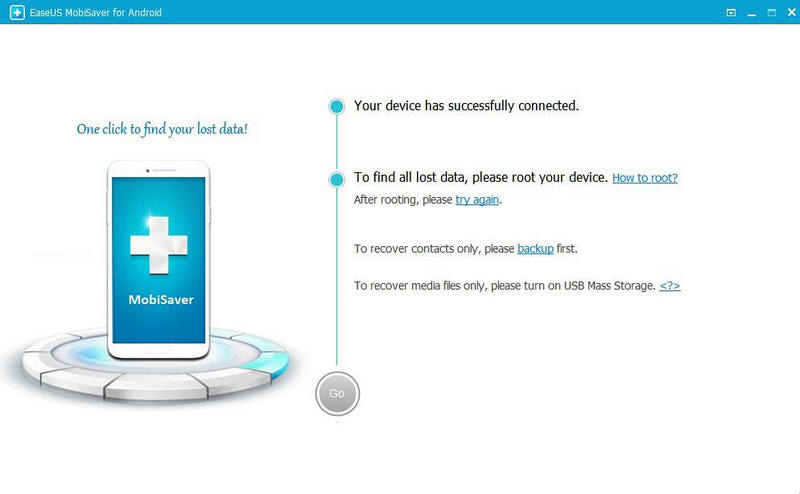
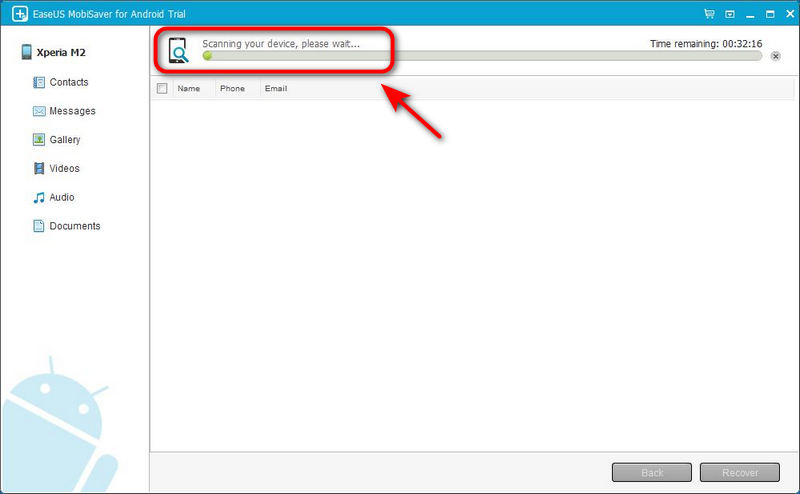
Étape 2 : Ce logiciel analysera ensuite votre appareil Android pour retrouver les fichiers supprimés. Une fois l'analyse terminée, vous pourrez prévisualiser tous les fichiers récupérables.
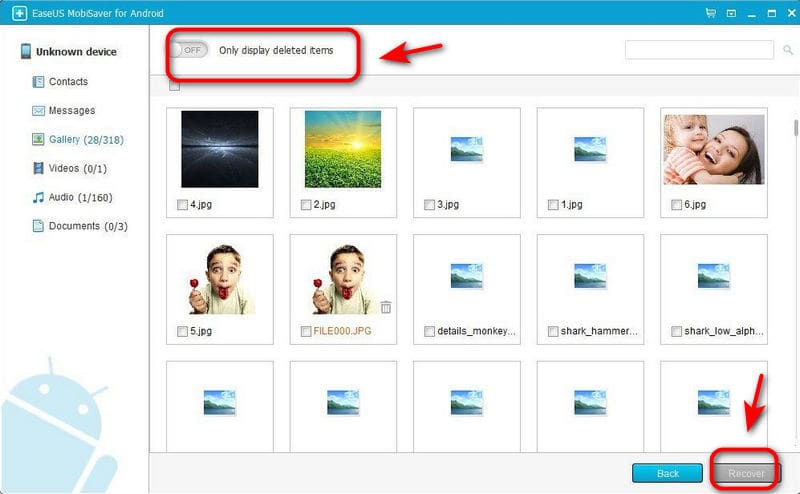
Étape 3 : Sélectionnez les fichiers que vous souhaitez récupérer, cliquez sur Récupérer bouton pour retrouver les fichiers perdus.
Partie 5 : Les meilleures alternatives à EaseUS Mobisaver pour Android
Bien qu'EaseUS MobiSaver offre une solution performante pour la récupération de données Android, elle ne convient pas à tous. Certains utilisateurs sont déçus par son taux de réussite, son prix élevé ou la durée de l'analyse. Heureusement, il existe de nombreuses alternatives intéressantes qui pourraient mieux répondre à vos besoins.
Apeaksoft Récupération de données Android Ce logiciel performant est conçu pour les utilisateurs Windows et Mac. Il permet de récupérer facilement des données perdues ou supprimées sur des appareils ou tablettes Android. Compatible avec plus de 500 types de fichiers, il offre un aperçu pour une récupération rapide et simple.
Une alternative ultime à EaseUS Mobisaver
- Restaurez les données perdues dans de multiples situations sans avoir besoin de rooter votre système.
- Prend en charge la numérisation d'un grand nombre de formats de fichiers.
- Compatible avec plus de 5000 appareils Android, y compris la dernière version Android 16.
- Récupérer les fichiers sélectionnés sans écraser les données existantes.
- Garantit la confidentialité de vos données tout au long du processus.
Téléchargement sécurisé
Téléchargement sécurisé
Voici un guide étape par étape pour l'utiliser :
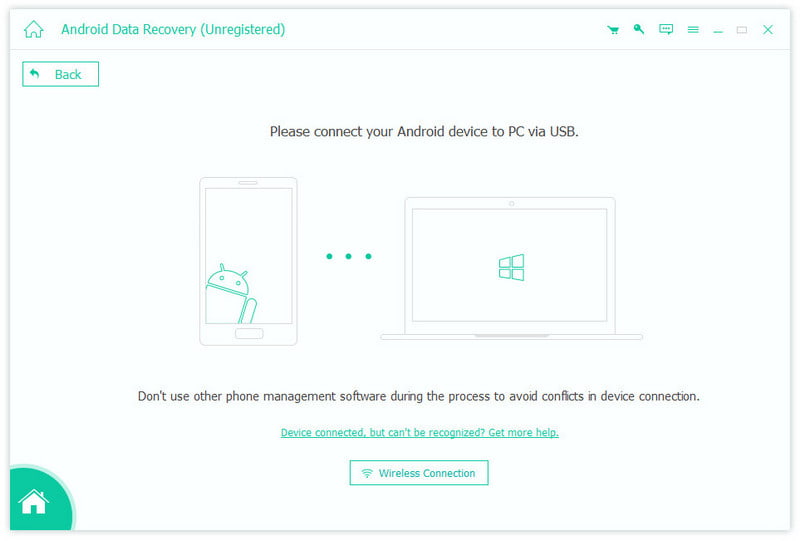
Étape 1 : Double-cliquez pour le lancer, puis choisissez le Récupération de Données Android Ensuite, vous devez connecter vos appareils Android à votre PC à l'aide d'un câble USB.
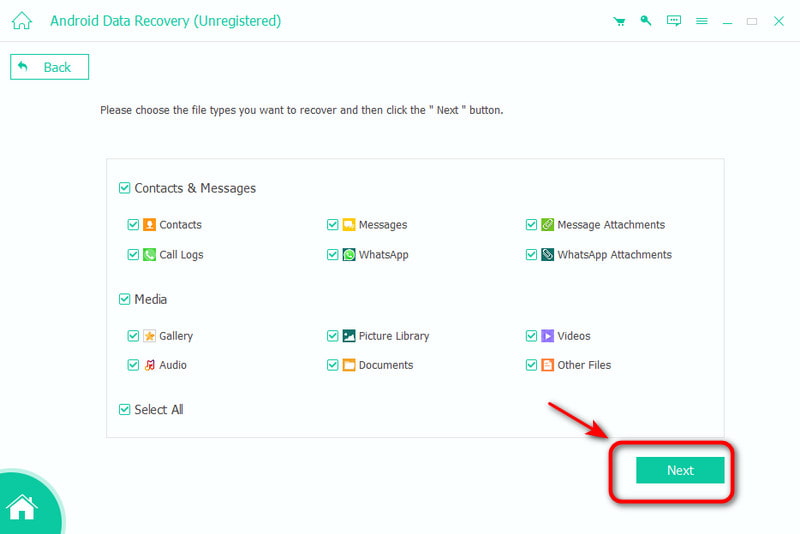
Étape 2 : Sélectionnez le type de données que vous souhaitez récupérer et cliquez SuivantIl analysera les données de votre appareil Android.
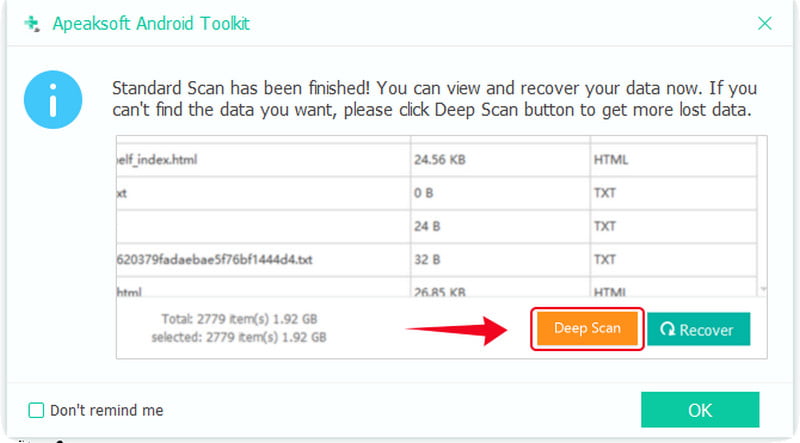
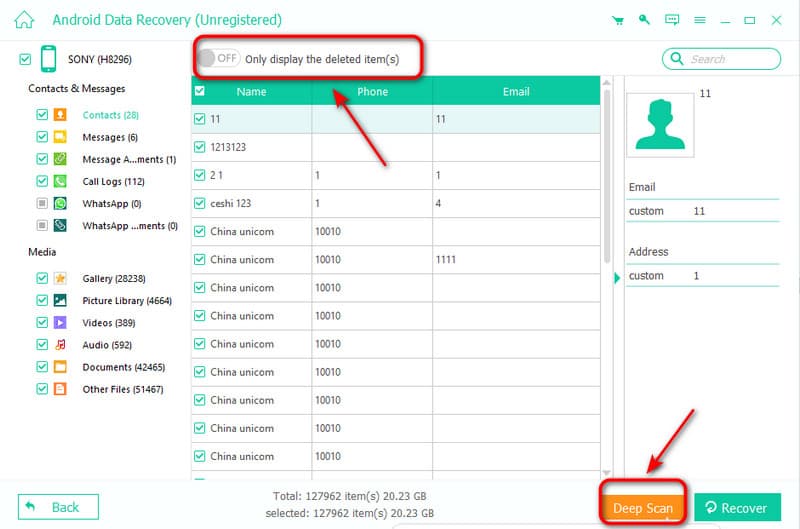
Étape 3 : Si vous ne trouvez pas les données que vous recherchez, vous pouvez cliquer Analyse approfondie dans le coin inférieur droit pour analyser à nouveau les données en profondeur.
Étape 4 : Après l'analyse, choisissez le fichier que vous souhaitez récupérer, ou vous pouvez également choisir Afficher uniquement les éléments supprimés pour récupérer les fichiers supprimés. Cliquez ensuite sur Récupérer bouton pour démarrer !
Récupération de données FonePaw Android
FonePaw Android Data Recovery est un outil efficace et facile à utiliser, même pour les débutants. Il prend en charge plus de 100 types de données et offre des performances élevées, permettant de traiter plus de 1 000 fichiers par seconde. Les utilisateurs peuvent ainsi récupérer de grandes quantités de données rapidement. De plus, il propose trois modes de récupération : mémoire interne, carte SD et carte SIM.
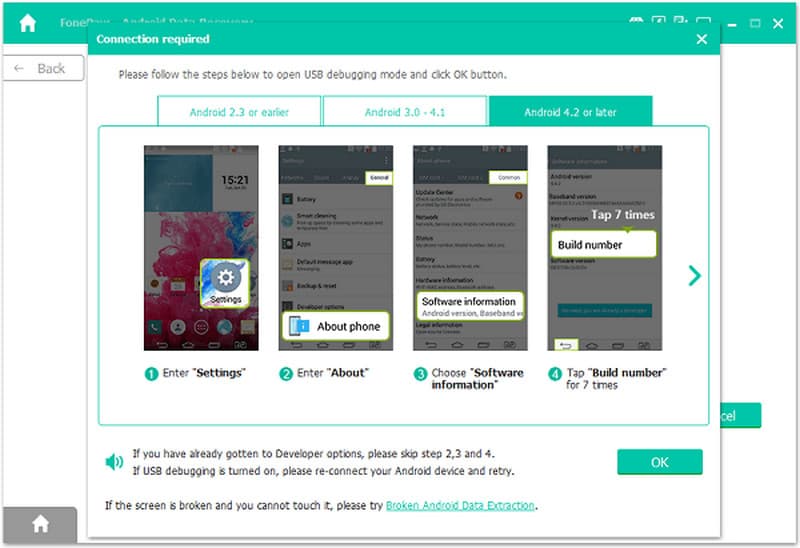
Étape 1 : Lancez FonePaw Android Data Recovery. Ensuite, connectez votre appareil Android à l'ordinateur.
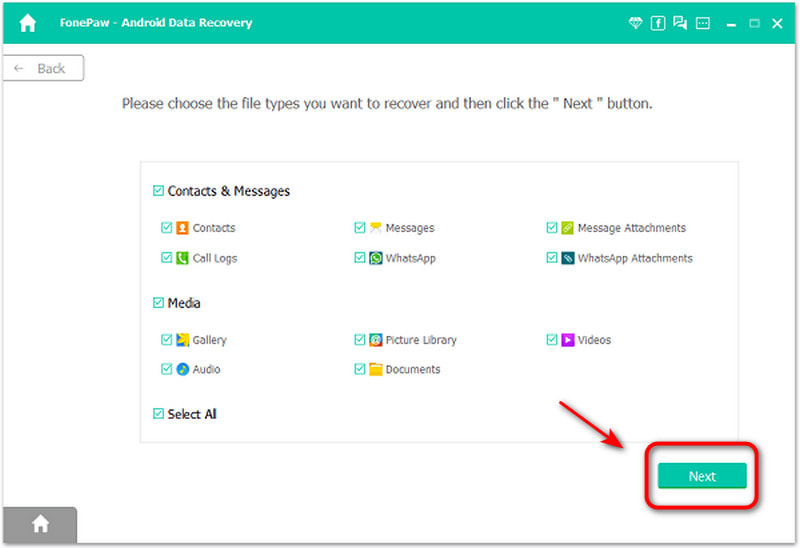
Étape 2 : Sélectionnez les types de fichiers à analyser, puis appuyez sur Suivant .
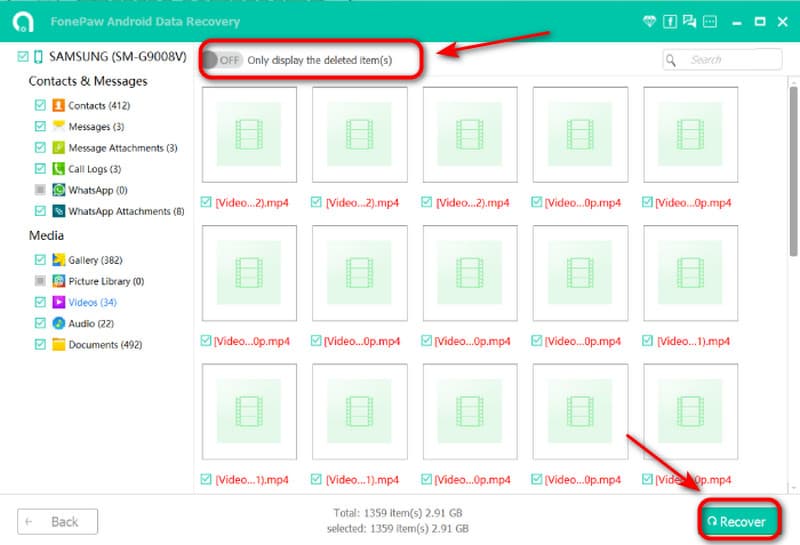
Étape 3 : Sélectionnez les objets que vous souhaitez récupérer. Cliquez Récupéreret le logiciel commencera à récupérer les fichiers sélectionnés.
Conclusion
Malgré son temps de numérisation relativement long, EaseUS MobiSaver pour Android reste un excellent choix pour la récupération de données. Sa fiabilité, ses puissantes fonctionnalités de récupération et son environnement d'exploitation sécurisé en font une option privilégiée pour de nombreux utilisateurs. S'il ne répond pas entièrement à vos besoins, plusieurs logiciels performants offrent des solutions efficaces et simples. récupérer des fichiers Android supprimésVenez essayer !
Articles Relatifs
Vous trouverez ici plusieurs méthodes pour récupérer des téléchargements sur un smartphone ou une tablette Android, avec ou sans sauvegarde.
Vous découvrirez ici six méthodes efficaces pour récupérer vos SMS Android sur smartphone, même sans fichier de sauvegarde.
Vous pouvez récupérer des vidéos perdues sur un téléphone Android grâce à différentes méthodes. De plus, vous pouvez récupérer des vidéos supprimées sur Android sans sauvegarde.
Vos messages vocaux importants sont conservés dans votre messagerie vocale. Si vous les avez perdus, consultez cet article pour récupérer vos messages vocaux supprimés sur Android.



