Comment récupérer et réinitialiser un identifiant Apple oublié ?

Il est bien connu qu'un compte Apple ID est essentiel dans l'écosystème Apple. Un compte Apple se compose de deux éléments : un identifiant et un mot de passe. L'identifiant est généralement une adresse e-mail, appelée adresse e-mail principale, qui sert à recevoir les messages d'Apple, à vérifier votre identité lors de la réinitialisation du mot de passe de votre identifiant Apple et à déverrouiller un compte Apple désactivé. Ce guide vous explique la marche à suivre si vous vous avez oublié votre mot de passe et votre adresse e-mail Apple ID.
CONTENU DE LA PAGE :
Partie 1 : Comment retrouver l'adresse e-mail d'un identifiant Apple oublié
Comme indiqué précédemment, l'adresse e-mail associée à votre identifiant Apple sert à réinitialiser le mot de passe de votre compte. Si vous avez oublié à la fois l'adresse e-mail et le mot de passe de votre identifiant Apple, il est préférable de le récupérer au préalable. Heureusement, plusieurs méthodes permettent de le retrouver.
Comment retrouver l'adresse e-mail de mon identifiant Apple oubliée sur un iPhone/iPad
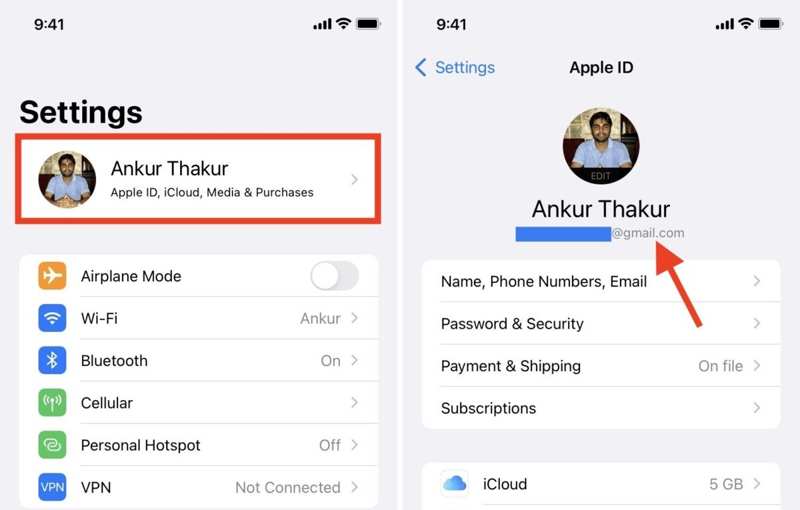
Étape 1 : Ouvrez le Paramètres application sur un appareil iOS sur lequel vous vous êtes connecté à votre compte.
Étape 2 : Appuyez sur votre profil.
Étape 3 : L'adresse e-mail sous votre nom est celle de votre identifiant Apple.
Comment retrouver l'adresse e-mail de mon identifiant Apple oublié sur Mac
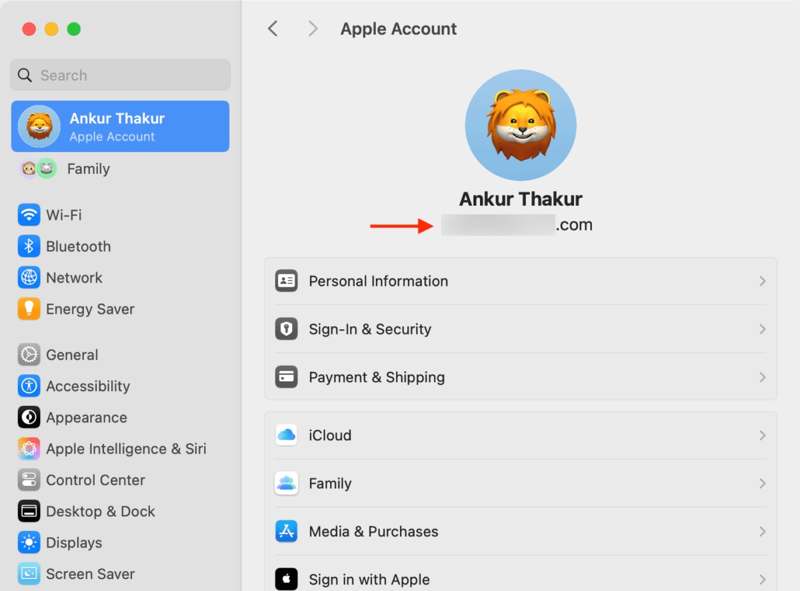
Étape 1 : Cliquez sur Apple menu et choisissez Les paramètres du système or Préférences de système.
Étape 2 : Cliquez sur Compte Apple or ID apple option.
Étape 3 : Vous verrez désormais l'adresse e-mail associée à votre identifiant Apple oublié sous votre nom.
Comment retrouver l'adresse e-mail de mon identifiant Apple oublié dans iTunes
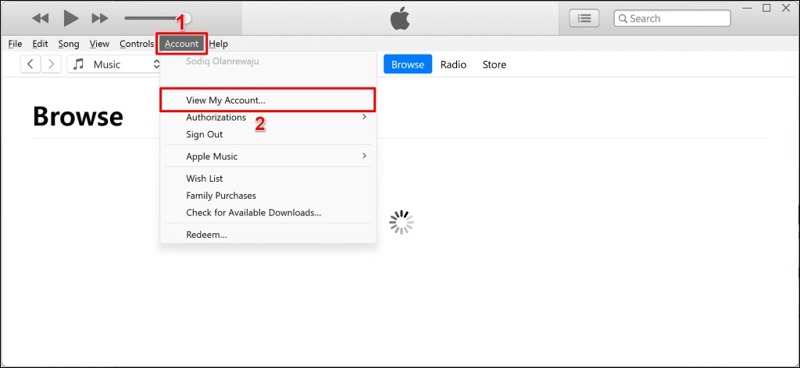
Étape 1 : Lancez le programme iTunes depuis votre ordinateur.
Étape 2 : Cliquez sur Compte menu.
Étape 3 : Si vous ne voyez pas votre compte, cliquez Voir mon compte.
Comment vérifier l'adresse e-mail de mon identifiant Apple oublié dans iCloud pour Windows
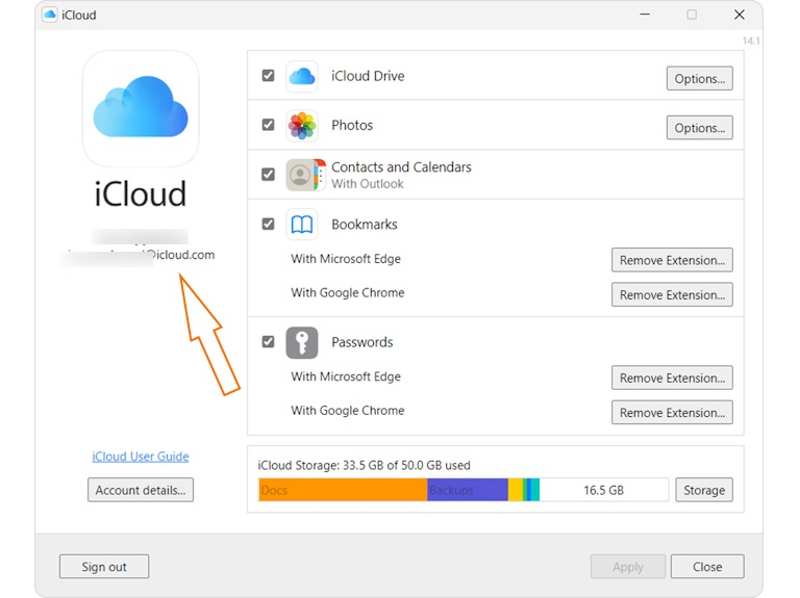
Étape 1 : Si vous vous êtes connecté avec votre compte iCloud pour Windows, ouvrez-le.
Étape 2 : Consultez l'adresse e-mail associée à votre identifiant Apple oublié dans la barre latérale gauche.
Comment retrouver l'adresse e-mail de son identifiant Apple oubliée à partir de son mot de passe
Sur iOS 18, iPadOS 18 et macOS Sequoia ou version ultérieure
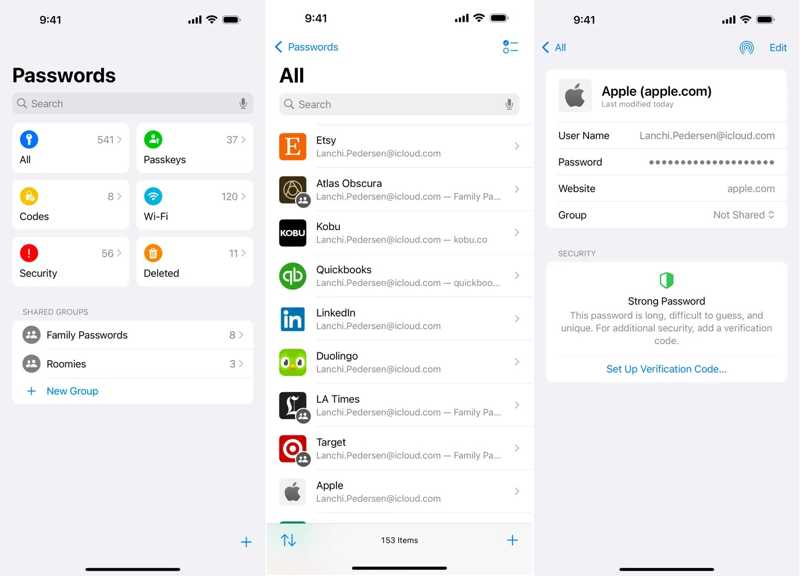
Étape 1 : Ouvrez le Les mots de passe app.
Étape 2 : Rendez-vous dans la section Tous en groupe.
Étape 3 : Recherchez Apple et choisissez le site web sur lequel vous vous êtes connecté à votre compte.
Étape 4 : Vous verrez ensuite votre e-mail associé à votre identifiant Apple dans le Nom d'utilisateur ( Ou : Nom d'épouse ) champ.
Méthode antérieure
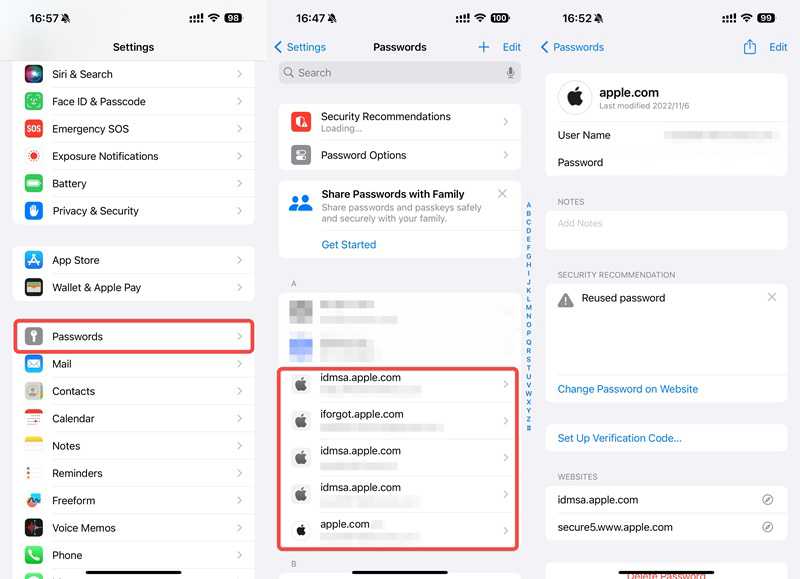
Étape 1 : Ouvrez le Paramètres or Les paramètres du système app.
Étape 2 : Faites défiler vers le bas et choisissez le Les mots de passe option.
Étape 3 : Trouvez un site web Apple et appuyez dessus.
Étape 4 : Vous recevrez désormais l'e-mail contenant votre identifiant Apple oublié dans le Nom d'utilisateur ( Ou : Nom d'épouse ) champ.
À noter: Par ailleurs, vous pouvez retrouver l'adresse e-mail oubliée de votre identifiant Apple dans un navigateur web tiers, comme Chrome, Firefox, etc., si vous vous êtes connecté via un site web Apple.
Comment récupérer l'adresse e-mail associée à votre identifiant Apple via le partage familial
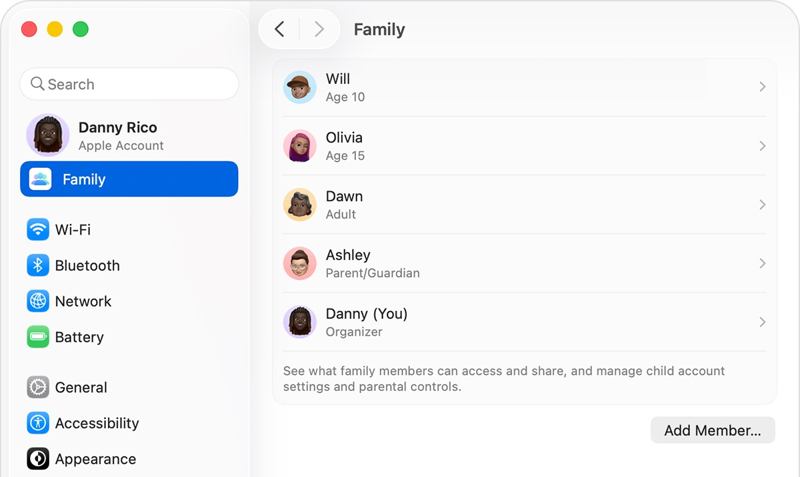
Étape 1 : Si vous avez souscrit au Partage familial, empruntez l'appareil Apple d'un membre.
Étape 2 : Rendez-vous dans la section Paramètres or Les paramètres du système app.
Étape 3 : Choisissez le Family option.
Étape 4 : Cliquez sur votre nom dans la liste et vous verrez l'adresse e-mail associée à votre identifiant Apple oublié.
Comment vérifier l'adresse e-mail de mon identifiant Apple oublié pour l'App Store
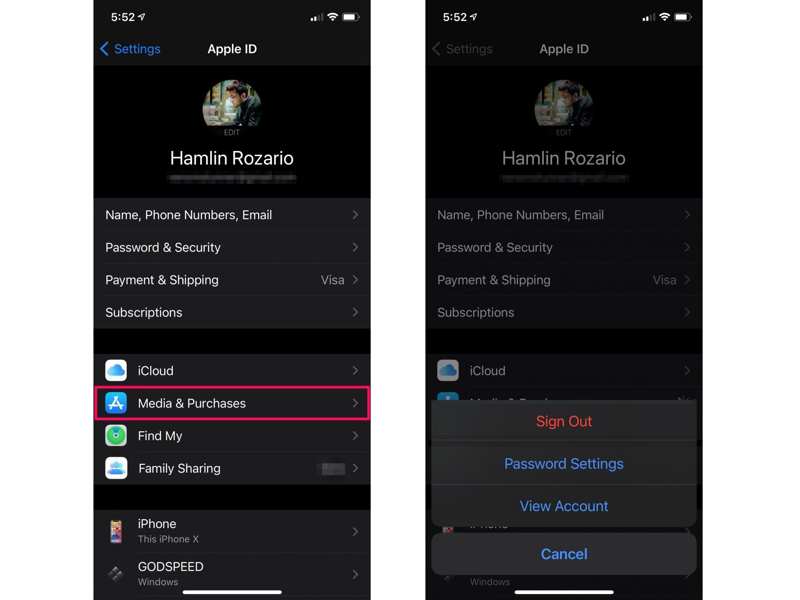
Étape 1 : Si vous avez oublié l'adresse e-mail de votre identifiant Apple pour l'App Store, exécutez la procédure suivante : Paramètres app.
Étape 2 : Appuyez sur votre profil et choisissez Média et achat.
Étape 3 : Ensuite, choisissez Voir le compte dans la boîte de dialogue pour trouver votre e-mail.
À noter: De plus, vous pouvez retrouver l'adresse e-mail associée à votre identifiant Apple depuis d'autres services sur lesquels vous vous êtes connecté, comme Apple Music.
Partie 2 : Comment récupérer l’adresse e-mail de votre identifiant Apple si vous l’avez oubliée
Si vous ne retrouvez pas l'adresse e-mail associée à votre identifiant Apple, vous devez la réinitialiser sur le site web « Mot de passe oublié » d'Apple. Vous devrez cependant fournir des informations exactes, comme votre nom. D'après nos recherches, le taux de réussite est assez faible.
Étape 1 : Ouvrez un navigateur et accédez à iforgot.apple.com.
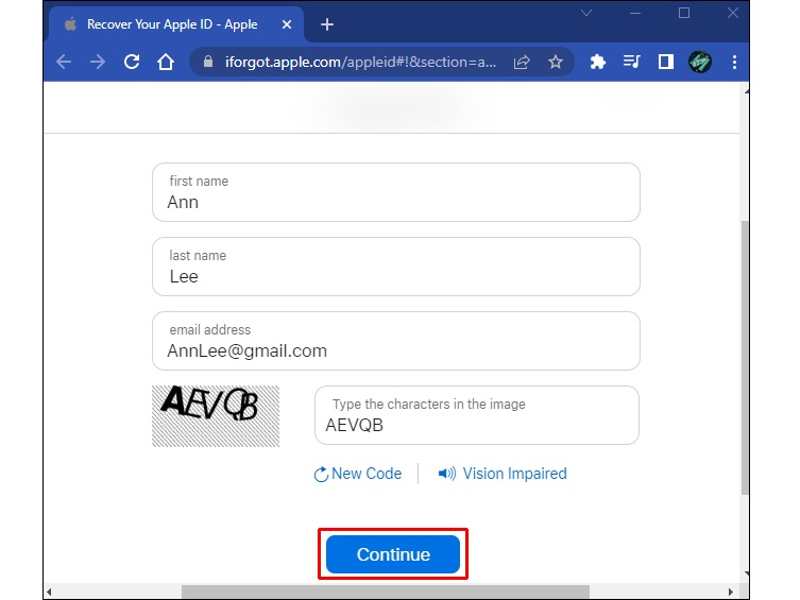
Étape 2 : Appuyez sur la touche Cherchez-le lien lorsque l'on vous demande de saisir votre adresse e-mail Apple ID.
Étape 3 : Saisissez les informations, comme votre prénom et votre nom de famille.
Étape 4 : Veuillez fournir une adresse e-mail accessible et cliquez Continuer.
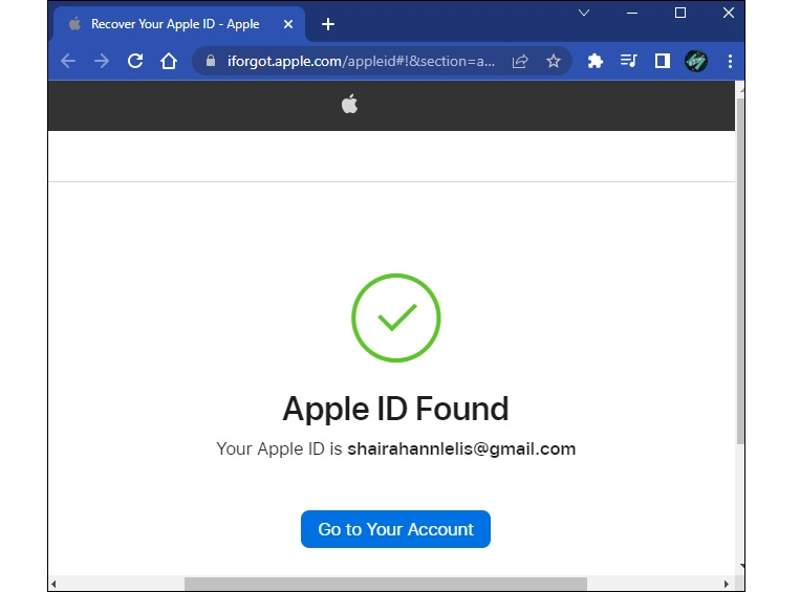
Étape 5 : Une fois qu'Apple aura trouvé une correspondance, l'adresse e-mail associée à votre identifiant Apple oublié vous sera communiquée. Si ce n'est pas le cas, répétez l'étape 3 et essayez un autre nom.
Étape 6 : Si vous avez oublié votre adresse e-mail et votre mot de passe pour votre identifiant Apple, vous pouvez réinitialiser votre mot de passe sur iForgot après avoir récupéré votre adresse e-mail principale.
Lectures complémentaires
Partie 3 : Comment réinitialiser l’adresse e-mail et le mot de passe oubliés de votre identifiant Apple

Téléchargé par plus de 1,000,000 des opportunités
- Supprimez rapidement le compte Apple ID actuel d'un appareil iOS.
- Ne nécessite pas le code d'accès de votre iPhone ou le mot de passe de votre identifiant Apple.
- Fonctionne sur les comptes Apple verrouillés et désactivés.
- Prend en charge une large gamme de modèles d'iPhone et d'iPad.
Téléchargement sécurisé
Téléchargement sécurisé
Comment réinitialiser l'adresse e-mail et le mot de passe oubliés de votre identifiant Apple depuis votre iPhone
Étape 1 : Suppression de l'identifiant Apple
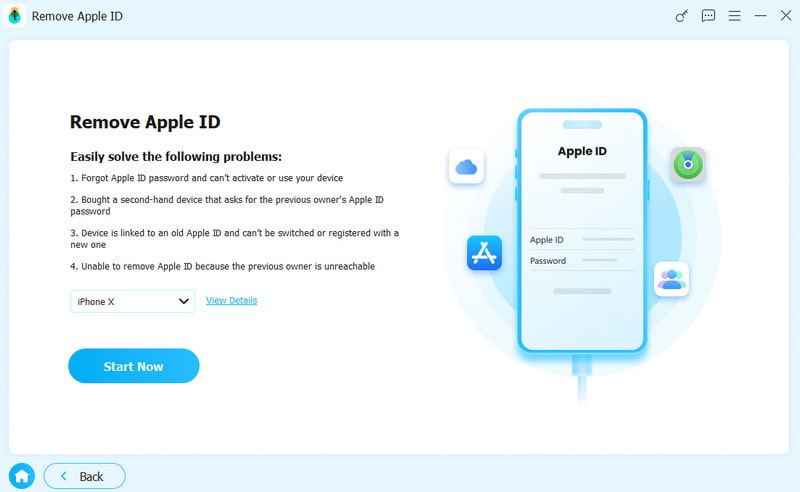
Lancez le logiciel de suppression d'identifiant Apple après l'avoir installé sur votre ordinateur. Il est compatible avec Windows 11 et versions antérieures, ainsi qu'avec macOS 10.7 et versions ultérieures. Choisissez l'option correspondante. Supprimer l'identifiant Apple .
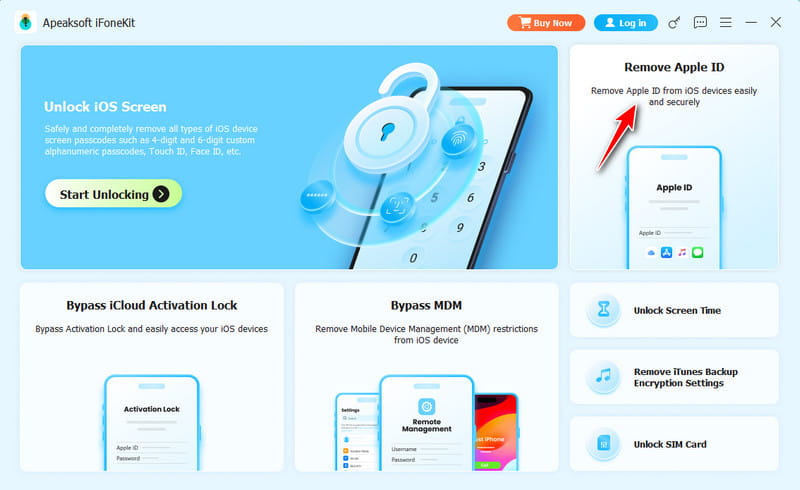
Étape 2 : Connectez-vous à votre iPhone
Connectez votre iPhone à votre ordinateur à l'aide d'un câble Lightning. Si un message s'affiche, appuyez sur « Faire confiance » à l'écran. Le logiciel détectera alors votre appareil et chargera le modèle de votre iPhone.
Étape 3 : Supprimer le compte Apple
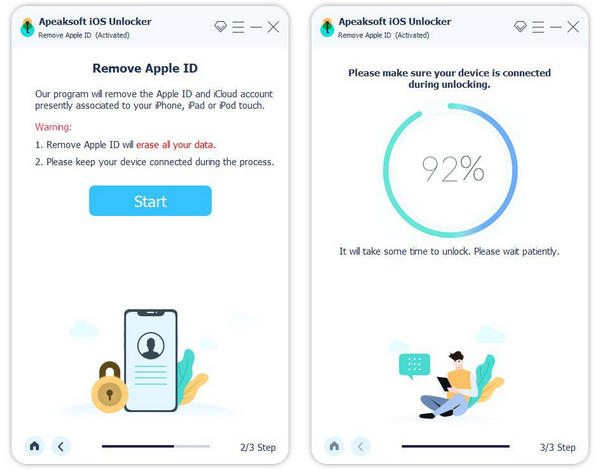
Cliquez sur Commencez maintenant Cliquez sur le bouton pour supprimer l'ancien compte si Localiser est désactivé. Si Localiser est activé, réinitialisez tous les paramètres de votre appareil. Ensuite, cliquez sur OK, et frapper Confirmer à nouveau Pour démarrer le processus, une fois celui-ci terminé, définissez une nouvelle adresse e-mail et un nouveau mot de passe pour votre identifiant Apple.
Conclusion
Ce guide explique ce qu'il faut faire si vous vous avez oublié votre mot de passe et votre adresse e-mail Apple IDVous pouvez suivre nos instructions pour trouver l'adresse e-mail principale associée à votre compte Apple ID. Si vous ne la trouvez pas, vous devrez contacter Apple pour la récupérer. Apeaksoft iFoneKit est la solution ultime pour se débarrasser de l'ancien compte Apple d'un appareil iOS.
 Apeaksoft iFoneKit
 Déverrouillez tous les types de mots de passe iOS de l'iPhone, de l'iPad et de l'iPod.
Téléchargement sécurisé
Téléchargement sécurisé
Articles Relatifs