破損したSDカードを修復してデータを回復する方法

SDカードは、スマートフォン、デジタルカメラ、その他のデジタル機器のストレージ拡張に広く利用されています。多くの人がファイルや情報をSDカードにバックアップしています。しかし、SDカードが破損したり損傷したりすると、非常に困った事態になります。SDカードを修復する簡単な方法はフォーマットですが、深刻な問題に対処することはできません。このチュートリアルでは、SDカードの修復方法をご紹介します。 破損したSDカードを修復する データを失うことなく。
パート1:WindowsでSDカードを修復する方法
Windowsで破損したSDカードを修復するにはどうすればいいですか?内蔵のCHKDSKコマンドを使えば、ローカルディスクや外付けハードドライブなど、あらゆるストレージドライブ上の破損したファイルシステムをスキャンして修復できます。さらに、トラブルシューティング機能を使えば、ハードウェアの問題を迅速に解決できます。
CHKDSKで破損したSDカードを修復する方法
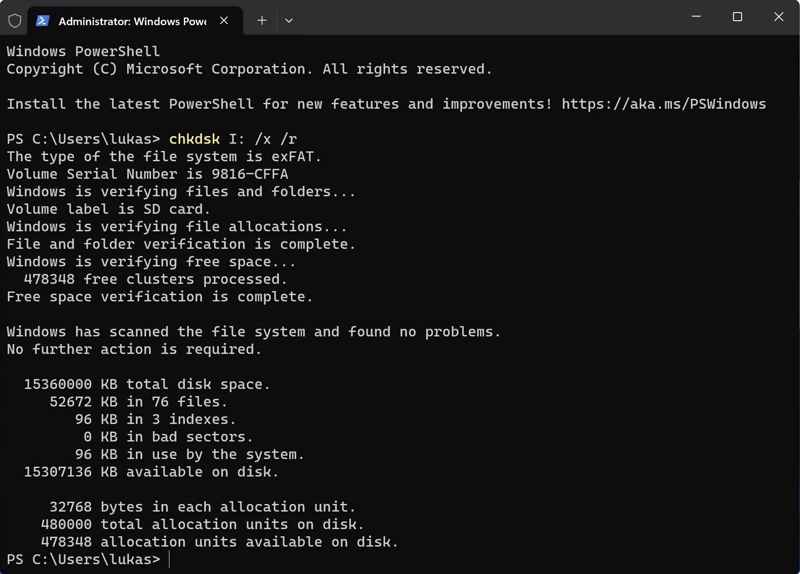
ステップ 1: 破損した SD カードを PC に挿入します。
ステップ 2: 右クリックして お気軽にご連絡ください メニューと選択 管理者としてコマンドプロンプトを実行するか、管理者として Windows PowerShell を実行する.
ステップ 3: 次のコマンドを入力します。 chkdsk E: /f /r。 置換 E: SD カードの文字を入力します。
ステップ 4: Enter キーボードのキーを押して、破損した SD メモリ カードを修復します。
トラブルシューティングツールを使って破損したSDカードを修復する方法
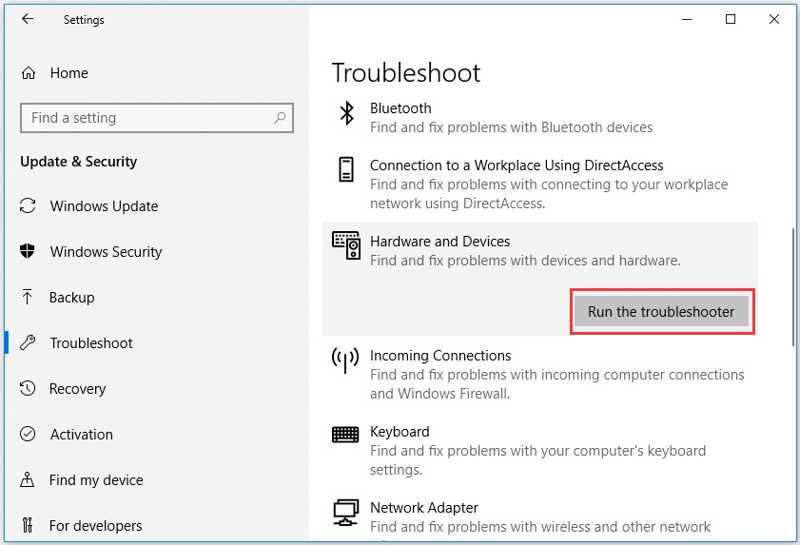
ステップ 1: 選択する 設定 お気軽にご連絡ください Windows 11/10 のメニュー。
ステップ 2: 破損した SD カードを PC に挿入します。
ステップ 3: クリックして展開 更新とセキュリティ 選択して 解決します.
ステップ 4: Pick ハードウェアとデバイス をクリックし トラブルシューティングを実行する.
ステップ 5: 画面の指示に従って、MicroSD カードを修復します。
パート2:MacでSDカードを修復する方法
近くのSDカード修理店を利用するだけでなく、MacBookを使えば自分でもこの問題を解決できます。内蔵のディスクユーティリティを使えば、SDカードを含むストレージデバイスのディスクエラーを修復できます。
ステップ 1: カードリーダーを使用して SD カードを Mac に接続します。
ステップ 2: Video Cloud Studioで ファインダー アプリを ドック バー。
ステップ 3: に行く 用途 (NAIST) と ユーティリティ.
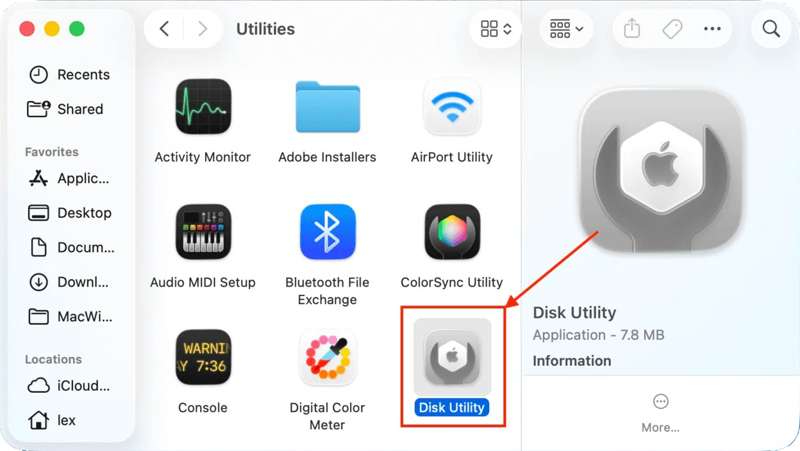
ステップ 4: 詳しくはこちら ディスクユーティリティ それを開く。
ステップ 5: ヒット 表示 上部のリボンのボタンをクリックして、 すべてのデバイスを表示.
ステップ 6: 下のSDカードを選択してください 外部 サイドバーに。
ステップ 7: クリック 応急処置 トップメニューバーのボタン。
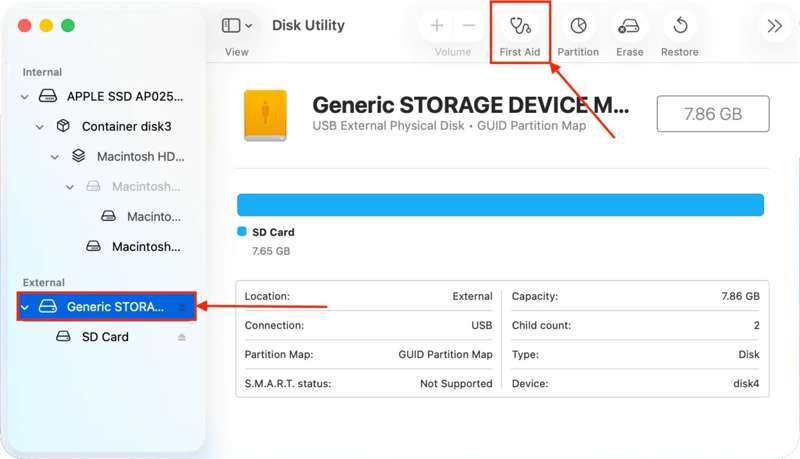
ステップ 8: プロンプトが表示されたら、をクリックします ラン ポップアップダイアログのボタンをクリックします。
ステップ 9: SD カードの修復後、SD カードを取り出し、Mac を再起動します。
ステップ 10: カードを再接続して動作するかどうか確認してください。
パート3:破損したSDカードからデータを復元する方法
CHKDSKやFirst Aidは破損したストレージを修復できます。ただし、SDカードから失われたデータを復元することはできず、デバイス上の既存のデータが中断される可能性があります。SDカード修復ソフトウェア(例: Apeaksoftデータ復旧失われたデータを素早く復元できます。修復前または修復後にSDカードをスキャンし、データを復元できます。
破損したSDカードからデータを復元する簡単な方法
- ワンクリックで SD カードから失われたデータを取得します。
- 幅広い状況に対応します。
- 数百のファイルタイプと形式をサポートします。
- 失われたファイルをプレビューして選択的に回復します。
- Windows および macOS で利用できます。

破損したSDカードからデータを復元する方法
ステップ 1: SDカードをスキャンします
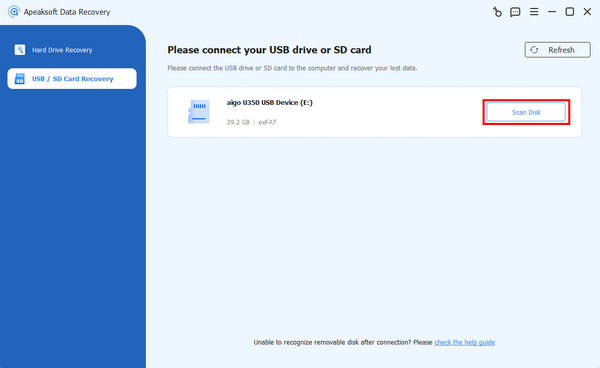
SDカード修復ツールをパソコンにダウンロードしてインストールし、デスクトップから起動します。破損したSDカードをパソコンに接続すると、ソフトウェアが自動的に検出します。 USB / SDカードの回復 サイドバーのタブから適切なタイプを選択してください タイプ オプションをクリックして スキャンディスク カードのスキャンを開始するボタンです。
ステップ 2: 失われたファイルをプレビューする
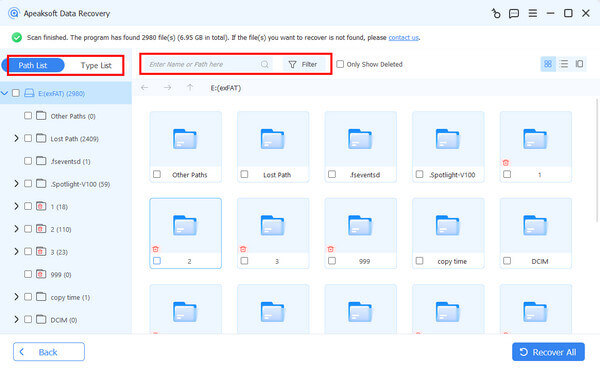
クイックスキャンが完了すると、ソフトウェアはすぐにディープスキャンを開始します。スキャンが完了すると、カード内のすべてのファイルを種類別またはパス別に表示できます。 タイプリスト 例えば、タブを開いて画像、動画、文書などを閲覧できます。また、 フィルター オプションを選択します。
ステップ 3: 破損したSDカードを復元する
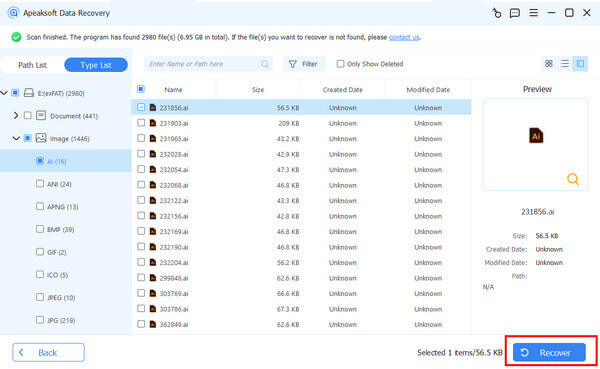
取得したいファイルをすべて選択し、 回復する ボタンをクリックします。出力フォルダを設定し、データの復元を確認します。SDカードではなく、ローカルハードドライブを指定することをお勧めします。処理が完了すれば、出力先でファイルを見つけて確認できます。
結論
このガイドでは、3つの方法を紹介しました。 破損したSDカードを修復する WindowsとmacOSでご利用いただけます。CHKDSK、トラブルシューター、First Aidなどの内蔵ディスク修復機能を使えば、パソコンの外付けストレージを修復できます。追加のソフトウェアやハードウェアは必要ありません。さらに、 Apeaksoftデータ復旧 破損または損傷したSDカードから失われたデータを復元するのに役立ちます。使いやすく、技術的なスキルは必要ありません。
関連記事