Hoe ontgrendel je je Apple Watch met je iPhone of iPad?

Het is algemeen bekend dat Apple een ecosysteem heeft opgebouwd in plaats van simpelweg smartphones uit te brengen. De Apple Watch is bijvoorbeeld een wearable van Apple die samenwerkt met de iPhone en iPad. Je moet een pincode instellen op je horloge en deze invoeren om je apparaat te ontgrendelen en je gegevens te beschermen. Aan de andere kant kun je Ontgrendel de Apple Watch met een iPhone.Deze handleiding beschrijft de gedetailleerde stappen.
PAGINA-INHOUD:
Deel 1: Hoe je je Apple Watch ontgrendelt met je iPhone
Je kunt je Apple Watch ontgrendelen met je iPhone zonder pincode. De functie 'Ontgrendelen met iPhone' is ingebouwd in de Watch-app op iPhones. Hiermee krijg je toegang tot je horloge zonder steeds opnieuw je pincode in te voeren.
Vereisten:
- 1.Je Apple Watch draait op watchOS 6 of hoger.
- 2.Je iPhone draait op iOS 14.5 of hoger.
- 3.Beide apparaten moeten ingelogd zijn met hetzelfde Apple-account.
- 4.Bluetooth moet op beide apparaten ingeschakeld zijn.
- 5.Je Apple Watch moet momenteel gekoppeld zijn aan je iPhone.
Hoe schakel je 'Ontgrendelen met iPhone' in op iOS?
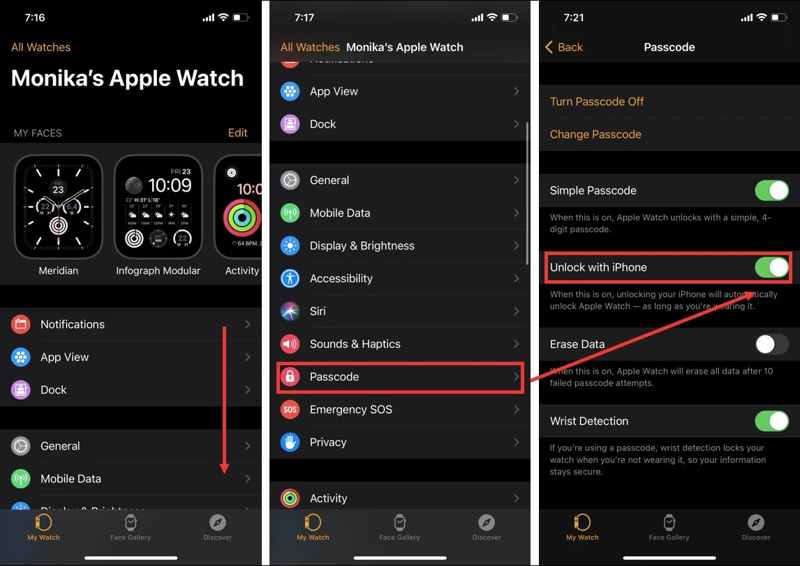
Stap 1. Open de Watch app op je iPhone.
Stap 2. Scroll naar beneden en ga naar de toegangscode optie.
Stap 3. Schakel in Ontgrendelen met iPhone.
Stap 4. Authenticeer met de toegangscode van je Apple Watch.
Hoe schakel je 'Ontgrendelen met iPhone' in op je Apple Watch?
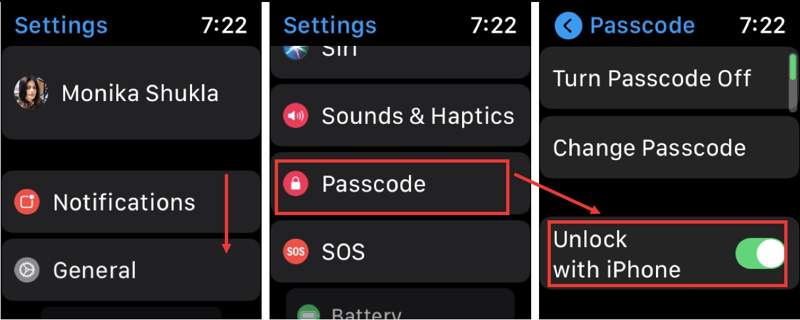
Stap 1. Zet je horloge aan en start de settings app.
Stap 2. Blader naar beneden en tik op toegangscode optie.
Stap 3. Schakel de Ontgrendelen met iPhone optie.
Na de installatie, je iPhone ontgrendelen De Apple Watch wordt automatisch ontgrendeld zolang je hem om je pols draagt.
Deel 2: Wat te doen als de Apple Watch niet ontgrendelt met de iPhone
Het is een veelvoorkomend probleem dat de Apple Watch niet ontgrendelt met een iPhone. De oorzaken zijn complex, zoals een slechte verbinding, een vastgelopen apparaat, onjuiste instellingen en meer. Je kunt de onderstaande oplossingen proberen om dit probleem op te lossen.
Oplossing 1: Schakel Bluetooth in.
Op iPhone
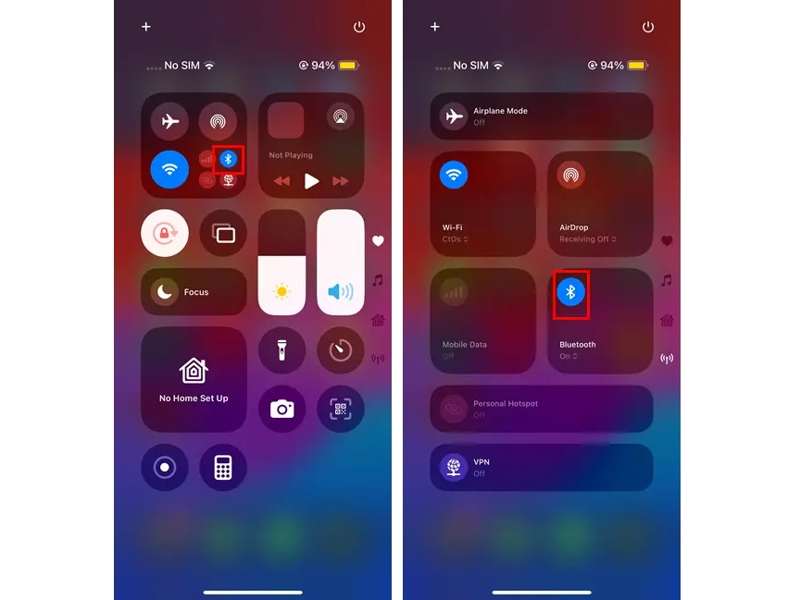
Stap 1. Ga naar uw controle Center op je iPhone.
Stap 2. Druk op Bluetooth knop.
Stap 3. Als Bluetooth is ingeschakeld, tik er dan op om het in te schakelen. Bluetooth schakel het uit. Tik er vervolgens nogmaals op om het weer in te schakelen.
Op Apple Watch
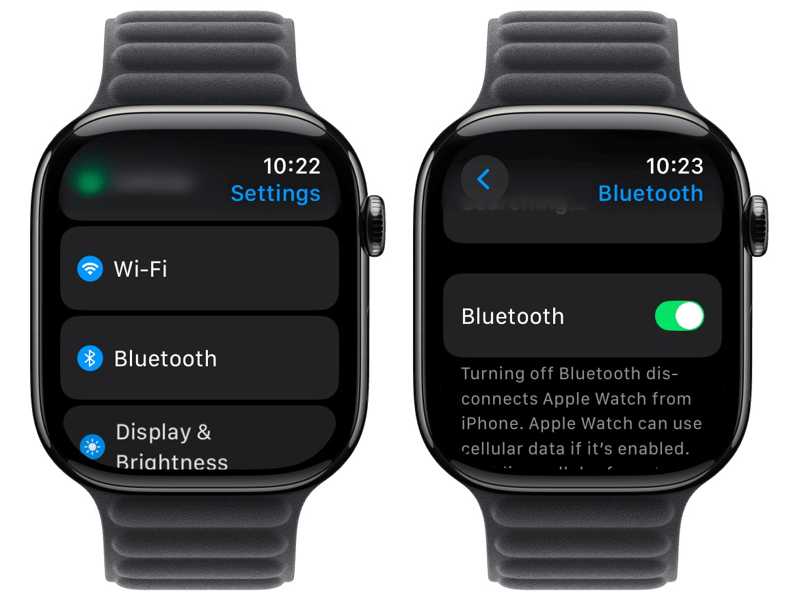
Stap 1. Ga naar uw settings app op je horloge.
Stap 2. Kies de Bluetooth optie.
Stap 3. Schakel in Bluetooth.
Ontgrendel nu de Apple Watch met de iPhone om te controleren of het probleem is opgelost.
Oplossing 2: Ontgrendelen met iPhone opnieuw inschakelen
Op iPhone
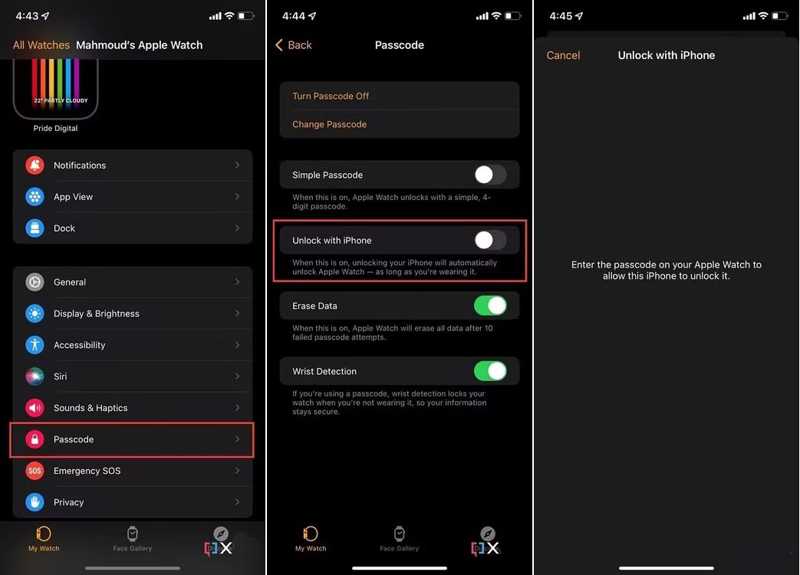
Stap 1. Voer de ... uit Watch app.
Stap 2. Ga naar uw Mijn horloge Tab.
Stap 3. Druk op toegangscode optie en schakelaar uit Ontgrendelen met iPhone.
Stap 4. Voer de toegangscode van je Apple Watch in wanneer daarom wordt gevraagd.
Stap 5. Herhaal de bovenstaande stappen om het apparaat in te schakelen. Ontgrendelen met iPhone weer.
Op Apple Watch
Stap 1. Ga naar settings en toegangscode op je horloge.
Stap 2. Uitschakelen Ontgrendelen met iPhone.
Stap 3. Schakel de optie vervolgens weer in.
Controleer vervolgens of de foutmelding dat de Apple Watch niet ontgrendelt met de iPhone is verdwenen.
Oplossing 3: Schakel 'Ontgrendelen met Apple Watch' uit.
Met Apple kun je je iPhone ontgrendelen met je Apple Watch. Als je deze functie op je iPhone hebt ingesteld, werkt de Apple Watch mogelijk niet meer. De oplossing is simpel: schakel 'Ontgrendelen met Apple Watch' uit op je iPhone.
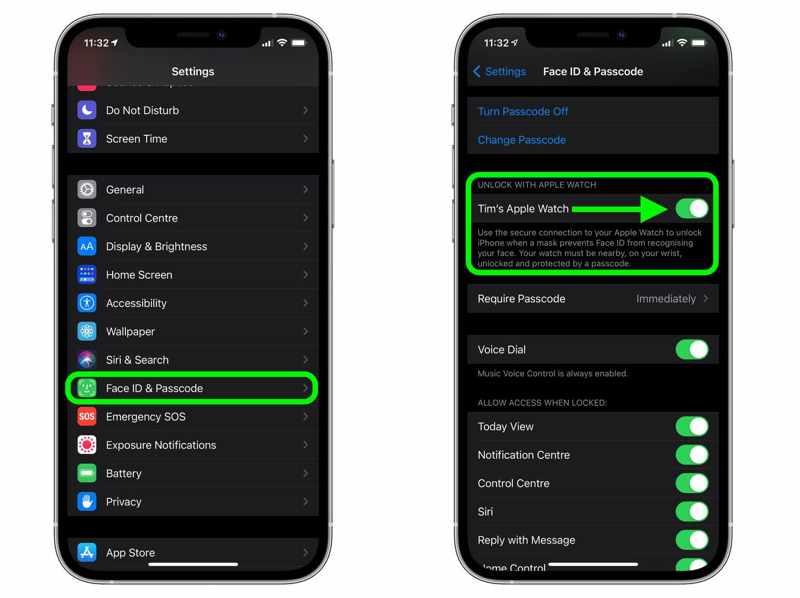
Stap 1. Voer de ... uit settings app vanaf je startscherm.
Stap 2. Scroll naar beneden en ga naar Face ID & toegangscode.
Stap 3. Voer uw iPhone-toegangscode in.
Stap 4. Zorg ervoor dat je je Apple Watch uitschakelt onder ONTGRENDELEN MET APPLE WATCH pagina.
Oplossing 4: update software
Op iPhone
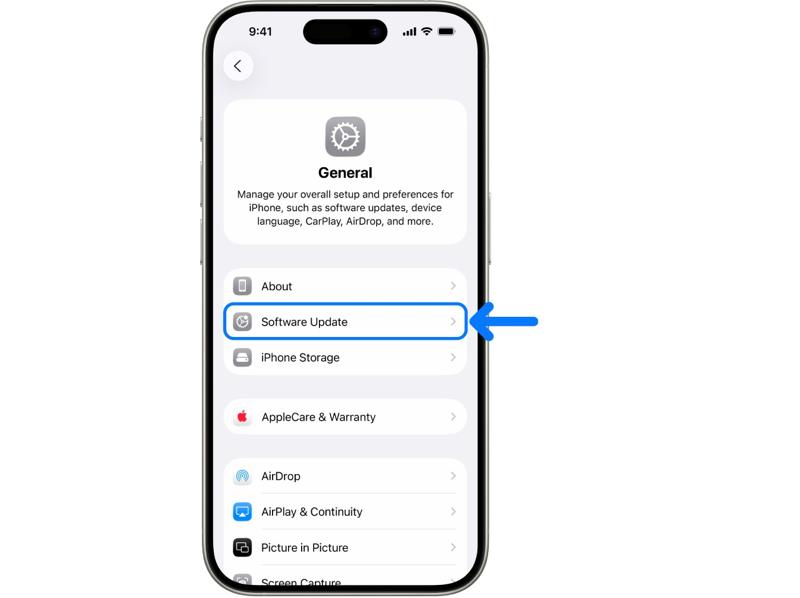
Stap 1. Voer je uit settings app.
Stap 2. Ga naar Algemeen en software bijwerken.
Stap 3. Als er een update beschikbaar is, tik dan op de Download en installeer knop.
Stap 4. Volg de instructies op het scherm om je iPhone bij te werken.
Op Apple Watch
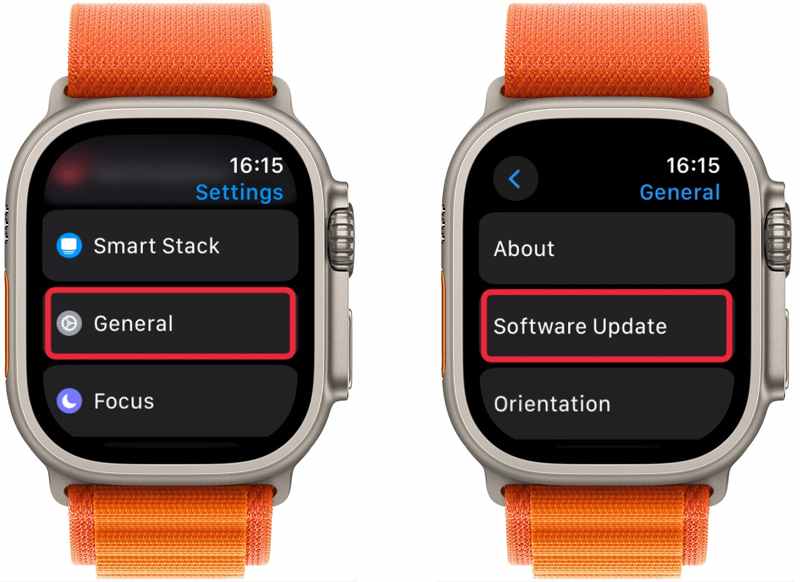
Stap 1. Ga naar de settings app.
Stap 2. Navigeer naar Algemeen en software bijwerken.
Stap 3. Tik Install Als je ziet dat er een nieuwe update beschikbaar is.
Let op: Je kunt watchOS bijwerken via de Watch-app op je iPhone.
Deel 3: Hoe je een iPhone ontgrendelt zonder wachtwoord
Na de installatie kun je je Apple Watch ontgrendelen met je iPhone nadat je je iPhone hebt ontgrendeld met je toegangscode, Face ID of Touch ID. Als je je iPhone-schermvergrendeling bent vergeten, moet je je apparaat ontgrendelen met... Apeaksoft iPhoneKit iOS UnlockerHet is mogelijk om je iPhone te ontgrendelen zonder wachtwoord.

Gedownload door meer dan 1,000,000 gebruikers
- Ontgrendel een iPhone of iPad zonder wachtwoord.
- Eenvoudig in gebruik en het proces is in drie stappen voltooid.
- Werkt ook voor vastgelopen, uitgeschakelde en vergrendelde iOS-apparaten.
- Bied bonusfuncties aan, zoals het verwijderen van uw Apple ID.
- Compatibel met een breed scala aan iPhone- en iPad-modellen.Windows downloaden, Mac downloaden
Veilige download
Veilige download
Hoe ontgrendel je je iPhone zonder wachtwoord?
Stap 1. Installeer iOS-unlocker
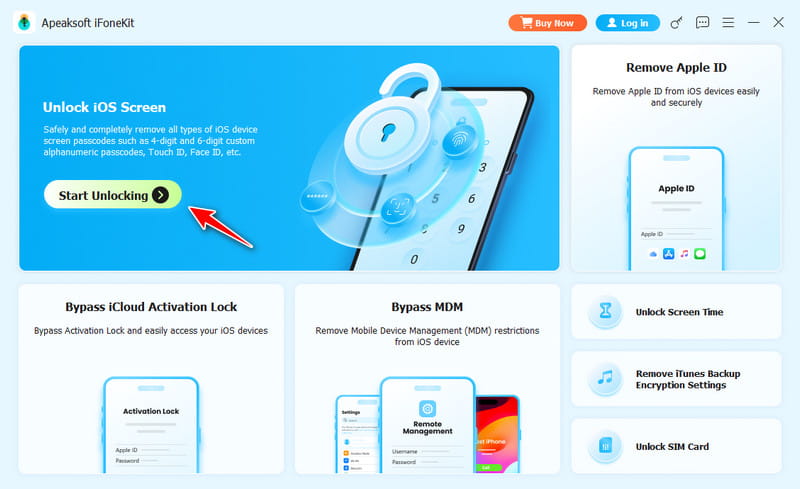
Start de iOS-ontgrendelingssoftware zodra u deze op uw computer hebt geïnstalleerd. De software is beschikbaar voor Windows 11/10/8/7/XP/Vista en Mac OS X 10.7 of hoger. Kies de Ontgrendel iOS-scherm modus om verder te gaan.
Stap 2. Maak verbinding met je iPhone
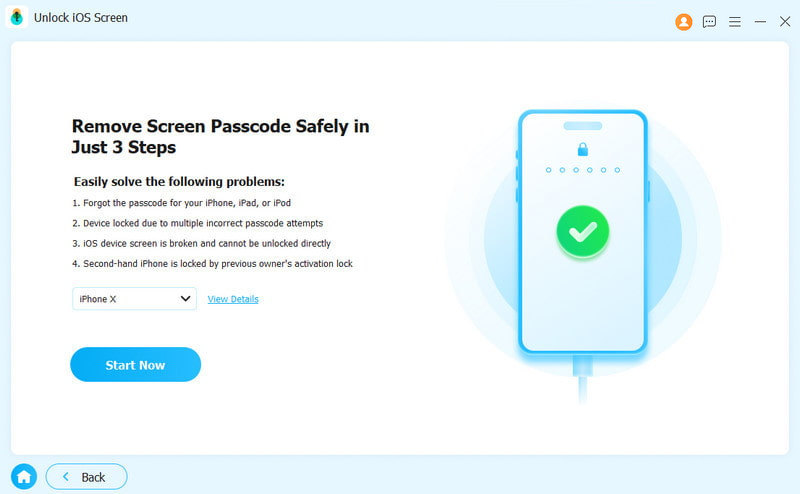
Sluit je iPhone met een Lightning-kabel aan op je computer. Zorg ervoor dat je deze computer vertrouwt. Zodra de software je apparaat detecteert, worden je iPhone-gegevens geladen. Controleer ze en klik op de knop. Begin nu knop om te beginnen met het downloaden van de firmware.
Stap 3. Ontgrendel je iPhone
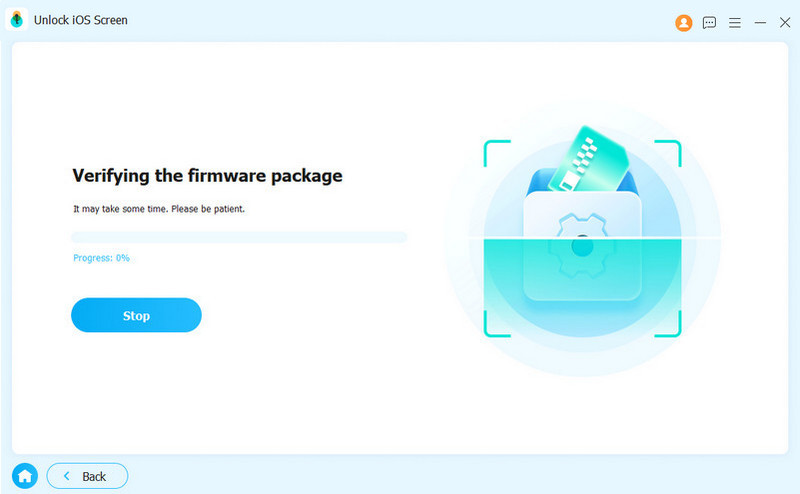
Nadat de firmware is gedownload, klikt u op de OK druk vervolgens op de knop in het bevestigingsvenster. Opnieuw bevestigen Klik op de knop om de firmware te verifiëren. Zodra de verificatie is geslaagd, begint de software automatisch met het ontgrendelen van je iPhone. Wanneer dit is voltooid, kun je 'Ontgrendelen met iPhone' opnieuw instellen.
Let op: Door dit proces worden je gegevens gewist. Je kunt het beste eerst een back-up van je iPhone maken.
Verder lezen
Conclusie
Deze gids demonstreerde Hoe ontgrendel je de Apple Watch met een iPhone?Je kunt de functie instellen op je iPhone en Apple Watch door onze gedetailleerde stappen te volgen. Als ontgrendelen met een iPhone niet werkt, probeer dan de bovenstaande oplossingen om dit probleem snel op te lossen. Apeaksoft iFoneKit iOS Unlocker is dé oplossing om je iPhone zonder wachtwoord te ontgrendelen. Daarna kun je de functie 'Ontgrendelen met iPhone' weer instellen.
 Apeaksoft iPhoneKit
 Ontgrendel alle soorten iOS-wachtwoorden vanaf iPhone, iPad en iPod.
Veilige download
Veilige download
Gerelateerde artikelen