Detaljert svar på om FaceTime varsler skjermopptak

FaceTime er den forhåndsinstallerte videochat-appen utviklet av Apple for at to eller flere brukere skal kunne se og snakke med hverandre i sanntid. Apple holder FaceTime privat og enkelt. Tenk deg at du ler med en venn på FaceTime, og plutselig slår en tanke deg: hva om de tar det opp? Ifølge vår forskning er slik tvil ikke uvanlig. Denne artikkelen svarer på om FaceTime varsler når skjermopptak skjer på iPhone eller Mac.
SIDEINNHOLD:
Del 1: Varsler FaceTime skjermopptak
Varsler Apple når du tar opp FaceTime med skjermen? Nei, FaceTime varsler ikke brukere hvis noen tar opp en videosamtale med skjermen, noe som gjør det mindre sikkert for private samtaler. Når noen tar opp FaceTime på enten en iPhone, iPad eller en Mac-datamaskin, vises det ingen popup-vinduer, ingen lyd eller noe varsel.
Apple designet FaceTime på denne måten av flere grunner, for eksempel mangel på opptakskontroller, den innebygde skjermopptaksfunksjonen rapporterer ikke aktivitet til apper, ingen avbrytende samtaler og mer.
Del 2: Hvordan kan du vite om noen tar opp FaceTime
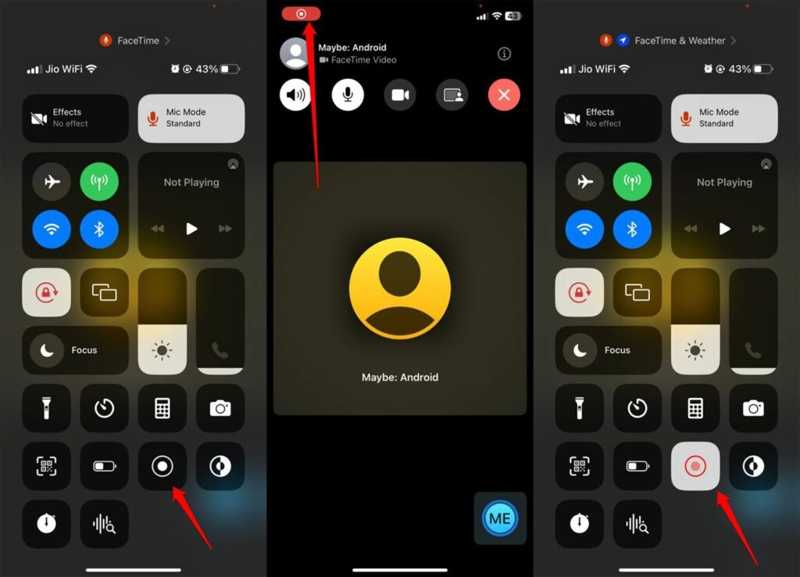
Selv om FaceTime ikke varsler deg om skjermopptak, kan du finne ut hva som skjer ved å følge noen få tegn. Teknisk sett finnes det ingen garantert metode. Lær deg disse tegnene for å holde chatten privat og trygg.
Skilt 1: Opptakspunkt
Når du tar opp skjermbildet med FaceTime, enten du bruker den innebygde skjermopptaksfunksjonen eller en tredjeparts skjermopptakerapp, vil en rød opptaksprikk vises på skjermen. Hvis du ser opptaksindikatoren på vennens skjerm, tar de opp videosamtalen din. Du kan be vennen din om å dele telefonskjermen via FaceTime når de ringer.
Tegn 2: Lag eller forsinkelse
Et viktig symbol er forsinkelse og lagg. Når man ringer i FaceTime, bruker man mange kilder. Hvis noen slår på skjermopptak for FaceTime, kan videoen plutselig bli forsinket og hakkete på grunn av hakking eller overoppheting på enheten.
Tegn 3: Mistenkelig lyd eller handlinger
Til ta opp FaceTime På en iPhone eller Mac må den som ringer gå til Kontrollsenteret og få tilgang til skjermopptaksfunksjonen. Du kan høre den mistenkelige klikkelyden eller se merkelige aktiviteter når du ringer FaceTime.
Skilt 4: Uvanlig forespørsel
En annen ledetråd for å se om noen tar opp skjermbildet FaceTime er uvanlige forespørsler eller oppførsel under samtalen. Hvis du støter på disse problemene, er det sannsynlig at den som ringer prøver å ta opp FaceTime-samtalen din for å oppnå et bestemt formål.
Del 3: Slik beskytter du personvernet ditt på FaceTime
Hvis du foretrekker å holde kontakten med venner og familie på FaceTime, kan du beskytte personvernet ditt ved å følge noen tips. Vi deler praktiske tips og triks for å holde deg trygg når du ringer via FaceTime:
- 1.Ring bare folk du stoler på.
- 2.Ikke vis privat informasjon i kameravisningen.
- 3.Spør venner og familie direkte når du bruker FaceTime.
- 4.Bruk en alternativ app som varsler når du tar opp skjermsamtaler, som Zoom.
Videre Reading
Del 4: Den ultimate måten å ta opp FaceTime uten forsinkelser
Hvis du ønsker å ta opp FaceTime uten å varsle andre, Apeaksoft Screen Recorder er et godt alternativ. Den lar deg ta opp videosamtaler på iPhone eller iPad med en datamaskin. Dermed blir ikke chatten avbrutt. Dessuten forenkler det intuitive designet arbeidsflyten.

Lastet ned av over 1,000,000 Brukere
- Ta opp FaceTime-samtaler på iPhonen din uten problemer.
- Lagre FaceTime-samtaler i HD-videoer.
- Støtter en rekke videoformater.
- Vil ikke varsle andre under skjermopptak.
- Tilby bonusfunksjoner, som å lage planlagte opptak.
Sikker nedlasting
Sikker nedlasting

Slik tar du opp FaceTime på iPhone uten å hakke
Trinn 1. Installer FaceTime-opptaker
Start FaceTime-opptaksprogramvaren når du har installert den på datamaskinen. Den er tilgjengelig på Windows 11/10/8/7/XP/Vista og Mac OS X 10.13 eller nyere. Velg Telefonopptaker og velg iOS-opptakerFølg deretter instruksjonene på skjermen for å speile iPhone-skjermen.
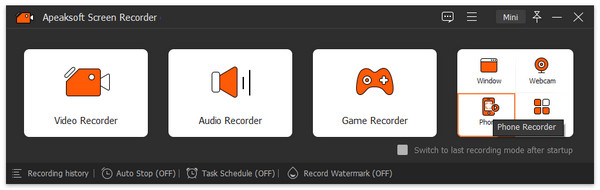
Trinn 2. Spill inn FaceTime
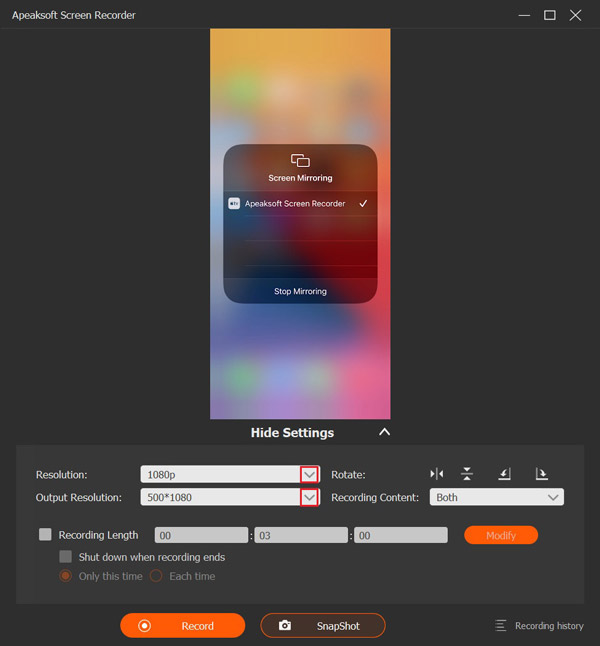
Angi oppløsningen og innholdet som tas opp, for eksempel TelefonhøyttalerStart en samtale i FaceTime på iPhonen din og klikk på Record -knappen for å starte opptaket av samtalen.
Trinn 3. Lagre samtaleopptaket
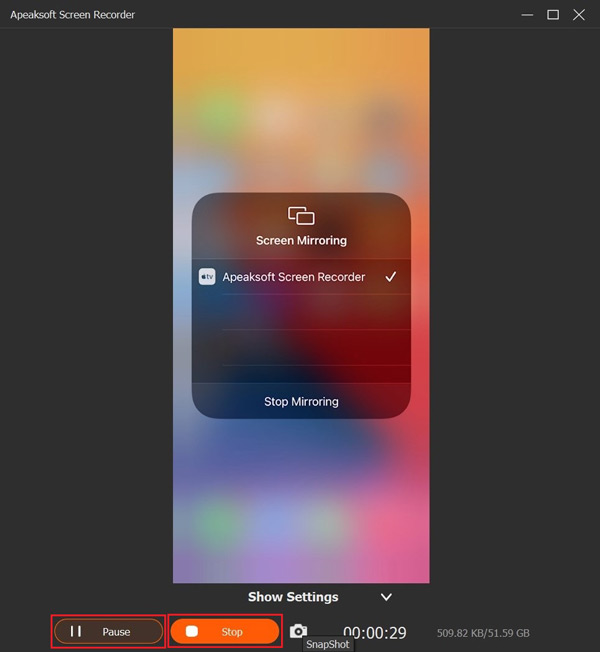
Når samtalen er fullført, klikker du på Stopp -knappen i vinduet for å lagre samtaleopptaket på harddisken. Underveis kan du midlertidig stoppe opptaket ved å trykke på pause -knappen. For å se opptaket, klikk på Innspillingshistorie og åpne den nyeste videoen.
Tips: Hvis du vil endre videoformatet eller utdatamappen, klikker du på Innstillinger-menyen i hovedgrensesnittet og går til Produksjon fanen i dialogboksen Innstillinger.
Konklusjon
Denne artikkelen svarte på om FaceTime varsler når du tar opp skjermen på iPhone, iPad eller Mac. Nå bør du lære svaret og den relevante kunnskapen. Hvis du mistenker at andre tar opp skjermopptak av FaceTime-samtalene dine, følg ledetrådene våre for å fortelle sannheten. Hvis du vil lagre en FaceTime-samtale i hemmelighet, Apeaksoft Screen Recorder er et utmerket alternativ for vanlige folk.
Relaterte artikler