

Where Is Recently Deleted Folder on iPhone and iPad

Accidentally deleting files is a common challenge among iOS users. Therefore, Apple released the Recently Deleted feature. It lets you restore photos, videos, messages, documents, and more that were deleted within 30 days on an iPhone. However, the location of the Recently Deleted folder is a little different in various services. This guide explains where recently deleted photos, messages, and more on your iPhone to get data recovery.
OBSAH STRÁNKY:
- Part 1: Where Is the Recently Deleted Photo on iPhone
- Part 2: Where Is the Recently Deleted Message on iPhone
- Part 3: Where Is the Recently Deleted App on iPhone
- Part 4: Where Is the Recently Deleted Folder on iPhone
- Part 5: Where Is the Recently Deleted Note on iPhone
- Part 6: How to Recover Permanently Deleted Data on iPhone
Part 1: Where Is the Recently Deleted Photo on iPhone
If you accidentally delete photos from the built-in Photos app on your iPhone, you can find them in the Recently Deleted album before they are permanently removed. Where are Recently Deleted photos on iPhone are different, depending on the version of iOS.
V systémech iOS 18 až 26
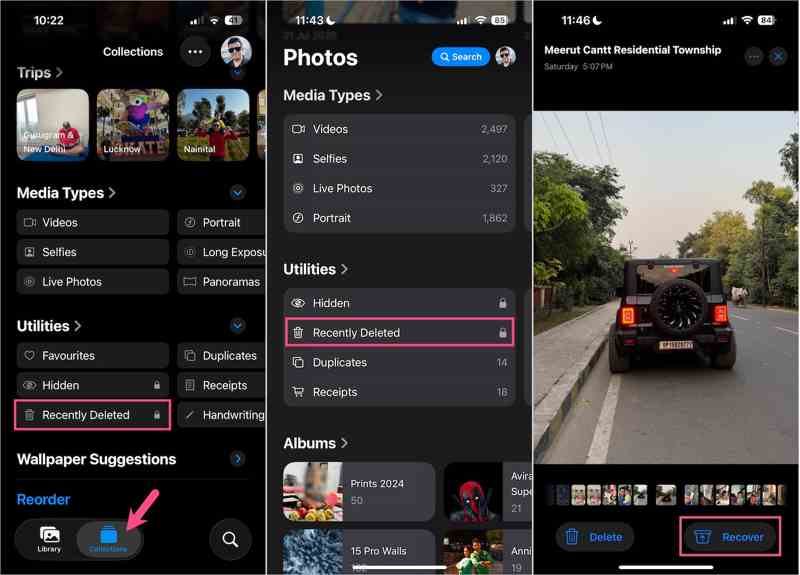
Krok 1. Otevřete Fotky app na vašem iPhone.
Krok 2. Tap the Collections tab, locate the Utilities section, and choose Nedávno byl smazán.
Krok 3. Využít Prohlédnout album and access Recently Deleted photos on iPhone with your Face ID or Touch ID.
Krok 4. Tap the deleted photo or video you want to recover, tap the Zotavit se a vyberte Obnovit fotografii.
If you want to permanently delete photos, tap Vymazat , a vyberte Delete From This iPhone.
Poznámka: If you want to recover multiple photos at one time, tap Select, choose the desired items, tap the Ellipsis button, and choose Recover.
V systémech iOS 17 až 8
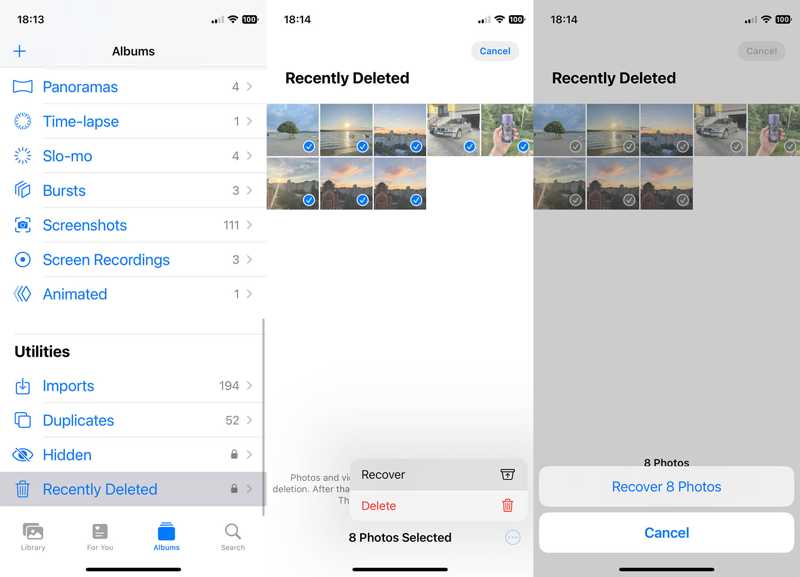
Krok 1. Spusťte Fotky aplikace z domovské obrazovky.
Krok 2. Přejít na Alba v dolní části.
Krok 3. Vyberte Nedávno byl smazán album pod Utility sekce.
Krok 4. Select the photos you wish to recover or delete, and tap the Více tlačítko s ikonou se třemi tečkami.
Krok 5. Vybrat Zotavit se or Vymazat a potvrďte akci.
Part 2: Where Is the Recently Deleted Message on iPhone
Apple introduced the Recently Deleted folder in the Messages app when launching iOS 16. It stores the recently deleted messages on your iPhone for up to 30 days. It is available to both texts and iMessages.
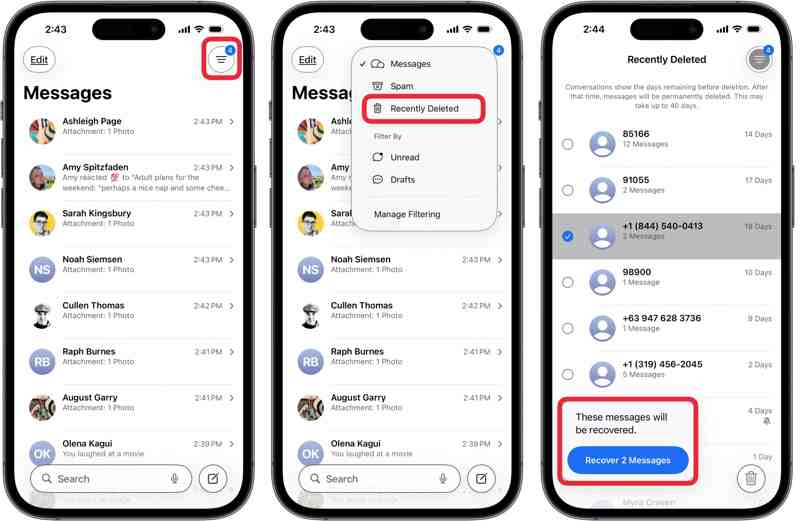
Krok 1. Spusťte Zprávy aplikaci a klepněte na ikonu Filtr tlačítko na horní stuze.
Tip: On iOS 18, tap Změnit namísto.
Krok 2. Vyberte Nedávno byl smazán folder from the context menu.
Krok 3. Now, you will see all deleted messages.
Krok 4. Pick a contact, and select the messages you want to edit.
Krok 5. Využít Obnovit N zpráv.
Další čtení
Part 3: Where Is the Recently Deleted App on iPhone
Unlike recently deleted texts on iPhone, the App Store keeps all apps you have installed on your device through your Apple ID, including uninstalled apps. In other words, you can find recently deleted apps on the iPhone’s App Store.
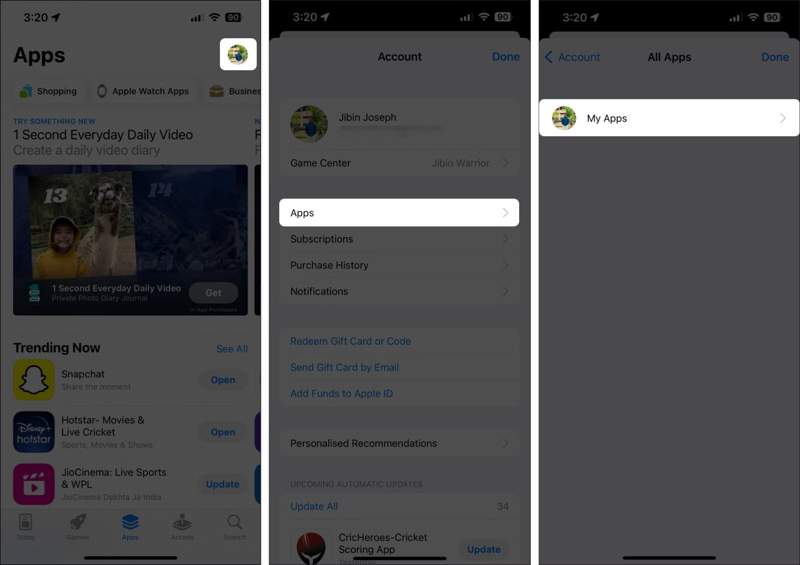
Krok 1. Run your App Store and tap on your profile.
Krok 2. Přejít na aplikace a klepněte na Moje aplikace to view all apps installed on your iPhone.
Krok 3. Přepněte na Není na tomto iPhone tab to find uninstalled apps.
Krok 4. If you want to reinstall an app, tap the Ke stažení .
Krok 5. Enter your Apple ID password or Face ID to download it again.
Poznámka: This way only recovers recently deleted apps on your iPhone, but does not include app data.
Part 4: Where Is the Recently Deleted Folder on iPhone
If you have saved files and documents in the Files app and delete them by mistake, you can recover files within 30 days. However, where is the recently deleted folder on iPhone? Here, you can locate the deleted files.
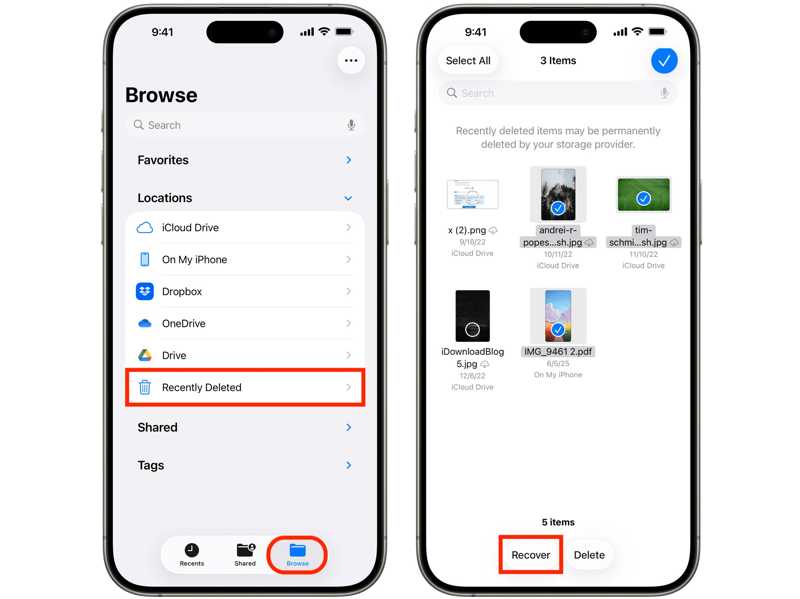
Krok 1. Spusťte soubory aplikaci na vašem iPhone a přejděte na Procházet Karta.
Krok 2. Vyberte Nedávno byl smazán složky pod Pobočky sekce.
Krok 3. Now, you can find recently deleted files on your iPhone.
Krok 4. Select the desired files and recover or delete them.
Part 5: Where Is the Recently Deleted Note on iPhone
Another service includes the Recently Deleted folder in the built-in Notes app on an iPhone. Therefore, you can find the recently deleted notes and attachments on your iOS device within 30 days.
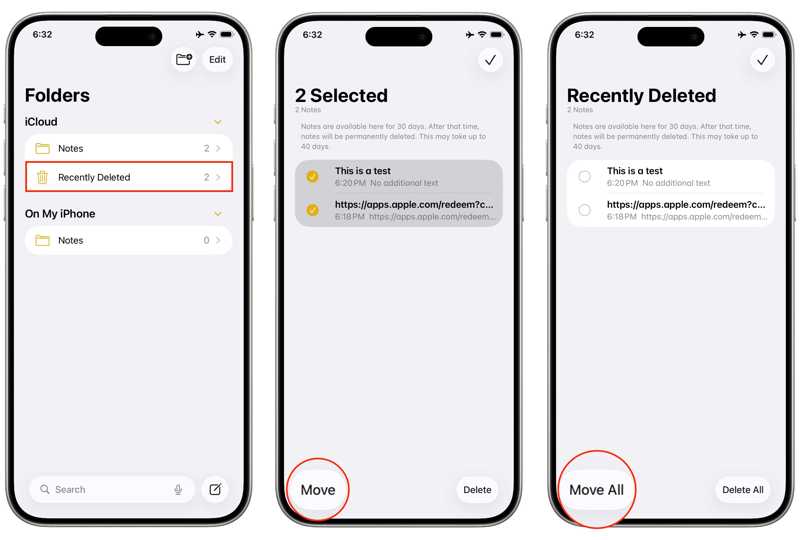
Krok 1. Run the iOS Poznámky app.
Krok 2. Klepněte na Zpět button to view all folders.
Krok 3. Vyberte Nedávno byl smazán složka.
Krok 4. Here, you can recover or permanently delete your notes.
Part 6: How to Recover Permanently Deleted Data on iPhone
As mentioned previously, the Recently Deleted folder only enables you to recover data deleted within 30 days. If you cannot find the desired data in the Recently Deleted folder, Apeaksoft iPhone Obnova dat can help you retrieve your files.
A Quick Way to Recover Permanently Deleted Data on iPhone
- Recover deleted data on your iPhone without backup.
- Work on recently and permanently deleted files.
- Náhled smazaných souborů pro selektivní obnovení.
- Nepřeruší stávající data na vašem iPhone.
- Podpora všech verzí iOS a iPadOS.
Bezpečné stahování
Bezpečné stahování

How to Recover Deleted Data on Your iPhone
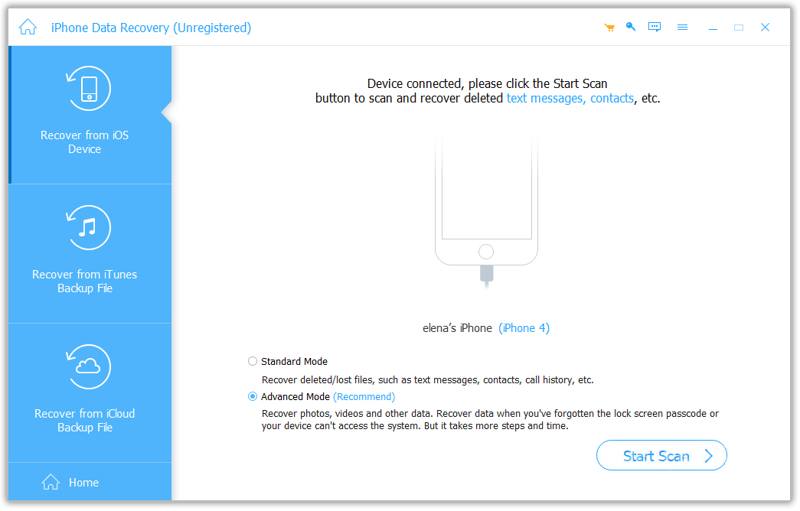
Krok 1. Skenujte svůj iPhone
Launch the deleted data recovery software after installing it on your PC. There is another version for Mac. Connect your iPhone to your PC with a Lightning cable. Choose the Obnovení z zařízení iOS a klepněte na tlačítko Spustit skenování tlačítko pro zahájení skenování vašeho iPhone.
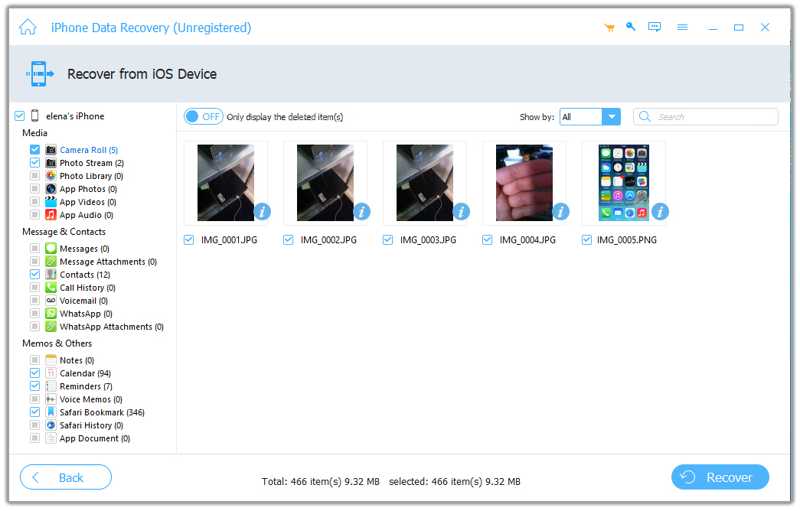
Krok 2. Náhled smazaných souborů
Once device scanning finishes, you can view your data by type. Choose Zobrazit pouze smazané from the top option to view deleted files on your device.
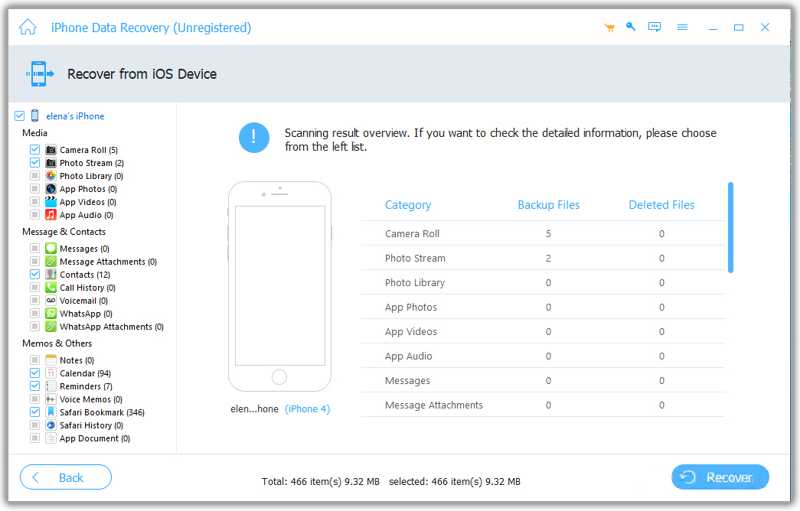
Krok 3. Obnovit smazané soubory
Select the deleted photos, messages, videos, contacts, and more you want to retrieve. Click the Zotavit se button at the bottom, set an output folder, and click Zotavit se znovu.
Závěr
Tento průvodce diskutoval where to find recently deleted photos, apps, and messages on iPhone. You can find your data that was deleted within 30 days and recover or permanently remove it. Plus, you can follow our guide to restore deleted apps from your App Store. If you cannot find your data in the Recently Deleted folder, Apeaksoft iPhone Obnova dat enables you to get back permanently deleted files without backup. Plus, it is easy to use.
Související články
Co je to režim DFU na iPhonu? K čemu režim DFU slouží? Jak se do režimu DFU vstoupí nebo z něj vystoupí na iPhonu 17/16/15/14/13/12/11 atd. Všechny odpovědi najdete v tomto příspěvku.
Odemknutí iPhonu pomocí čísla IMEI zdarma není obtížný úkol a lze jej snadno provést správnou metodou bez technických znalostí.
Tento článek ukazuje, jak zkontrolovat a opravit chyby serveru Apple ID. Pokud se tedy dostanete k chybě při připojování k serveru Apple ID, postupujte následovně.
Nemáte ponětí, jak opravit chybu iTunes Library.itl nelze číst? Tento článek může být vaším nejlepším průvodcem pro downgrade iTunes nebo získání nejlepší alternativy iTunes.



