So entfernen Sie weiße Flecken auf Ihrem iPhone-Bildschirm

„Ich habe mir ein iPhone 11 gekauft und vor einigen Monaten einen weißen Punkt auf dem Bildschirm bemerkt. Ich glaube, er wird größer. Was könnte die Ursache sein und lässt er sich reparieren?“ iOS-Geräte sind hochentwickelte Smartphones. Der Touchscreen reagiert auf Tippen, Wischen und Gesten mit gedrückter Berührung. Wie bei anderen digitalen Displays können jedoch verschiedene Probleme auftreten. weißer Fleck auf dem iPhone-Bildschirm, kann beispielsweise nach unserer Fehlerbehebung entfernt werden.
SEITENINHALT:
Teil 1: Warum befindet sich ein weißer Fleck auf dem iPhone-Bildschirm?
Ein weißer Fleck auf dem iPhone-Bildschirm kann verwirrend und beunruhigend sein, besonders wenn er sich nicht bewegt oder verschwindet. Die Ursachen können von einer einfachen Funktion bis hin zu einem Hardwareproblem reichen. Die häufigsten Gründe für einen weißen Fleck auf meinem iPhone-Bildschirm sind:
- Eine Blase unter der Displayschutzfolie.
- Die AssistiveTouch-Taste.
- Pixelfehler und Anzeigeproblem.
- Update-Fehler.
- Softwarefehler.
- Beschädigung des Berührungssensors oder durch Druck.
- Hardwareschaden.
Teil 2: So entfernen Sie weiße Flecken auf dem iPhone-Bildschirm
Situation 1: Weißer Fleck unter der Displayschutzfolie
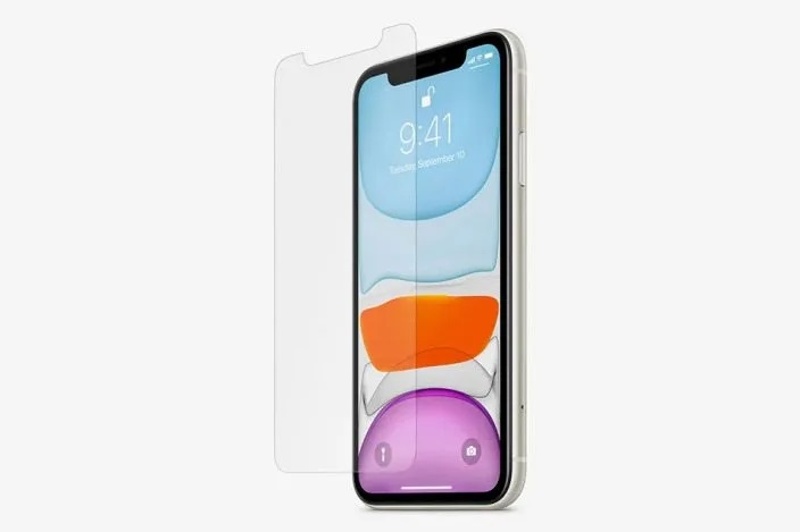
Manche Nutzer schützen ihre iPhone-Touchscreens mit Displayschutzfolien. Ungeeignete Displayschutzfolien oder falsche Handhabung können jedoch zu einem weißen Punkt auf dem Bildschirm führen, der die Anzeige von Inhalten blockiert.
Wie zu sagen:
- 1. Der Punkt schwebt über Ihrem Bildschirm und unter der Schutzfolie.
- 2. Es bewegt sich nicht, wenn Sie auf den Bildschirm tippen.
So entfernen Sie einen kleinen weißen Fleck auf einem iPhone
Am einfachsten lässt sich der kleine weiße Fleck auf Ihrem Bildschirm entfernen, indem Sie die Displayschutzfolie abnehmen. Reinigen Sie anschließend Ihren Bildschirm, und der Fleck sollte verschwinden. Falls Sie dennoch eine Displayschutzfolie verwenden möchten, kaufen Sie eine hochwertige und lassen Sie diese von Fachleuten anbringen.
Situation 2: AssistiveTouch-Taste
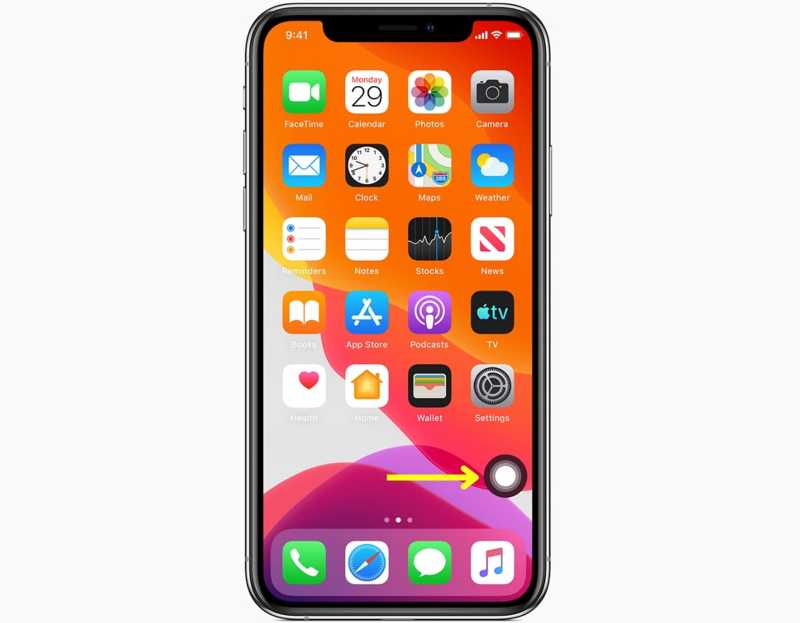
AssistiveTouch ist eine integrierte Funktion des iPhones. Sie fungiert als virtuelle, schwebende Taste. Nach der Aktivierung ermöglicht sie die schnelle Ausführung verschiedener Aktionen, ohne die physischen Tasten betätigen zu müssen.
Wie zu sagen:
- 1. Auf Ihrem Bildschirm erscheint ein weißer Fleck.
- 2. Wenn Sie darauf tippen, öffnet sich ein Menüfenster.
- 3. Sie können den Punkt per Drag & Drop an eine beliebige Position auf Ihrem Bildschirm verschieben.
So entfernen Sie weiße Flecken auf dem iPhone-Bildschirm
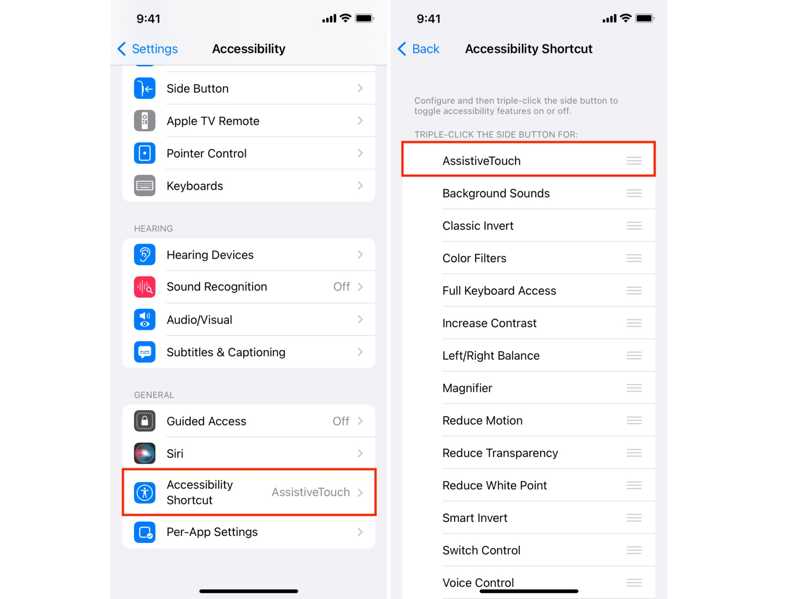
Schritt 1: Öffnen Sie den Microsoft Store auf Ihrem Windows-PC Einstellungen App auf Ihrem iPhone.
Schritt 2: Scrolle nach unten und tippe auf Eingabehilfe-Verknüpfung.
Schritt 3: Deaktivieren Sie AssistiveTouch, und der weiße Fleck auf Ihrem iPhone-Bildschirm verschwindet.
Hinweis: Die AssistiveTouch-Taste ist kein Fehler, sondern eine nützliche Funktion. Wenn Sie sie nicht stört, können Sie die Optionen dafür anpassen.
Situation 3: Hängender Pixel
Ein defekter Pixel ist eine häufige Ursache für weiße Flecken auf dem iPhone-Bildschirm. Ein Touchscreen besteht aus Millionen von Pixeln. Wenn ein Pixel nicht funktioniert oder nicht reagiert, erscheint ein weißer Punkt oder Fleck.
Wie zu sagen:
- 1. Der weiße Fleck bewegt sich nicht.
- 2. Es erscheint immer im selben Gebiet.
- 3. Es ist sogar auf Screenshots zu sehen.
So beheben Sie weiße Flecken auf einem iPhone-Bildschirm
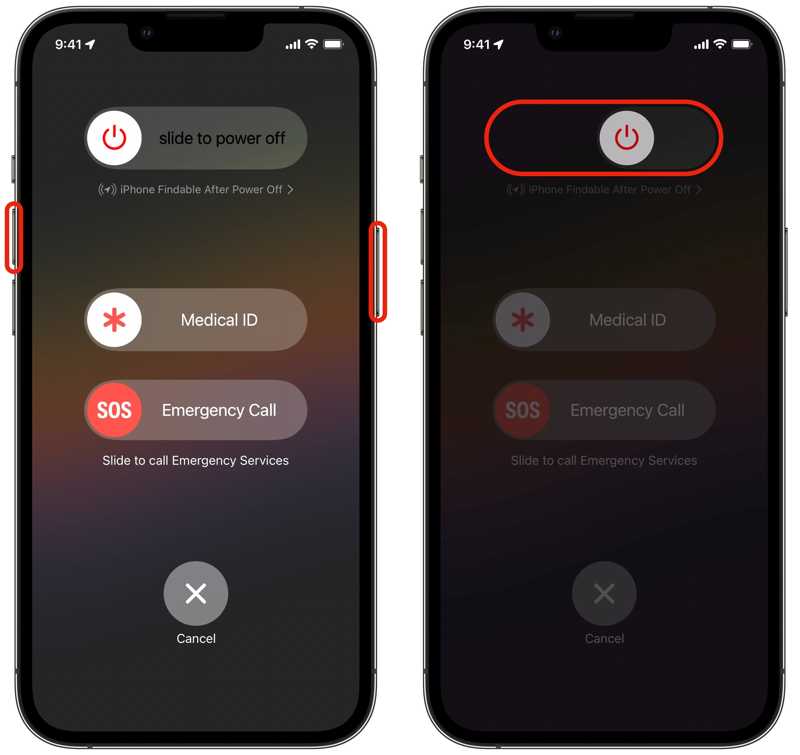
Schritt 1: Halten Sie eine der Lautstärketasten gedrückt + Seite Bei einem iPhone mit Face ID die Taste gleichzeitig drücken. Wenn Ihr iPhone nicht über Face ID verfügt, die Taste gedrückt halten. Seite or Tuning .
Schritt 2: Wenn der Ausschaltbildschirm erscheint, lassen Sie die Tasten los.
Schritt 3: Bewegen Sie den Schieberegler, um Ihr iPhone auszuschalten.
Schritt 4: Halten Sie einige Minuten später die Seite or Tuning drücken, bis das Apple-Logo angezeigt wird.
Schritt 5: Schalten Sie anschließend Ihr Gerät ein, um zu überprüfen, ob der weiße Fleck auf dem iPhone-Bildschirm behoben ist.
Situation 4: Weißer Fleck nach Software-Update
Einige Nutzer berichteten von einem weißen Fleck auf dem iPhone-Bildschirm nach dem Software-Update. Dies könnte auf einen Update-Fehler zurückzuführen sein, insbesondere bei Beta-Versionen. Die Lösung ist einfach: Installieren Sie die neueste oder eine reguläre Version.
Wie zu sagen:
- 1.Der weiße Fleck erscheint nach einem Update.
- 2.Es erscheint ständig auf Ihrem Bildschirm oder auf dem Startbildschirm.
So beheben Sie weiße Flecken auf einem iPhone-Bildschirm
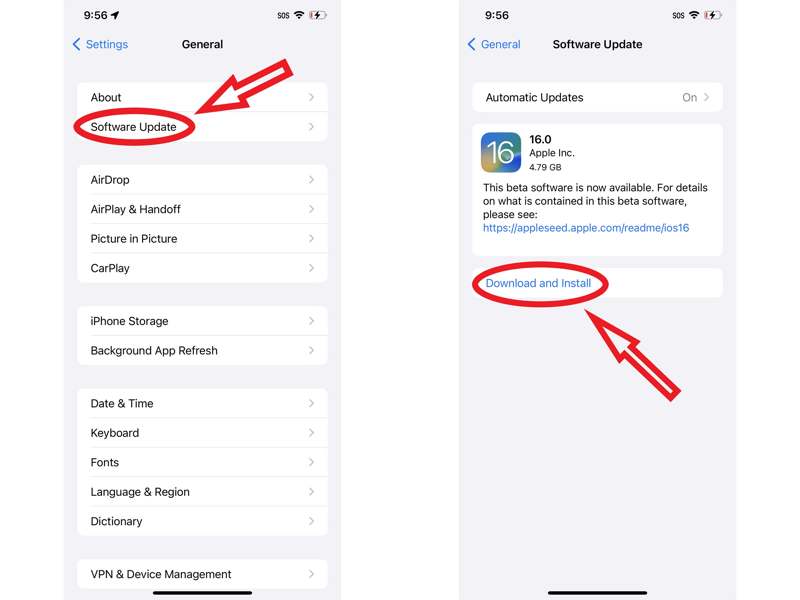
Schritt 1: Führen Sie die Einstellungen App.
Schritt 2: Navigieren Allgemein und Software-Update um nach Aktualisierungen zu suchen.
Schritt 3: Wenn ein Update verfügbar ist, tippen Sie auf Lade und installiere.
Hinweis: Wenn nach der Installation einer Beta-Version ein weißer Fleck auftritt, aktualisieren Sie auf eine reguläre iOS-Version.
Situation 5: iOS-Softwarefehler
Was verursacht einen weißen Fleck auf dem iPhone-Bildschirm? Die Antwort könnte in Softwarefehlern liegen, beispielsweise in falschen Einstellungen, einem falschen Datum oder einer falschen Uhrzeit. Manchmal ist es schwierig, die genaue Ursache zu ermitteln.
Wie zu sagen:
- 1.Der weiße Fleck könnte ein visueller Fehler sein.
So entfernen Sie weiße Flecken auf einem iPhone-Bildschirm
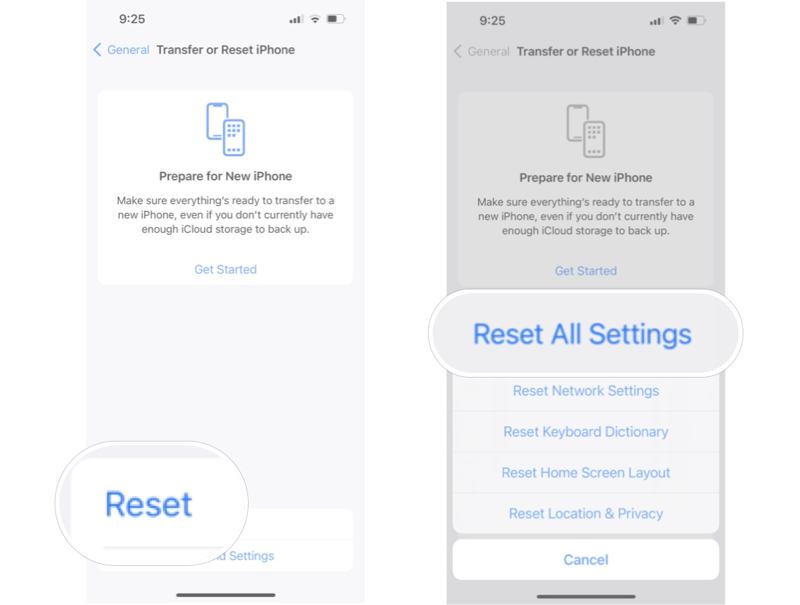
Schritt 1: Führen Sie Ihre Einstellungen App.
Schritt 2: Head to Allgemein, und dann Übertragen oder Zurücksetzen.
Schritt 3: Zylinderkopfschrauben Zurücksetzen und wählen Sie Alle Einstellungen zurücksetzen.
Schritt 4: Geben Sie bei Aufforderung Ihren iPhone-Passcode oder Ihr Apple-ID-Passwort ein, um den weißen Fleck auf dem iPhone-Bildschirm zu entfernen.
Weiterführende Literatur
Situation 6: Beschädigung des Touchscreens
Physische Beschädigungen können ebenfalls zu weißen Flecken auf dem iPhone-Bildschirm führen. Wenn Sie Ihr Gerät kürzlich fallen gelassen oder beschädigt haben, kann der Touchscreen beschädigt sein. In diesem Fall müssen Sie den Bildschirm im nächstgelegenen Apple Store reparieren oder austauschen lassen. Versuchen Sie nicht, das iPhone selbst zu öffnen. Sichern Sie außerdem unbedingt Ihre Daten, bevor Sie eine Reparatur in Erwägung ziehen.
Teil 3: Die ultimative Lösung zur Entfernung weißer Flecken auf dem iPhone-Bildschirm
Sollten die üblichen Lösungen für den weißen Fleck auf Ihrem iPhone-Bildschirm nicht funktionieren, empfiehlt sich die Suche nach einem leistungsstärkeren Tool, wie zum Beispiel … Apeaksoft iOS SystemwiederherstellungEs kann Ihr iOS-Gerät scannen, den Fehler finden und ihn mithilfe fortschrittlicher Technologie beheben. Noch wichtiger ist, dass das benutzerfreundliche Design den Arbeitsablauf optimiert.

wurde von über 1,000,000 Nutzer
- Erkennen Sie Softwarefehler auf iOS-Geräten automatisch.
- Eine Vielzahl von Fehlern, Bugs und Software-Pannen beheben.
- Aktualisieren oder downgraden Sie eine ältere iOS-Version.
- Schützen Sie Ihre Daten während des Prozesses.
- Unterstützt die neuesten Versionen von iOS und iPadOS.
Sicherer Download
Sicherer Download
So entfernen Sie weiße Flecken auf Ihrem iPhone-Bildschirm
Schritt 1: Installieren Sie die iOS-Systemwiederherstellung
Starten Sie die iOS-Systemwiederherstellungssoftware, sobald Sie sie auf Ihrem PC installiert haben. Es gibt eine weitere Version für macOS 10.7 und höher. Verbinden Sie Ihr iPhone mit einem Lightning-Kabel mit Ihrem PC. Bestätigen Sie die Sicherheitsabfrage, indem Sie dem PC vertrauen. Wählen Sie iOS Systemwiederherstellung, klicken Jetzt starten unter dem Systemreparatur Abschnitt und treffen Sie die Start .
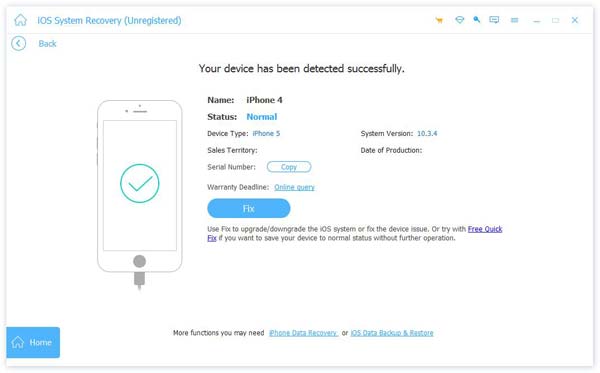
Tipps: Wenn Sie ein Update benötigen oder Herabstufen von iOSKlicken Sie unter „iOS Upgrade/Downgrade“ auf „Jetzt starten“.
Schritt 2: Wähle einen Modus
Drücken Sie auf Kostenlose Schnellkorrektur Hier ist der Link für eine schnelle Lösung. Falls das nicht funktioniert, klicken Sie auf [Link einfügen]. Fixieren Um fortzufahren, wählen Sie dann die Option aus. Standart Modus or Erweiterter Modus, abhängig von Ihrer Situation. Klicken Sie auf die Schichtannahme Zum Fortfahren auf diese Schaltfläche klicken. Beachten Sie, dass die Erweiterter Modus wird alle Probleme lösen Löschen Ihres iPhones.
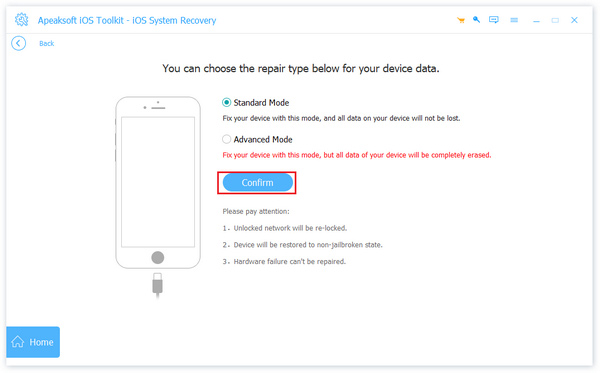
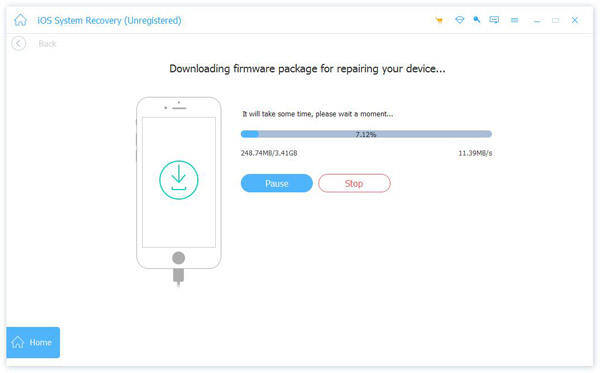
Schritt 3: Reparieren Sie den weißen Fleck.
Überprüfen Sie anschließend Ihre Geräteinformationen und laden Sie die passende Firmware herunter. Klicken Sie nach Abschluss des Downloads auf die Schaltfläche Weiter Klicken Sie auf diese Schaltfläche, um die Behebung des weißen Flecks auf Ihrem iPhone-Bildschirm zu starten.
Fazit
Dieser Leitfaden erklärte, warum Auf dem iPhone-Bildschirm erscheinen weiße Flecken.Außerdem können Sie bewährte Lösungen für dieses Problem in verschiedenen Situationen kennenlernen. Falls Sie gängige Lösungsansätze bereits ausprobiert haben und der weiße Fleck weiterhin auf Ihrem Bildschirm zu sehen ist, versuchen Sie Folgendes: Apeaksoft iOS SystemwiederherstellungEs ist eine gute Option für Anfänger und normale Leute.
 Apeaksoft iOS Systemwiederherstellung
 Behebt diverse iOS-Systemprobleme auf iPhone, iPad und iPod.
Sicherer Download
Sicherer Download
Ähnliche Artikel