

Die 7 besten kostenlosen Datenrettungsprogramme 2026 – einfach und schnell

Haben Sie versehentlich Dateien im Papierkorb gelöscht und ihn erst geleert, als Sie die benötigten Dateien wiederfanden? Keine Panik – Ihre Dateien sind nicht für immer verloren!
In diesem Artikel haben wir 7 Produkte getestet und bewertet. beste kostenlose Datenwiederherstellungssoftware Sowohl für Windows als auch für Mac, um Ihnen zu helfen, gelöschte oder verlorene Dateien schnell und sicher wiederherzustellen.
SEITENINHALT:
- Kurzübersicht der 7 besten kostenlosen Datenrettungsprogramme
- Platz 1: Apeaksoft Datenrettung (Windows/Mac)
- Platz 2: Recuva (Windows)
- Top 3: MiniTool Power Data Recovery (Windows)
- Top 4: EaseUS Data Recovery Wizard (Windows/Mac)
- Top 5: Disk Drill (Windows/Mac)
- Top 6: Stellar Data Recovery (Windows/Mac)
- Top 7: R-Studio (Windows/Mac/Linux)
- Tipps zur Auswahl kostenloser Software für die Datenwiederherstellung
Kurzübersicht der 7 besten kostenlosen Datenrettungsprogramme
| Software | Plattform | Freies Limit | Scan-Zeit | Erfolgsrate | Am besten geeignet für | Benutzerfreundlich |
| Apeaksoft Datenwiederherstellung | Windows/Mac | 200MB | 2 5-min | Hoch | Umfassende Wiederherstellung, SD-Karten-Wiederherstellung | ⭐⭐⭐⭐⭐ |
| Recuva | Windows | Unlimited | 3 8-min | Medium | Einfache Dateiwiederherstellung | ⭐⭐⭐⭐ |
| MiniTool Power Datenrettung | Windows | 1GB | 5 10-min | Medium | Grundlegende Wiederherstellung | ⭐⭐⭐⭐ |
| EaseUS Data Recovery Wizard | Windows/Mac | 2 GB (mit Aufgaben) | 8 15-min | Hoch | Anfänger | ⭐⭐⭐⭐⭐ |
| Disk Drill | Windows/Mac | 500 MB | 10 20-min | Medium-High | Mac-Benutzer | ⭐⭐⭐⭐ |
| Stellare Datenrettung | Windows/Mac | Eingeschränkte Vorschau | 10 25-min | Hoch | Foto-/Videowiederherstellung | ⭐⭐⭐⭐ |
| R-Studio | Windows / Mac / Linux | Nur Demo | 15 30-min | Sehr hoch | Fortgeschrittene Benutzer | ⭐⭐⭐ |
* Hinweis: Die Scanzeit basiert auf Tests mit einer 500-GB-Festplatte mit unterschiedlichen Dateitypen. Die tatsächliche Zeit kann je nach Festplattengröße, Dateisystem und Beschädigungsgrad variieren.
Das Redaktionsteam von Apeaksoft testet jedes Tool unabhängig. Wir überprüfen Kompatibilität, Erfolgsquote, Benutzerfreundlichkeit und Gesamtleistung anhand realer Geräte und der neuesten Betriebssysteme. Unsere Bewertungen basieren auf praktischer Erfahrung, technischer Analyse und Nutzerfeedback. Wir aktualisieren die Inhalte regelmäßig, um Software-Updates, Betriebssystemänderungen und Nutzerfeedback zu berücksichtigen.
- Test UmgebungWindows 10/11 Pro (24H2), macOS Ventura & Sequoia 15
- Simulierte DatenverlustszenarienVersehentliches Löschen, geleerter Papierkorb, schnelle Festplattenformatierung, Partitionsbeschädigung, Systemabsturz
- Fotografien: JPEG-komprimierte Schnappschüsse (10 KB-5 MB), RAW-Kamerafotos (20-80 MB)
- Unterlagen: DOCX, XLSX, PDF (20 KB-20 MB)
- Videos: MP4-, MOV-Videomaterial (500 MB-5 GB)
- Audio: MP3-, M4A-Audioclips (1 MB–30 MB)
- TestregelnJede Software wird mindestens dreimal getestet. Die Wiederherstellung gilt nur dann als erfolgreich, wenn die wiederhergestellten Dateien normal und ohne Beschädigung geöffnet werden können und ihre ursprünglichen Dateinamen beibehalten.
- ErinnerungDie tatsächliche Erfolgsquote der Datenwiederherstellung hängt von verschiedenen Gerätemodellen, Betriebssystemversionen und davon ab, ob gelöschte Dateien durch neue Daten überschrieben wurden.
Platz 1: Apeaksoft Datenrettung (Windows/Mac)
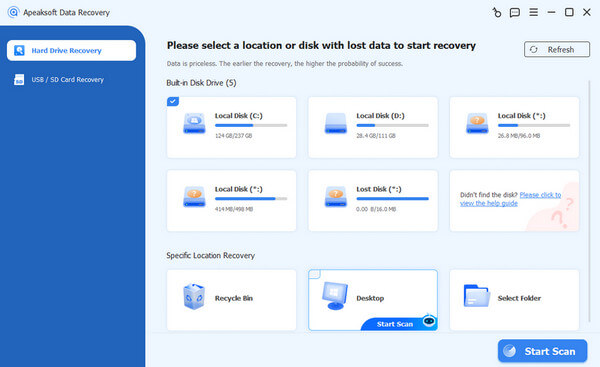
Haben Sie versehentlich wichtige Dateien auf Ihrem Windows- oder Mac-Computer gelöscht? Keine Sorge! Apeaksoft Datenwiederherstellung ist eine getestete, kostenlose Datenrettungssoftware, die unter Windows 7/8/10/11 und macOS funktioniert. Sie hilft Ihnen, Fotos, Videos, Dokumente und mehr von Festplatten, USB-Sticks, SD-Karten und sogar aus dem geleerten Papierkorb wiederherzustellen. Unsere Tests haben gezeigt, dass sie einwandfrei funktioniert und eine hohe Erfolgsquote aufweist.
Sicherer Download
Sicherer Download
- Dateien vor der Datenwiederherstellung in der Vorschau anzeigen und so eine unnötige Wiederherstellung vermeiden.
- Intelligente Suche und rote Hervorhebung gelöschter Dateien
- Stellen Sie Ihre gewünschten Dateien gezielt mit einem Klick wieder her.
- Unterstützt Festplatten, USB-Sticks, USB-Geräte, Papierkorb und SD-Kartenwiederherstellung.
- Hohe Wiederherstellungsrate bei kürzlich erfolgten Deletionen (getestet).
- Bei großen Datendateien ist der Scan- und Wiederherstellungsprozess relativ langsam.
- Bei der kostenlosen Testversion können Einschränkungen hinsichtlich der insgesamt wiederhergestellten Daten bestehen.
Platz 2: Recuva (Windows)
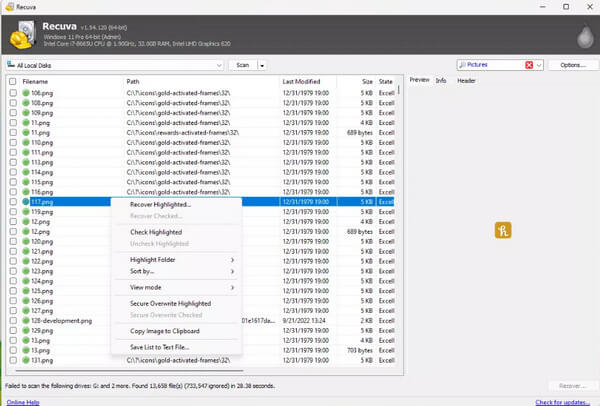
Recuva ist eine kostenlose Datenrettungssoftware von Piriform. Diese Software funktioniert auf Festplatten, USB-Sticks, Speicherkarten und anderen Geräten mit den Dateisystemen FAT und NTFS. Wenn Sie nach einer kostenlosen Datenrettungssoftware für Windows 10/11 suchen, sollten Sie sie sich nicht entgehen lassen!
- Es ist eine gute Möglichkeit, Wiederherstellen verlorener Daten von einer defekten Festplatte.
- Unterstützt das Scannen tragbarer Geräte.
- Es wurde nur eine Windows-Version herausgebracht. Wenn Sie also nach einer kostenlosen Datenwiederherstellungssoftware für Mac suchen, ist diese nicht geeignet.
- Die Wiederherstellungsgeschwindigkeit ist langsam.
- Die Wiederherstellungsleistung ist relativ gering.
Top 3: MiniTool Power Data Recovery (Windows)
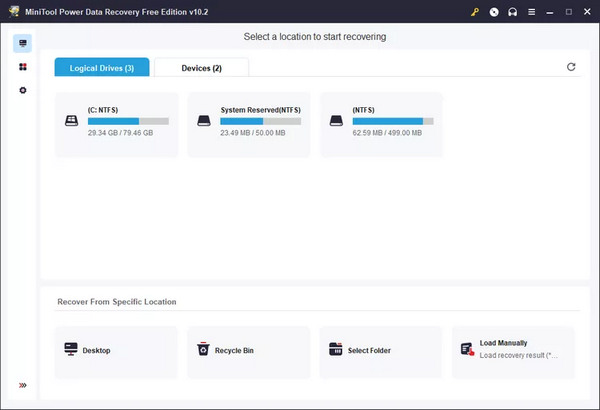
MiniTool Power Datenrettung Diese kostenlose Datenrettungssoftware kann dauerhaft gelöschte Dateien von Festplatten und externen Speichermedien wiederherstellen. Allerdings bietet die einfache Benutzeroberfläche nicht genügend benutzerfreundliche Funktionen. Die Auswahl der gewünschten Dateien kann etwas Zeit in Anspruch nehmen. Dafür ist die Software ressourcenschonend und scannt Ihren Computer schnell.
- Kostenlose Rückgabe dauerhaft gelöschter Dateien.
- Unterstützt Festplatten, externen Speicher und USB-Verbindung.
- Unterstützt die Ordnerwiederherstellung.
- Nur 1 GB zur kostenlosen Wiederherstellung.
- Einige Programmdaten können nicht wiederhergestellt werden.
Top 4: EaseUS Data Recovery Wizard (Windows/Mac)
EaseUS Data Recovery Wizard ist eine kostenlose (Test-)Datenrettungssoftware für Windows und Mac, die Sie sich nicht entgehen lassen sollten. Sie hilft Ihnen, Dateien von Ihrer Festplatte, USB-Sticks, SD-Karten und anderen externen Geräten wiederherzustellen. Die benutzerfreundliche Software unterstützt sowohl Schnellscans als auch Tiefenscans, um verlorene Dateien effizient wiederherzustellen. Da sie sowohl unter Windows als auch unter Mac funktioniert, deckt sie ein breites Spektrum an Datenrettungsszenarien ab. Darüber hinaus bietet sie zusätzliche Funktionen wie die Partitionswiederherstellung.
- Scannen Sie Ihre Laufwerke schnell, um alle gängigen Dateitypen wiederherzustellen.
- Unterstützt externe Geräte wie USB-Sticks und SD-Karten.
- Kostenlose Testversion für die erste Wiederherstellung ohne vollständigen Kauf verfügbar.
- Für die vollständige Wiederherstellung ist ein Upgrade auf die kostenpflichtige Version erforderlich.
- Die Wiederherstellung großer oder stark beschädigter Dateien kann länger dauern.
Top 5: Disk Drill (Windows/Mac)
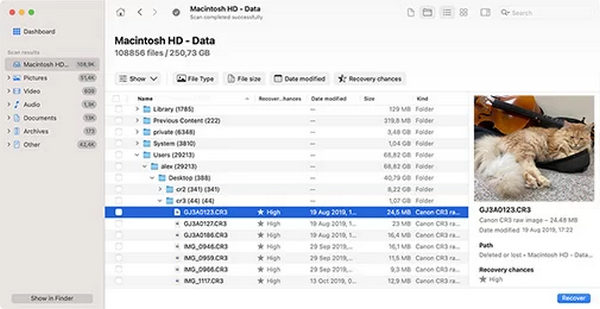
Disk Drill Es handelt sich zwar nicht um eine vorinstallierte Funktion auf dem Mac, aber dennoch um eine kostenlose Datenrettungssoftware für Mac. Sie zeichnet sich durch ein sehr einfaches Design und eine benutzerfreundliche Bedienung aus, sodass Sie sich sofort zurechtfinden. Mit dieser kostenlosen Dateiwiederherstellungssoftware können Sie verlorene Dateien von jedem Speichermedium wiederherstellen, darunter interne Festplatten, externe Festplatten, USB-Sticks, SD-Karten usw. Sie können sich die Dateien vor der Wiederherstellung in einer Vorschau ansehen.
- Unterstützt verschiedene Dateitypen.
- Bieten Sie eine tragbare Option für externe Geräte.
- Führen Sie einen gründlichen Scan Ihres Macs durch, um dauerhaft gelöschte Dateien zu finden.
- Es bietet nur 500 MB für die kostenlose Dateiwiederherstellung.
- Die Scangeschwindigkeit ist nicht so hoch.
Top 6: Stellar Data Recovery (Windows/Mac)
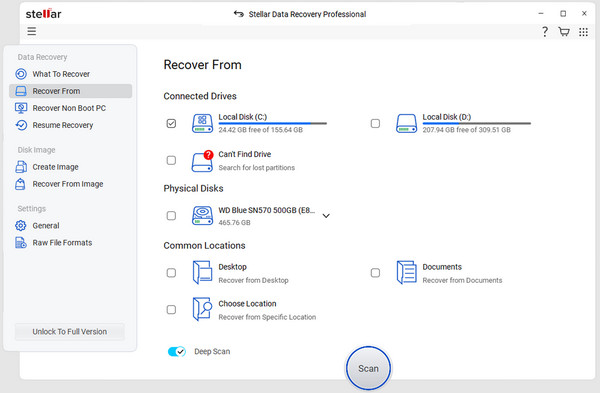
Stellar Data Recovery ist eine beliebte, kostenlose Datenrettungssoftware für Windows und Mac, die sich besonders für Einsteiger eignet. Sie ermöglicht die Wiederherstellung versehentlich gelöschter Dateien, geleerter Papierkörbe, beschädigter Festplatten und RAW-Partitionen. In unseren Tests lag die Erfolgsquote bei bis zu 80 %. Allerdings ist der Tiefenscan im Vergleich zu anderer Software relativ langsam, und es kann gelegentlich zu fragmentierten Dateien kommen. Der kostenlose Speicherplatz von 1 GB ist für die Datenrettung, beispielsweise von Videos, nicht ausreichend.
- Einsteigerfreundliche Oberfläche.
- Daten von einer formatierten Festplatte wiederherstellensowie eine korrumpierte Version.
- Dateien vor der Wiederherstellung ansehen.
- 1 GB kostenloser Wiederherstellungsspeicher.
- Die Wiederherstellungsergebnisse können in komplexen Szenarien variieren.
Top 7: R-Studio (Windows/Mac/Linux)
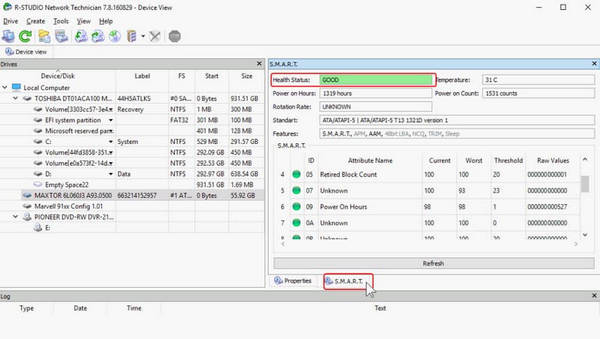
R-Studio ist eine professionelle, kostenlose Datenrettungssoftware (Testversion), die speziell für professionelle Anwender und IT-Fachkräfte entwickelt wurde. Sie unterstützt die Wiederherstellung formatierter Laufwerke, verlorener Partitionen und sogar komplexer RAID-Systeme. Im Vergleich zu den meisten Programmen für Endverbraucher bietet sie eine präzisere Dateirekonstruktion.
Unsere Tests ergaben, dass R-Studio eine Erfolgsquote von bis zu 99.8 % erreicht, insbesondere bei komplexen Datenverlustszenarien. Es kann sogar die ursprünglichen Dateinamen und Ordnerstrukturen wiederherstellen. Die Benutzeroberfläche ist jedoch recht kompliziert, was viele unerfahrene Nutzer abschrecken könnte.
- Hohe Erfolgsquote, insbesondere bei komplexen Szenarien.
- Unterstützt RAID-Wiederherstellung und erweiterte Festplattenstrukturen.
- Stellen Sie den ursprünglichen Dateiordner und -namen wieder her.
- Verfügbar für Linux.
- Steile Lernkurve und keine offizielle Anleitung.
- Komplexe und veraltete Benutzeroberfläche.
- Freies Limit von 256 KB.
Tipps zur Auswahl kostenloser Software für die Datenwiederherstellung
Bei der Auswahl einer kostenlosen Software zur Dateidatenwiederherstellung sollten Sie auf folgende Aspekte achten:
Operation System
Sie sollten eine Software wählen, die mit Ihrem Computersystem kompatibel ist. Wir haben oben das Betriebssystem der 5 besten kostenlosen Datenrettungsprogramme für den PC aufgeführt. Wählen Sie mit Bedacht.
Dateisystem
Sie sollten besser das kostenlose Datenwiederherstellungstool wählen, das Wiederherstellen verlorener Daten von einer externen Festplatte und interne Festplatten, einschließlich FAT, FAT32, NTFS usw.
Dateityp
Die von Ihnen gewählte Software sollte in der Lage sein, verschiedene Dateitypen wie Fotos, Videos, Audio usw. wiederherzustellen.
Eigenschaften
Auch die Funktionen kostenloser Datenwiederherstellungssoftware sollten berücksichtigt werden. Sie sollten sich für Software entscheiden, die Ihnen eine Vorschau vor der Wiederherstellung, eine selektive Wiederherstellung usw. ermöglicht.
Sicherheit
Die von Ihnen gewählte Software sollte Ihre Dateien nicht nach Belieben sichern oder löschen.
Fazit
Es gibt 5 ausgezeichnete kostenlose Datenrettungssoftware zur Verwendung unter Windows und Mac. Sie haben jedoch unterschiedliche Nachteile, wie z. B. Dateivolumenbeschränkungen, Dateiformatbeschränkungen usw. Basierend auf unseren Tests ist die beste kostenlose Datenwiederherstellungssoftware Apeaksoft Datenwiederherstellung. Sie können Ihren PC oder Mac schnell scannen und alle Dateien mit nur einem Klick wiederherstellen. Es unterstützt alle Dateitypen und kann sie sogar wiederherstellen, wenn sie vor Jahren gelöscht wurden.
Ähnliche Artikel




