

So stellen Sie fehlende Apps auf Android-Smartphones und -Tablets wieder her

Android-Geräte sind beliebt, unter anderem wegen der riesigen Auswahl an Apps – von praktischen Dienstprogrammen über Instant Messenger und mobile Spiele bis hin zu sozialen Medien, Marktplätzen und Sport-Apps. Allerdings können Apps aus verschiedenen Gründen fehlen, beispielsweise durch versehentliches Löschen, fehlgeschlagene Updates, Systemabstürze und mehr. Die gute Nachricht: Sie können… Gelöschte Apps auf Android wiederherstellen Smartphones und Tablets. Dieses Tutorial demonstriert die bewährten Methoden und erklärt die Arbeitsabläufe.
SEITENINHALT:
- Teil 1: So stellen Sie versteckte Apps auf Android wieder her
- Teil 2: So stellen Sie fehlende Apps auf Android von Google Play wieder her
- Teil 3: So stellen Sie gelöschte Spiele auf Android von Google Games wieder her
- Teil 4: So stellen Sie fehlende Apps auf Samsung Android wieder her
- Teil 5: So stellen Sie gelöschte APKs aus dem Android-Speicher wieder her
- Teil 6: So stellen Sie Apps auf Android aus einem Backup wieder her
- Teil 7: Die ultimative Methode zur Wiederherstellung gelöschter App-Daten auf Android
Teil 1: So stellen Sie versteckte Apps auf Android wieder her
Manchmal blendet man Apps nur aus, löscht sie aber nicht. Dadurch lassen sich fehlende Apps auf Android leicht wiederherstellen. Dazu müssen Sie die Apps lediglich im Ordner „Ausgeblendete Apps“ Ihres Android-Geräts wieder einblenden.
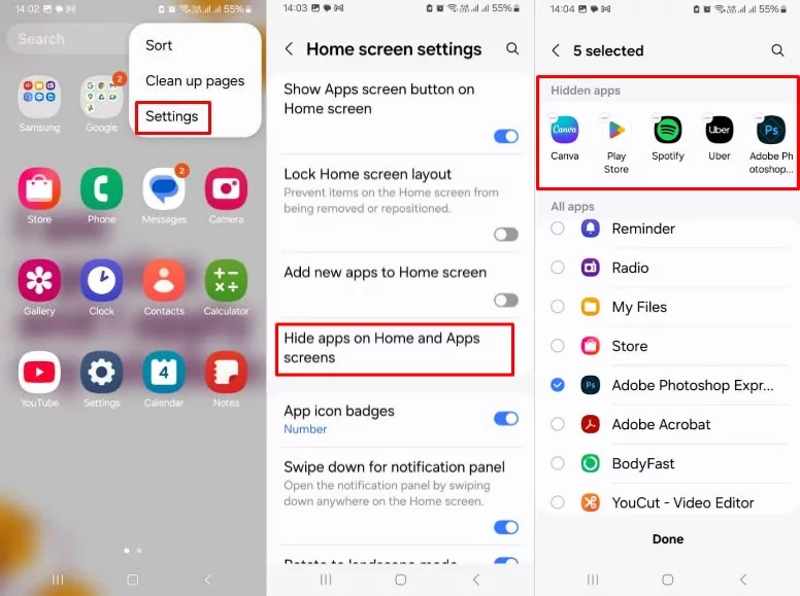
Schritt 1: Öffne deine App-Übersicht.
Schritt 2: Tippen Sie auf die Menu Schaltfläche mit einem Dreipunktsymbol und wählen Sie Einstellungen .
Schritt 3: Wählen Apps auf dem Startbildschirm und dem App-Bildschirm ausblenden oder eine ähnliche Möglichkeit.
Schritt 4: Suchen Sie den Versteckte Apps .
Schritt 5: Tippen Sie auf die gewünschte App und stellen Sie sie wieder her. Anschließend finden Sie sie in Ihrer App-Übersicht oder auf Ihrem Startbildschirm.
Teil 2: So stellen Sie fehlende Apps auf Android von Google Play wieder her
Sobald Sie eine App im Google Play Store herunterladen, wird Ihre Aktivität von Ihrem zugehörigen Google-Konto protokolliert. Selbst wenn Sie die Apps löschen, bleibt der Download in Ihrem Google-Konto gespeichert. Dadurch können Sie fehlende Apps auf Ihrem Android-Gerät über Google Play wiederherstellen.
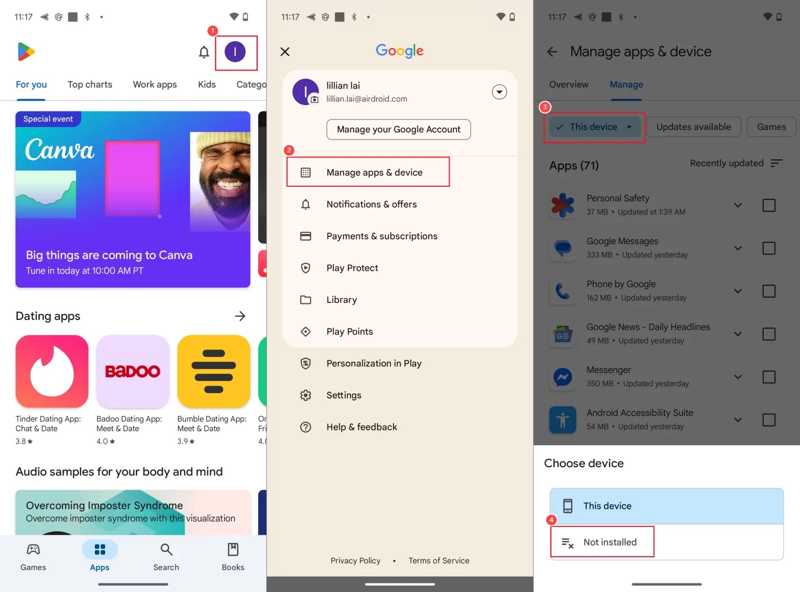
Schritt 1: Öffne den Google Play Store auf deinem Smartphone.
Schritt 2: Tippen Sie auf Ihr Profil, wählen Sie Verwalten Sie Apps und Geräteund tippen Sie auf Verwalten.
Schritt 3: Tippen Sie auf und erweitern Sie das Diese Geräte Option und wählen Sie Nicht installiert.
Schritt 4: Tippen Sie anschließend auf die App, die Sie wiederherstellen möchten, und drücken Sie die entsprechende Taste. Wiederherstellen Drücken Sie die entsprechende Schaltfläche, um die App wiederherzustellen. Wenn Sie mehrere Apps wiederherstellen möchten, wählen Sie alle aus und tippen Sie auf die Schaltfläche. Herunterladen .
Teil 3: So stellen Sie gelöschte Spiele auf Android von Google Games wieder her
Der Google Play Store erlaubt lediglich die Neuinstallation der fehlenden Apps, während Wiederherstellung gelöschter Spieldaten auf AndroidAllerdings können die App-Daten verloren gehen. Bei Spiele-Apps sieht das anders aus. Google Play Games speichert nicht nur Ihre Spiele-Apps, sondern auch die App-Daten, wie beispielsweise Ihren Spielstand. Sie können eine gelöschte App auf Android zusammen mit Ihrem Spielfortschritt wiederherstellen.
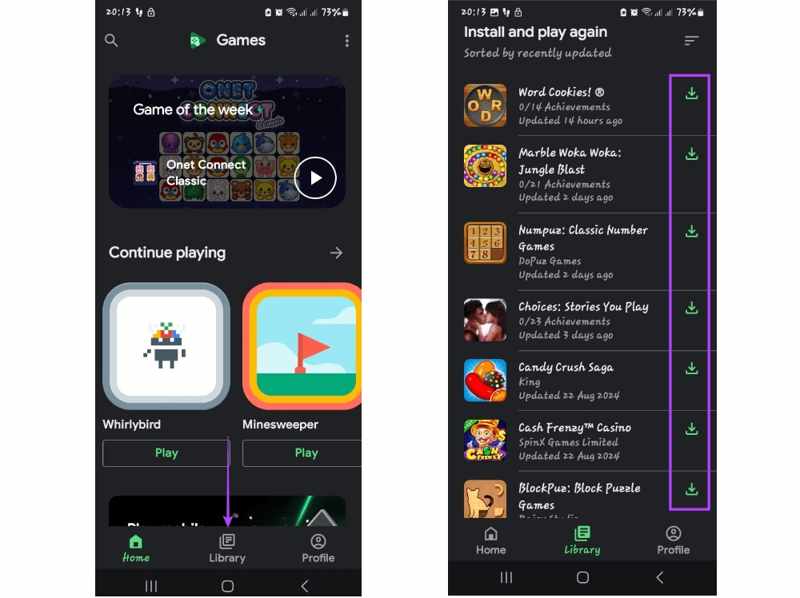
Schritt 1: Starte deine Google Play Spiele-App.
Schritt 2: Gehen Sie zur Bibliothek Registerkarte am unteren Rand.
Schritt 3: Hier können Sie alle Spiele-Apps anzeigen, die auf Ihrem Gerät installiert sind.
Schritt 4: Tippen Sie auf die Herunterladen Klicken Sie auf die Schaltfläche neben der gewünschten App, um diese wiederherzustellen.
Teil 4: So stellen Sie fehlende Apps auf Samsung Android wieder her
Neben dem Google Play Store integrieren Hersteller auch eigene App-Stores in ihre Produkte. Samsung beispielsweise hat den Galaxy Store auf seinen Geräten installiert. Dieser dient dazu, fehlende Apps auf Samsung-Android-Geräten wiederherzustellen.
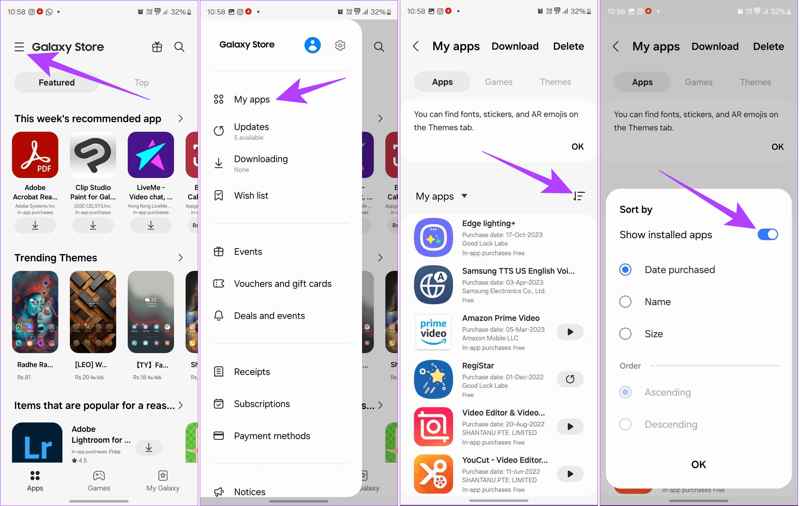
Schritt 1: Führen Sie die Galaxy Store auf Ihrem Samsung-Gerät.
Schritt 2: Tippen Sie auf die Hamburger Klicken Sie oben rechts auf die Schaltfläche und wählen Sie Meine Apps.
Schritt 3: Sie können nun alle auf Ihrem Gerät installierten Apps anzeigen, einschließlich der gelöschten.
Schritt 4: Sie können die Apps nach Datum, Name und Größe sortieren.
Schritt 5: Tippe auf die App, die du wieder aufrufen möchtest, und tippe dann auf die Installieren .
Hinweis: Um Ihre App-Daten wiederherzustellen, öffnen Sie die neu installierte App und melden Sie sich in Ihrem Konto an.
Teil 5: So stellen Sie gelöschte APKs aus dem Android-Speicher wieder her
Wenn Sie gelöschte Apps auf Ihrem Android-Gerät nicht aus dem App Store wiederherstellen können, wurden diese wahrscheinlich als APK-Dateien installiert. Glücklicherweise können Sie die APK-Datei im Gerätespeicher finden und neu installieren.
Schritt 1: Führen Sie die Einstellungen App.
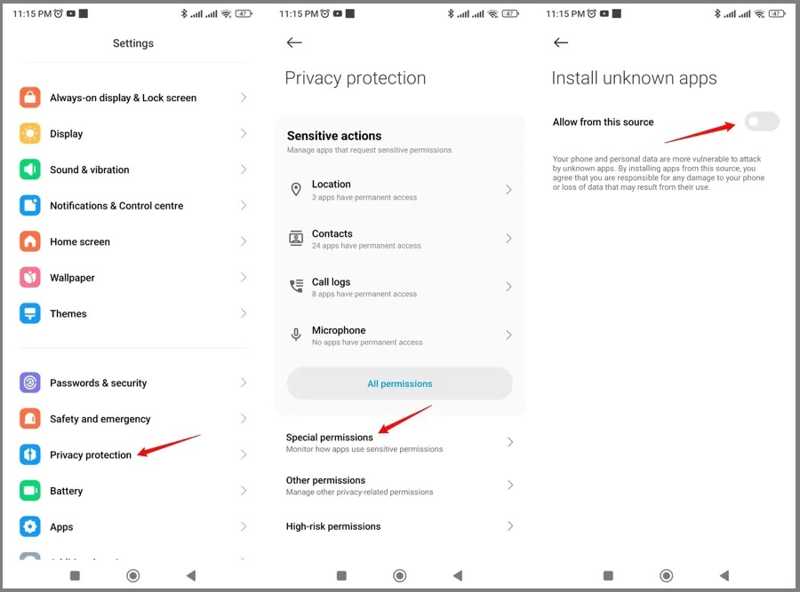
Schritt 2: Navigieren Datenschutz, Sonderberechtigungen und Installieren Sie unbekannte Apps.
Schritt 3: Wählen Sie einen Kanal aus und schalten Sie ihn ein. Aus dieser Quelle zulassenAktivieren Sie anschließend weitere Kanäle.
Schritt 4: Kehren Sie zu Ihrem Startbildschirm zurück und führen Sie die Datei aus. Datei-Manager App.
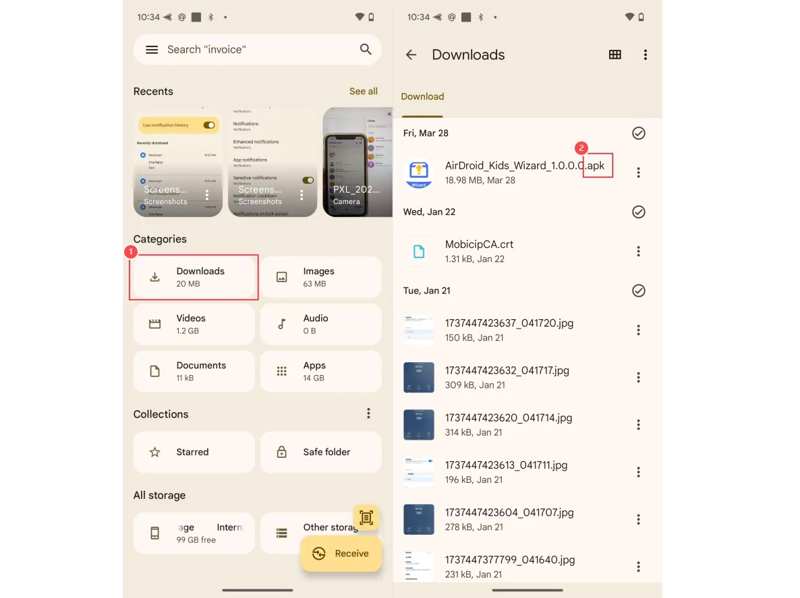
Schritt 5: Gehen Sie zur Downloads Öffnen Sie den Ordner und suchen Sie die APK-Datei der gelöschten App.
Schritt 6: Tippen Sie darauf und folgen Sie den Anweisungen auf dem Bildschirm, um es erneut zu installieren.
Teil 6: So stellen Sie Apps auf Android aus einem Backup wieder her
Mit einer Android BackupSie können Apps und App-Daten auf Ihrem Android-Gerät schnell wiederherstellen. Dazu müssen Sie Ihr Gerät vorher löschen. Sichern Sie daher am besten Ihre aktuellen Daten, um Datenverlust zu vermeiden.
Schritt 1: Führen Sie Ihre Einstellungen App.
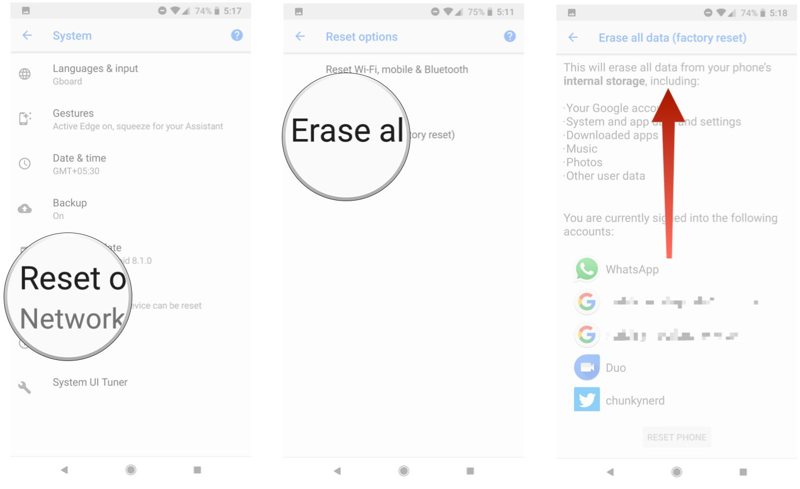
Schritt 2: Zurück Nach System, Optionen zurücksetzenund tippen Sie auf Alle Daten löschen oder eine ähnliche Möglichkeit.
Schritt 3: Geben Sie bei Aufforderung Ihr Telefonpasswort oder Ihr Kontopasswort ein.
Schritt 4: Tippen Sie auf die Telefon zurücksetzen drücken, um es zu bestätigen.
Schritt 5: Wenn Ihr Gerät neu startet, richten Sie es ein und verbinden Sie es mit einem WLAN-Netzwerk.
Schritt 6: Solange Sie dazu aufgefordert werden Apps und Daten kopieren, Zapfhahn Weiter, und wählen Sie Altes Gerät kann nicht verwendet werden.
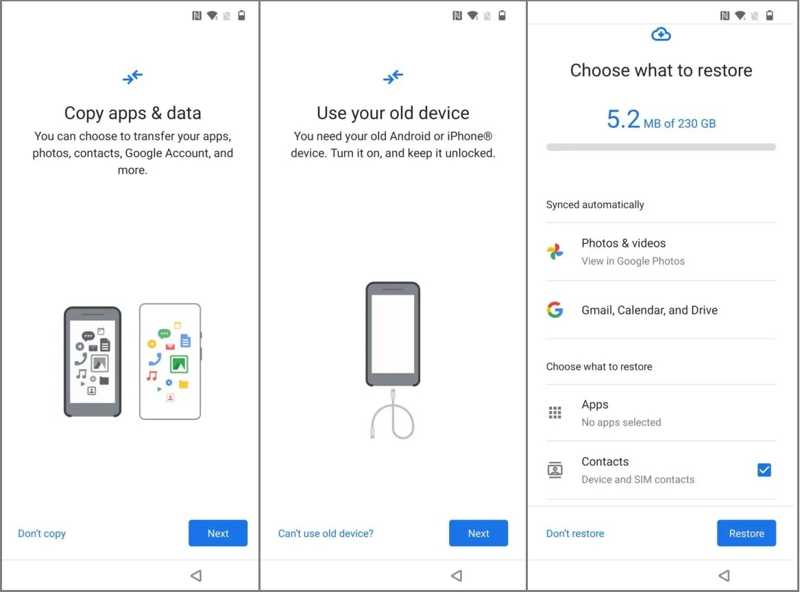
Schritt 7: Melden Sie sich in Ihrem Google-Konto an, das Sie für die Datensicherung verwenden, und wählen Sie eine geeignete Sicherungsdatei aus.
Schritt 8: Zylinderkopfschrauben Apps und wählen Sie alle Apps aus, die Sie wiederherstellen möchten, und tippen Sie auf Wiederherstellen.
Teil 7: Die ultimative Methode zur Wiederherstellung gelöschter App-Daten auf Android
Wenn Sie kein Backup haben, Apeaksoft Android Datenwiederherstellung kann Ihnen helfen, gelöschte App-Daten auf einem Android-Gerät wiederherzustellen. Es kann Ihren Telefonspeicher scannen und gelöschte App-Daten direkt aufspüren.
Der beste Weg, gelöschte App-Daten auf Android ohne Backup wiederherzustellen
- App-Daten auf Android mit einem Klick wiederherstellen.
- Vorschau der verlorenen App-Dateien.
- Unterstützt eine Vielzahl von Dateiformaten.
- Funktioniert mit nahezu allen Android-Marken und -Modellen.
Sicherer Download
Sicherer Download
So stellen Sie gelöschte App-Daten auf Android wieder her
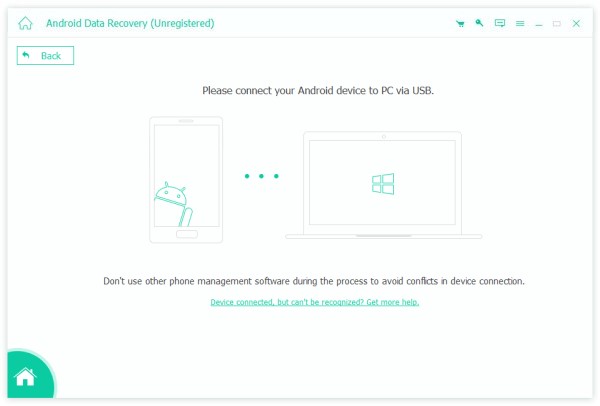
Schritt 1: Verbinden Sie sich mit Ihrem Telefon
Installieren Sie das beste Tool zur App-Datenwiederherstellung auf Ihrem Computer und führen Sie es anschließend aus. Verbinden Sie Ihr Smartphone mit einem kompatiblen Kabel mit Ihrem Computer. Aktivieren Sie den USB-Debugging-Modus auf Ihrem Smartphone und wählen Sie die gewünschte Option aus. Dateien übertragen wenn aufgefordert.
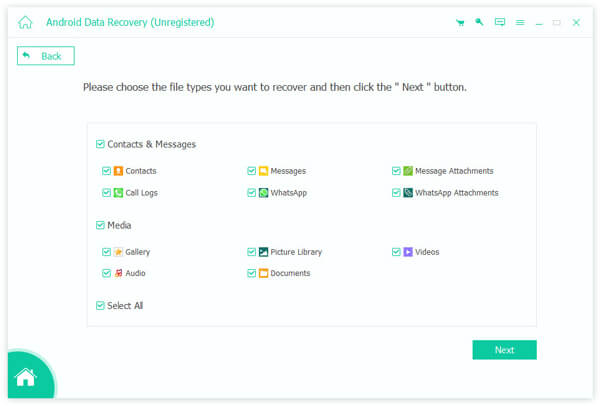
Schritt 2: Vorschau der App-Daten
Nachdem Ihr Gerät erkannt wurde, wählen Sie die Datentypen aus, die Sie wiederherstellen möchten, wie zum Beispiel Nachrichten, Dokumente, WhatsApp, und mehr. Drücke den Weiter Klicken Sie auf die Schaltfläche, um fortzufahren. Nach Abschluss des Vorgangs können Sie eine Vorschau der verlorenen Dateien anzeigen.
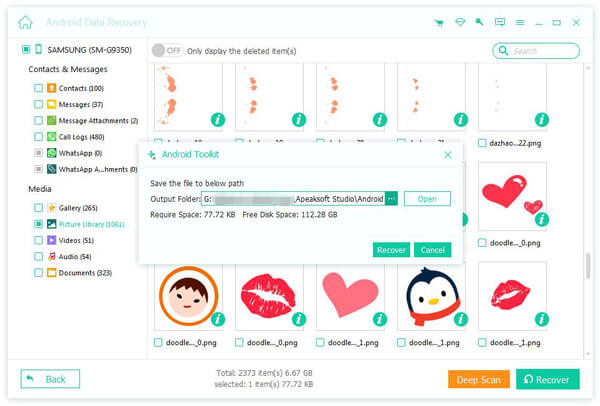
Schritt 3: App-Daten auf Android wiederherstellen
Wählen Sie die App-Dateien aus, die Sie wiederherstellen möchten, und klicken Sie auf die Schaltfläche. Entspannung Schaltfläche. Lassen Sie einen Ausgabeordner und drücken Sie die Schaltfläche. Entspannung erneut.
Fazit
Dieser Artikel stellte sieben Möglichkeiten vor Gelöschte Apps auf Android wiederherstellen Geräte sowie App-Daten und Dateien können verloren gehen. Fehlende Apps lassen sich aus dem jeweiligen App-Store (z. B. Google Play Store, Galaxy Store oder APK) neu installieren. Ein Backup hilft Ihnen dabei, Ihre App-Daten wiederherzustellen. Apeaksoft Android Datenwiederherstellung ist die einfachste Möglichkeit, verlorene App-Daten auf Ihrem Android-Gerät ohne Backup wiederherzustellen.
Ähnliche Artikel




