What Is Apeaksoft Video Converter Ultimate and Review

A video converter software is a program that allows you to transcode videos between formats, optimize quality, and adjust codecs for playback across devices. There are a lot of video converter software programs on the market. However, it is impossible to distinguish the right one for ordinary people. Apeaksoft Video Converter Ultimate, for example, is a one-stop solution to convert videos between formats. To learn more information, read our unbiased review.
PAGE CONTENT:
- Part 1: What Is Apeaksoft Video Converter Ultimate
- Part 2: Tech-Specs of Apeaksoft Video Converter Ultimate
- Part 3: Key Features of Apeaksoft Video Converter Ultimate
- Part 4: Apeaksoft Video Converter Ultimate Test
- Part 5: Apeaksoft Video Converter Ultimate Review
- Part 6: Apeaksoft Video Converter Ultimate Pricing
- Part 7: Apeaksoft Video Converter Ultimate vs. HandBrake vs. FFmpeg
- Part 8: Final Verdict
- Part 9: FAQs of Apeaksoft Video Converter Ultimate
Part 1: What Is Apeaksoft Video Converter Ultimate
Apeaksoft Video Converter Ultimate is a great software program that excels in video format conversion. It is able to convert media files into numerous formats, ensuring compatibility with a wide range of platforms and devices. It comes with a variety of custom options to adjust codecs, frame rate, and more. Furthermore, it offers video editing tools to make adjustments.
Secure Download
Secure Download
Part 2: Tech-Specs of Apeaksoft Video Converter Ultimate
The last update of Apeaksoft Video Converter Ultimate was released in May, 2026. The latest version is 2.3.62. The update primarily focuses on maintaining compatibility and expanding the core capabilities.
Tech Specs
| OS | Windows 11/10/8.1/8/7 macOS 10.12 and above, including macOS 27 Golden Gate |
| CPU | Windows: 1GHz Intel/AMD CPU or above Mac: 1GHz or above Intel and Apple Silicon processor |
| RAM | 2GB RAM or above |
Supported Input Formats
| 8K/5K Video | MP4, MKV |
| 4K UHD Video | MP4, AVI, FLV, WebM, TS, MKV, MOV, MXF |
| 4K UHD Encoding | H.265, H.264, VP8/9, MPEG, XviD |
| HD Video | MPG, MPEG, MP4, MOV, WMV, HD TS, HD MTS, HD TRP, HD TP |
| SD Video | 3GP, AVI, DV, MOD, MJPEG, FLV, SWF, F4V, MKV, MPEG, MOV, MPG, RM, RMVB, TOD, TS, TRP, WMV, ASF |
| Audio | AAC, AIFF, CUE, FLAC, M4A, MP3, APE, OGG, AC3, RAM, WAV, WMA |
Supported Output Formats
| Video | MPG, MPEG-1, MPEG-2, MPEG-4, H.264, DivX, XviD, AVI, FLV, MP4, M4V, MKV, MOV, 3GP, 3G2, MTV, SWF, WMV, ASF, TS, MTS, DPG, M2TS, DV, VOB, AMV, WebM, MXF, MPEG, OGV, TRP |
| HD Video | H.265, H.264, AVI, ASF, MKV, MOV, MPG, TS, MTS, M2TS, WMV, MP4, WebM, MXF, M4V, XviD, MPEG, OGV, DivX, TRP, MPG, FLV, F4V, SWF |
| 4K UHD Video | MP4, MOV, WebM, AVI |
| 8K/5K Video | MP4, MKV |
| 3D Video | Almost all 3D video formats |
| Audio | AAC, AC3, AIFF, AMR, AU, FLAC, M4A, M4B, M4R, MKA, MP2, MP3, OGG, WAV, WMA, DTS, APE, ALAC |
Supported Devices
| iOS | iPhone 4 and later All iPad models iPod touch 7 and earlier |
| Android | Samsung Galaxy, Motorola, Google Pixel, LG, Sony, HTC, etc. |
| Console | Xbox, PS4/3, PSP, Wii, NDS |
Part 3: Key Features of Apeaksoft Video Converter Ultimate
- 1.Convert videos between formats. You can add one or multiple videos and change to another format at the same time due to the multi-thread technology.
- 2.Adjust custom options when converting video formats, such as codec, frame rate, resolution, and more.
- 3.Offer a basic video editor to clip, slip, trim, rotate, flip, crop, watermark, and filter a video quickly, and change audio or subtitle tracks.
- 4.Create a video story with clips, photos, and background music. The built-in templates, themes, and library allow users to make movies easily.
- 5.Make video collages with layouts and templates. Choose a template, adjust it, and add a video or a photo for each part.
- 6.Provide a wide range of video post-production tools to compress, optimize, and edit videos quickly.
- 7.Preview the result and effect in real-time with the built-in media player.
- 8.Support almost all video formats, including input and output.
Part 4: Apeaksoft Video Converter Ultimate Test
How We Test
Hardware and System
| OS | Windows 11 64-bit |
| CPU | Intel Core i7-14700K |
| GPU | NVIDIA RTX 4070 |
| RAM | 32GB |
| Storage | 1TB SSD |
Test Videos
| Video 1 | Video 2 | Video 3 | Video 4 | Video 5 | |
| File Size | 100MB | 1GB | 100MB | 60MB | 1GB |
| Format | MOV | MP4 | MP4 | MP4 | MKV |
| Resolution | 1080p | 4K | 1080p | 720p | 4K |
Test 1: Convert Video Format
Purpose: Test for speed, output quality, and compatibility
Phases: Import all five video clips and convert them to MP4 at one time
| Video 1 | Video 2 | Video 3 | Video 4 | Video 5 | |
| Input format | MOV | MP4 | MP4 | MP4 | MKV |
| Output format | MP4 | MP4 | MP4 | MP4 | MP4 |
| Output resolution | 4K | 4K | 4K | 4K | 4K |
| Speed | 8-11 minutes | 8-11 minutes | 8-11 minutes | 8-11 minutes | 8-11 minutes |
Key Finding: The video converting feature is robust with broad format support. The user-friendly interface simplifies the workflow. The built-in hardware acceleration speeds up the process.
Test 2: Edit Videos
Purpose: Test for ease of use and video quality
Phases: Import a video and retouch it with the editor
| Video 1 | Video 2 | Video 3 | Video 4 | Video 5 | |
| Action | Clip | Rotate | Add effect | Watermark | Adjust audio |
| Quality loss | Keep the original quality | Optmize with AI | Optmize with AI | Keep the original quality | Optmize with AI |
| Note | Clip and trim unwanted parts on the timeline quickly | Automatically optimize video quality | Apply video effects and preview in real time | Apply text and image watermark | Select one audio track and edit it |
Key Finding: While the built-in video editor is basic, it can retouch and post-produce video clips one by one or at once. Of course, it is not a replacement for professional video editing software.
Test 3: Enhance Video Quality
Purpose: Test for video enhancement
Phases: Go to the Toolbox window, choose the Video Enhancer, add a video, and increase the quality.
| Video 1 | Video 4 | |
| Resolution | 1080p | 720p |
| Output Resolution | 4K | 1080p |
| Other Enhancement | Remove Video Noise | Optmize Brightness and Contrast |
| Speed | 15 seconds | 18 seconds |
Key Finding: Apeaksoft Video Converter Ultimate is able to enhance video resolution automatically or manually. Moreover, it allows users to optimize images, remove noise, and reduce shaking effectively.
Test 4: Compress Videos
Purpose: Test video file size compression
Phases: Import a large video file and compress it.
| Video 2 | Video 5 | |
| File Size | 1GB | 1GB |
| Compressed File Size | 500MB | 300MB |
| Output Quality | OK | OK |
| Speed | 13 seconds | 16 seconds |
Key Finding: Apeaksoft Video Converter Ultimate can compress videos file size effectively. More importantly, it won’t reduce output quality or video resolution during to the process. Plus, it allows you to compress videos through format conversion at the same time.
Test 5: Convert Videos to 3D or GIF
Purpose: Test for 3D video or GIF conversion
Phases: Choose the right tool from the Toolbox window, import a video, and convert it to the desired result.
| Video 2 | Video 3 | |
| Action | Make 3D | Convert to GIF |
| Quality | Keep its original quality | Downscale |
| Speed | 32 seconds | 8 seconds |
Key Finding: It takes a while to generate a 3D video from a standard video file. However, the quality of the result is great. When converting a video to GIF, the quality will be downscaled due to the maximum resolution for GIFs.
Part 5: Apeaksoft Video Converter Ultimate Review
- Convert multiple video files at once.
- Offer a video editor to crop, rotate, merge, trim, and watermark videos quickly.
- Get advanced video editing capabilities.
- Create movies with templates easily.
- Make collages with videos and photos.
- Export videos up to 4K resolution.
- It takes a while to process multiple long videos.
- The advanced video editing tools can only handle one video at a time.
Part 6: Apeaksoft Video Converter Ultimate Pricing
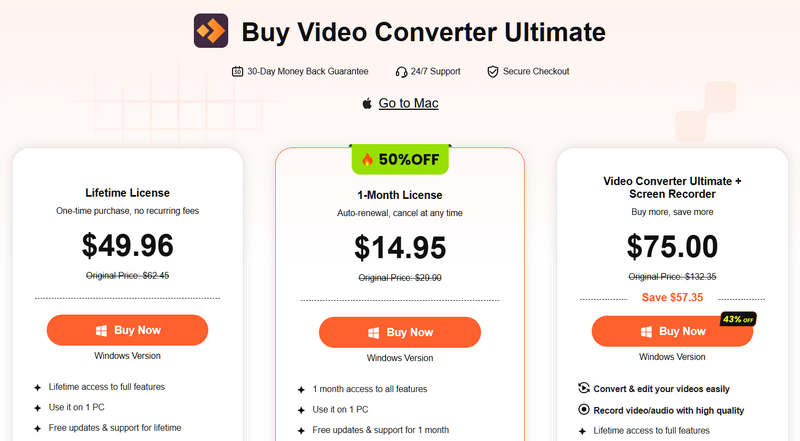
Users are allowed to download Apeaksoft Video Converter Ultimate for free from the official website. Moreover, users can try the free demo. If you want to use the software with full features, you’d better purchase a license. The monthly license costs $14.95, and the lifetime license costs $49.96.
Part 7: Apeaksoft Video Converter Ultimate vs. HandBrake vs. FFmpeg
| Apeaksoft Video Converter Ultimate | HandBrake | FFmpeg | |
| Best for | Beginners and general users | Occasional users | Tech-savvy |
| Price | $14.95 per month $49.96 for lifetime | Free | Free |
| Supported formats | Over 1,000 video and audio formats | MP4 and MKV | Nearly all video formats |
| Presets | Hundreds of customizable presets | 23 presets | No |
| Ease of use | Very easy | Easy | Difficult |
Part 8: Final Verdict
Apeaksoft Video Converter Ultimate is a paid, all-in-one solution for video conversion, editing, and post-production. It comes with a user-friendly interface and extensive presets. That makes it a good option for beginners.
Part 9: FAQ
Is Apeaksoft Video Converter Ultimate legal?
Yes, it was released by a reputable software brand. According to our test, it is legal to use.
Can Apeaksoft convert videos without quality loss?
Yes, it can convert videos while keeping the quality and resolution.
Is Apeaksoft Video Converter Ultimate free?
You can download it for free and try the free trial.
Conclusion
Now, you should understand what Apeaksoft Video Converter Ultimate is, its benefits and downsides, and other information based on our testing. Our information can help you make the best decision before downloading the software.
 Apeaksoft Video Converter Ultimate
Convert, edit video and audio files in more than 1,000 formats.
Secure Download
Secure Download
Related Articles