CapCut Review: Is It Worth Using for Video Editing

CapCut offers many features and tools for creating and editing videos on the desktop, mobile, and online. Because it has been a popular video editing app worldwide since its release in 2020, many people want to know whether it is worth using, and want an honest and unbiased CapCut review to know more about this video editing tool. We tested CapCut on mobile, desktop, and online versions, taking an in-depth look at its features, performance, and best alternative. Read more!
PAGE CONTENT:
Part 1: Key Features of CapCut
CapCut video editor is a popular tool with many features for creating and editing videos. This section will introduce its main features with reviews.
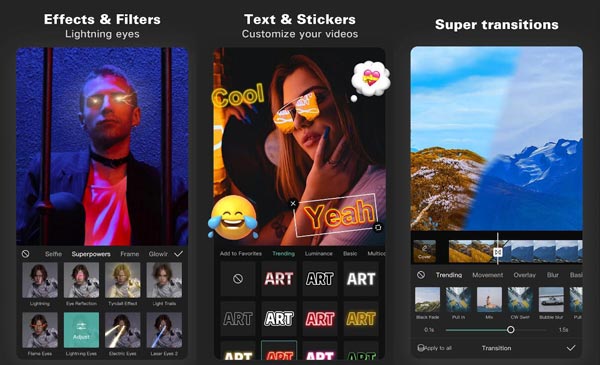
Editing Tools: CapCut offers a variety of editing tools to help users create unique and professional-looking videos. These tools include video trimming, merging, splitting, and speed adjustment, which are more than enough for most short-form video creation scenarios. But compared to other professional desktop editors, it is less flexible or precise.
Templates: CapCut provides a wide range of templates for you to use. With just one click, users can recreate popular internet-famous editing styles and quickly produce social-media-ready content. But you should note that the customization options within templates are relatively limited.
Filters and Effects: CapCut offers an extensive collection of filters and effects that users can apply to their videos to enhance their visual appeal. These include beauty filters, color correction tools, and various video effects. And you can learn how to blur on CapCut with these effects. But during our test process on the mobile, we found that many advanced and popular filters and effects are only available for CapCut Pro users.
Music and Sound Effects: CapCut allows users to add music tracks to videos or choose from a library of royalty-free music tracks. It also offers a variety of sound effects for enhancing the video's overall impact. Moreover, it also supports importing background music from your TikTok collections.
Text and Stickers: CapCut offers a range of text styles and fonts that can be used to add captions or titles to videos. It also provides an extensive collection of stickers and emojis for enhancing the visual appeal of the video.
Transition Effects: CapCut offers a range of transition effects that can create smooth transitions between different scenes or shots in the video. In addition, you can learn how to do slow-mo on CapCut.
Social Sharing: CapCut allows users to easily share their videos on social media platforms such as Instagram, TikTok, and YouTube, making it easy to reach a wider audience.
Part 2: Brief Review of CapCut
Based on our hands-on experience with desktop, mobile, and online video editors, we found that CapCut strikes a strong balance between ease of use and practical functionality for everyday content creation.
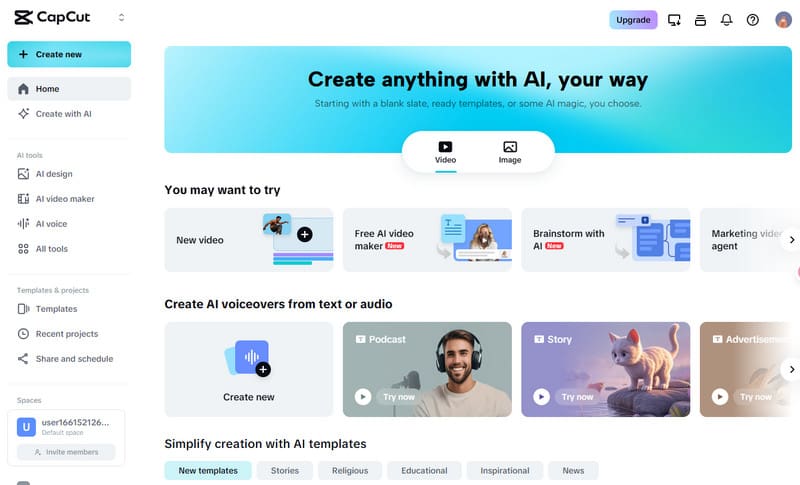
What leaves the strongest impression is its user-friendly and intuitive interface, with a simple layout that allows users to access the app’s features quickly. Users can import videos from their device's library or record videos directly within the app. The app also includes a range of CapCut templates that users can use to create videos with preset effects and filters.
What’s more, its ability to edit and share videos for social media platforms like Instagram, TikTok, and YouTube is also one of CapCut's standout features. The app includes preset aspect ratios and export settings optimized for these platforms, making the created content look great on social media.
Its most noticeable advantage is the flexibility in how it can be used, as CapCut provides a desktop program, a mobile app, and an online platform, allowing users to switch between devices depending on their workflow. Notice that the CapCut online version also requires users to sign in before editing.
Overall, CapCut is a powerful and versatile video editing app that offers a range of features and tools for creating and editing videos. Its user-friendly interface and optimized export settings make it an excellent choice for content creators who want to make high-quality videos on their mobile devices. While the app has some limitations, such as the lack of advanced features like keyframe animation and multi-track editing, CapCut still offers a comprehensive set of tools that are more than sufficient for most users.
Who Is CapCut Best For?
- TikTok/Reels/Short-form content creators
- Beginners who want fast results
- Users who prefer templates and AI tools
- Social media managers and small creators
Who May Not Like CapCut?
- Long-form YouTube editors
- Users needing advanced color grading
- Team collaboration workflows
- Highly specialized post-production needs
Part 3: Best Desktop Alternative to CapCut
If you often work with long videos, multiple formats, or need to handle files in batches, CapCut may be a bit limited or slow. On top of that, many of CapCut’s premium templates, effects, and assets now require a CapCut Pro subscription, which typically costs around $19.99 per month or $179.99 per year, depending on region and platform.
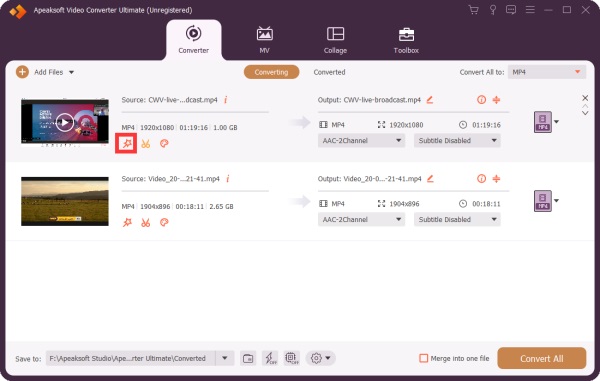
In these cases, Apeaksoft Video Converter Ultimate offers a solid alternative. It not only provides basic trimming, merging, and video enhancement, but also supports batch processing and format conversion without worrying about recurring subscription fees for premium templates.
Secure Download
Secure Download
The software uses advanced algorithms to ensure high-quality conversion without losing data. It is compatible with various formats and devices for you to edit. This software allows users to edit videos with ease, unlike CapCut. It supports various video and audio formats, including popular formats like MP4, AVI, MOV, WMV, and MP3.
One of its standout features is the preset export settings for various social media platforms - with just one click, you can export videos ready for TikTok, Instagram, YouTube, and more, without needing to adjust aspect ratios, resolution, or other parameters manually.
While Apeaksoft Video Converter Ultimate offers a wide range of editing and conversion features, it does have a few limitations that users should be aware of. One of the main drawbacks of Apeaksoft Video Converter Ultimate is that it doesn’t include social media templates, so creators can’t quickly apply trendy effects or pre-made styles like they can in CapCut.
Overall, Apeaksoft Video Converter Ultimate is a powerful and versatile tool for converting and editing videos, with a range of features to suit the needs of both casual and professional users.
Part 4: FAQs about CapCut
What is the maximum video resolution supported by CapCut?
CapCut video editor supports video editing up to 4K, the highest resolution available for consumer-level video editing.
Can I use CapCut on my PC or Mac?
Yes. Although CapCut is primarily designed for mobile devices and is available on iOS and Android, it has released CapCut desktop versions. The company also released a CapCut online platform.
Does CapCut include a watermark on videos?
No, CapCut does not add a watermark to edited videos, unlike some other free video editing apps.
Is CapCut free?
Yes, CapCut is free for basic editing, including trimming, merging, filters, and templates. However, some premium templates and advanced features require a CapCut Pro subscription, which costs around $19.99/month or $179.99/year.
Is CapCut safe?
Yes, CapCut is safe to use. The app is officially distributed by Bytedance and does not contain malware.
Does CapCut require the internet?
It depends. Suppose you use it for basic video editing like trimming, merging, etc. If you want to download templates, music, or cloud sync features, an internet connection is needed.
Conclusion
After seeing our review of CapCut, you know it is an impressive video editing app offering various features and tools for creating and editing videos. Its powerful editing capabilities make it an excellent choice for content creators looking to make high-quality videos for social media platforms. And if you want to find a CapCut alternative for computers, you can use Apeaksoft Video Converter Ultimate.
 Apeaksoft Video Converter Ultimate
 Convert, edit video and audio files in more than 1,000 formats.
Secure Download
Secure Download
Related Articles