Expert Guide to Compressing Videos for WhatsApp: Tools & Tips

Key Takeaways
- Best video compression for WhatsApp: 64MB or less for chats, 16MB or less for Status.
- Apeaksoft Video Converter Ultimate, VidShift, and Panda Video Compressor can help you compress.
- You can also send large WhatsApp videos without compressing.
Why does WhatsApp reject the video you are sending to friends or sharing on Status? Probably because it's too big. Then what can we do in this situation? Compress videos for WhatsApp on desktop, online, and on mobile devices, blazing-fast with no effort.
PAGE CONTENT:
Part 1: Why Compress Video for WhatsApp?
WhatsApp has updated a series of limits on video size. Only by following the rules can you share videos nice and fast. The limits vary depending on how and where you send them. Let's check it out:
| Sharing Method | Maximum File Size | Duration | Supported Formats | Notes |
| Chat (from Gallery) | 100 MB 720p for fast internet 64 MB 480p for slow internet | No limit | MP4, MOV, 3GP, AVI, FLV, or MKV | Video plays directly in chat |
| Chat (as Document) | 2 GB | No limit | MP4, MOV, 3GP, AVI, FLV, or MKV | Appears as a downloadable link; receiver must download to view |
| Status | 16 MB | Less than 90 seconds | 3GP, MPEG4 | Strict limit for Status updates |
When your file is too large to send, compressing the video size for WhatsApp is a good idea to fit it into the limits with minimal loss. I will introduce 3 ways I have tested and trialed to help you compress a video for WhatsApp.
Part 2: Compress Videos for WhatsApp on Desktop
Apeaksoft Video Converter Ultimate is a one-stop toolbox that lets you change the video codec, bitrate, frame rate, aspect ratio, resolution, sample rate, or even split the video clips to compress video files for WhatsApp. What's better, it provides video enhancement features so you can get a satisfying video.

Downloaded by over 1,000,000 users
- Support videos, audio files, online stream files, and even homemade DVDs.
- Compress the videos via video/audio settings, split, and remove video files.
- Basic editing features to mirror, flip, clip, merge, crop, and watermark videos.
- Provide 4 different methods to enhance the video quality like a pro.
Secure Download
Secure Download
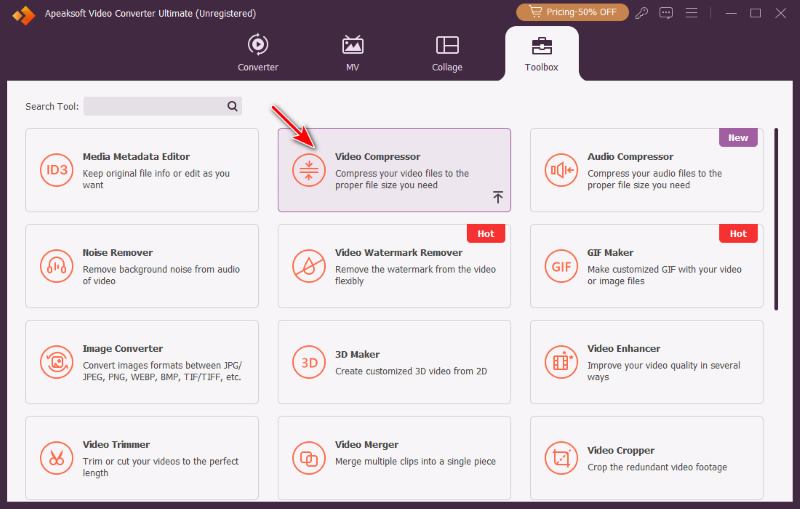
Step 1. Download and install the software according to your operating system. Then launch the program and go to Toolbox to find Video Compressor.
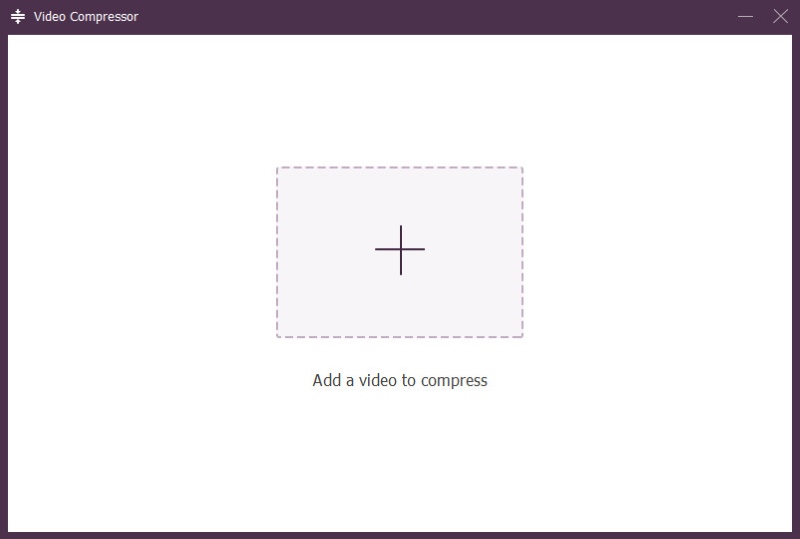
Step 2. Add a file by clicking the Plus button or drag-and-dropping a file on it.
Step 3. Automatically, a series of compression settings is set up. You can also manually change the size, format, resolution, and bitrate. Click Preview to observe the first 10 seconds before the full export.
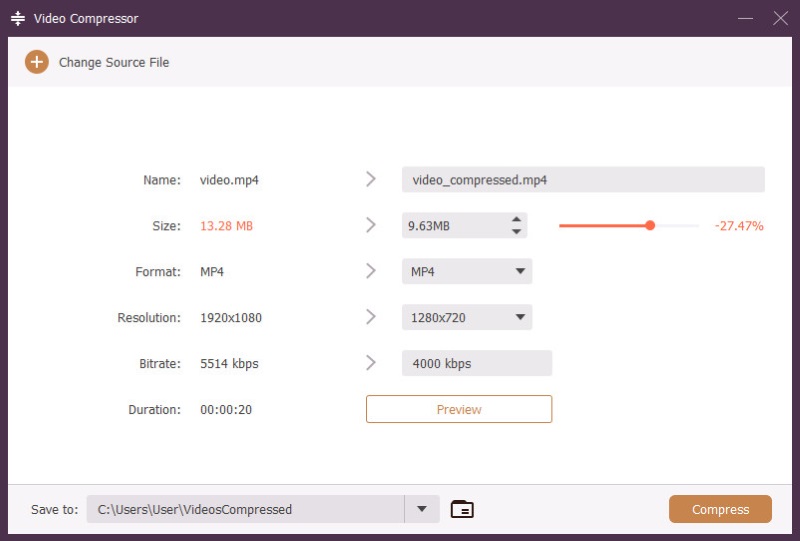
Tips: Best WhatsApp video preset tested, good for most scenarios.
• Size: reduce 15-30%
• Format: MP4, MOV, 3GP, AVI, FLV, or MKV for a chat; 3GP or MP4 for Status
• Resolution: 1280×720 (720p) widescreen, or 720×1280 vertical
• Bitrate: 3000-5000 kbps
Step 4. When everything is ready, click Compress. The process is lightning-fast, and when it's done, the save location pops up automatically so you can check on the result right away.
Part 3: Compress Videos for WhatsApp Online
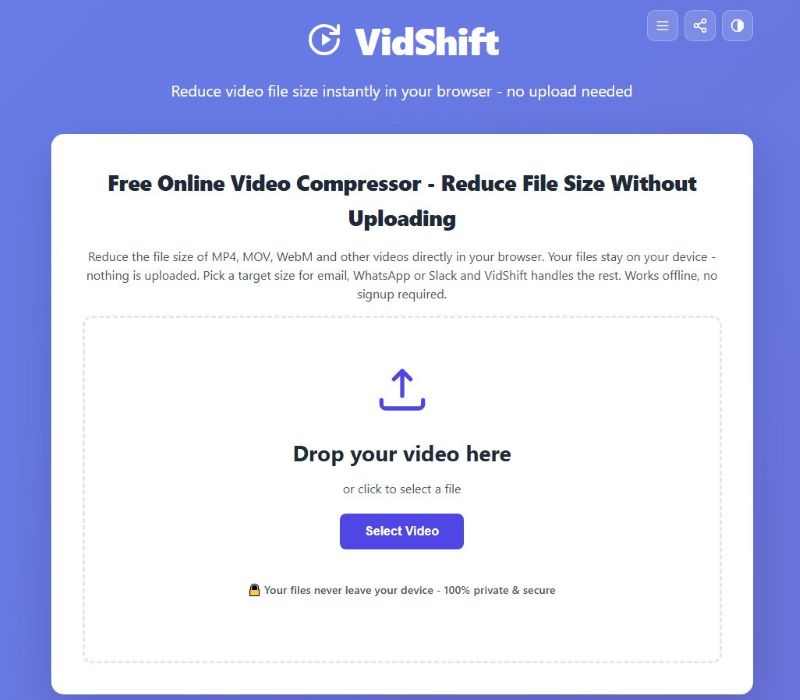
VidShift is a free in-browser tool that compresses videos for WhatsApp free online, with no software required. Although it's browser-based, it doesn't rely much on the internet: a stable connection is only needed to load the site; once you enter the site, all processing will be done locally using WebAssembly, the speed depending on your device's hardware.
Most importantly, it offers a 16MB preset exactly for WhatsApp Status, saving you the trouble while still getting you great results. And you can always customize the target size as you want – but only the size, though. This lightweight tool doesn't support advanced control over format, bitrate, etc., or give any preview.
Step 1. Enter vidshift.io/compress/ and then add a video file on the website.
Step 2. Choose the Target Preset for WhatsApp or choose Custom to enter a target size on your own, and select a preferred Resolution.
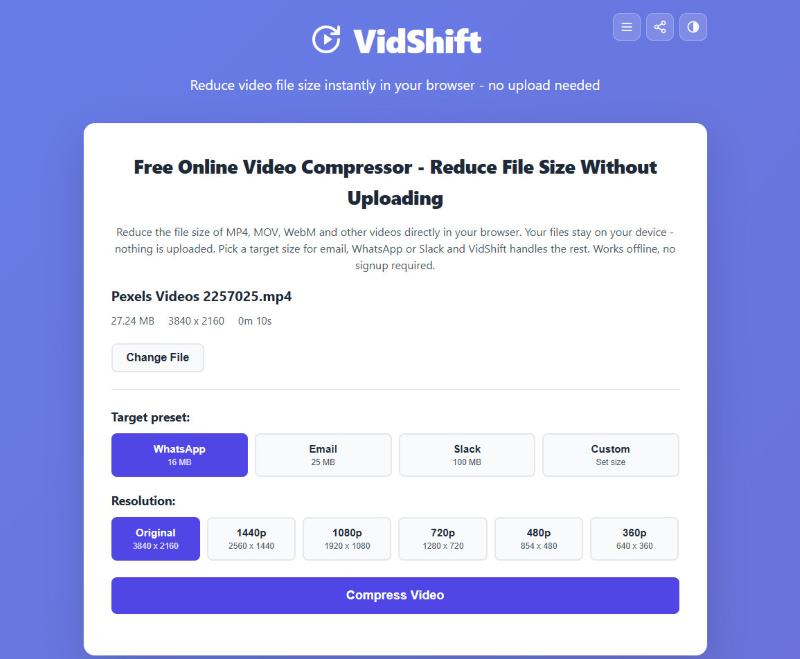
Step 3. Ready? Click Compress and let it do the job.
Part 4: Compress Videos for WhatsApp on iPhone/Android
Panda Video Compressor is an easy-to-use mobile app for customizing video sizes and sharing directly on WhatsApp – an excellent hit on our goal.
Step 1. Download and install the app from Google Play or the App Store.
Step 2. Launch the app, pick a video from your local album, and tap Compress.
Step 3. Set the specs for your compression: target file size, resolution, and format. You can choose from the app's offered presets or customize them yourself. Then tap Apply.
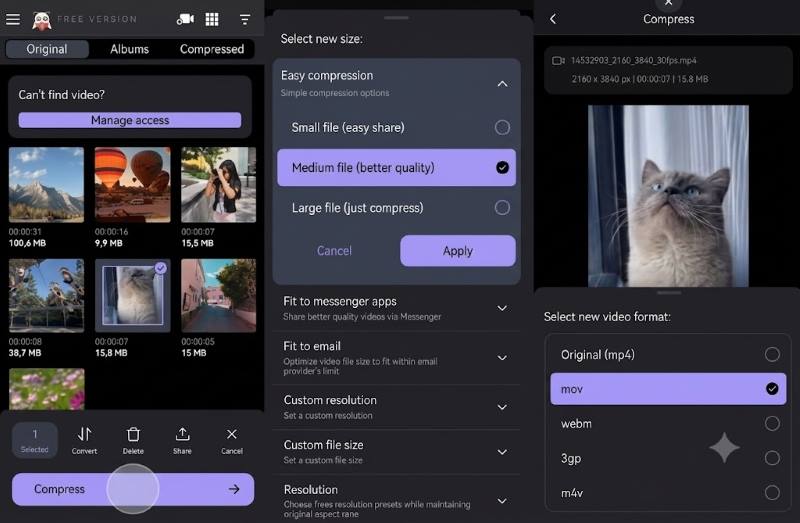
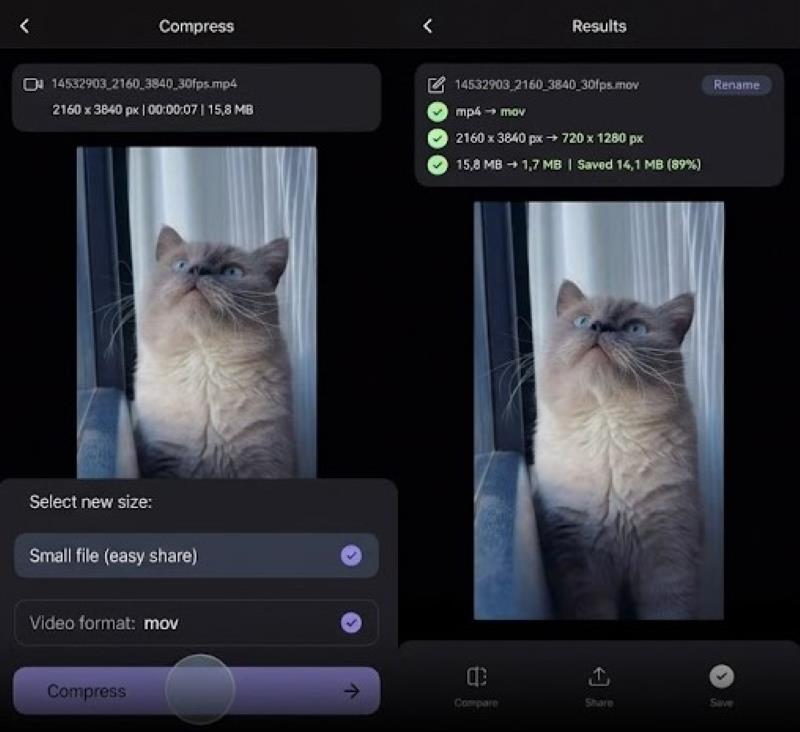
Step 4. Click Compress and wait for it to finish. When it's over, you can Compare the new video with the original, Share it directly to WhatsApp, and Save it on your device.
Bonus: What Else Can I Do to Send Large Videos on WhatsApp?
Send as documents. As I have mentioned before, WhatsApp's size limit for documents is 2GB, much larger than 64MB/100MB for files from the Gallery. By sending as documents, you can send videos up to 2GB in full quality. But the receiver has to save the video from WhatsApp before playing it locally.
Split and send in parts. A 2-minute video may be too much, but by cutting it in half, you take the pressure off. If your video is too long and you want a quick split, Apeaksoft Video Converter Ultimate can help. Just open Video Trimmer in the Toolbox, click Fast Split, and set a split average or time for it to work on.
Turn on WhatsApp's HD quality option. WhatsApp's restrictions on video quality are not immovable – if your file is too large to send because it's high-quality, go to WhatsApp Settings > Storage and Data > Media Upload Quality, and select HD. Then you can send slowly but in original quality.
Post it online and send a link. As for where to post, YouTube, Google Drive, and Dropbox are feasible. This may be a fuss compared to sending directly on WhatsApp, but it allows you to keep the video in high quality.
Tips: Whatever changes you make to the video, remember: always keep a backup of the original.
Conclusion
Whether you are using a computer or a mobile device, you can easily compress video size for WhatsApp using these brilliant tools at hand: Apeaksoft Video Converter Ultimate is a versatile desktop toolbox, the best choice overall, covering all your needs. The browser-based VidShift simplifies your compression with presets. Panda Video Compressor is easy to use on iPhone and Android. Now choose the best video compressor yourself and share stunning videos on WhatsApp.
 Apeaksoft Video Converter Ultimate
 Convert, edit video and audio files in more than 1,000 formats.
Secure Download
Secure Download
Related Articles