How to Recover Deleted Files from OneDrive Quickly

OneDrive is the cloud storage platform released by Microsoft for users. Once you set up OneDrive on your Windows PC and log in with your Microsoft account, you can back up important files to the cloud. Microsoft offers 5GB of free storage per account, with 50GB for $2 per month. An Office 365 subscription provides 1 TB of OneDrive storage for free. This guide shares four ways to ανακτήστε τα διαγραμμένα αρχεία από το OneDrive.
ΠΕΡΙΕΧΟΜΕΝΟ ΣΕΛΙΔΑΣ:
Part 1: How to Recover Deleted Files from OneDrive Recycle Bin
By default, files deleted in OneDrive will be stored in the Recycle Bin for a period. Before they are permanently removed, you can quickly recover deleted files from OneDrive. This way only works for recently deleted files in OneDrive.
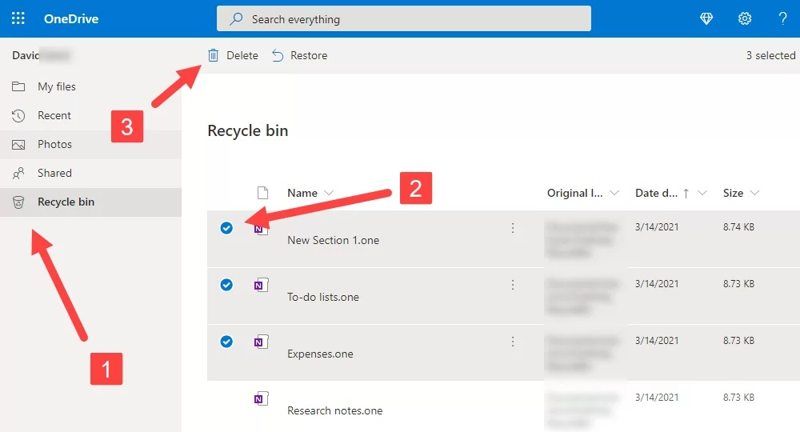
Βήμα 1. Access https://onedrive.live.com/ in a web browser.
Βήμα 2. Log in with your Microsoft account.
Βήμα 3. Επιλέξτε Κάδος ανακύκλωσης φάκελο στην αριστερή πλαϊνή γραμμή.
Συμβουλές: If you use the OneDrive app on a mobile device, tap Me Και επιλέξτε Κάδος ανακύκλωσης.
Βήμα 4. View and select the files you want to recover.
Βήμα 5. Κάντε κλικ στο Επαναφορά κουμπί στην επάνω γραμμή μενού.
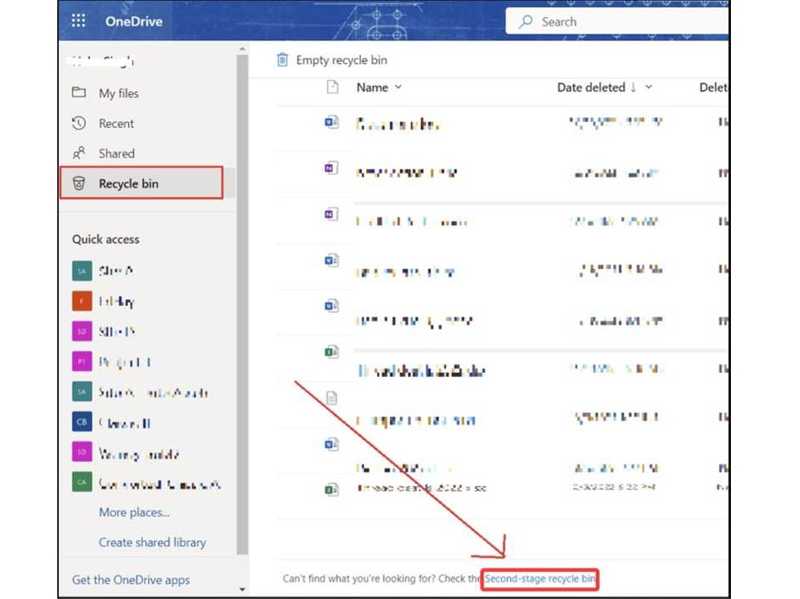
Βήμα 6. If the files are removed from the OneDrive Recycle Bin, click ο Κάδος ανακύκλωσης δεύτερου σταδίου and try again. The Second-stage recycle bin is only available to OneDrive for Business.
Σημείωση: OneDrive Recycle Bin keeps deleted files for 30 days. After 30 days, all files will be removed automatically. If you log in to OneDrive with a work or school account, the Recycle bin keeps deleted files for 93 days.
Part 2: How to Recover Deleted OneDrive Files from Recycle Bin or Trash
If you have OneDrive syncing enabled on your PC or Mac, the files backed up will appear on your hard drive. Therefore, you can try the Recycle Bin or Trash to recover deleted files from OneDrive.
Στα Windows
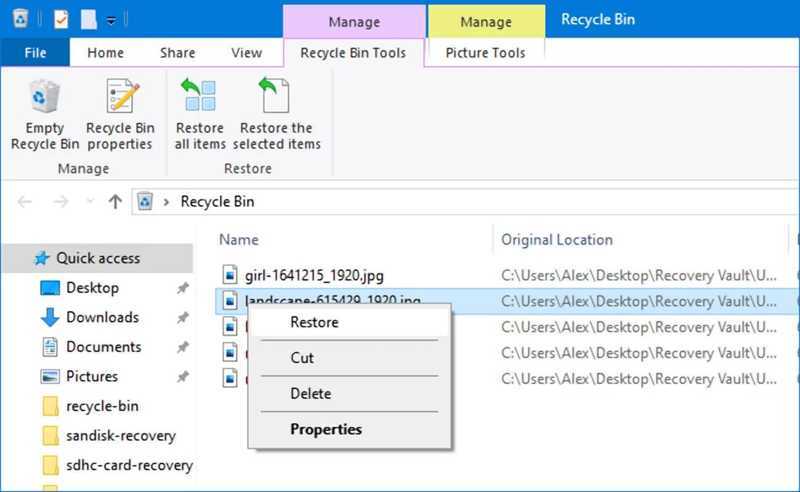
Βήμα 1. Click the Recycle Bin on your desktop or in File Explorer.
Βήμα 2. Find the deleted OneDrive file.
Βήμα 3. Κάντε δεξί κλικ πάνω του και επιλέξτε Επαναφορά.
Σε Mac
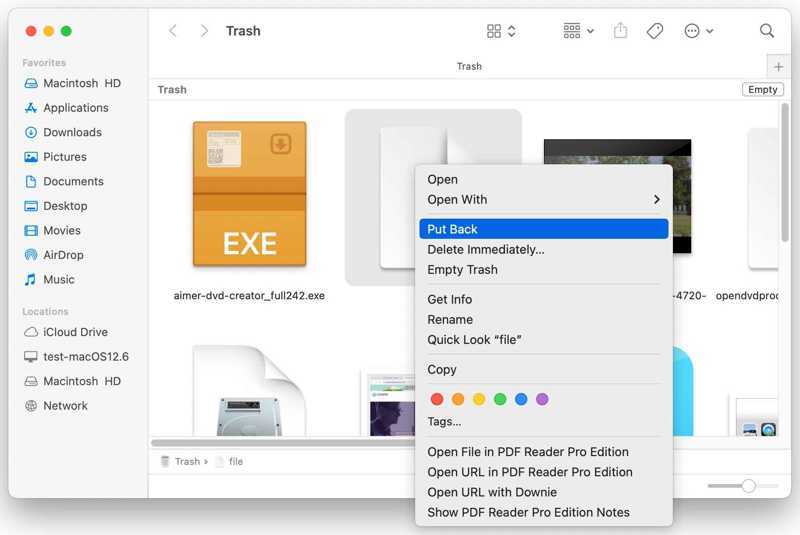
Βήμα 1. Ανοίξτε το σκουπίδια φάκελο από το Dock.
Βήμα 2. Locate the deleted file you want to recover.
Βήμα 3. Κάντε δεξί κλικ στο αρχείο και επιλέξτε Βάλε πίσω.
Part 3: How to Recover Deleted Files from OneDrive by Restoring
Microsoft has added a useful data protection feature. It lets you ανακτήστε τα διαγραμμένα αρχεία από το OneDrive to a previous version. This feature restores your entire OneDrive account to its original condition and retrieves the lost files.
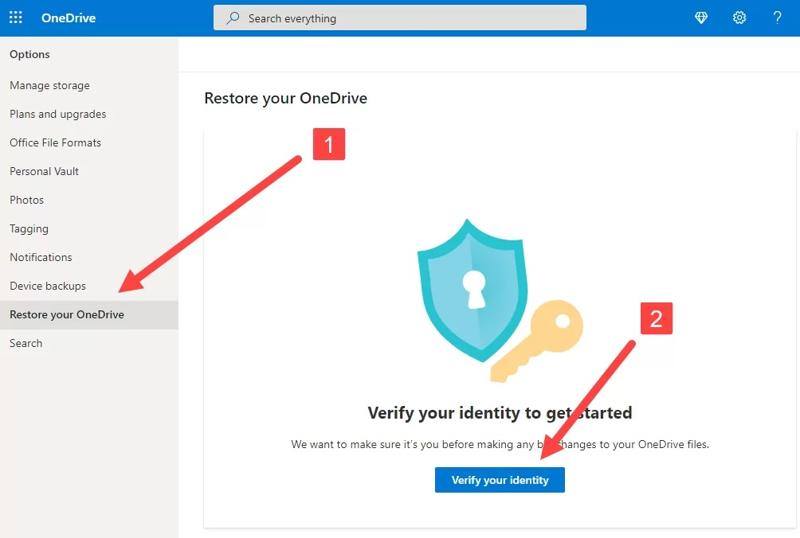
Βήμα 1. Go to https://onedrive.live.com/ in a browser.
Βήμα 2. Log in with your OneDrive account.
Βήμα 3. Πηγαίνετε στο Ρυθμίσεις Και επιλέξτε Επιλογές if you sign in to a personal Microsoft 365 account. Or head to Ρυθμίσεις και Επαναφορά if you log in with a work or school account.
Βήμα 4. Κάντε κλικ στο Επαναφέρετε το OneDrive σας option in the sidebar.
Βήμα 5. Στη συνέχεια, κάντε κλικ στο Επιβεβαιώστε την ταυτότητα σας κουμπί.
Βήμα 6. Select a date from the dropdown list and click Επαναφορά.
Part 4: How to Recover Deleted Files from OneDrive Without Backup
If you cannot recover permanently deleted files from OneDrive, try Apeaksoft Data Recovery. It can scan your hard drive for lost files, including those in OneDrive. The user-friendly interface makes it easy to use.

Λήψη από πάνω από 1,000,000 Χρήστες
- Recover permanently deleted files from OneDrive.
- Retrieve lost files from hard drives without a backup.
- Preview deleted OneDrive files before recovering.
- Support images, videos, documents, and other files.
- Available on Windows 11/10/8.1/8/7/Vista/XP and Mac OS X 10.7 or above.
Ασφαλής λήψη
Ασφαλής λήψη

How to Recover Deleted OneDrive Files Without Backup
Βήμα 1. Σάρωση σκληρών δίσκων
Launch the file recovery software after you install it on your PC. There is another version for Mac. Go to the Αποκατάσταση σκληρού δίσκου tab and select the disk where the deleted OneDrive files were previously stored. Click the έναρξη σάρωσης για να ξεκινήσει η σάρωση της μονάδας δίσκου σας.
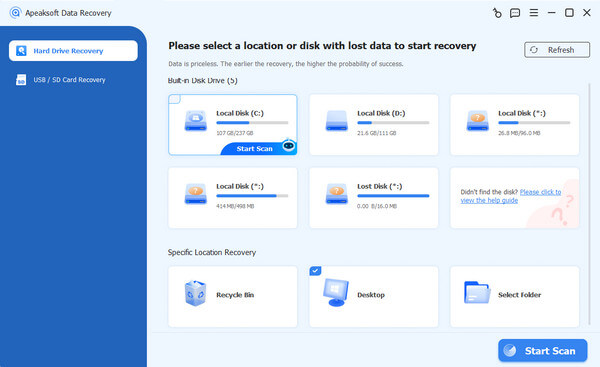
Βήμα 2. Προεπισκόπηση διαγραμμένων αρχείων
Once the data scan finishes, you can preview deleted files by type or directory. Go to the Λίστα τύπων tab, select the desired file types, and browse the deleted files. Alternatively, head to the Λίστα διαδρομών tab and navigate to the right location. To view deleted files only, check Μόνο Εμφάνιση έχει διαγραφεί.
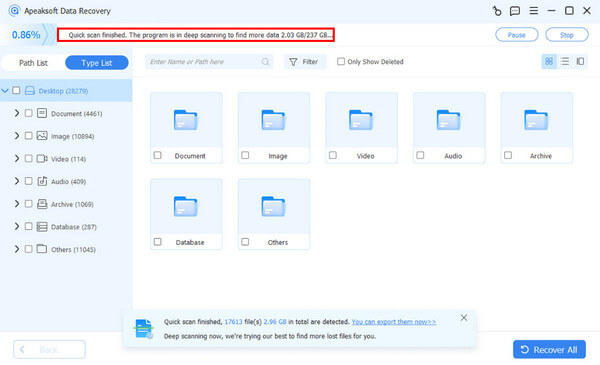
Βήμα 3. Recover deleted files from OneDrive
Επιλέξτε όλα τα αρχεία που θέλετε να ανακτήσετε και κάντε κλικ στο Ανάκτηση button. Next, set an output folder and click the Ανάκτηση Πατήστε ξανά το κουμπί.
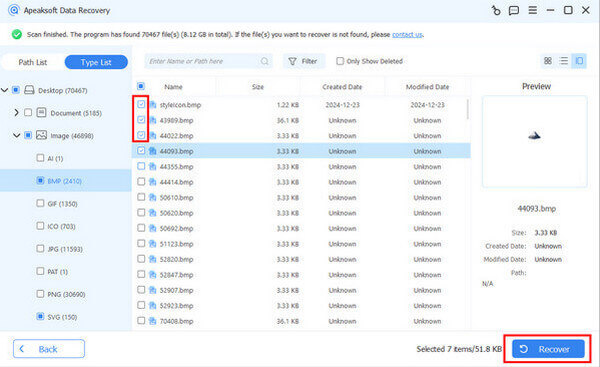
Περισσότερες Πληροφορίες
Συμπέρασμα
Αυτός ο οδηγός εξήγησε πώς να ανακτήστε τα διαγραμμένα αρχεία από το OneDrive. The built-in Recycle bin folder is a quick way to find the recently deleted files within OneDrive. You can try the Recycle Bin or Trash folder on your computer. The Restore feature is available in the business version of OneDrive. Apeaksoft Data Recovery can help you find the permanently deleted files without a backup.
 Apeaksoft Data Recovery
 Ανακτήστε τα διαγραμμένα ή χαμένα δεδομένα σε υπολογιστή Windows και Mac.
Ασφαλής λήψη
Ασφαλής λήψη
Σχετικά άρθρα