


Kadotitko iPhone-vastaajaviestisi? Näin palautat ne nopeasti

On aina harmittavaa, kun iPhonen vastaajaviestit yhtäkkiä katoavat. Monet meistä poistavat vahingossa arvokkaita vastaajaviestejä tai kadottavat ne iOS-päivityksen jälkeen. Hyvä uutinen on, että kadonneet vastaajaviestit saattavat olla palautettavissa! Lue tämä opas saadaksesi lisätietoja. kuinka palauttaa poistetut vastaajaviestit iPhonessa, olipa sinulla varmuuskopioita tai ei!
SIVUN SISÄLTÖ:
- Osa 1: Miksi en löydä vastaajaviestejäni iPhonesta
- Osa 2: Poistettujen vastaajaviestien palauttaminen poistettujen viestien kautta
- Osa 3: Poistettujen vastaajaviestien palauttaminen varmuuskopioilla
- Osa 4: Poistettujen vastaajaviestien palauttaminen ilman varmuuskopioita
- Osa 5: Usein kysytyt kysymykset iPhonen vastaajaviestin palauttamisesta
Osa 1: Miksi en löydä vastaajaviestejäni iPhonesta
On todella ärsyttävää huomata, että vastaajaviestisi puuttuvat. Joskus niitä ei poisteta pysyvästi, vaan ne yksinkertaisesti piilotetaan järjestelmäongelmien vuoksi. On useita syitä, miksi vastaajaviestisi eivät näy.
- Laitteesi on vaurioitunut.
Vesivahinko, rikkoutunut näyttö tai laitteisto-ongelmat voivat aiheuttaa tietojen menetystä ja tehdä vastaajaviestistäsi käyttökelvottoman. - iOS-päivitys epäonnistui.
Epäonnistunut iOS-päivitys voi aiheuttaa häiriöitä vastaajassa, jolloin viestisi katoavat väliaikaisesti. - Poistit ne vahingossa.
Joskus vastaajaviestit poistetaan vahingossa vanhoja viestejä tyhjennettäessä. - iPhonen tallennustila on täynnä.
iPhonen tallennustila ei riitä saattaa estää uusien vastaajaviestien latautumisen tai synkronoinnin laitteellasi.
Voiko iPhonesta palauttaa poistettuja vastaajaviestejä? Kyllä! Monissa tilanteissa poistetut vastaajaviestit voidaan edelleen palauttaa. Jatka lukemista ja opi useita tehokkaita tapoja saada ne takaisin.
Osa 2: Poistettujen vastaajaviestien palauttaminen poistettujen viestien kautta
Jos iPhonessasi on iOS 16 tai uudempi, poistettuja vastaajaviestejä ei poisteta laitteestasi välittömästi. Ne siirretään äskettäin poistettuihin viesteihin ja säilytetään siellä jopa 30 päivää ennen kuin ne poistetaan pysyvästi. Joten jos poistit vahingossa tärkeän vastaajaviestin, on silti hyvät mahdollisuudet palauttaa se. Tämä on myös nopein ja helpoin tapa palauttaa poistetut vastaajaviestit iPhonessa.
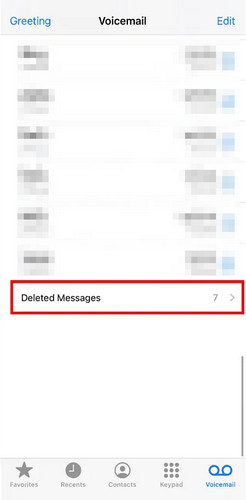
Vaihe 1. Avaa Puhelin sovellus ja napauta ääniviestit Tab.
Vaihe 2. Vieritä alaspäin ja napauta Poistetut viestit pohjalla.
Vaihe 3. Valitse palautettavat vastaajaviestit ja napauta Undelete. Tämän jälkeen vastaajaviesti palaa alkuperäiseen sijaintiinsa ennen poistamista.
Osa 3: Poistettujen vastaajaviestien palauttaminen varmuuskopioilla
Jos varmuuskopioit säännöllisesti iPhone-tietosi, voit palauttaa vastaajaviestisi helposti iCloud- tai iTunes-varmuuskopiosta.
Huomautus: Tämä menetelmä palauttaa iPhonen varmuuskopioinnin päivämäärään, joten kaikki varmuuskopioinnin jälkeen luodut uudet tiedot menetetään. Varmista, että varmuuskopioi iPhone iTunesiin tai iCloudissa ennen kuin jatkat!
Palauta iCloud-varmuuskopio
Jos et löydä poistettuja vastaajaviestejä äskettäin poistetuista viesteistä, voit silti palauttaa ne varmuuskopion avulla. Jos iCloud-varmuuskopiointi oli aiemmin käytössä iPhonessasi, voit palauttaa poistetut vastaajaviestit iCloud-varmuuskopiosta.
Vaihe 1. Varmuuskopioi nykyiset tietosi iCloudiin.
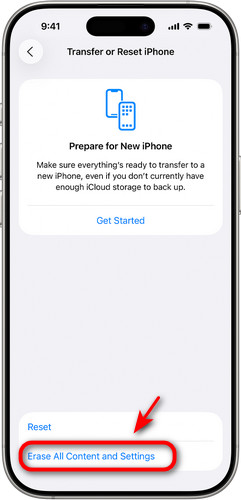
Vaihe 2. Palauttaaksesi iCloud-varmuuskopiosta sinun on ensin tyhjennettävä laitteesi. Siirry osoitteeseen Asetukset > general > Siirrä tai nollaa iPhone. hana Poista kaikki sisältö ja asetukset.
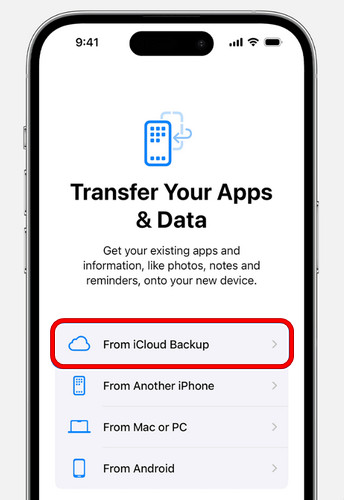
Vaihe 3. Kun iPhone on käynnistynyt uudelleen, noudata näytön asennusohjeita. Valitse pyydettäessä Palauta iCloud-varmuuskopioja valitse varmuuskopio, joka sisältää vastaajaviestisi.
Palauta iTunes/Finder-varmuuskopiosta
Käyttäjille, joilla on paikallisia varmuuskopioita iTunesissa tai Finderissa, poistettujen vastaajaviestien palauttaminen iPhonella on helppoa. Tämä menetelmä vaatii tietokoneen, johon on asennettu iTunes/Finder.
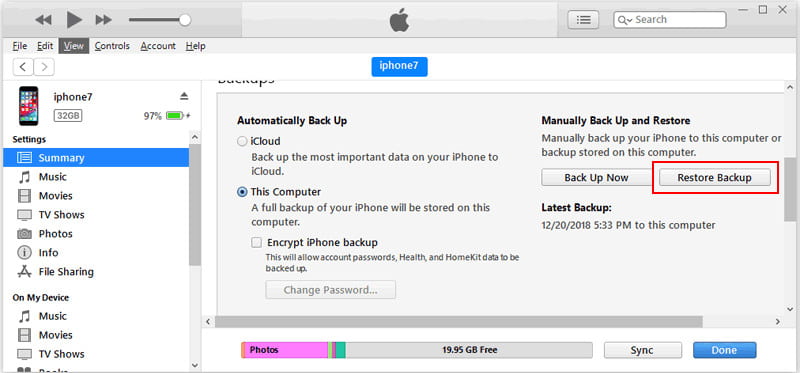
Vaihe 1. Avaa iTunes tai Finder tietokoneellasi. Liitä iPhone tietokoneeseen USB-kaapelilla.
Vaihe 2. Valitse laitteesi paneelin yläreunasta. Napsauta Yhteenveto or general ja valitse Palauta varmuuskopiointi.
Vaihe 3. Valitse sopiva vastaajaviestien varmuuskopio ja napsauta Palauttaa.
Osa 4: Poistettujen vastaajaviestien palauttaminen ilman varmuuskopioita
Varmuuskopiot ovat epäilemättä turvallisin tapa palauttaa poistetut vastaajaviestit, mutta useimmat käyttäjät eivät pidä yllä säännöllisiä varmuuskopiointitapoja. Entä jos sinulla ei ole tallennettuja iCloud- tai iTunes-varmuuskopioita? Älä panikoi! Sinulla on edelleen kaksi tapaa palauttaa poistetut vastaajaviestit ilman varmuuskopioita.
Apeaksoft iPhone Data Recovery
Ilman voimassa olevia varmuuskopioita ammattimaiset kolmannen osapuolen työkalut ovat paras vaihtoehtosi poistettujen vastaajaviestien palauttamiseksi iPhonessa. Apeaksoft iPhone Data Recovery voi syvällisesti skannata iPhonen sisäisen tallennustilan, löytää jäljellä olevat vastaajaviestitiedot ja palauttaa ne sitten valikoivasti.

Ladannut yli 1,000,000 Käyttäjät
- Palauta poistetut vastaajaviestit iPhonestasi ilman varmuuskopioita.
- Palauta erilaisia iOS-tietoja, kuten viestit, yhteystiedot, muistutukset ja paljon muuta.
- Esikatsele kaikkia palautettavia tietoja ja palauta vain valitut tiedostot.
- Tukee kaikkia iPhone-malleja ja uusimpia iOS-versioita korkealla onnistumisprosentilla.
Suojattu lataus
Suojattu lataus

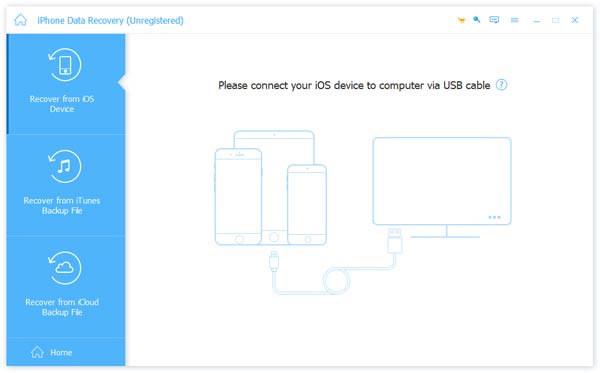
Vaihe 1. Käynnistä ohjelmisto tietokoneella ja napsauta Palauta iOS-laitteesta vasemmassa palkissa. Liitä iOS-laitteesi tietokoneeseen USB:n kautta. Napauta Luottamus luottamaan tietokoneeseesi.
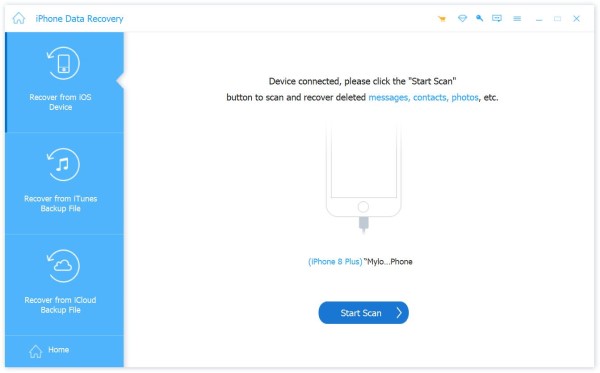
Vaihe 2. Valitse Aloita haku -painiketta ja se skannaa kaikki iPhonessasi olevat tiedot.
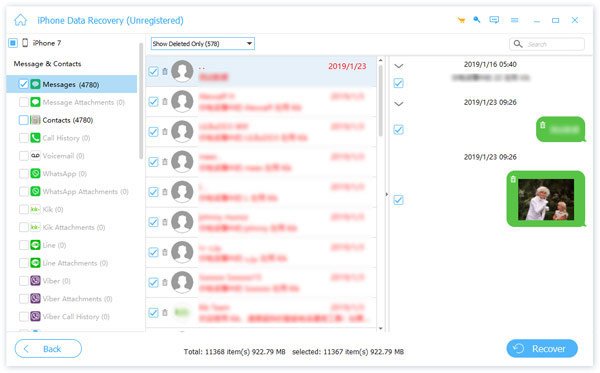
Vaihe 3. Voit valita Näytä kaikki or Näytä vain poistetut esikatsellaksesi skannaustuloksia nopeasti. Valitse palautettava vastaajaviesti ja napsauta toipua.
Ota yhteyttä Carrierin asiakastukeen
Jos et vieläkään saa iPhonen vastaajaviestejäsi palautettua, ota yhteyttä suoraan operaattoriisi. He saattavat säilyttää vastaajaviestejä palvelimillaan rajoitetun ajan, tyypillisesti 30–90 päivää poistamisen jälkeen. Operaattorit säilyttävät kuitenkin vastaajatietoja vain lyhyen ajan. Säilytysajan päätyttyä vanhempia vastaajaviestejä ei välttämättä voida enää palauttaa heidän palvelimiltaan.
Osa 5: Usein kysytyt kysymykset iPhonen vastaajaviestin palauttamisesta
Voinko palauttaa poistetun vastaajaviestin iPhonessa, jos minulla ei ole varmuuskopiota?
Kyllä. Tarkista ensin äskettäin poistetut viestit Puhelin-sovelluksesta. Jos vastaajaviestejä ei enää ole siellä, voit kokeilla ammattilaisen työkalua, kuten Apeaksoft iPhone Data Recovery, palauttaaksesi poistetut vastaajaviestit ilman varmuuskopiointia.
Kuinka kauan poistetut vastaajaviestit säilyvät iPhonessa?
Poistetut vastaajaviestit säilytetään yleensä äskettäin poistettujen viestien kansiossa jopa 30 päivää ennen kuin ne poistetaan pysyvästi. Aika voi kuitenkin olla pidempi operaattoristasi riippuen.
Kuinka poistat poistetut vastaajaviestit pysyvästi?
Jos haluat poistaa vastaajaviestit pysyvästi iPhonesta, avaa Puhelin app ja kosketa Voicemail. Avaa seuraavaksi äskettäin poistetut viestit ja napauta Tyhjennä kaikki poistaaksesi kaikki viestit kerralla tai poistaaksesi yksittäisiä vastaajaviestejä manuaalisesti.
Yhteenveto
jotta palauta poistetut vastaajaviestit iPhonessaTarkista ensin äskettäin poistetut viestit Puhelin-sovelluksesta, jos olet juuri poistanut ne. Jos sinulla on iCloud- tai iTunes-varmuuskopio, palauta se saadaksesi kaikki äänitiedostosi takaisin. Jos et pidä varmuuskopioita, ammattimainen palautusohjelmisto on luotettavin vaihtoehto, ja myös matkapuhelinoperaattorisi voi auttaa äskettäin poistettujen vastaajaviestien hakemisessa.
 Apeaksoft iPhone Data Recovery
 Palauta poistetut tai kadonneet tiedot iOS-laitteista, iTunesista ja iCloud-varmuuskopioista.
Suojattu lataus
Suojattu lataus
Aiheeseen liittyvät artikkelit




