

Kuinka saada Samsung-yhteystietojen palautus varmuuskopiolla tai ilman

Nykyään tallennamme paljon dataa älypuhelimiimme. Esimerkiksi yhteystietoluettelo ja puhelinnumerot ovat puhelimen tärkeimmät tiedot. Arjessa saatamme menettää tärkeitä yhteystietoja inhimillisten virheiden, vahingossa tapahtuvan poistamisen, tehdasasetusten palautuksen, päivitysvirheen, ohjelmistohäiriöiden ja muiden syiden vuoksi. Samsungin käyttäjien keskuudessa tämä ongelma on yleinen. Oppaamme keskittyy tarjoamaan sinulle todistettuja menetelmiä... yhteystietojen palauttaminen Samsungilla laitteelle.
SIVUN SISÄLTÖ:
Osa 1: Palauta Samsungin yhteystiedot roskakorista
Roskakori-kansio on helpoin tapa palauttaa Samsung-puhelimen yhteystiedot. Sen avulla voit palauttaa 30 päivän sisällä poistetut yhteystiedot. Tämä on Yhteystiedot-sovelluksen sisäänrakennettu ominaisuus.
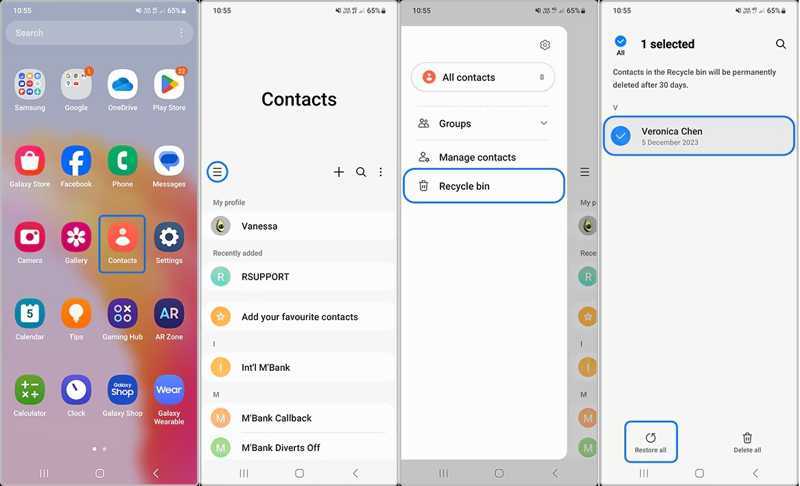
Vaihe 1. Suorita Yhteystiedot sovellus Samsung-puhelimellasi.
Vaihe 2. Napauta Hampurilainen painiketta ja valitse Roskakoriin.
Vaihe 3. Täällä voit tarkastella kaikkia äskettäin poistettuja yhteystietoja.
Vaihe 4. Napauta Muokkaa-painiketta, valitse haluamasi yhteystiedot ja paina Palauta.
Osa 2: Hae Samsungin yhteystiedot Samsung Cloudista
Samsung Cloud on Samsungin asiakkailleen julkaisema pilvipalvelu. Sen avulla voit varmuuskopioida yhteystietosi. Kun olet kadottanut joitakin yhteystietoja, voit hakea Samsung-laitteesi yhteystiedot Samsung Cloudista.
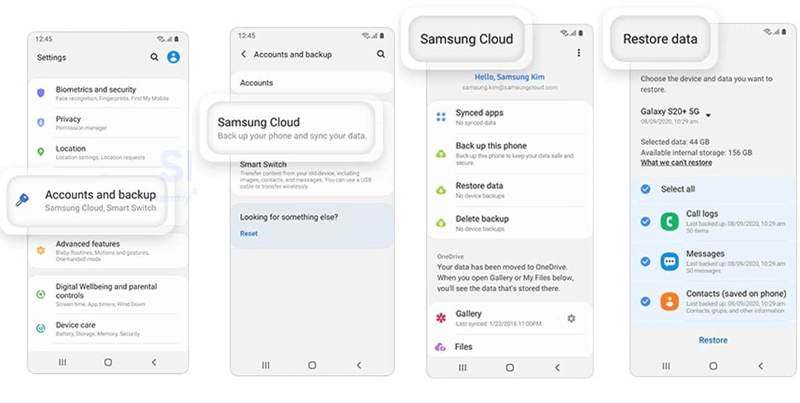
Vaihe 1. Avaa Asetukset sovellus Samsung-puhelimellasi.
Vaihe 2. Napauttaa Samsung-tili, ja valitse Samsung Cloud.
Vaihe 3. paina Palauta tiedot painiketta.
Vaihe 4. Valitse sitten varmuuskopio, joka saattaa sisältää kadonneet yhteystiedot.
Vaihe 5. valita Yhteystiedot ja napauta Palauttaa painiketta. Tämä prosessi ei tehdasasetusten palautus laitteesi.
Osa 3: Palauta Samsungin yhteystiedot Smart Switchin kautta
Smart Switch on Samsung-laitteiden varmuuskopiointitoiminto. Se voi varmuuskopioida tietosi SD-kortille tai tietokoneelle. Tietenkin se mahdollistaa poistettujen yhteystietojen palauttamisen Samsung-laitteeseesi. Edellytyksenä on, että sinulla on Smart Switch -varmuuskopio.
Kuinka palauttaa yhteystiedot Samsungiin SD-kortilta
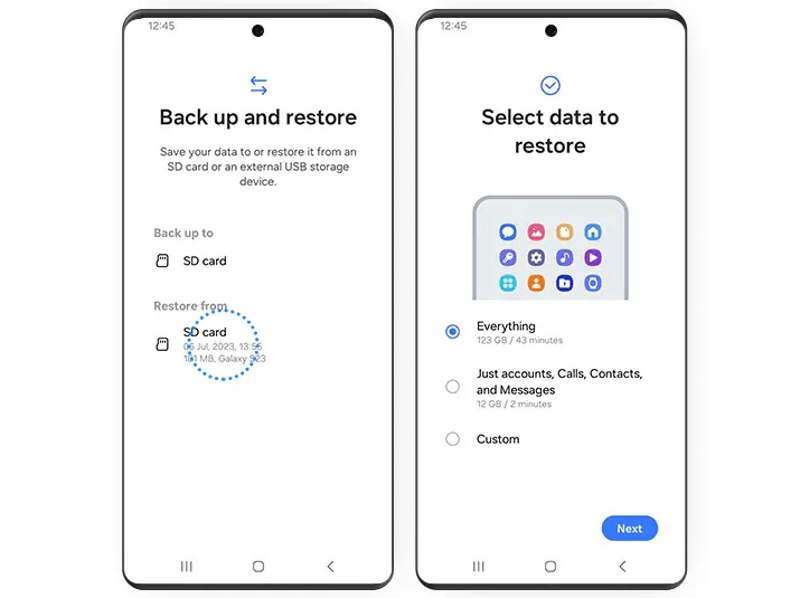
Vaihe 1. Aseta varmuuskopio-SD-kortti puhelimeesi.
Vaihe 2. Avaa Smart Switch -sovellus.
Vaihe 3. Valita Varmuuskopioi ja palauta tietosi, ja osuma jatkaa.
Vaihe 4. Napauttaa SD-kortti alla Palauta alueella.
Vaihe 5. valita Vain tilit, puhelut, yhteystiedot ja viestit.
Vaihe 6. Napauttaa seuraava ja seuraa näytön ohjeita löytääksesi kadonneita yhteystietoja Samsungista.
Kuinka palauttaa yhteystiedot Samsungiin tietokoneelta
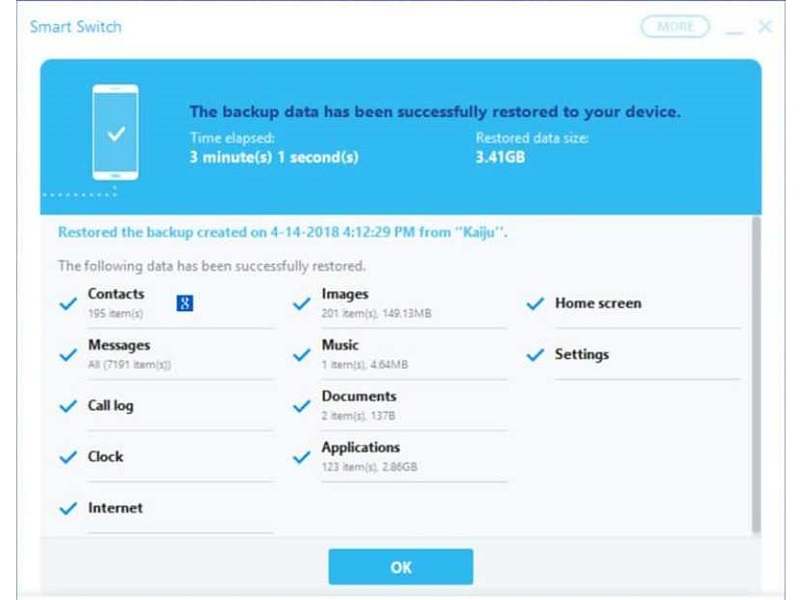
Vaihe 1. Avaa Smart Switch -asiakasohjelma tietokoneellasi.
Vaihe 2. Liitä Samsung-puhelimesi tietokoneeseen USB-kaapelilla.
Vaihe 3. Kun laite on tunnistettu, napsauta Palauttaa.
Vaihe 4. Napauta Valitse tiedosto manuaalisestija valitse yhteystiedot.
Vaihe 5. Lopuksi paina Palauta uudelleen aloittaaksesi Samsung-puhelimen yhteystietojen palautuksen.
Osa 4: Etsi poistetut yhteystiedot Samsungista Googlelta
Jos olet synkronoinut tai varmuuskopioinut yhteystietosi Google-tilillesi, voit hakea poistetut numerot Samsungista. Voit tuoda yhteystiedot tililtäsi ja yhdistää ne olemassa oleviin yhteystietoihin.
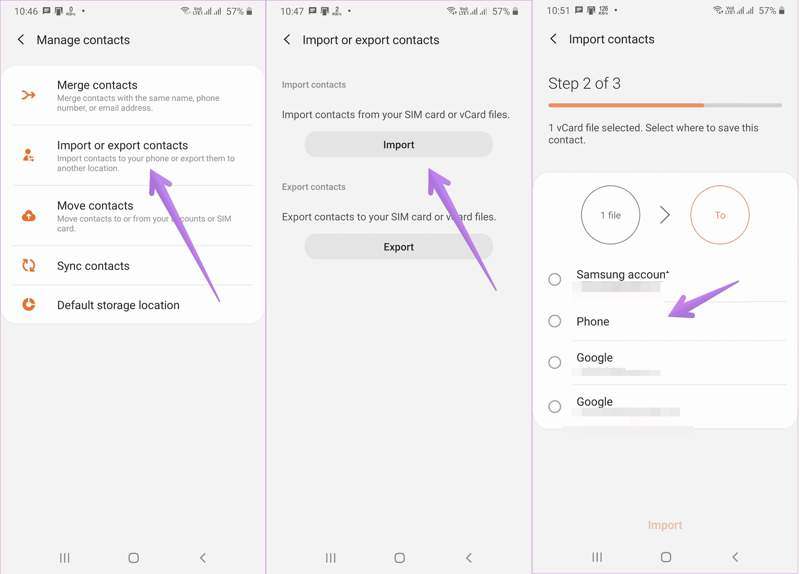
Vaihe 1. Suorita Yhteystiedot App.
Vaihe 2. Napauta valikko -painiketta ja valitse Tuo tai vie yhteystietoja.
Vaihe 3. Napauta Tuo painiketta.
Vaihe 4. Valitse Google-tilisi tai Googlesta viemäsi yhteystietotiedosto.
Vaihe 5. Valitse sitten +XNUMX XNUMX XNUMX XNUMX ja kosketa Tuo.
Osa 5: Palauta yhteystiedot Samsungilla ilman varmuuskopiointia
Voiko Samsungilla palauttaa poistetut yhteystiedot, jos sinulla ei ole varmuuskopiota? Vastaus on kyllä, ja tarvitset vain Apeaksoft Android Data RecoverySe voi skannata muistisi ja etsiä poistettuja yhteystietoja.
Paras tapa palauttaa yhteystiedot Samsungilla ilman varmuuskopiointia
- Palauta poistetut yhteystiedot Samsung-puhelimista yhdellä napsautuksella.
- Esikatsele kadonneita yhteystietoja laitteellasi.
- Ota yhteystiedot rikkinäisestä Samsung-laitteesta.
- Yhteensopiva lähes kaikkien Samsung-puhelimien ja -tablettien kanssa.
Suojattu lataus
Suojattu lataus
Kuinka palauttaa poistetut yhteystiedot Samsungilla
Vaihe 1. Asenna yhteystietojen palautustyökalu
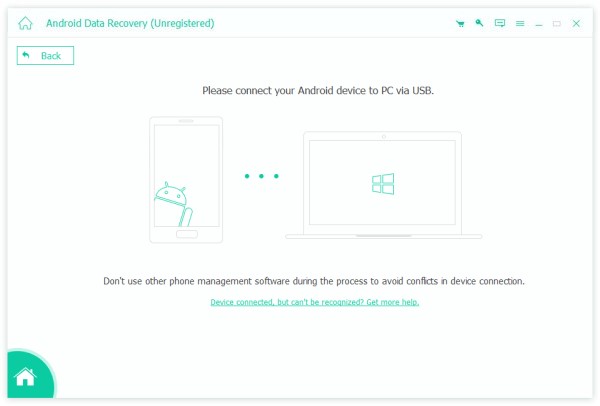
Suorita paras Samsungin yhteystietojen palautusohjelmisto asennettuasi sen tietokoneellesi. Liitä laite tietokoneeseen USB-kaapelilla. Varmista, että otat sen käyttöön. USB-testaus tila puhelimessasi ja valitse Siirrä tiedostoja.
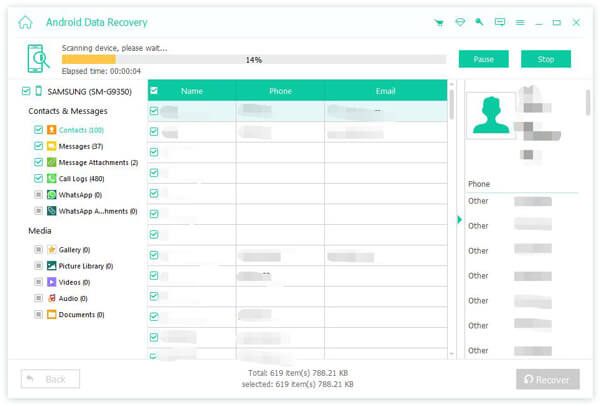
Vaihe 2. Skannaa yhteystiedot puhelimestasi
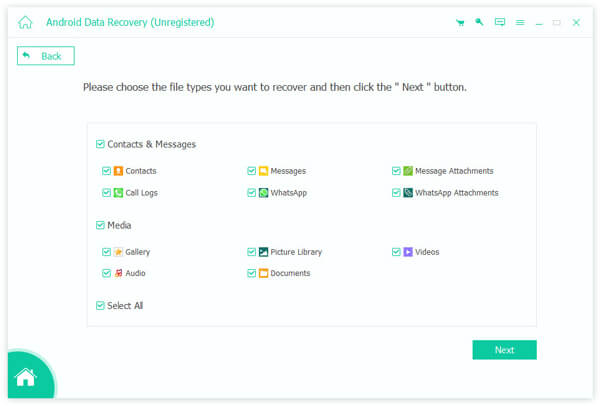
Kun Samsung-puhelimesi on havaittu, valitse Yhteystiedot, Ja napsauta seuraava -painiketta aloittaaksesi muistissa olevien yhteystietojen skannauksen. Kun se on valmis, kytke päälle Näytä vain poistetut kohteetja tarkastella poistettuja yhteystietoja.
Vaihe 3. Yhteystietojen hakeminen Samsungilla
Valitse lopuksi yhteystiedot, jotka haluat hakea, ja napsauta toipua -painiketta alareunassa. Aseta tulostuskansio ja vahvista Samsung-puhelimen yhteystietojen palautus. Voit myös palauttaa poistetut vastaajaviestit Androidilla.
Yhteenveto
Tässä artikkelissa jaettiin useita menetelmiä hakea yhteystietoja Samsung-puhelimistaRoskakori-kansio on helpoin tapa palauttaa äskettäin poistamasi yhteystiedot. Varmuuskopion avulla voit löytää kadonneet yhteystiedot Samsung Cloudista, Smart Switchin avulla tai Googlesta. Apeaksoft Android Data Recovery on yksinkertainen tapa palauttaa kadonneet yhteystiedot Samsung-puhelimellasi ilman varmuuskopiota.
Aiheeseen liittyvät artikkelit
Opi, minne poistetut tekstiviestit tallennetaan Androidilla, ja tutustu siihen, miten voit palauttaa tekstiviestit Androidilla useilla todistetuilla tavoilla!
Jos poistat vahingossa pelin tai tiedot Androidista, opi tästä artikkelista palauttamaan ne Google Playsta tai muista lähteistä.
Oletko koskaan vahingossa poistanut tiedostoja Android-laitteellasi? Tässä viestissä näytetään, kuinka palauttaa poistetut tiedostot Android-laitteeltasi, vaikka et olisi aiemmin varmuuskopioinut niitä!
Voit palauttaa kadonneita videoita Android-puhelimella eri tavoilla. Lisäksi voit palauttaa poistetut videot Androidilla ilman varmuuskopioita.



