

Pourquoi mon iPhone redémarre-t-il sans cesse et comment y remédier ?

Imaginez que vous allumiez votre iPhone pour répondre à un message important et que vous voyiez l'écran devenir soudainement noir et s'allumer à plusieurs reprises - cela arrive à de nombreux utilisateurs lorsque leur iPhone continue à redémarrerCette panne soudaine peut être frustrante, que vous soyez en réunion, en train de regarder une émission ou d'utiliser la navigation. Alors, est-ce l'iPhone qui sauve des vies ou un signe avant-coureur de problèmes ? Cet article commence par identifier la cause du problème et vous propose une solution complète et efficace pour rétablir le fonctionnement normal de votre appareil.
CONTENU DE LA PAGE :
- Partie 1. Pourquoi mon iPhone redémarre-t-il sans cesse ?
- Partie 2. Comment résoudre le problème de redémarrage incessant de l'iPhone grâce aux fonctions intégrées
- Partie 3. Comment résoudre les problèmes de redémarrage de l'iPhone sans perte de données
- Partie 4. Comment prolonger la durée de vie de votre iPhone
Partie 1. Pourquoi mon iPhone redémarre-t-il sans cesse ?
Si votre iPhone redémarre sans cesse, cela affecte votre expérience et peut indiquer un problème potentiel. Comprendre la cause du problème est la première étape pour le résoudre et une mesure importante pour protéger votre équipement. Les causes peuvent être diverses, principalement réparties dans les catégories suivantes :
Problèmes de logiciel système
Les causes les plus fréquentes sont des mises à jour système incorrectes ou des problèmes logiciels sur l'iPhone. Par exemple, une mise à jour iOS avec des téléchargements incomplets ou l'installation d'applications incompatibles peut entraîner des redémarrages répétés de l'appareil.
Erreur matérielle
Les dommages matériels, tels que les batteries vieillissantes, les cartes mères endommagées ou les composants mal connectés, peuvent déclencher des redémarrages fréquents de l'appareil.
Espace de stockage insuffisant
Si l'appareil manque d'espace de stockage, l'iPhone peut être incapable de charger les fichiers système nécessaires, ce qui entraîne une boucle de redémarrage.
Un logiciel malveillant ou un virus
Malgré la réputation d'iOS en matière de sécurité, l'iPhone, qui dispose d'applications non officielles, peut toujours être vulnérable aux logiciels malveillants déstabilisant le système.
Le problème de la température
Lorsque l'appareil surchauffe ou est exposé à un froid extrême, l'iPhone peut redémarrer automatiquement pour protéger les composants internes.
Une fois que vous savez ce qui cause le problème, vous pouvez le résoudre en fonction du type de problème et éviter les redémarrages répétés de l'iPhone.
Partie 2. Comment résoudre le problème de redémarrage incessant de l'iPhone grâce aux fonctions intégrées
Une fois que vous aurez compris les raisons courantes pour lesquelles votre iPhone redémarre sans arrêt, vous saurez comment résoudre ces problèmes. Nous allons donc voir comment réparer votre appareil grâce aux fonctionnalités intégrées et le faire fonctionner à nouveau normalement.
Redémarrez de force votre iPhone
Si votre iPhone redémarre sans cesse, la première chose à faire est de forcer son redémarrage. Vous pourrez ainsi interrompre le cycle de redémarrage et résoudre les problèmes temporaires du système. La procédure de redémarrage obligatoire varie selon le modèle de votre appareil.
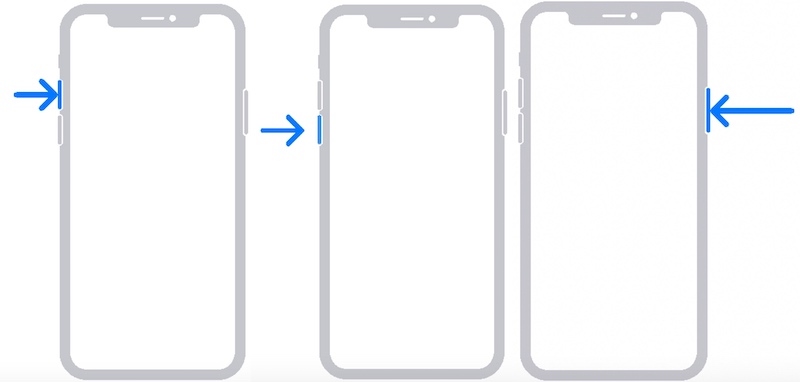
iPhone 8, iPhone X et versions ultérieures :
Étape 1 : Appuyez et relâchez le volume vers le haut .
Étape 2 : Appuyez et relâchez le des volumes en baisse .
Étape 3 : Appuyez et maintenez la power Appuyez sur le bouton sur le côté jusqu'à ce que l'écran devienne noir et que le logo Apple apparaisse, puis relâchez-le.
iPhone 7 et versions antérieures:
Étape 1 : Maintenez la touche des volumes en baisse bouton et le power bouton en même temps.
Étape 2 : Maintenez les deux touches enfoncées jusqu'à ce que l'écran devienne noir et que le logo Apple apparaisse. Relâchez ensuite les touches.

Passez à la dernière version d'iOS
Si votre iPhone redémarre sans cesse et que le redémarrage manuel ne fonctionne pas, il est possible qu'il soit incompatible avec une ancienne version du système. La mise à jour vers la dernière version d'iOS corrige les vulnérabilités connues et améliore la stabilité du système.
Méthode 1 : Mettre à jour directement depuis votre iPhone
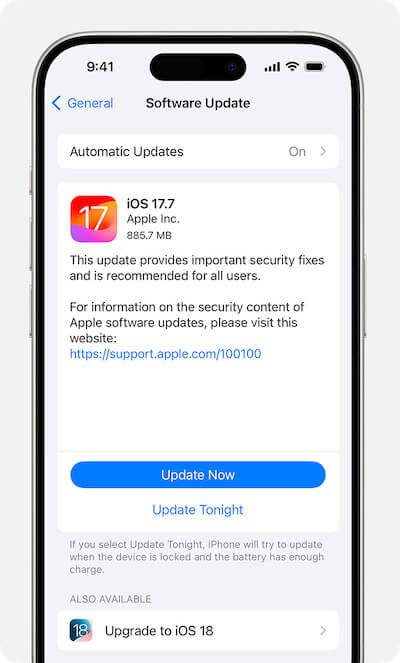
Étape 1 : Accédez à Paramètres et sélectionnez Généralités > Mise à jour du logicielLe système recherche automatiquement les mises à jour disponibles. Les détails de la mise à jour et la taille du fichier s'affichent si une version est disponible.
Étape 2 : Cliquez à nouveau Mettre à jour maintenantL'appareil redémarrera automatiquement et installera la mise à jour.
Méthode 2 : Mise à jour via votre ordinateur à l'aide d'iTunes/Finder
Si votre L'iPhone est bloqué sur la mise à jour ou ne peut pas mettre à jour normalement via les paramètres, vous pouvez utiliser votre ordinateur pour terminer la mise à niveau :
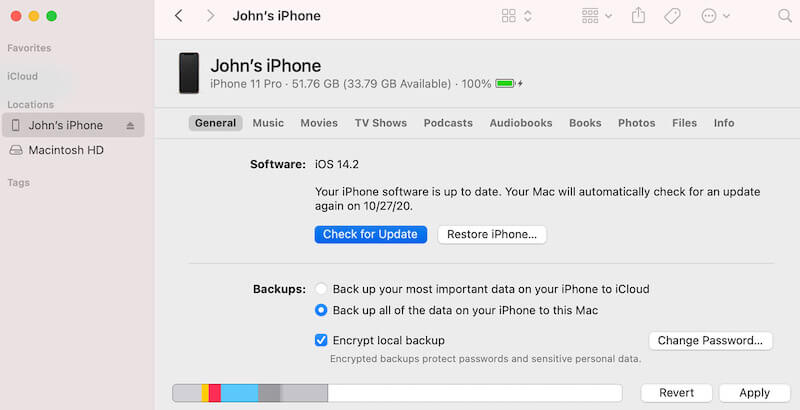
Étape 1 : Connectez votre iPhone à un ordinateur via un câble de données. Ouvrez iTunes ou le Finder et sélectionnez iPhone dans la barre d'appareils à gauche.
Étape 2 : Cliquez à nouveau Vérifier la mise à jourSi une mise à jour est disponible, vous serez invité à la télécharger. Cliquez sur Téléchargement et mise à jour et suivez les invites à l'écran.
Étape 3 : Si l'appareil passe en mode de récupération, cliquez sur Mises à jour au lieu de Restaurer pour conserver les données et installer le système le plus récent.
L'appareil redémarrera automatiquement pendant l'installation. Ne le déconnectez pas. Une fois l'installation terminée, l'appareil affichera le dernier écran de verrouillage iOS.
Partie 3. Comment résoudre les problèmes de redémarrage de l'iPhone sans perte de données
Si les fonctionnalités intégrées ne résolvent pas complètement le problème, ou si votre iPhone continue de redémarrer après la mise à jour iOS 18, essayez d'utiliser un outil professionnel tiers. Apeaksoft iOS System Recovery est un choix idéal. Cet outil est simple et permet de résoudre les problèmes tout en protégeant vos données.
Résoudre les problèmes de redémarrage de l'iPhone sans perte de données
- Conservez les données sur votre appareil pendant le processus de réparation sans vous soucier de l'effacement de fichiers importants.
- La vitesse de réparation est rapide et l'appareil peut être remis en service normal en quelques minutes.
- Des modes standard et avancés sont fournis pour répondre aux exigences de réparation de différents problèmes.
- Compatible avec tous les modèles d'iPhone et versions iOS, y compris les dernières mises à jour du système.
Téléchargement sécurisé
Téléchargement sécurisé
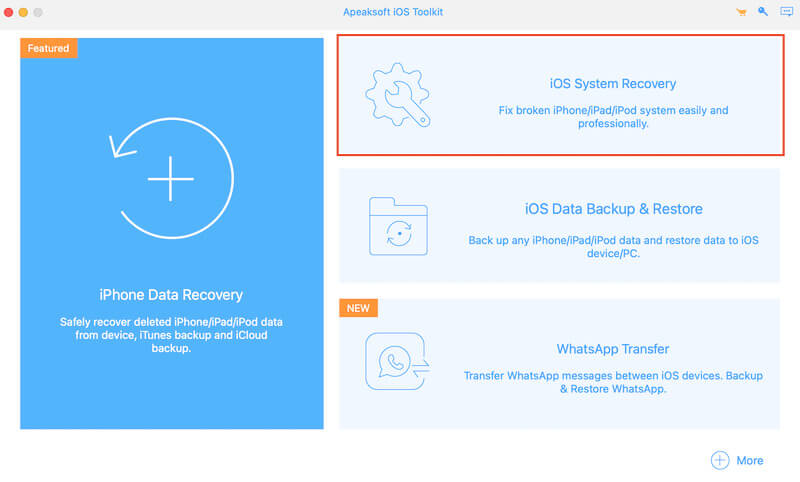
Étape 1 : Installez et lancez le logiciel. Dans l'interface principale, sélectionnez l'icône Restauration de Système iOS module de fonction.
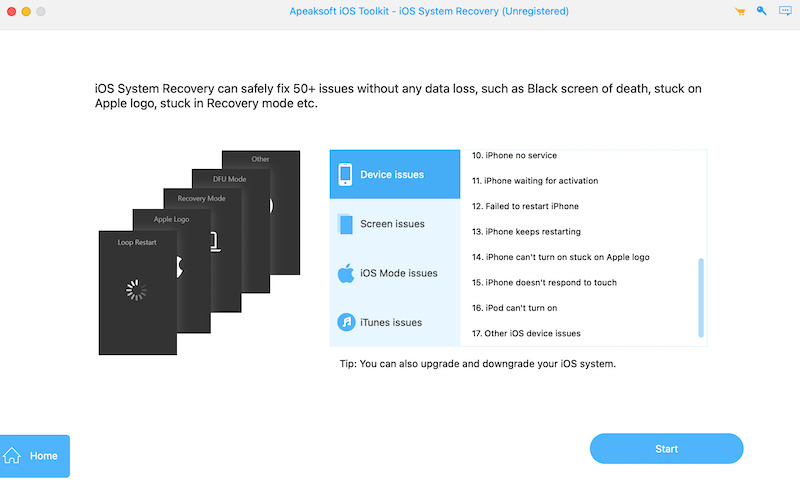
Étape 2 : Dans ce module, vous pouvez trouver le problème que vous rencontrez actuellement dans les détails : iPhone continue à redémarrer. Clique le Commencer bouton pour plonger officiellement dans le processus de réparation.
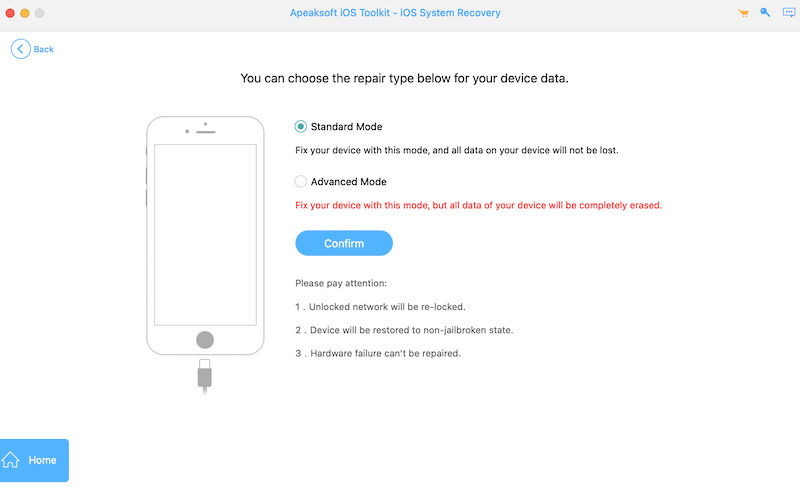
Étape 3 : Connectez ensuite votre iPhone à votre ordinateur, de préférence avec le câble d'origine, pour garantir une connexion stable. Le logiciel identifie automatiquement votre appareil et détecte l'état du système. Sélectionnez Mode standard or Mode avancé selon vos besoins, et cliquez sur Confirmer pour passer à l'étape suivante.
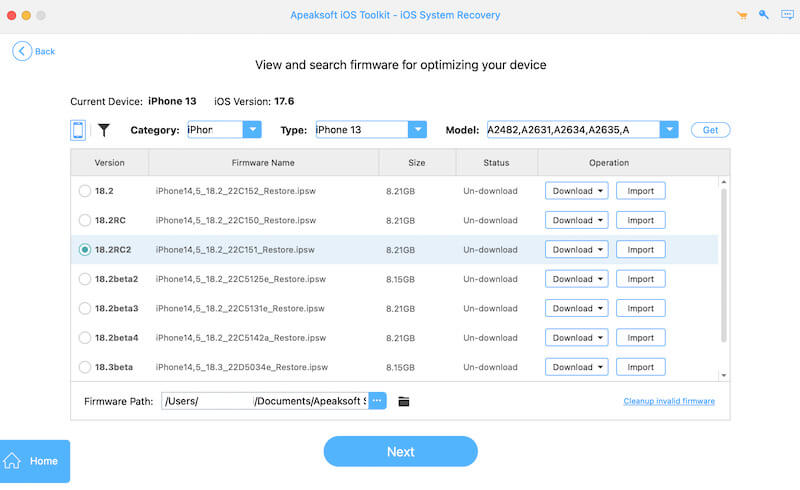
Étape 4 : Le logiciel détectera le modèle de l'appareil et la version du système, et recommandera le firmware iOS approprié. Cliquez sur le Télécharger et Suivant boutons pour entrer dans le processus de réparation.
Étape 5 : Enfin, cliquez sur le Récupération Le logiciel réparera automatiquement le système de votre appareil. Ne débranchez pas l'appareil pendant la réparation pour éviter toute interruption. Une fois la réparation terminée, l'iPhone redémarrera automatiquement et retrouvera son fonctionnement normal.
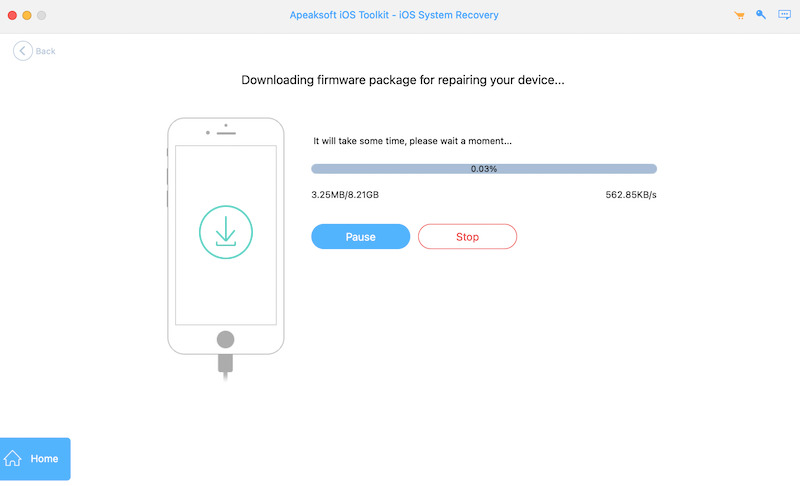
S'il y a encore des exceptions, vous pouvez essayer de passer à Mode avancé Pour les réparer à nouveau. Grâce à ces actions simples, Apeaksoft iOS System Recovery peut vous aider à résoudre rapidement les problèmes de redémarrage de votre iPhone tout en préservant l'intégrité des données et en restaurant son fonctionnement normal.
Partie 4. Comment prolonger la durée de vie de votre iPhone
Après avoir réparé un iPhone qui ne cessait de redémarrer, un entretien régulier est aussi important que de bonnes habitudes d'utilisation pour prolonger la durée de vie de votre appareil. Voici quelques astuces pour prolonger la durée de vie de votre iPhone :
Protéger le matériel de l'appareil
Utilisez un étui de protection et un film d'écran de bonne qualité pour éviter les chutes et les dommages causés par les liquides aux composants internes.
Nettoyez régulièrement votre espace de stockage
Supprimez les applications et fichiers inutiles pour éviter les retards ou les exceptions du système en raison d'un espace de stockage insuffisant.
Dépannage
Si une exception se produit sur votre appareil, vous pouvez essayer de activer le mode sans échec de l'iPhone pour détecter la source du problème et désinstaller les applications en conflit à temps.
Gardez la batterie de votre iPhone en bonne santé
Ne laissez pas la puissance être trop faible ou trop élevée ; essayez de maintenir la puissance entre 20 % et 80 % et retardez le vieillissement de la batterie.
De cette façon, vous pouvez réduire l’occurrence des pannes et prolonger efficacement la durée de vie de votre appareil, en vous assurant que votre iPhone reste en parfait état pour une utilisation quotidienne.
Conclusion
Comprendre pourquoi mon iPhone continue de redémarrer La réparation n'est pas seulement un problème technique. C'est l'occasion de redonner une seconde vie à votre iPhone. Ce faisant, nous avons identifié la cause du problème et appris à utiliser l'équipement plus efficacement. Que vous utilisiez des fonctionnalités intégrées ou des outils professionnels comme Apeaksoft iOS System Recovery, vous pouvez rapidement résoudre le problème.
Articles Relatifs




