iOS 27 Features: What Changes Are Coming to Your iPhone

Apple announced iOS 27 at WWDC26 in June 2026, and you can explore all updates on iOS 27 on Apple's official website. This article will help you figure out the main iOS 27 features and what's new in the latest update.
Disclaimer
This article refers to official information from Apple, iOS 27 beta release notes, and reporting from trusted Apple-focused outlets such as MacRumors, 9to5Mac, and AppleInsider.
PAGE CONTENT:
Part 1. iOS 27 Core AI Features
One of the most significant and highly anticipated updates in iOS 27 is its core AI features. In this iOS 27 update, Apple is expected to introduce many iOS 27 new AI features. Below are the main iOS 27 AI features:
1. Siri AI
Unlike simple and mechanical question‑and‑answer patterns, Siri AI on iOS 27 supports more natural and coherent conversations. It moves beyond a traditional voice assistant to a more versatile AI assistant that can understand context, allowing users to continue previous conversations instead of starting over with each new request (much like an AI chatbot like ChatGPT).
However, the full Siri AI features are only available for newer iPhone models (reportedly from the iPhone 16 series and iPhone 15 Pro / 15 Pro Max). Some of the more advanced on-device AI capabilities also require newer, more powerful iPhone models (such as iPhone Air, iPhone 17 Pro, and iPhone 17 Pro Max). And due to local regulatory rules, users in the EU will face partial feature restrictions.
2. Camera & Photos AI
Another noticeable iOS 27 new feature is that iOS 27 brings brand‑new AI processing capabilities to the Camera and Photos apps.
When you open the Camera app, you can enable AI to recognize objects, texts, and landmarks in real‑world scenes.

As for the Photos app, users can access AI‑powered remover, spatial reframe, and image expansion and enhancement tools for photo editing. You can also input text prompts to describe your editing requirements in the photo editing interface, and AI will adjust the images automatically and accordingly.
3. AI Text Generation & Rewriting
On iOS 27, users can use AI to polish and rewrite texts within Messages, Notes, Mail, and more apps.
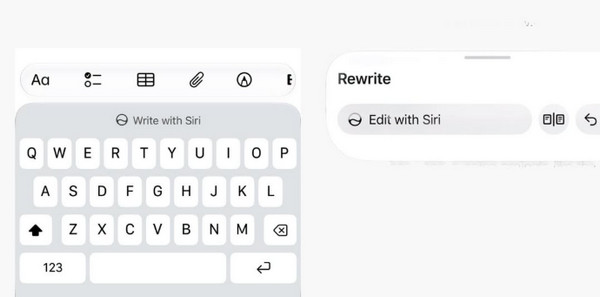
The iOS 27 Apple Intelligence is also capable of generating and rewriting based on your personal writing style, automatically adapting to the tone and communication style you use.
4. AI Enhancements for System‑Built Tools
Safari also comes with built‑in AI features. You can make use of AI to summarize webpage content and organize open tabs automatically.
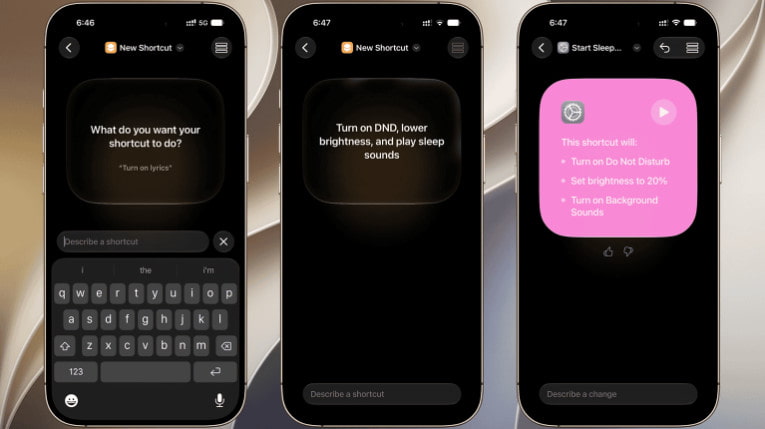
AI also makes it easier to create automation workflows in the Shortcuts app. Instead of manually configuring prompts step by step, you can describe your daily needs in plain language. Then, AI will generate the corresponding workflow for you.
Part 2. iOS 27 UI & Visual Upgrades
What will iOS 27 look like? iOS 27 continues to build on the Liquid Glass design introduced in iOS 26. However, Apple is expected to give users greater control over how the interface looks and feels. In the updated iOS 27, users can reportedly adjust the transparency of the Dock and widgets based on their personal preferences.

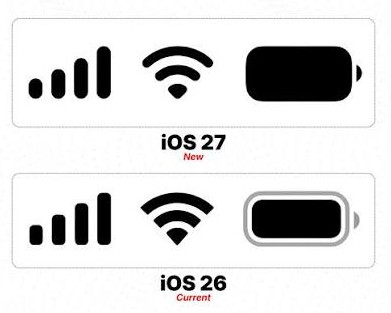
What's more, Apple also adjusts the built‑in app icons to make them sharper and more detailed for better visual depth and layers. And the cellular signal, WiFi, and battery icons in the status bar are changed into a cleaner and more unified design.
Another notable change is how iOS 27 handles notifications. Notifications are expected to be stacked based on how frequently you use each app. The most-used apps will appear at the top. And based on the iOS 27 beta version, Apple has changed notification animations. It slides out from the top left corner instead of the top center.
Part 3. iOS 27 Built‑in Apps Improvements
- FaceTime adds a dual‑camera feature. You can use both front and rear cameras simultaneously during FaceTime calls.
- The Health app adds symptom‑logging options for perimenopause and menopause, which ensures a more comprehensive tracking of personal health conditions.
- In the Mail app, the system prioritizes and displays the most relevant email search results at the top.
- AirDrop delivers noticeably faster file‑transfer speed in iOS 27. Transfer efficiency is improved for large‑sized videos and RAW‑format photos.
Part 4. iOS 27 Performance Improvements
- iOS 27 improves overall response speed for app launching and smoother app switching in the background. As Apple claims, "app launches are up to 30% faster."
- iOS 27 system also optimizes battery efficiency, particularly in Low Power Mode. The Camera will launch faster and use less power in the Low Power mode.
- The iOS 27 system-level optimizations will also benefit older compatible iPhones, including improved CPU scheduling for smoother overall performance.
Part 5. Pros and Cons of iOS 27 Features
Above are the major feature updates introduced in iOS 27. While the update brings many practical new features, it also comes with some limitations. Below is a quick overview of the pros and cons of iOS 27 features for your reference.
- Powerful AI functions greatly improve daily operating efficiency.
- The overall UI offers users high flexibility to personalize the interface.
- Underlying performance and battery efficiency are optimized to deliver a more stable and power‑efficient user experience.
- The full iOS 27 AI features are exclusive to newer iOS 27-supported devices, while older compatible models suffer obvious feature cuts.
- iOS feature accessibility can vary by region. Some AI features are unavailable in certain regions.
- AI functions may require more device storage space. Therefore, low‑end models may run into insufficient storage issues.

Downloaded by over 1,000,000 users
- Upgrade to iOS 27 safely and easily.
- Downgrade from iOS 27 anytime.
- Fix various iOS problems, such as an iPhone stuck on update.
- Support all popular iPhone and iPad models and iOS versions.
Secure Download
Secure Download
Conclusion
This article summarizes the core iOS 27 features in terms of AI, UI, built‑in apps, and system performance. We also analyze the pros and cons of the iOS update. Hope you can gain a general understanding of iOS 27 features and decide whether to install this update based on your actual needs.
 Apeaksoft iOS System Recovery
 Fix virious iOS system issues on iPhone, iPad, and iPod.
Secure Download
Secure Download
Related Articles